# Arsel Docs
---
> Arsel is a marketing engagement platform with a REST API: email, SMS, WhatsApp and push messaging, contacts and segments, product events, and automations. The API base URL is https://api.arsel.sa/v1 and every request authenticates with `Authorization: Bearer be_...`.
---
Source: https://docs.arsel.sa/get-started
# Arsel for developers
Arsel is a marketing engagement platform with a REST API. You can send messages across four channels, keep an audience of contacts in sync with your own database, and stream product events that trigger automations and attribute revenue.
## The four channels
| Channel | What it does | Prerequisite |
|---------|--------------|--------------|
| **[Email](https://docs.arsel.sa/guides/email)** | Transactional email and campaigns, with per-recipient delivery, open, click, bounce and complaint tracking. Send over REST or plain SMTP. | A [verified domain](https://docs.arsel.sa/guides/email/domains) |
| **[SMS](https://docs.arsel.sa/guides/sms)** | Transactional SMS and campaigns to any country where your sender name is registered, with per-recipient delivery receipts. | A registered sender name |
| **[WhatsApp](https://docs.arsel.sa/guides/whatsapp)** | Transactional messages from templates Meta has approved. | A connected WhatsApp Business account |
| **[Push Notifications](https://docs.arsel.sa/guides/push)** | Android, iOS and web notifications sent with your own Firebase project and Apple key. | A [client SDK](https://docs.arsel.sa/client-sdks) or server-side device registration |
Every channel also uses:
- **[Audience](https://docs.arsel.sa/guides/audience)** — contacts, lists, tags, segments, and custom properties. Everything you send targets a contact.
- **[Events & automation](https://docs.arsel.sa/guides/events)** — send your own product events (`order.completed`, `cart.abandoned`) to trigger automations in real time and power conversion and revenue reporting.
## Base URL
Every endpoint is relative to:
```
https://api.arsel.sa/v1
```
## Authentication
Authenticate each request with your secret API key in the `Authorization` header:
```
Authorization: Bearer be_your_api_key
```
Generate API keys from your [Arsel Dashboard](https://arsel.sa). Client SDKs in your app use a publishable `pub_` key instead. See [Authentication](https://docs.arsel.sa/get-started/authentication).
## Where to go next
| | |
|--|--|
| **[Quickstart](https://docs.arsel.sa/get-started/quickstart)** | Send your first email and confirm it was delivered. |
| **[Authentication](https://docs.arsel.sa/get-started/authentication)** | Key formats, generation, rotation, and what belongs in client code. |
| **[API basics](https://docs.arsel.sa/api-basics/errors)** | Errors, pagination, rate limits, and idempotency. |
| **[Guides](https://docs.arsel.sa/guides)** | Channel-by-channel integration, from domain setup to campaign sends. |
| **[API reference](https://docs.arsel.sa/api)** | Every endpoint, grouped by resource. Also available as an [OpenAPI document](https://api.arsel.sa/v1/openapi.json). |
| **[Client SDKs](https://docs.arsel.sa/client-sdks)** | Record events and register devices from your web, Android, or iOS app. |
| **[AI agents](https://docs.arsel.sa/ai)** | Connect Claude, Cursor or Codex over MCP, and read these docs as Markdown via [`llms.txt`](https://docs.arsel.sa/llms.txt). |
---
Source: https://docs.arsel.sa/get-started/quickstart
# Quickstart
Send your first email through the Arsel API and confirm it was delivered. About ten minutes, most of which is DNS propagation.
## 1. Verify a sending domain
Arsel rejects a `from` address on an unverified domain. In the [Arsel Dashboard](https://arsel.sa) go to **Email > Domains**, add your domain, and publish the SPF, DKIM and DMARC records it gives you.
Records usually resolve within minutes, though some providers take up to a few hours. See [Domain verification](https://docs.arsel.sa/guides/email/domains), or the step-by-step guides for [Cloudflare](https://docs.arsel.sa/guides/email/dns-providers/cloudflare), [GoDaddy](https://docs.arsel.sa/guides/email/dns-providers/godaddy), [Namecheap](https://docs.arsel.sa/guides/email/dns-providers/namecheap), [Route 53](https://docs.arsel.sa/guides/email/dns-providers/route53) and [Hostinger](https://docs.arsel.sa/guides/email/dns-providers/hostinger).
:::tip[Want to try something without DNS?]
[Custom events](https://docs.arsel.sa/guides/events) need no verification. You can `POST /events/send` as soon as you have an API key.
:::
## 2. Create an API key
In the dashboard, go to **Integrations > API keys** and create a secret key. It looks like:
```
be_xxxxxxxxxxxxxxxxxxxxxxxxxxxxxxxx
```
Keep it server-side. It is shown once, so store it in your secrets manager now. [Authentication](https://docs.arsel.sa/get-started/authentication) covers rotation and the publishable `pub_` key that client SDKs use.
The examples in these docs read the key from an environment variable:
```bash
export ARSEL_API_KEY=be_xxxxxxxxxxxxxxxxxxxxxxxxxxxxxxxx
```
## 3. Send the email
```bash
curl -X POST "https://api.arsel.sa/v1/email/send" \
-H "Authorization: Bearer $ARSEL_API_KEY" \
-H "Content-Type: application/json" \
-H "Idempotency-Key: quickstart-001" \
-d '{
"from": "noreply@yourdomain.com",
"from_name": "My App",
"to": ["user@example.com"],
"subject": "Hello from Arsel",
"html": "Welcome!
Your integration is working.
"
}'
```
**Response** — `202 Accepted`:
```json
{
"id": "01957e3a-4b5c-7d8e-9f0a-1b2c3d4e5f6a"
}
```
`202` means the email is queued, not yet delivered. Use the `id` to track it.
The `Idempotency-Key` header is optional. If you retry the same request after a timeout, you get the original response back instead of sending a second email. See [Idempotency](https://docs.arsel.sa/api-basics/idempotency).
## 4. Confirm delivery
```bash
curl "https://api.arsel.sa/v1/email/01957e3a-4b5c-7d8e-9f0a-1b2c3d4e5f6a" \
-H "Authorization: Bearer $ARSEL_API_KEY"
```
```json
{
"id": "01957e3a-4b5c-7d8e-9f0a-1b2c3d4e5f6a",
"to": [
{ "email": "user@example.com", "status": "delivered", "timestamp": "2026-03-08T12:00:05.000Z" }
],
"subject": "Hello from Arsel",
"created_at": "2026-03-08T12:00:00.000Z"
}
```
Each recipient carries its own `status`, which starts at `sent` and advances as tracking events arrive: `delivered`, then `opened` or `clicked`, or `bounced`. The full list is in [Get Email](https://docs.arsel.sa/api/email/get-email#recipient-status-values).
If it did not arrive, [Errors](https://docs.arsel.sa/api-basics/errors#common-send-errors) covers what a rejection looks like and [Sender reputation](https://docs.arsel.sa/guides/email/sender-reputation) covers what happens when a domain starts bouncing.
## Where to go from here
| | |
|--|--|
| **[Email guide](https://docs.arsel.sa/guides/email)** | Templates, campaigns, attachments, and the SMTP route. |
| **[Audience guide](https://docs.arsel.sa/guides/audience)** | Create contacts so you can target people rather than raw addresses. |
| **[Events guide](https://docs.arsel.sa/guides/events)** | Trigger automations from your own product events. |
| **[API basics](https://docs.arsel.sa/api-basics/pagination)** | Pagination, rate limits, and the error envelope. |
---
Source: https://docs.arsel.sa/get-started/authentication
# Authentication
Every request to the Arsel API must include a valid API key. Keys are scoped to your organization, so all usage and rate limits apply at the organization level.
:::note[REST vs SMTP]
This page covers REST API keys. The [SMTP server](https://docs.arsel.sa/guides/email/smtp) uses a separate SMTP credential (username and password); see [Managing SMTP Credentials](https://docs.arsel.sa/guides/email/smtp#managing-credentials). The two are not interchangeable.
:::
## Credential Types
Arsel issues two kinds of credential. The prefix tells you which one you hold and whether it is safe to ship in a browser or mobile app.
| Prefix | Name | Secret? | Where it belongs | Used for |
|--------|------|---------|------------------|----------|
| `be_` | **API key** | **Yes** | Your server only | The whole REST API |
| `pub_` | **Client key** | No — publishable | Shipped in web/mobile app code | [Client SDKs](https://docs.arsel.sa/client-sdks): event ingestion and device registration |
Everything on this page describes the `be_` API key unless stated otherwise.
:::tip[Building an app for other Arsel customers?]
Don't ask them for API keys. Use [Sign in with Arsel (OAuth)](https://docs.arsel.sa/guides/oauth): the customer approves your app in the browser, and you send the access token you get in the same `Authorization: Bearer` header.
:::
## API Key Format
```
be_xxxxxxxxxxxxxxxxxxxxxxxxxxxxxxxx
```
The `be_` prefix identifies the key type; the remaining 32 characters are cryptographically random.
## Sending Authenticated Requests
Include your API key in the `Authorization` header using the `Bearer` scheme:
```
Authorization: Bearer be_your_api_key
```
| Header | Value | Required |
|--------|-------|----------|
| `Authorization` | `Bearer ` | Yes |
| `Content-Type` | `application/json` | On requests with a body |
## Generating API Keys
1. Log in to your [Arsel Dashboard](https://arsel.sa)
2. Navigate to **Integrations > API keys**
3. Click **Create API Key** and give it a descriptive name
4. Copy the key immediately. It is only shown once
:::warning
Store your API key securely. It cannot be retrieved after creation. If you lose it, revoke the old key and generate a new one.
:::
## Key Lifetime
**Every API key expires one year after it is created.** The expiry cannot be extended, so rotate keys before requests start returning `401`.
To rotate with no downtime: create the new key, deploy it, confirm traffic has moved by watching the old key's last-used timestamp, then revoke the old key.
## Key Management
From the dashboard you can view all active keys with their expiry and last-used timestamps, revoke keys you no longer need, and create replacements.
## Security Best Practices
- **Never expose `be_` API keys in client-side code.** They grant access to your whole organization and are for server-to-server use only. To send events or register devices from a browser or mobile app, use a `pub_` client key, which is safe to ship in client code and can do far less. See [Client SDKs](https://docs.arsel.sa/client-sdks).
- **Store keys in environment variables**, not source code. The examples in these docs read the key from `ARSEL_API_KEY`.
- **Rotate keys periodically** and immediately if a key may have been compromised.
- **Use separate keys** for development and production environments.
## Authentication Errors
If your API key is missing, invalid, or revoked, the API returns:
```json
{
"status_code": 401,
"name": "unauthorized",
"message": "Invalid API Key"
}
```
---
Source: https://docs.arsel.sa/api-basics/errors
# Errors
The Arsel API uses standard HTTP status codes and returns errors in a consistent JSON format.
## Error Response Format
All errors follow this structure:
```json
{
"status_code": 422,
"name": "validation_error",
"message": "to must be an array, each value in to must be an email"
}
```
| Field | Type | Description |
|-------|------|-------------|
| `status_code` | number | The HTTP status code |
| `name` | string | A machine-readable error identifier in `snake_case` |
| `message` | string | A human-readable description of what went wrong |
## Status Codes
Successful responses are `200 OK` (reads and updates), `201 Created` (creates), and `202 Accepted` (a send that has been queued). Everything below carries the error envelope above.
| Code | Name | When It Happens |
|------|------|-----------------|
| 400 | `bad_request` | The request body is malformed, the sender email is not on a verified domain, or an account-level rule rejects the send. See [Common Send Errors](#common-send-errors) below. |
| 401 | `unauthorized` | The API key is missing, invalid, expired, or revoked |
| 403 | `forbidden` | The API key does not have permission for this action |
| 404 | `not_found` | The requested resource does not exist |
| 409 | `conflict` | The request conflicts with the current state of the resource |
| 422 | `validation_error` | The request body failed validation (e.g., invalid email format) |
| 413 | `payload_too_large` | The request body exceeds the size limit (30 MB on `/email/send`) |
| 429 | `rate_limit_exceeded` | You have exceeded the request limit for the current 60-second window (on `/events/send`, the **event** limit). See [Rate Limiting](https://docs.arsel.sa/api-basics/rate-limiting) |
| 429 | `monthly_quota_exceeded` | Your organization has used its monthly quota for the channel. See [Common Send Errors](#common-send-errors). |
| 500 | `internal_server_error` | An unexpected error occurred on our end |
| 502 | `upstream_error` | A downstream provider rejected the request in a way Arsel could not map |
| 503 | `service_unavailable` | Temporarily unavailable — retry shortly |
| 504 | `upstream_timeout` | A downstream provider did not answer in time |
These are the generic names, one per status. Some errors carry a more specific `name` under the same status code; see [Specific error names](#specific-error-names). Treat `name` as an open set: branch on the ones you handle and fall back to `status_code` for the rest.
## Common Send Errors
An authenticated, well-formed request can still be rejected at send time. These errors return `400` / `name: bad_request` unless stated otherwise.
| Scenario | Status | `name` | Example `message` |
|----------|--------|--------|-------------------|
| Sender domain not verified | 400 | `bad_request` | `Sender email domain is not verified for this organization. Please verify the domain first.` |
| Sender email format invalid or not allowed | 400 | `bad_request` | `Sender email is required` / `Invalid sender email` |
| Recipient list empty or address invalid | 400 | `bad_request` | `At least one recipient is required.` |
| Total recipients (`to` + `cc` + `bcc`) exceeds 50 | 400 | `bad_request` | `Too many recipients. Maximum 50 allowed, but N provided.` |
| An attachment has a blocked type or extension | 400 | **`attachment_rejected`** | `1 of 2 attachment(s) rejected: setup.exe. …` |
| Email sending suspended (high bounce/complaint rate) | **403** | **`sending_suspended`** | `Email sending is suspended for this organization. Reason: high bounce/complaint rate. Review on the dashboard or contact support to unsuspend.` |
| Monthly email quota exhausted | **429** | **`monthly_quota_exceeded`** | `Monthly email quota exceeded` |
:::note
`monthly_quota_exceeded` is distinct from `rate_limit_exceeded`. The first means you've used your plan's allotment for the month; the second means you're sending faster than the 60-second window allows (counted in events on `/events/send`). Retrying the quota error won't help until the next billing period or a plan upgrade.
:::
## Specific error names
| `name` | Status | Where | Meaning |
|--------|--------|-------|---------|
| `sending_suspended` | 403 | Email sends | Email sending is suspended for the organization. See [Sender reputation](https://docs.arsel.sa/guides/email/sender-reputation). |
| `attachment_rejected` | 400 | `POST /email/send` | An attachment has a blocked type; nothing was sent. |
| `invalid_idempotency_key` | 400 | Idempotent endpoints | The `Idempotency-Key` is empty or longer than 256 characters. |
| `invalid_idempotent_request` | 409 | Idempotent endpoints | The key was already used with a different request. |
| `concurrent_idempotent_requests` | 503 | Idempotent endpoints | An earlier request with the same key is still processing. |
| `contact_required` | 400 | `POST /events/send` | No contact identifier was provided. |
| `contact_ambiguous` | 400 | `POST /events/send` | `contact_id` was combined with another identifier. |
| `contact_not_found` | 404 | `POST /events/send` | The `contact_id` does not exist. |
| `event_not_found` | 404 | `POST /events/send` | No event with that name is defined. |
| `schema_mismatch` | 422 | `POST /events/send` | The payload does not match the event's schema. |
| `event_in_use` | 409 | `DELETE /events/:id` | An active automation is triggered by the event. |
| `event_limit_reached` | 422 | `POST /events` | The organization has reached its event-definition limit. |
| `conversion_value_field_invalid` | 400 | `POST`/`PATCH /events` | The conversion `value_field` is not a numeric field. Other conversion misconfigurations return a `conversion_*` name. |
| `segment_limit_reached` | 422 | `POST /segments` | The organization has reached its segment limit. |
| `segment_in_use` | 409 | `DELETE /segments/:id` | A scheduled or sending campaign targets the segment. |
| `segment_not_ready` | 409 | `GET /contacts?segment_id=` | The segment is still being computed. |
| `automation_graph_invalid` | 422 | `POST`/`PATCH /automations` | The steps break a structural rule; nothing was saved. |
| `automation_not_ready` | 422 | `POST`/`PATCH /automations` | Enabling an automation that has issues; nothing was changed. |
| `automation_enabled` | 422 | `PATCH /automations/:id` | New steps for an automation that stays enabled. |
| `domain_unavailable` | 400 | `POST /email/domains` | The domain, or a related one, is already registered by another organization. |
| `domain_limit_reached` | 400 | `POST /email/domains` | The plan's sending-domain limit is reached. |
See [Idempotency](https://docs.arsel.sa/api-basics/idempotency) for the three idempotency errors.
## Validation Errors
When a request fails validation, the `message` field contains a comma-separated list of all validation issues:
```json
{
"status_code": 422,
"name": "validation_error",
"message": "from must be an email, to should not be empty, subject must be shorter than or equal to 998 characters"
}
```
## Handling Errors
Check `status_code` for the category of error. Use `name` for programmatic handling and `message` for logging or display.
```javascript
const response = await fetch("https://api.arsel.sa/v1/email/send", options);
const data = await response.json();
if (response.status >= 400) {
switch (data.name) {
case "unauthorized":
// Refresh or rotate your API key
break;
case "validation_error":
// Fix the request payload
break;
case "rate_limit_exceeded":
// Back off and retry
break;
default:
// Log and alert
console.error(`API error: ${data.name} — ${data.message}`);
}
}
```
---
Source: https://docs.arsel.sa/api-basics/pagination
# Pagination
List endpoints use cursor-based pagination. Cursors stay stable as items are created or removed.
## Response Shape
Every paginated response has the same envelope:
```json
{
"object": "list",
"has_more": true,
"data": [
/* page items */
]
}
```
| Field | Type | Description |
|-------|------|-------------|
| `object` | string | Always `"list"`. |
| `has_more` | boolean | `true` when there are more items beyond the current page. |
| `data` | array | The items on this page. |
There is no `total`, `page`, or `totalPages`. Use `has_more` to decide whether to fetch the next page.
## Query Parameters
| Parameter | Type | Default | Description |
|-----------|------|---------|-------------|
| `limit` | number | 20 | Items per page (min: 1, max: 100). |
| `after` | string | — | Return items **after** this `id` (exclusive). Use the `id` of the **last** item from the previous page to fetch the next one. |
| `before` | string | — | Return items **before** this `id` (exclusive). Use the `id` of the **first** item from a page to walk backwards. |
:::warning
You can't pass both `after` and `before` in the same request. Doing so returns `400 bad_request`.
:::
## Order
Results are always returned newest first. There is no `sort_by` parameter.
## Forward Pagination
Walk from newest to oldest by reading the last item's `id` and passing it as `after`:
```bash
# First page
curl "https://api.arsel.sa/v1/contacts?limit=50" \
-H "Authorization: Bearer $ARSEL_API_KEY"
# Next page — use the id of the LAST item from the previous response
curl "https://api.arsel.sa/v1/contacts?limit=50&after=01957e3a-4b5c-7d8e-9f0a-1b2c3d4e5f6a" \
-H "Authorization: Bearer $ARSEL_API_KEY"
```
```javascript
async function* paginate(url, apiKey) {
let cursor = null;
while (true) {
const u = new URL(url);
u.searchParams.set("limit", "100");
if (cursor) u.searchParams.set("after", cursor);
const res = await fetch(u, {
headers: { Authorization: `Bearer ${apiKey}` },
});
const page = await res.json();
if (!res.ok) throw new Error(`${page.name}: ${page.message}`);
for (const item of page.data) yield item;
if (!page.has_more) return;
cursor = page.data[page.data.length - 1].id;
}
}
for await (const contact of paginate(
"https://api.arsel.sa/v1/contacts",
process.env.ARSEL_API_KEY,
)) {
console.log(contact.id, contact.email);
}
```
## Backward Pagination
To walk from a known point toward newer items, pass the `id` of the **first** item from the page you have as `before`:
```bash
curl "https://api.arsel.sa/v1/contacts?limit=50&before=01957e3a-4b5c-7d8e-9f0a-1b2c3d4e5f6a" \
-H "Authorization: Bearer $ARSEL_API_KEY"
```
## Endpoints That Paginate
- `GET /contacts`
- `GET /lists`
- `GET /tags`
- `GET /segments`
- `GET /properties`
- `GET /events`
- `GET /templates`
- `GET /templates/gallery`
- `GET /email`
- `GET /email/domains`
- `GET /email/campaigns`
- `GET /sms`
- `GET /sms/senders`
- `GET /sms/campaigns`
- `GET /whatsapp`
- `GET /whatsapp/templates`
- `GET /push`
- `GET /push/campaigns`
- `GET /push/contacts/:contact_id/devices`
Single-resource endpoints (`GET /contacts/:id`, etc.) and operation endpoints (e.g. `POST /lists/:id/contacts`) are not paginated.
## Errors
| Error | When |
|-------|------|
| `validation_error` | `limit` outside the 1–100 range, or invalid types. |
| `bad_request` | Both `after` and `before` provided in the same request. |
---
Source: https://docs.arsel.sa/api-basics/rate-limiting
# Rate Limiting
Rate limits apply per organization and are shared across every API key in it, so adding keys does not raise the limit.
## Default Limits
The API allows **1,000 requests per 60-second window** per organization (about 16 requests per second on average). It is a fixed window, so the full budget can be spent at any point inside the 60 seconds.
[`POST /events/send`](https://docs.arsel.sa/api/events/send-event) is the one exception: it is budgeted in **events**, not requests. See [Event ingestion](#event-ingestion) below.
Need more? Contact [support@arsel.sa](mailto:support@arsel.sa).
## Event ingestion
`POST /events/send` has its own budget of **1,500 events per 60-second window** per organization, and no more than **250 events in any one second**. It does not consume the 1,000-request budget above.
A batch of 50 events spends 50, so the limit is the same whether your client batches events or sends them one at a time.
```
POST /events/send { "event": "order.completed", ... } → costs 1
POST /events/send { "events": [ <50 items> ] } → costs 50
```
Batching still saves round trips, and one `Idempotency-Key` covers the whole batch.
The budget is shared across every credential in the organization, secret keys (`be_…`) and publishable client keys (`pub_…`) alike.
:::note[Rate limit vs. monthly quota]
This page covers the **60-second-window** request and event limits. Your plan also has a **monthly send quota** per channel. Exhausting it returns `429 monthly_quota_exceeded`, which retrying won't resolve. See [Common Send Errors](https://docs.arsel.sa/api-basics/errors#common-send-errors).
:::
## Rate Limit Headers
Successful responses include these rate limit headers:
| Header | Description |
|--------|-------------|
| `ratelimit-limit` | Maximum allowed in the current window: 1000 requests, or 1500 events on `/events/send` |
| `ratelimit-remaining` | How much of that budget is left in the current window |
| `ratelimit-reset` | **Seconds remaining** until the window resets (a duration, not a Unix timestamp) |
On `/events/send` these count events. A request there costs between 1 and 50 depending on how
many events it carries, so read `ratelimit-remaining` rather than counting your own calls.
:::warning[These headers are only on successful responses]
`ratelimit-*` headers are not returned on a `429` response, only `retry-after`. On a `429`, wait `retry-after` seconds.
:::
When a rate limit is exceeded, this header is included instead:
| Header | Description |
|--------|-------------|
| `retry-after` | Seconds to wait before retrying |
## Rate Limit Exceeded
If you exceed the limit, the API returns HTTP `429`:
```json
{
"status_code": 429,
"name": "rate_limit_exceeded",
"message": "Too many requests. Please retry after the period indicated in the retry-after header."
}
```
Match on `status_code` and `name`. The `message` string may change.
## Handling Rate Limits
**Read the headers on successful responses.** Check `ratelimit-remaining` on `2xx` responses to pace yourself, especially on `/events/send`.
**Wait for `retry-after`.** On a `429`, wait the number of seconds in `retry-after` before retrying. Avoid tight retry loops.
**Retry safely with an idempotency key.** A retried send or event can be processed twice, double-counting rollups and revenue. Send an `Idempotency-Key` header so a retry within 24 hours returns the original result instead of repeating the side effect. See [Idempotency](https://docs.arsel.sa/api-basics/idempotency) for the endpoints that accept it.
**Batch where a batch endpoint exists.** Three endpoints take many items in one request:
| Endpoint | Items per request | Cost against the limit |
|----------|-------------------|------------------------|
| [`POST /events/send`](https://docs.arsel.sa/api/events/send-event#sending-a-batch) | 50 | one per **event** |
| [`POST /push/devices/bulk`](https://docs.arsel.sa/api/push/bulk-register-devices) | 1,000 | one call |
| [`POST /contacts/bulk-delete`](https://docs.arsel.sa/api/contacts/delete-contacts#bulk-delete-contacts) | 1,000 | one call |
Everything else is one call per item, so space a bulk push out rather than emptying the 60-second budget at once.
---
Source: https://docs.arsel.sa/api-basics/idempotency
# Idempotency
Every send endpoint, transactional and campaign, accepts an `Idempotency-Key` header. Use it when a request times out or the connection drops and you do not know whether the message went out.
Sending the same request twice (for example, retrying after a network timeout) could deliver the same message twice. To make a retry safe, send an `Idempotency-Key` header whose value is unique to that request (for example `order-1042-receipt`):
- The **first** request with a given key is processed normally and its response is stored.
- Any **later** request with the **same key** (within 24 hours) is not reprocessed: it returns the **original** response unchanged, plus an `Idempotent-Replayed: true` response header.
- After 24 hours the key expires and may be reused.
The key can be any unique string up to 256 characters. A UUID works, but a value derived from the entity the request is about, like `order-1042-receipt`, is easier to regenerate identically on a retry. Keys are scoped per endpoint, so the same value can be reused independently across the send-email, send-SMS, and send-event endpoints without colliding.
:::warning[Reusing a key with a different payload]
Reusing a key with a **different** request body is rejected with `409 invalid_idempotent_request`, so you never receive the wrong cached response. Use a fresh key for a different request.
:::
**Idempotency error responses**
| Status | `name` | When |
|--------|--------|------|
| `400` | `invalid_idempotency_key` | The key is empty or longer than 256 characters. |
| `409` | `invalid_idempotent_request` | The key was already used with a different request body. |
| `503` | `concurrent_idempotent_requests` | An earlier request with the same key is still being processed. Retry shortly. |
## Which endpoints support it
| Endpoint | Suggested key |
|----------|---------------|
| [`POST /email/send`](https://docs.arsel.sa/api/email/send-email) | The thing the email is about — `order-1042-receipt` |
| [`POST /sms/send`](https://docs.arsel.sa/api/sms/send-sms) | `otp-{user_id}-{attempt}` |
| [`POST /whatsapp/send`](https://docs.arsel.sa/api/whatsapp/send-whatsapp) | `booking-{booking_id}-confirmation` |
| [`POST /push/send`](https://docs.arsel.sa/api/push/send-push) | `shipment-{shipment_id}-out-for-delivery` |
| [`POST /events/send`](https://docs.arsel.sa/api/events/send-event) | Your own event ID from the source system |
| `POST /{email,sms,push}/campaigns/:id/send` — [email](https://docs.arsel.sa/api/email/campaigns/send), [SMS](https://docs.arsel.sa/api/sms/campaigns/send), [push](https://docs.arsel.sa/api/push/campaigns/send) | `campaign-{id}-send` |
| `POST /{email,sms,push}/campaigns/:id/cancel` — [email](https://docs.arsel.sa/api/email/campaigns/cancel), [SMS](https://docs.arsel.sa/api/sms/campaigns/cancel), [push](https://docs.arsel.sa/api/push/campaigns/cancel) | `campaign-{id}-cancel` |
On the campaign routes the campaign ID is part of the request, so reusing a key for a different campaign is rejected with `409 invalid_idempotent_request` rather than replayed.
## Choosing a key
Use a key your retry can regenerate without having stored anything. A key derived from the entity the request is about (an order ID, a booking reference, a shipment number) survives a process restart mid-retry. A random UUID only works if you persist it before the first attempt.
Avoid keys derived from the current time: a retry a second later produces a different key.
## Idempotency is not deduplication
The 24-hour window protects retries of one logical request. After 24 hours the key expires and a request carrying it is processed as new. To prevent repeat sends over longer spans, deduplicate on your own side.
Creation endpoints such as [`POST /contacts`](https://docs.arsel.sa/api/contacts/create-contact) do not use idempotency keys. They are protected by uniqueness constraints, and a duplicate returns `409`.
---
Source: https://docs.arsel.sa/guides
# Guides
Each channel guide covers the setup you need before you can send, how sending works, and the limits and rejections to expect. The [API reference](https://docs.arsel.sa/api) documents every parameter.
## Channels
| Guide | Covers |
|-------|--------|
| [Email](https://docs.arsel.sa/guides/email) | Transactional sends, campaigns, templates, SMTP, domain verification, sender reputation |
| [SMS](https://docs.arsel.sa/guides/sms) | Sender-name registration, supported countries and number formats, encoding and message parts, campaigns |
| [WhatsApp](https://docs.arsel.sa/guides/whatsapp) | Template approval, filling placeholders, delivery states |
| [Push Notifications](https://docs.arsel.sa/guides/push) | Per-platform credential setup, sending and targeting, engagement reporting, migrating from another provider |
## Audience and behaviour
| Guide | Covers |
|-------|--------|
| [Audience](https://docs.arsel.sa/guides/audience) | Contacts, identifiers, lists, tags, segments, and custom properties |
| [Events & automation](https://docs.arsel.sa/guides/events) | Sending product events, triggering automations, conversion and revenue attribution |
## Building on Arsel
| Guide | Covers |
|-------|--------|
| [Sign in with Arsel (OAuth)](https://docs.arsel.sa/guides/oauth) | Letting your app act on your customers' Arsel organizations without API keys |
## Before you send anything
Two email prerequisites, both covered in the [Email guide](https://docs.arsel.sa/guides/email):
- **[Domain verification](https://docs.arsel.sa/guides/email/domains)** — no email leaves the platform from an unverified domain.
- **[Sender reputation](https://docs.arsel.sa/guides/email/sender-reputation)** — bounce and complaint rates are monitored, and sustained bad rates suspend sending.
---
Source: https://docs.arsel.sa/guides/email
# Email
Arsel sends two kinds of email.
**Transactional** email is one message triggered by something a specific person did, such as a receipt, a password reset or an OTP. You call [`POST /email/send`](https://docs.arsel.sa/api/email/send-email) with explicit recipient addresses and it goes out immediately.
**Campaign** email is one message sent to an audience you defined, such as a newsletter or an announcement. You create a campaign, attach lists, tags or segments, then send or schedule it. Arsel resolves recipients from your audience at send time.
Both use the same delivery infrastructure and tracking.
## Before your first send
[Verify a sending domain](https://docs.arsel.sa/guides/email/domains). Arsel rejects any `from` address on an unverified domain, for both transactional and campaign sends. Verification means publishing SPF, DKIM and DMARC records. There are step-by-step guides for [Cloudflare](https://docs.arsel.sa/guides/email/dns-providers/cloudflare), [GoDaddy](https://docs.arsel.sa/guides/email/dns-providers/godaddy), [Namecheap](https://docs.arsel.sa/guides/email/dns-providers/namecheap), [Route 53](https://docs.arsel.sa/guides/email/dns-providers/route53) and [Hostinger](https://docs.arsel.sa/guides/email/dns-providers/hostinger).
Once you are sending, watch your [sender reputation](https://docs.arsel.sa/guides/email/sender-reputation). Arsel monitors bounce and complaint rates continuously, and sustained bad rates suspend sending for your organization.
## Sending transactional email
```bash
curl -X POST "https://api.arsel.sa/v1/email/send" \
-H "Authorization: Bearer $ARSEL_API_KEY" \
-H "Content-Type: application/json" \
-H "Idempotency-Key: order-1042-receipt" \
-d '{
"from": "receipts@yourdomain.com",
"from_name": "My App",
"to": ["customer@example.com"],
"subject": "Your order {{order_id}}",
"template_id": "0192a1b2-c3d4-7e5f-9000-abcdef123456",
"variables": { "order_id": "1042" }
}'
```
- **Exactly one content source.** Provide `html`, `text`, or `template_id`, but not a template alongside inline content. `html` and `text` together are fine, and produce a multipart message.
- **50 recipients per message**, counting `to` + `cc` + `bcc` combined. Larger sends belong in a campaign, or split across calls.
- **`202` means queued.** Poll [`GET /email/:id`](https://docs.arsel.sa/api/email/get-email) for per-recipient delivery status.
- **Use an `Idempotency-Key`.** A timed-out request you retry blindly sends the receipt twice. See [Idempotency](https://docs.arsel.sa/api-basics/idempotency).
- **Open and click tracking is message-level** for multi-recipient emails. With `cc`/`bcc` in play you cannot attribute an open to a specific address.
Full parameter list: [Send Email](https://docs.arsel.sa/api/email/send-email).
## Sending a campaign
A campaign has three steps:
1. **[Create](https://docs.arsel.sa/api/email/campaigns/create)** — `POST /email/campaigns`. Every field is optional, so you can create an empty draft and fill it in later. Recipients come from `list_ids`, `tag_ids` and `segment_ids`, not from an address array.
2. **[Update](https://docs.arsel.sa/api/email/campaigns/update)** — the campaign stays fully editable while it is `draft` or `scheduled`.
3. **[Send](https://docs.arsel.sa/api/email/campaigns/send)** — `POST /email/campaigns/:id/send`. Omit `scheduled_at` to send now; include a future ISO 8601 datetime to schedule. Re-send with a new `scheduled_at` to reschedule, or [cancel](https://docs.arsel.sa/api/email/campaigns/cancel) before it goes.
Status progresses `draft` → `queued` → `sending` → `sent`, or `draft` → `scheduled` → `queued` → … Poll [`GET /email/campaigns/:id`](https://docs.arsel.sa/api/email/campaigns/get).
:::warning[Unsubscribe is enforced]
Every marketing campaign must offer an opt-out. Arsel enforces this with the reserved `{{unsubscribe_link}}` variable. See [Unsubscribe compliance](https://docs.arsel.sa/api/email/campaigns/send#unsubscribe-compliance).
:::
## Templates
Campaigns need a `template_id`; transactional sends can optionally use one.
| Route | How |
|-------|-----|
| Build it in the dashboard | The visual editor under **Email > Templates** |
| Create it via API | [`POST /templates`](https://docs.arsel.sa/api/templates/create-template) |
| Copy a starter design | [Browse the gallery](https://docs.arsel.sa/api/template-gallery/list-templates), then [copy it](https://docs.arsel.sa/api/template-gallery/copy-template) into your own templates in one call |
Templates support `{{variable}}` placeholders, filled from the `variables` object on a transactional send or from contact properties on a campaign. Define the properties you want to merge from in the [Audience guide](https://docs.arsel.sa/guides/audience#custom-properties).
## Sending over SMTP
Point an existing SMTP client at `smtp.arsel.sa` to send without changing your email code. Messages go through the same pipeline, tracking and analytics as API sends. Listing status and per-recipient tracking still come from the REST API.
See [SMTP](https://docs.arsel.sa/guides/email/smtp) for connection details and credential management, and [SMTP client setup](https://docs.arsel.sa/guides/email/smtp-clients) for worked examples across languages and frameworks.
## Reference
| | |
|--|--|
| [Send Email](https://docs.arsel.sa/api/email/send-email) · [List](https://docs.arsel.sa/api/email/list-emails) · [Get](https://docs.arsel.sa/api/email/get-email) | Transactional endpoints |
| [Campaigns](https://docs.arsel.sa/api/email/campaigns/create) | Create, update, send, cancel, delete |
| [Domains](https://docs.arsel.sa/api/email/create-domain) | Register, verify, list, delete sending domains |
| [Templates](https://docs.arsel.sa/api/templates/create-template) · [Gallery](https://docs.arsel.sa/api/template-gallery/list-templates) | Content |
---
Source: https://docs.arsel.sa/guides/email/domains
# Domain Verification
Domain verification proves that you own the domain used in your sender email address (for example, `noreply@yourdomain.com`).
Until your domain is verified, Arsel rejects email requests sent from that domain.
## Required DNS records
| Record | Purpose |
|---|---|
| SPF (TXT) | Authorizes sending servers for your domain |
| DKIM (CNAME/TXT) | Cryptographically signs outgoing messages |
| DMARC (TXT) | Defines how receiving servers handle authentication failures |
## Verify your domain
You need access to the Arsel Dashboard and permission to add DNS records for the domain.
1. In the Arsel Dashboard, open **Email > Domains** and click **Add Domain**.
2. Enter your domain (for example, `yourdomain.com`) and copy the DNS records Arsel shows.
3. In your DNS provider, add each record exactly as shown: same **Type** (TXT, CNAME), same **Host/Name** (such as `@`, `_dmarc`, or your DKIM selector), same **Value/Target**. Leave TTL at the default, or set it low (for example 300 seconds).
4. Wait for DNS propagation, often 5–30 minutes, sometimes a few hours. The status in the dashboard updates automatically once the records are valid.
5. Send a test email from the domain to confirm it is accepted (`202 Accepted`).
The same steps are available through the API: [Create Domain](https://docs.arsel.sa/api/email/create-domain) returns the DNS records, and [Verify Domain](https://docs.arsel.sa/api/email/verify-domain) checks them on demand.
:::caution
Do not create duplicate SPF TXT records for the same host. SPF should exist as one TXT record per host.
:::
For provider-specific steps, see the [DNS Providers](https://docs.arsel.sa/guides/email/dns-providers/cloudflare) section.
## Verification status
| Status | Meaning | What you should do |
|---|---|---|
| Pending | Arsel is still checking DNS records | Confirm records are published publicly and wait. Status updates automatically. |
| Verified | DNS authentication records are valid | Start sending emails from this domain. |
| Failed | DNS records did not validate within the verification window (around 72 hours after adding the domain) | This status is final; Arsel does not re-check the domain. To retry, delete the domain and add it again. Doing so generates new DKIM records that you must update in your DNS provider. |
## Troubleshooting
| Problem | Likely Cause | Fix |
|---|---|---|
| Domain stuck in pending | DNS propagation not complete, or a record does not match | Re-check each record against Arsel's values. Verification keeps retrying on its own for about 72 hours after the domain is added. |
| SPF invalid | Multiple SPF records or wrong include value | Keep one SPF TXT record and include Arsel-required value. |
| DKIM not found | Selector host copied incorrectly | Re-copy selector/host from Arsel and republish record exactly. |
| DMARC parse error | Invalid syntax | Start record with `v=DMARC1;` and validate tag format. |
| Domain marked Failed | DNS did not validate within the 72-hour verification window | Delete the domain and add it again. Copy the new DKIM records to your DNS provider. The original DKIM records are no longer valid. |
---
Source: https://docs.arsel.sa/guides/email/dns-providers/cloudflare
# Cloudflare DNS Setup
Use these steps to publish Arsel SPF, DKIM, and DMARC records in Cloudflare.
1. Sign in to Cloudflare and open your domain.
2. Go to **DNS** > **Records**.
3. Click **Add record** for every record shown in Arsel.
4. For DKIM CNAME records, set **Proxy status** to **DNS only** (gray cloud).
5. Keep TTL on **Auto** (or use a low TTL if your policy requires it).
6. Save each record and wait for DNS propagation.
7. Return to Arsel and wait for the domain status to update automatically.
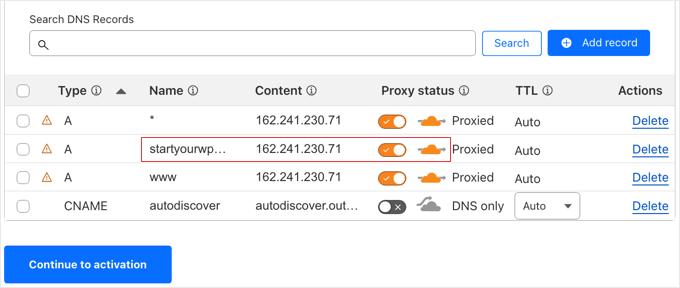
[Cloudflare - Create DNS records](https://developers.cloudflare.com/dns/manage-dns-records/how-to/create-dns-records/)
Once your records are published, return to [Domain Verification](https://docs.arsel.sa/guides/email/domains) to complete the process.
---
Source: https://docs.arsel.sa/guides/email/dns-providers/godaddy
# GoDaddy DNS Setup
Use these steps to publish Arsel SPF, DKIM, and DMARC records in GoDaddy.
1. Sign in to GoDaddy.
2. Open **My Products** and select your domain.
3. Click **DNS** then **Manage DNS**.
4. Add each Arsel record using **Add New Record**.
5. Use host values exactly as Arsel provides:
- `@` for root-domain SPF (when Arsel specifies root)
- DKIM selector host (for example `selector1._domainkey`)
- `_dmarc` for DMARC
6. Save changes and allow time for DNS propagation.
7. Return to Arsel and wait for the domain status to update automatically.
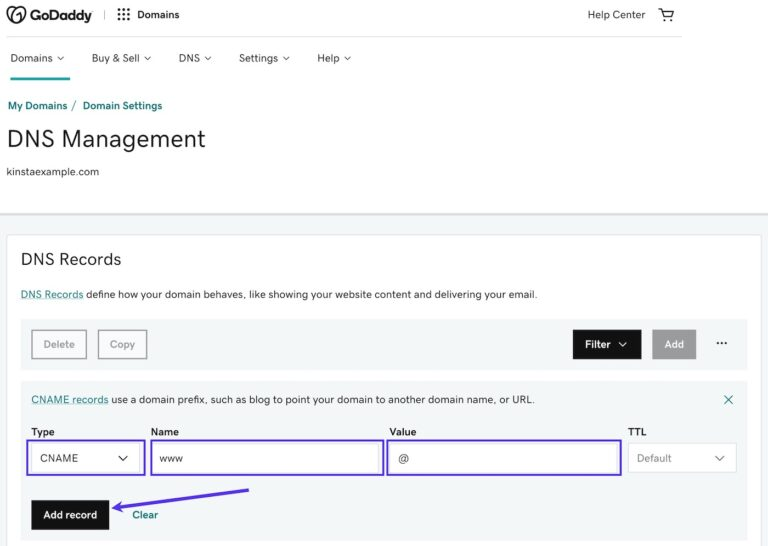
[GoDaddy - Manage DNS records](https://www.godaddy.com/en/help/manage-dns-records-680)
Once your records are published, return to [Domain Verification](https://docs.arsel.sa/guides/email/domains) to complete the process.
---
Source: https://docs.arsel.sa/guides/email/dns-providers/hostinger
# Hostinger DNS Setup
Use these steps to publish Arsel SPF, DKIM, and DMARC records in Hostinger.
1. Sign in to Hostinger and open **hPanel**.
2. Go to **Domains** > your domain > **DNS / Nameservers**.
3. In the DNS Zone Editor, add each Arsel record.
4. Confirm record names match exactly, especially DKIM selectors and `_dmarc`.
5. Keep TTL default unless your team uses a specific policy.
6. Save records and wait for DNS propagation.
7. Return to Arsel and wait for the domain status to update automatically.
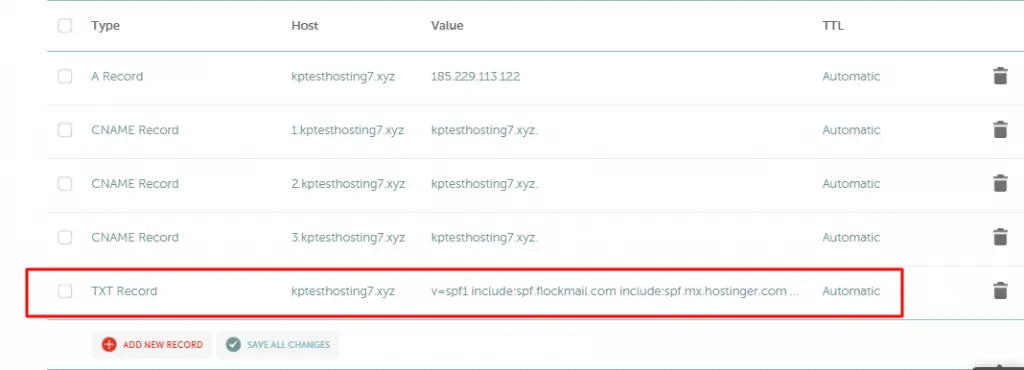
[Hostinger - Manage DNS zone](https://support.hostinger.com/en/articles/1583227-how-to-manage-dns-zone-on-hostinger)
Once your records are published, return to [Domain Verification](https://docs.arsel.sa/guides/email/domains) to complete the process.
---
Source: https://docs.arsel.sa/guides/email/dns-providers/namecheap
# Namecheap DNS Setup
Use these steps to publish Arsel SPF, DKIM, and DMARC records in Namecheap.
1. Sign in to Namecheap.
2. Open **Domain List** and click **Manage** for your domain.
3. Select the **Advanced DNS** tab.
4. Under **Host Records**, add all Arsel-provided entries.
5. Use **TXT Record** for SPF/DMARC and **CNAME Record** for DKIM when Arsel shows DKIM as CNAME.
6. Save all changes and wait for DNS propagation.
7. Return to Arsel and wait for the domain status to update automatically.
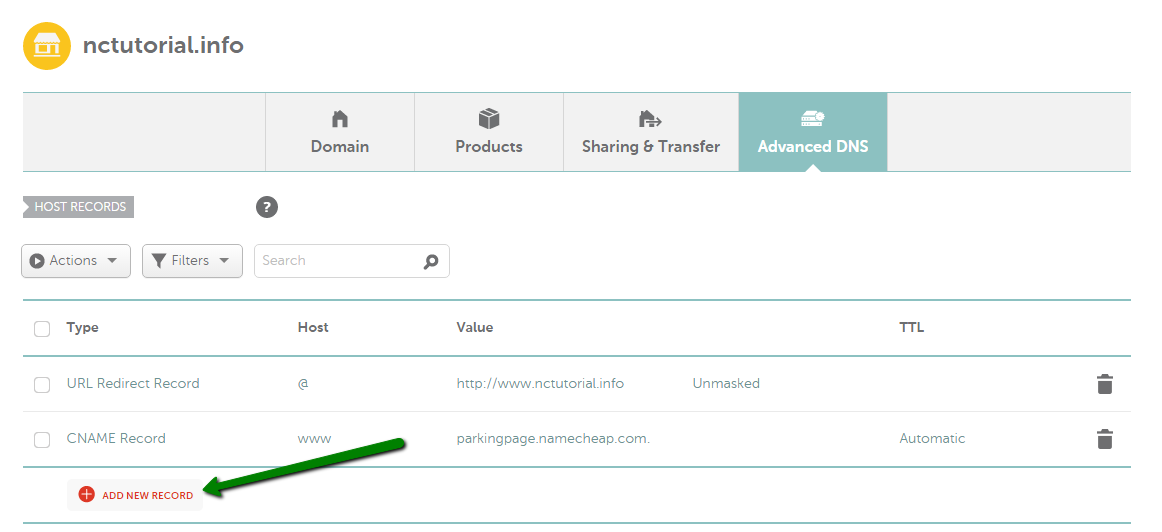
[Namecheap - How to create a DNS record](https://www.namecheap.com/support/knowledgebase/article.aspx/9776/2237/how-to-create-a-dns-record/)
Once your records are published, return to [Domain Verification](https://docs.arsel.sa/guides/email/domains) to complete the process.
---
Source: https://docs.arsel.sa/guides/email/dns-providers/route53
# Amazon Route 53 DNS Setup
Use these steps to publish Arsel SPF, DKIM, and DMARC records in Amazon Route 53.
1. Sign in to AWS and open the **Route 53** console.
2. Select **Hosted zones** and choose your domain.
3. Click **Create record** for each Arsel entry.
4. Match each Arsel record exactly:
- **Type** (`TXT`, `CNAME`)
- **Record name** (`@`, `_dmarc`, DKIM selector)
- **Value/Route traffic to**
5. For TTL, keep your default policy or use a low value while validating.
6. Save records and allow DNS propagation.
7. Return to Arsel and wait for the domain status to update automatically.
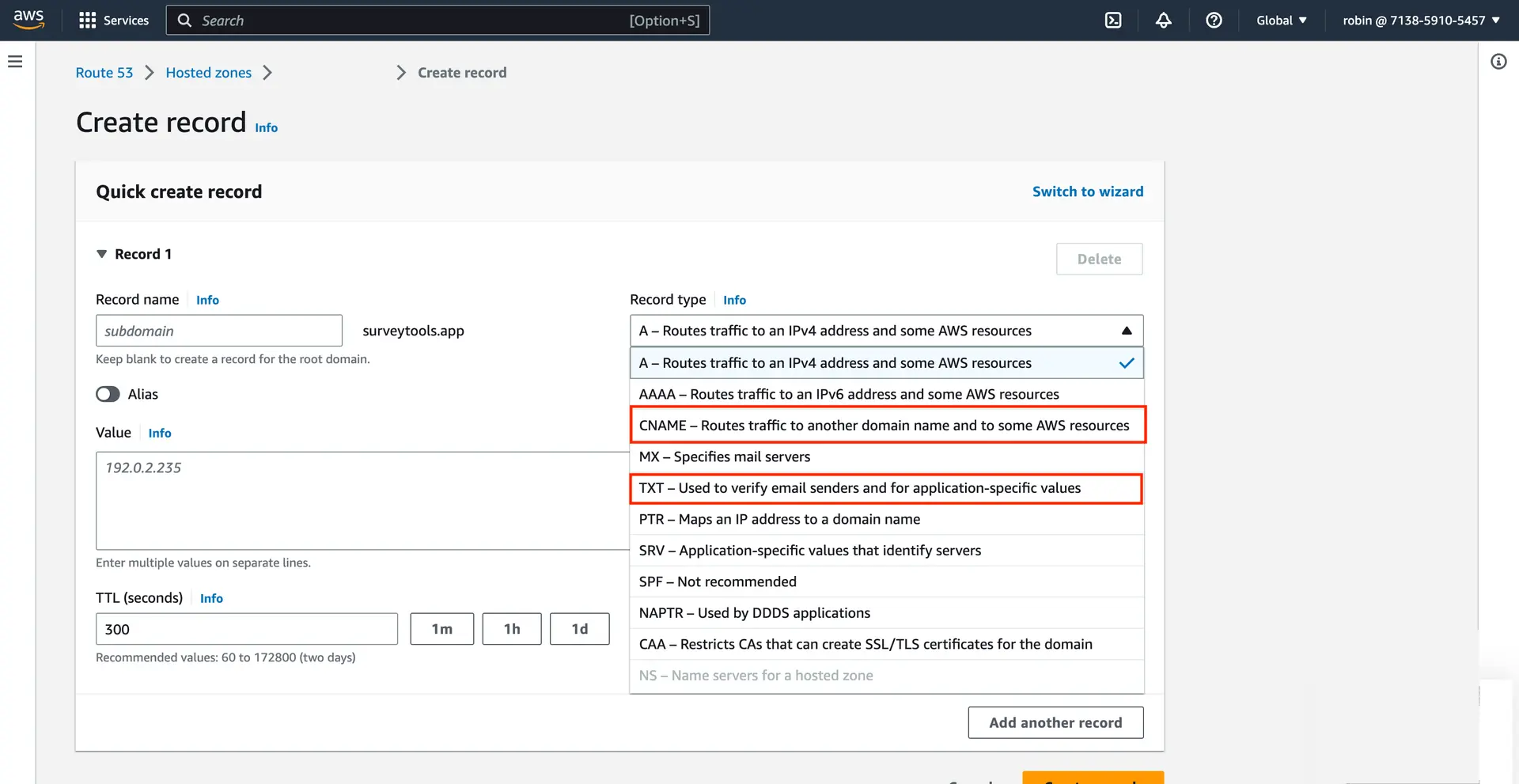
[AWS Route 53 - Creating records](https://docs.aws.amazon.com/Route53/latest/DeveloperGuide/resource-record-sets-creating.html)
Once your records are published, return to [Domain Verification](https://docs.arsel.sa/guides/email/domains) to complete the process.
---
Source: https://docs.arsel.sa/guides/email/sender-reputation
# Sender Reputation
Arsel customers share sending infrastructure, so one organization's poor list quality affects deliverability for everyone. Arsel monitors your sending health over a **rolling 30-day window**, covering campaigns and transactional sends together, and intervenes when rates degrade.
## What we measure and the limits
| Signal | What it is | Suspension limit | Healthy target |
|---|---|---|---|
| **Hard bounce rate** | Sent messages that bounced permanently (address doesn't exist, domain invalid, blocklisted). | **4%** | well under 2% |
| **Complaint rate** | Messages marked as spam, out of those sent to inbox providers that report complaints. See [How the complaint rate is measured](#how-the-complaint-rate-is-measured). | **0.08%** | well under 0.04% |
## How the complaint rate is measured
When a recipient clicks **Report spam**, only some inbox providers tell the sender. Outlook, Hotmail, Live and MSN (Microsoft), Yahoo and AOL report each complaint back to us. Gmail and most company mail servers report none.
So the complaint rate counts only the mail those providers could have reported:
> complaint rate = spam complaints ÷ messages sent to Microsoft, Yahoo and AOL addresses
For example, an organization that sends 30,000 emails, 4,000 of them to Microsoft and Yahoo addresses, and receives 12 complaints has a complaint rate of **0.30%** (12 ÷ 4,000), not 0.04% (12 ÷ 30,000). That is well over the 0.08% limit.
:::note[Seeing your Gmail complaints]
Gmail doesn't report individual complaints to any sender. To see your Gmail spam rate, verify your sending domain in [Google Postmaster Tools](https://postmaster.google.com). Arsel tags every email with a `Feedback-ID` header so Gmail can break that rate down by campaign.
:::
## Reading your bounce rate
Your analytics split bounces into three parts:
- **Hard** — permanent failures: the address doesn't exist or the domain is invalid.
- **Soft** — temporary failures: a full mailbox, or a receiving server that was briefly unavailable.
- **Validator-rejected** — addresses Arsel's email validation flagged as undeliverable at send time, before delivery was attempted.
Validator-rejected addresses are marked undeliverable so you stop sending to them, but they do **not** count toward the hard bounce rate that triggers auto-cancellation or suspension.
## What you'll experience
Enforcement escalates in three stages:
1. **Campaign auto-cancellation.** A single campaign with unusually high bounce or complaint rate is cancelled mid-send. Remaining recipients aren't sent to, the campaign moves to **Cancelled** with a reason, and admins are emailed. Hard-bounced addresses are auto-added to your suppression list.
2. **At-risk warning.** If your overall rates drift toward the suspension limits, admins receive a one-time email per episode with current rates, volume, and the suspension limits for context. You can keep sending, but further degradation leads to suspension.
3. **Account suspension.** If rates continue to degrade, or multiple campaigns are auto-cancelled in a short window, email sending is suspended: scheduled/queued/in-flight campaigns are cancelled, new sends are rejected, the dashboard shows a notification, and admins are emailed.
:::warning[Suspension doesn't lift on its own]
Sending stays suspended until you request and are granted reinstatement. There is no time-based unlock. See [Requesting reinstatement](#requesting-reinstatement).
:::
An email suspension covers **all** email. Transactional sends are rejected too, with `403` and `name: sending_suspended`. SMS, WhatsApp and push are unaffected.
## Keeping your reputation healthy
Most reputation incidents trace back to list quality:
- **Only send to opted-in contacts.** Purchased and scraped lists are the biggest source of bounces and complaints. If you can't say where and when each contact opted in, don't send to that list.
- **Re-validate older lists.** Addresses go stale. Before mailing a list you haven't used in months, run it through a verifier (NeverBounce, ZeroBounce, Bouncer) or send to a small slice first and check the bounce rate.
- **Remove disengaged contacts.** Recipients who haven't opened or clicked in 6+ months are a complaint risk even if the address still works. Suppress them or run a re-engagement flow first.
- **Don't re-import unsubscribes.** Arsel removes unsubscribed contacts automatically, but if you import from another tool, make sure unsubscribed contacts there aren't re-added as active.
Hard-bounced addresses are suppressed automatically, so they can't re-bounce on your next campaign. New bounces come from newly imported data, so fix the source.
## Requesting reinstatement
Reply to the suspension email or contact [support@arsel.sa](mailto:support@arsel.sa). Reviews are manual. Include the following to speed them up:
1. **Where the affected list came from** — which signup form, which import, which export from another tool.
2. **What you've changed** — removed segments, ran a verifier, switched sources, paused a problem flow.
3. **Evidence** — a report from NeverBounce, ZeroBounce, Bouncer, or similar; or a pre/post-cleanup count.
After reinstatement, evaluations look only at sends from that point forward. Repeat incidents lead to longer reviews and may lead to permanent closure.
## Related
- [Domain verification](https://docs.arsel.sa/guides/email/domains) — set up SPF, DKIM, and DMARC. Authenticated mail bounces and complains less.
---
Source: https://docs.arsel.sa/guides/email/smtp
# Sending over SMTP
Arsel runs a standard SMTP server, so you can send transactional email from any SMTP client and route existing SMTP code through Arsel without changing it.
## When to use SMTP vs the API
| | SMTP | REST API |
|--|------|----------|
| **Best for** | Existing apps with SMTP code, legacy systems, platforms that only support SMTP | New integrations, full control over request/response, programmatic workflows |
| **Authentication** | Username + password per connection | API key per request |
| **Features** | Send emails with HTML, text, attachments | Send emails + list status + per-recipient tracking + SMS |
| **Rate limiting** | 50 messages/sec per organization, `421` reply (closes connection) when blocked | 1,000 requests/min per organization, `429` with rate-limit headers |
| **Tracking** | Full delivery tracking via the API status endpoints | Full delivery tracking built-in |
:::tip
SMTP emails go through the same pipeline as API emails, with the same delivery infrastructure, tracking and analytics.
:::
## Connection details
| Setting | Value |
|---------|-------|
| **Host** | `smtp.arsel.sa` |
| **Port** | `465` (implicit TLS) |
| **Security** | TLS required |
| **Authentication** | `PLAIN` or `LOGIN` |
| **Max message size** | 30 MB |
## Quick start
1. **Create SMTP credentials** from your [Arsel Dashboard](https://arsel.sa) under **Email > SMTP**. See [Managing credentials](#managing-credentials) below.
2. **Configure your SMTP client** with the connection details above and your generated username and password.
3. **Send an email** through your application's existing email flow.
See [SMTP client setup](https://docs.arsel.sa/guides/email/smtp-clients) for detailed examples across languages and frameworks.
## Requirements
Before sending via SMTP, ensure:
- Your **sender domain is verified** in the Arsel dashboard (see [Domain verification](https://docs.arsel.sa/guides/email/domains))
- Your **SMTP credentials are active** (not revoked)
- Your organization's **sending quota** has not been exceeded
- Your organization is **not suspended** due to bounce/complaint rates (see [Sender reputation](https://docs.arsel.sa/guides/email/sender-reputation))
## Recipients
Arsel delivers to the **envelope** recipients (the addresses your client passes in `RCPT TO`), as any standard SMTP server does. The `To:` and `Cc:` headers control only what the recipient sees.
Your SMTP library already handles this:
- **BCC works normally.** Most clients (Nodemailer, Python's `smtplib.send_message`, JavaMail) deliberately strip the `Bcc:` header before sending and carry blind recipients in the envelope only. Those recipients receive the message, and the other recipients cannot see them.
- **An address in `To:` that you did not `RCPT TO` is not a recipient.** This is what lets you send a message addressed to `To: members@yourdomain.com` while delivering an individual copy to each member.
- Envelope addresses that appear in no header are treated as blind copies.
| Limit | Value |
|-------|-------|
| Recipients per message (To + Cc + Bcc combined) | 50 |
The 51st `RCPT TO` in a message is answered with `452 Too many recipients` ([RFC 5321 §4.5.3.1.10](https://datatracker.ietf.org/doc/html/rfc5321#section-4.5.3.1.10)). The first 50 are still accepted, and standard clients send the remaining recipients in a follow-up message. For bulk sends, use a campaign.
## Managing credentials
SMTP credentials are organization-scoped username/password pairs. Each is independent, so you can create separate credentials for different applications or environments.
### Creating credentials
Generate SMTP credentials from your Arsel dashboard:
1. Navigate to **Email > SMTP**
2. Click **Create Credentials**
3. Optionally give them a descriptive name (e.g., "Production Server", "Staging")
4. Copy the username and password immediately
:::warning
The password is only shown **once** at creation time. Store it securely; it cannot be retrieved later. If lost, rotate the credential to generate a new password.
:::
### Credential format
| Field | Format | Example |
|-------|--------|---------|
| Username | `smtp_` + 16 random characters | `smtp_aB3xK9mP2qR5wY7z` |
| Password | `sk_` + 32 random characters | `sk_4f8Hj2kLmN6pQrStUvWxYz1a3B5cD7e` |
### Credential lifecycle
**Active credentials.** New credentials are active by default. Active credentials can authenticate SMTP connections and send emails.
**Rotating.** Rotate a credential if it may have been compromised, or on a regular schedule:
1. Navigate to **Email > SMTP**
2. Click **Rotate** on the credential
3. Copy the new password immediately
4. Update your application's SMTP configuration
5. The old password is immediately invalidated
:::tip
To rotate with zero downtime: create a **new** credential, update your application to use it, then revoke the old one.
:::
**Revoking.** Revoking disables a credential without deleting it, for example to suspend access temporarily:
1. Click **Revoke** on the credential
2. Any active SMTP sessions using this credential will fail on the next authentication
3. The credential can be re-enabled later by updating its status
**Deleting.** Deleting a credential permanently removes it. This cannot be undone:
1. Click **Delete** on the credential
2. Confirm the deletion
3. The credential is permanently removed
### Security best practices
- **Use separate credentials** for each environment (development, staging, production)
- **Use separate credentials** for each application or service that sends emails
- **Rotate credentials regularly** as part of your security policy
- **Revoke immediately** if a credential may have been exposed
- **Never commit credentials** to source control; use environment variables or secrets management
- **Monitor last-used timestamps** in the dashboard to identify unused credentials
### Tracking usage
The dashboard shows for each credential:
| Field | Description |
|-------|-------------|
| **Name** | Optional label you assigned |
| **Username** | The SMTP username |
| **Status** | Active or Revoked |
| **Last Used** | Timestamp of the most recent authentication |
| **Created** | When the credential was generated |
## Attachments
| Limit | Value |
|-------|-------|
| Attachments per message | 10 |
| Message size, as sent | 30 MB |
The size limit applies to the whole message as your client transmits it. Attachments are base64-encoded on the wire, which adds about a third, so the practical ceiling is roughly **22 MB of attachments**. A larger message is refused with `552`: before the upload if your client declares the message size (most libraries do when the server advertises `SIZE`), otherwise at the end of `DATA`.
Allowed types: PDF, Word, Excel, PowerPoint, RTF, plain text, CSV, JSON, XML, ZIP, calendar invites (`.ics`), and JPEG/PNG/GIF/WebP/SVG images.
If your client labels attachments `application/octet-stream` (many do, including Outlook and most `smtplib` scripts), Arsel resolves the real type from the filename extension, so `invoice.pdf` is accepted as a PDF. Give every attachment a filename with the correct extension.
An attachment that is not an allowed type, or whose extension is on the executable blocklist, causes the **whole message** to be rejected with:
```
552 Attachment rejected: disk.iso, payload.exe
```
The message is not sent and no partial copy goes out, so you can fix the attachment and resend safely.
Attachments are held encrypted only while the message is being delivered and are deleted once it has been sent.
### Inline images
Images embedded in the HTML with `cid:` references (a logo, a signature) are delivered inline, in their `multipart/related` structure, exactly as your client built them. Nodemailer's `cid` attachments, `MIMEImage` with a `Content-ID` in Python, and Outlook's embedded images all work unchanged. Inline images count toward the attachment limits above.
### Calendar invites
A calendar invite is delivered so that Gmail, Outlook and Apple Mail show it as an invite with accept/decline buttons, not as a file. Send it the way your library normally does. Nodemailer's `icalEvent`, or a `text/calendar` part with a `method` parameter such as `REQUEST` or `CANCEL`, keeps its method. An `.ics` file sent as an ordinary attachment is delivered as an attachment.
## Rate limits
Each organization can submit **50 messages per second** in production. The limit is shared across all SMTP credentials and concurrent connections, so additional credentials do not raise your throughput.
When you exceed it, the server replies to your `DATA` command with:
```
421 Too many messages, please slow down
```
and closes the connection ([RFC 5321 §3.8](https://datatracker.ietf.org/doc/html/rfc5321#section-3.8)). Your next message opens a fresh session. The limit is a 1-second window aligned to the wall clock, so backing off slightly more than one second is the safest pattern.
- The check runs **after** the message body has streamed. You can't pre-flight at `MAIL FROM` or `RCPT TO`, so a throttled message still pays the full upload cost.
- The slot is consumed even when the message later fails downstream validation (unverified sender, bad recipients). Fix the underlying error before retrying, or the retry burns rate budget.
- The monthly **sending quota** is a separate limit and returns `451 Monthly sending quota exceeded` (connection stays open). Waiting a second won't clear it.
### Handling rate limits
When you see `421 Too many messages`:
- **Match on code `421` *and* the text `Too many messages`.** Other `421` causes, such as restarts or maintenance, are a different condition.
- **Open a new connection.** The old one is closed. Pooled libraries (Nodemailer pool, JavaMail) reopen automatically; ad-hoc clients construct a fresh transport.
- **Back off exponentially with jitter**, e.g. `1s × 2^attempt` capped at ~10 s, and stop after about 5 attempts. Surface persistent failures to a dead-letter queue or your upstream caller.
- **Prefer prevention.** If you regularly hit the limit, add a client-side token bucket sized to 50 msg/s/org. Back-pressure is cheaper than retries, because `421` only fires after the body has finished uploading.
The REST API has a separate limit. See [Rate limiting](https://docs.arsel.sa/api-basics/rate-limiting).
### Concurrent connections
Each organization can hold up to **20 authenticated connections** at once, across all of its credentials. Authenticating a 21st returns:
```
421 Too many concurrent connections for this organization, retry later
```
and closes that connection; the ones already open are unaffected. A pool of 5–10 connections covers the 50 messages/second limit, because each connection can carry many messages. In Nodemailer, set `pool: true` with `maxConnections` at 10 or less. Idle connections are closed after 60 seconds, and pooled clients reconnect on their own.
## Safe retries (`X-Idempotency-Key`)
Transient SMTP replies (`421`, `451`) ask you to retry, and so does a connection that drops after you send `DATA` but before you read the reply. In that last case the message may already have been accepted, and a blind retry sends it twice.
Set an `X-Idempotency-Key` header to make a retry safe:
```
X-Idempotency-Key: order-1001-shipped
```
- The **first** message with a given key is processed normally.
- Any **later** message with the **same key**, within 24 hours, is accepted with `250` and **not sent again**.
- After 24 hours the key expires and may be reused.
The key is any unique string of up to 256 characters. Derive it from what the message is about (`order-1001-shipped`, `interview-invite-8842`) instead of using a random UUID, so your retry path can regenerate it without storing it.
### Example
```javascript
await transporter.sendMail({
from: "notifications@yourdomain.com",
to: "candidate@example.com",
subject: "Your interview is confirmed",
text: "See you on Thursday.",
headers: {
"X-Idempotency-Key": `interview-invite-${interviewId}`,
},
});
```
```python
msg["X-Idempotency-Key"] = f"interview-invite-{interview_id}"
```
### Error replies
| Reply | Meaning | Retry? |
|-------|---------|--------|
| `501` | The key is empty or longer than 256 characters | No — fix the key |
| `554` | The key was already used with a **different** message | No — use a fresh key |
| `451` | A message with this key is still being processed | Yes — after a short delay |
:::warning[Reusing a key for a different message]
The key is bound to the message it was first used with. Sending different content under a key that is already in use is rejected with `554`; the original is not replaced. Use a fresh key for a different message.
:::
:::tip
Keys are scoped per organization. SMTP and the REST [send email](https://docs.arsel.sa/api-basics/idempotency) endpoint share one key space, so a key used on one path is answered from that record on the other. Use keys that are unique across both.
:::
---
Source: https://docs.arsel.sa/guides/email/smtp-clients
# Sending Emails via SMTP
Examples for connecting to the Arsel SMTP server from common languages and frameworks.
## Connection Settings
Use these settings in all examples below:
| Setting | Value |
|---------|-------|
| Host | `smtp.arsel.sa` |
| Port | `465` |
| Security | Implicit TLS (SSL) |
| Auth method | `PLAIN` or `LOGIN` |
| Username | Your SMTP username (starts with `smtp_`) |
| Password | Your SMTP password (starts with `sk_`) |
---
## Language Examples
**Node.js**
Using [Nodemailer](https://nodemailer.com):
```javascript
import nodemailer from "nodemailer";
const transporter = nodemailer.createTransport({
host: "smtp.arsel.sa",
port: 465,
secure: true, // implicit TLS
auth: {
user: process.env.ARSEL_SMTP_USERNAME,
pass: process.env.ARSEL_SMTP_PASSWORD,
},
});
const info = await transporter.sendMail({
from: '"My App" ',
to: "user@example.com",
subject: "Welcome to our platform",
html: "Welcome!
Thanks for signing up.
",
text: "Welcome! Thanks for signing up.",
});
console.log("Message sent:", info.messageId);
```
**Python**
Using the standard library `smtplib`:
```python
import smtplib
import os
from email.mime.text import MIMEText
from email.mime.multipart import MIMEMultipart
msg = MIMEMultipart("alternative")
msg["Subject"] = "Welcome to our platform"
msg["From"] = "My App "
msg["To"] = "user@example.com"
text = "Welcome! Thanks for signing up."
html = "Welcome!
Thanks for signing up.
"
msg.attach(MIMEText(text, "plain"))
msg.attach(MIMEText(html, "html"))
with smtplib.SMTP_SSL("smtp.arsel.sa", 465) as server:
server.login(
os.environ["ARSEL_SMTP_USERNAME"],
os.environ["ARSEL_SMTP_PASSWORD"],
)
server.send_message(msg)
print("Message sent successfully")
```
**PHP**
Using [PHPMailer](https://github.com/PHPMailer/PHPMailer):
```php
isSMTP();
$mail->Host = 'smtp.arsel.sa';
$mail->SMTPAuth = true;
$mail->Username = getenv('ARSEL_SMTP_USERNAME');
$mail->Password = getenv('ARSEL_SMTP_PASSWORD');
$mail->SMTPSecure = PHPMailer::ENCRYPTION_SMTPS;
$mail->Port = 465;
$mail->setFrom('noreply@yourdomain.com', 'My App');
$mail->addAddress('user@example.com');
$mail->isHTML(true);
$mail->Subject = 'Welcome to our platform';
$mail->Body = 'Welcome!
Thanks for signing up.
';
$mail->AltBody = 'Welcome! Thanks for signing up.';
$mail->send();
echo 'Message sent successfully';
```
**C#**
Using `System.Net.Mail`:
```csharp
using System.Net;
using System.Net.Mail;
var client = new SmtpClient("smtp.arsel.sa", 465)
{
EnableSsl = true,
Credentials = new NetworkCredential(
Environment.GetEnvironmentVariable("ARSEL_SMTP_USERNAME"),
Environment.GetEnvironmentVariable("ARSEL_SMTP_PASSWORD")
)
};
var message = new MailMessage
{
From = new MailAddress("noreply@yourdomain.com", "My App"),
Subject = "Welcome to our platform",
Body = "Welcome!
Thanks for signing up.
",
IsBodyHtml = true
};
message.To.Add("user@example.com");
await client.SendMailAsync(message);
Console.WriteLine("Message sent successfully");
```
**Ruby**
Using the standard library `net/smtp`:
```ruby
require "net/smtp"
message = <<~MESSAGE
From: My App
To: user@example.com
Subject: Welcome to our platform
MIME-Version: 1.0
Content-Type: text/html; charset=UTF-8
Welcome!
Thanks for signing up.
MESSAGE
Net::SMTP.start(
"smtp.arsel.sa",
465,
"yourdomain.com",
ENV["ARSEL_SMTP_USERNAME"],
ENV["ARSEL_SMTP_PASSWORD"],
:plain,
true # enable TLS
) do |smtp|
smtp.send_message(message, "noreply@yourdomain.com", "user@example.com")
end
puts "Message sent successfully"
```
**Go**
Using the standard library `net/smtp`:
```go
package main
import (
"crypto/tls"
"fmt"
"net/smtp"
"os"
)
func main() {
host := "smtp.arsel.sa"
port := "465"
username := os.Getenv("ARSEL_SMTP_USERNAME")
password := os.Getenv("ARSEL_SMTP_PASSWORD")
tlsConfig := &tls.Config{ServerName: host}
conn, err := tls.Dial("tcp", host+":"+port, tlsConfig)
if err != nil {
panic(err)
}
client, err := smtp.NewClient(conn, host)
if err != nil {
panic(err)
}
defer client.Quit()
auth := smtp.PlainAuth("", username, password, host)
if err := client.Auth(auth); err != nil {
panic(err)
}
from := "noreply@yourdomain.com"
to := "user@example.com"
msg := "From: My App <" + from + ">\r\n" +
"To: " + to + "\r\n" +
"Subject: Welcome to our platform\r\n" +
"MIME-Version: 1.0\r\n" +
"Content-Type: text/html; charset=UTF-8\r\n\r\n" +
"Welcome!
Thanks for signing up.
"
client.Mail(from)
client.Rcpt(to)
w, _ := client.Data()
w.Write([]byte(msg))
w.Close()
fmt.Println("Message sent successfully")
}
```
---
## Framework Examples
**Django**
Add to your `settings.py`:
```python
EMAIL_BACKEND = "django.core.mail.backends.smtp.EmailBackend"
EMAIL_HOST = "smtp.arsel.sa"
EMAIL_PORT = 465
EMAIL_USE_SSL = True
EMAIL_HOST_USER = os.environ["ARSEL_SMTP_USERNAME"]
EMAIL_HOST_PASSWORD = os.environ["ARSEL_SMTP_PASSWORD"]
DEFAULT_FROM_EMAIL = "noreply@yourdomain.com"
```
Then send emails using Django's built-in functions:
```python
from django.core.mail import send_mail
send_mail(
subject="Welcome to our platform",
message="Welcome! Thanks for signing up.",
html_message="Welcome!
Thanks for signing up.
",
from_email=None, # uses DEFAULT_FROM_EMAIL
recipient_list=["user@example.com"],
)
```
**Laravel**
Add to your `.env`:
```
MAIL_MAILER=smtp
MAIL_HOST=smtp.arsel.sa
MAIL_PORT=465
MAIL_USERNAME="${ARSEL_SMTP_USERNAME}"
MAIL_PASSWORD="${ARSEL_SMTP_PASSWORD}"
MAIL_ENCRYPTION=ssl
MAIL_FROM_ADDRESS="noreply@yourdomain.com"
MAIL_FROM_NAME="My App"
```
Then send emails normally:
```php
use Illuminate\Support\Facades\Mail;
use App\Mail\WelcomeEmail;
Mail::to('user@example.com')->send(new WelcomeEmail());
```
**Ruby on Rails**
Add to `config/environments/production.rb`:
```ruby
config.action_mailer.delivery_method = :smtp
config.action_mailer.smtp_settings = {
address: "smtp.arsel.sa",
port: 465,
user_name: ENV["ARSEL_SMTP_USERNAME"],
password: ENV["ARSEL_SMTP_PASSWORD"],
authentication: :plain,
ssl: true
}
```
Then use Action Mailer as usual:
```ruby
class WelcomeMailer < ApplicationMailer
def welcome_email(user)
mail(to: user.email, subject: "Welcome to our platform")
end
end
```
**Spring Boot**
Add to `application.properties`:
```properties
spring.mail.host=smtp.arsel.sa
spring.mail.port=465
spring.mail.username=${ARSEL_SMTP_USERNAME}
spring.mail.password=${ARSEL_SMTP_PASSWORD}
spring.mail.properties.mail.smtp.ssl.enable=true
spring.mail.properties.mail.smtp.auth=true
```
Then inject and use `JavaMailSender`:
```java
@Service
public class EmailService {
@Autowired
private JavaMailSender mailSender;
public void sendWelcome(String to) {
var message = mailSender.createMimeMessage();
var helper = new MimeMessageHelper(message, true);
helper.setFrom("noreply@yourdomain.com");
helper.setTo(to);
helper.setSubject("Welcome to our platform");
helper.setText("Welcome!
", true);
mailSender.send(message);
}
}
```
---
## Sending with Attachments
**Node.js**
```javascript
import nodemailer from "nodemailer";
import { readFileSync } from "fs";
const transporter = nodemailer.createTransport({
host: "smtp.arsel.sa",
port: 465,
secure: true,
auth: {
user: process.env.ARSEL_SMTP_USERNAME,
pass: process.env.ARSEL_SMTP_PASSWORD,
},
});
await transporter.sendMail({
from: '"Billing" ',
to: "customer@example.com",
subject: "Your invoice for March 2026",
html: "Please find your invoice attached.
",
attachments: [
{
filename: "invoice-march-2026.pdf",
content: readFileSync("./invoice.pdf"),
contentType: "application/pdf",
},
],
});
```
**Python**
```python
import smtplib
import os
from email.mime.multipart import MIMEMultipart
from email.mime.text import MIMEText
from email.mime.base import MIMEBase
from email import encoders
msg = MIMEMultipart()
msg["Subject"] = "Your invoice for March 2026"
msg["From"] = "Billing "
msg["To"] = "customer@example.com"
msg.attach(MIMEText("Please find your invoice attached.
", "html"))
with open("invoice.pdf", "rb") as f:
attachment = MIMEBase("application", "pdf")
attachment.set_payload(f.read())
encoders.encode_base64(attachment)
attachment.add_header("Content-Disposition", "attachment", filename="invoice-march-2026.pdf")
msg.attach(attachment)
with smtplib.SMTP_SSL("smtp.arsel.sa", 465) as server:
server.login(
os.environ["ARSEL_SMTP_USERNAME"],
os.environ["ARSEL_SMTP_PASSWORD"],
)
server.send_message(msg)
```
---
## Templates and Variables
Optional custom headers let you send a saved Arsel template and fill in per-send variables without rendering the email yourself.
### Custom Headers Reference
| Header | Type | Description |
|--------|------|-------------|
| `X-Category` | string | Analytics category label. Appears in dashboard and API status endpoints. Defaults to `"smtp"`. |
| `X-Template-Id` | string | ID of a saved Arsel template. When set, the email body is replaced with the template's HTML. Find the ID in your dashboard under **Email > Templates**, or via the [Templates API](https://docs.arsel.sa/api/templates/list-templates). |
| `X-Variables` | JSON string | A JSON object of `{"key": "value"}` pairs. Values are substituted into `{{variable}}` placeholders in the subject line, HTML body, and plain text body. |
| `X-Idempotency-Key` | string | Makes a retry safe: a second message with the same key within 24 hours is accepted but not sent again. Up to 256 characters. See [Safe retries](https://docs.arsel.sa/guides/email/smtp#safe-retries-x-idempotency-key). |
---
### Using a Saved Template (`X-Template-Id`)
Pass the template ID in the `X-Template-Id` header. The template's HTML replaces the HTML body you provide. The plain-text body (`text` part) is passed through as-is.
Find your template ID in the dashboard under **Email > Templates**, or from the response of [`POST /templates`](https://docs.arsel.sa/api/templates/create-template).
**Node.js**
```javascript
import nodemailer from "nodemailer";
const transporter = nodemailer.createTransport({
host: "smtp.arsel.sa",
port: 465,
secure: true,
auth: {
user: process.env.ARSEL_SMTP_USERNAME,
pass: process.env.ARSEL_SMTP_PASSWORD,
},
});
await transporter.sendMail({
from: '"My App" ',
to: "user@example.com",
subject: "Your order has shipped",
headers: {
"X-Template-Id": "tpl_01abc123def456",
},
});
```
**Python**
```python
import smtplib
import os
from email.mime.multipart import MIMEMultipart
msg = MIMEMultipart("alternative")
msg["Subject"] = "Your order has shipped"
msg["From"] = "My App "
msg["To"] = "user@example.com"
msg["X-Template-Id"] = "tpl_01abc123def456"
with smtplib.SMTP_SSL("smtp.arsel.sa", 465) as server:
server.login(
os.environ["ARSEL_SMTP_USERNAME"],
os.environ["ARSEL_SMTP_PASSWORD"],
)
server.send_message(msg)
```
:::note
If the template ID does not exist or belongs to a different organization, the message is rejected with SMTP error `550`.
:::
---
### Variable Substitution (`X-Variables`)
Pass a JSON object in the `X-Variables` header. Arsel replaces every `{{key}}` placeholder in the subject, HTML, and plain-text body with the corresponding value.
Variable replacement is **case-sensitive**. Placeholders with no matching key are left unchanged.
**Node.js**
```javascript
import nodemailer from "nodemailer";
const transporter = nodemailer.createTransport({
host: "smtp.arsel.sa",
port: 465,
secure: true,
auth: {
user: process.env.ARSEL_SMTP_USERNAME,
pass: process.env.ARSEL_SMTP_PASSWORD,
},
});
await transporter.sendMail({
from: '"My App" ',
to: "user@example.com",
subject: "Hi {{firstName}}, your order {{orderId}} has shipped",
html: "Hi {{firstName}},
Your order {{orderId}} is on its way!
",
text: "Hi {{firstName}}, your order {{orderId}} is on its way!",
headers: {
"X-Variables": JSON.stringify({
firstName: "Sara",
orderId: "ORD-9821",
}),
},
});
```
**Python**
```python
import smtplib
import os
import json
from email.mime.multipart import MIMEMultipart
from email.mime.text import MIMEText
msg = MIMEMultipart("alternative")
msg["Subject"] = "Hi {{firstName}}, your order {{orderId}} has shipped"
msg["From"] = "My App "
msg["To"] = "user@example.com"
msg["X-Variables"] = json.dumps({"firstName": "Sara", "orderId": "ORD-9821"})
text = "Hi {{firstName}}, your order {{orderId}} is on its way!"
html = "Hi {{firstName}},
Your order {{orderId}} is on its way!
"
msg.attach(MIMEText(text, "plain"))
msg.attach(MIMEText(html, "html"))
with smtplib.SMTP_SSL("smtp.arsel.sa", 465) as server:
server.login(
os.environ["ARSEL_SMTP_USERNAME"],
os.environ["ARSEL_SMTP_PASSWORD"],
)
server.send_message(msg)
```
:::warning
`X-Variables` must be a valid JSON **object** (`{}`). Arrays and primitives are rejected with SMTP error `500`. Keep the serialized value under a few kilobytes; very large variable payloads may be truncated by intermediate mail servers.
:::
---
### Combining a Template with Variables
Load a saved template and fill in per-recipient values in the same message.
**Node.js**
```javascript
import nodemailer from "nodemailer";
const transporter = nodemailer.createTransport({
host: "smtp.arsel.sa",
port: 465,
secure: true,
auth: {
user: process.env.ARSEL_SMTP_USERNAME,
pass: process.env.ARSEL_SMTP_PASSWORD,
},
});
await transporter.sendMail({
from: '"My App" ',
to: "user@example.com",
subject: "Your order {{orderId}} has shipped",
headers: {
"X-Template-Id": "tpl_01abc123def456",
"X-Variables": JSON.stringify({
firstName: "Sara",
orderId: "ORD-9821",
trackingUrl: "https://track.example.com/ORD-9821",
}),
},
});
```
**Python**
```python
import smtplib
import os
import json
from email.mime.multipart import MIMEMultipart
msg = MIMEMultipart("alternative")
msg["Subject"] = "Your order {{orderId}} has shipped"
msg["From"] = "My App "
msg["To"] = "user@example.com"
msg["X-Template-Id"] = "tpl_01abc123def456"
msg["X-Variables"] = json.dumps({
"firstName": "Sara",
"orderId": "ORD-9821",
"trackingUrl": "https://track.example.com/ORD-9821",
})
with smtplib.SMTP_SSL("smtp.arsel.sa", 465) as server:
server.login(
os.environ["ARSEL_SMTP_USERNAME"],
os.environ["ARSEL_SMTP_PASSWORD"],
)
server.send_message(msg)
```
When both headers are present, the template's HTML is used as the base and variables are substituted into it. The inline email body is ignored.
---
## Custom Category
Set the analytics category for SMTP emails using the `X-Category` header:
**Node.js**
```javascript
await transporter.sendMail({
from: "noreply@yourdomain.com",
to: "user@example.com",
subject: "Password Reset",
html: "Click here to reset your password.
",
headers: {
"X-Category": "password-reset",
},
});
```
**Python**
```python
msg = MIMEText("Click here to reset your password.
", "html")
msg["Subject"] = "Password Reset"
msg["From"] = "noreply@yourdomain.com"
msg["To"] = "user@example.com"
msg["X-Category"] = "password-reset"
```
The `X-Category` value appears in the API status endpoints and dashboard analytics, letting you filter and group emails by type.
---
## Tracking SMTP Emails
Emails sent via SMTP are tracked the same way as API emails. Use the REST API status endpoints to check delivery:
```bash
# List recent emails (includes both API and SMTP emails)
curl "https://api.arsel.sa/v1/email?limit=10" \
-H "Authorization: Bearer $ARSEL_API_KEY"
```
SMTP emails appear with `category` set to the `X-Category` header value, or `"smtp"` if no category header was provided.
## Troubleshooting
| Issue | Solution |
|-------|----------|
| **Connection refused** | Verify your firewall allows outbound traffic on port 465 |
| **Authentication failed** (`535`) | Check that your credentials are active and not revoked. Verify username starts with `smtp_` |
| **TLS handshake error** | Ensure your client supports TLS 1.2 or higher. Use port 465 with implicit TLS, not STARTTLS |
| **Message rejected** (`550 Sender ... is not authorized`) | Verify your sender domain is verified in the Arsel dashboard |
| **Template not found** (`550`) | Check that the `X-Template-Id` value matches a template ID in your organization. Template IDs are available in the dashboard under **Email > Templates** or via the Templates API |
| **Invalid variables** (`500 X-Variables header must be a valid JSON object`) | Ensure `X-Variables` is a JSON object — not an array or a plain string. Example: `{"key": "value"}` |
| **Too many messages** (`421 Too many messages, please slow down`) | You're exceeding the 50 messages/sec per-organization limit. The server closes the connection — retry on a fresh one. See [Handling rate limits](https://docs.arsel.sa/guides/email/smtp#handling-rate-limits). |
| **Attachment rejected** (`552 Attachment rejected: ...`) | The named files are not an allowed type. Check the filename has the correct extension — a PDF sent as `application/octet-stream` is accepted when it is named `.pdf`. See [Attachments](https://docs.arsel.sa/guides/email/smtp#attachments). |
| **Too many concurrent connections** (`421 Too many concurrent connections ...`) | Your organization already has 20 authenticated connections open. Lower your pool size (Nodemailer `maxConnections`) or close idle connections. See [Concurrent connections](https://docs.arsel.sa/guides/email/smtp#concurrent-connections). |
| **Some recipients deferred** (`452 Too many recipients`) | The message had more than 50 recipients. The first 50 were accepted; send the rest in another message. See [Recipients](https://docs.arsel.sa/guides/email/smtp#recipients). |
| **Message sent twice** | A transient reply (`421`/`451`) or a dropped connection was retried after the message was already accepted. Set `X-Idempotency-Key` — see [Safe retries](https://docs.arsel.sa/guides/email/smtp#safe-retries-x-idempotency-key). |
| **Monthly sending quota exceeded** (`451 Monthly sending quota exceeded`) | You've used your plan's monthly allotment. Upgrade your plan or wait for the next billing period — retrying immediately won't help. |
---
Source: https://docs.arsel.sa/guides/sms
# SMS
Arsel delivers SMS to any country where your sender name is approved. There are two paths: [`POST /sms/send`](https://docs.arsel.sa/api/sms/send-sms) for transactional messages to explicit numbers, and campaigns for sends to an audience defined by lists, tags and segments.
## Before your first send: register a sender name
The `from` field is an alphanumeric **sender name** of 3–11 characters, not a phone number. It must be registered and approved before you can send. Arsel provisions sender names on your behalf: contact [support@arsel.sa](mailto:support@arsel.sa) to register one. [List Senders](https://docs.arsel.sa/api/sms/list-senders) returns the names approved for your organization.
Registration is a regulatory requirement in each destination country, and approval goes through the local telecom operators, so register early. Messages sent from an unregistered name are rejected.
Promotional SMS to Saudi Arabia must come from a separate sender name ending in `-AD`, for example `Acme-AD`. Saudi operators reject promotional content from a plain sender name, which is for transactional messages such as codes and order updates. Register both if you send both, and keep the `-AD` name short: some operators allow only 8 characters including the suffix.
Sender names are approved per country. A name cleared for KSA can't be used for Egypt or any other country until you register it there. [List Senders](https://docs.arsel.sa/api/sms/list-senders) shows the `country` each approval covers.
## Phone number format
Numbers must be mobile numbers in international (E.164) format, with the leading `+` and country code, for example `+966512345678` or `+201012345678`. The country is detected from the number; landlines and service numbers are rejected.
:::warning[One country per request]
Every recipient in a single `POST /sms/send` call must be in the same country. Mixing countries in one request is rejected. Split them into separate calls.
:::
The cap is 100 recipients per request.
## Encoding and message parts
Encoding sets how many characters fit in each billed part.
| Encoding | Triggered by | Single message | Per part when split |
|----------|--------------|----------------|---------------------|
| **GSM** | Latin letters, digits, common punctuation | 160 characters | 153 characters |
| **Unicode** | Arabic script, CJK, emoji, unusual symbols | **70 characters** | 67 characters |
Encoding is detected automatically from the content, and it is all-or-nothing: **one** Arabic character or emoji anywhere in the message switches the entire message to Unicode and cuts your budget from 160 characters to 70.
- An Arabic message is billed in 70-character parts throughout.
- A predominantly-English message with a single decorative emoji costs more than twice what the same message costs without it. If parts matter to you, drop the emoji.
`{{variable}}` substitution happens before the split, so a long merged value can push a message into an extra part. Test with realistic values.
A message may run to at most **10 parts** (1,530 GSM characters or 670 Unicode characters). Beyond that the send is rejected with `400 bad_request`.
## Sending a transactional SMS
```bash
curl -X POST "https://api.arsel.sa/v1/sms/send" \
-H "Authorization: Bearer $ARSEL_API_KEY" \
-H "Content-Type: application/json" \
-H "Idempotency-Key: otp-user-8821-attempt-1" \
-d '{
"from": "MyApp",
"to": ["+966512345678"],
"content": "Your verification code is {{code}}",
"variables": { "code": "482913" },
"category": "otp"
}'
```
`202` means queued. Poll [`GET /sms/:id`](https://docs.arsel.sa/api/sms/get-sms) for per-recipient delivery status, which arrives asynchronously from the operator.
Use an [idempotency](https://docs.arsel.sa/api-basics/idempotency) key for OTP sends. A retried request that sends a second code invalidates the first one from the user's point of view.
## Campaigns
[Create](https://docs.arsel.sa/api/sms/campaigns/create) a draft, attach `list_ids`, `tag_ids` or `segment_ids`, then [send or schedule](https://docs.arsel.sa/api/sms/campaigns/send). Content supports `{{variables}}` resolved from contact properties, so the encoding and parts arithmetic above applies per recipient.
Every `http` or `https` link in a campaign is replaced with a short tracked link of about 20 characters, such as `arsel.sa/r/Ab3dE7x`, so Arsel can count clicks. A long URL with UTM parameters costs no more than a short one: count each link as 20 characters. Don't put links through a public shortener such as bit.ly first, as Saudi operators filter them. Transactional sends through `POST /sms/send` keep the URL exactly as you wrote it.
## Delivery status
SMS delivery receipts come back from the operator and can lag the send by seconds to minutes. A message that still shows as queued or sent has not necessarily failed; it may not have been reported on yet.
An "undelivered" marketing message often means the recipient has registered a **do-not-disturb** preference with their operator. DND does not affect transactional traffic.
## Reference
| | |
|--|--|
| [Send SMS](https://docs.arsel.sa/api/sms/send-sms) · [List](https://docs.arsel.sa/api/sms/list-sms) · [Get](https://docs.arsel.sa/api/sms/get-sms) | Transactional endpoints |
| [Campaigns](https://docs.arsel.sa/api/sms/campaigns/create) | Create, update, send, cancel, delete |
| [List Senders](https://docs.arsel.sa/api/sms/list-senders) | The sender names approved for your organization |
---
Source: https://docs.arsel.sa/guides/whatsapp
# WhatsApp
The WhatsApp sending rules below are set by Meta.
## You cannot send free text
WhatsApp does not permit business-initiated free-text messages. Every message you send through the API is an **approved template**, referenced by name, with values filled into its placeholders.
Before you send:
1. Connect a WhatsApp Business account in the [Arsel Dashboard](https://arsel.sa) under **WhatsApp > Setup**, and top up your WhatsApp wallet.
2. Create your templates under **WhatsApp > Templates**, or with the [Templates API](https://docs.arsel.sa/api/whatsapp/templates/create).
3. Wait for Meta to approve each one. Approval is not instant and templates can be rejected. [Get Template](https://docs.arsel.sa/api/whatsapp/templates/get) reports the current status.
4. Send by template name.
## Sending
```bash
curl -X POST "https://api.arsel.sa/v1/whatsapp/send" \
-H "Authorization: Bearer $ARSEL_API_KEY" \
-H "Content-Type: application/json" \
-H "Idempotency-Key: booking-5521-confirmation" \
-d '{
"to": "+966512345678",
"template_name": "booking_confirmation",
"language": "ar",
"parameters": { "booking_ref": "5521", "date": "12 March" }
}'
```
`to` is a single recipient in E.164 format, not an array.
## Filling in `parameters`
What belongs in `parameters` depends on the template's category:
| Category | What to pass |
|----------|--------------|
| `AUTHENTICATION` | The one-time code as `code`. If the template has a copy-code button, the value is repeated into it automatically, so pass it once. |
| `UTILITY` | One entry per `{{placeholder}}` in the template body, keyed by placeholder name. |
| `MARKETING` | Same as `UTILITY`, but subject to the recipient's marketing opt-out. |
:::info[When `language` is required]
If you omit `language`, Arsel resolves the template by name alone. If that name is approved in more than one language, the request returns `409 Conflict`, so send the language code explicitly whenever a name exists in multiple languages.
:::
:::note[Parameters are never readable back]
`parameters` is absent from every response, because for an authentication template it holds the one-time code. If you need the code later, store it yourself.
:::
## Delivery status
`202` means the provider accepted the message, not that it arrived. Poll [`GET /whatsapp/:id`](https://docs.arsel.sa/api/whatsapp/get-whatsapp):
| Status | Meaning |
|--------|---------|
| `queued` | Accepted by Arsel, not yet handed to the provider |
| `sent` | The provider accepted it and returned a message ID |
| `delivered` | Confirmed delivered to the recipient's device |
| `read` | The recipient opened the message |
| `failed` | See `failure_reason` |
`read` may never arrive, because recipients can disable read receipts. Use `delivered` as your success condition.
## Billing
Each message is charged at the rate for the destination country and template category. The charge is held when the message is accepted and settled from the delivery receipt. A message the provider rejects is not charged.
## Reference
| | |
|--|--|
| [Send WhatsApp](https://docs.arsel.sa/api/whatsapp/send-whatsapp) · [List](https://docs.arsel.sa/api/whatsapp/list-whatsapp) · [Get](https://docs.arsel.sa/api/whatsapp/get-whatsapp) | Transactional endpoints |
| [Templates](https://docs.arsel.sa/api/whatsapp/templates/create) | Create, list, get, edit, delete |
---
Source: https://docs.arsel.sa/guides/push
# Push Notifications
Push needs credentials for each platform you send to. Set up each platform you ship on in the Arsel Dashboard under **Push > Setup**.
| Platform | What you supply | Where it comes from |
|---|---|---|
| **Android** | A Firebase service-account JSON | Your own Firebase project |
| **iOS** | An APNs auth key (`.p8`) plus its Key ID, your Team ID and your bundle ID | Apple Developer |
| **Web** | The origins allowed to register devices | Nothing external — Arsel generates the keys |
:::note[Quick Start]
1. Set up the platforms you ship on, using the sections below.
2. Copy your client key (`pub_…`) and give it to whoever integrates the [SDK](https://docs.arsel.sa/client-sdks).
:::
## Credentials
Arsel sends with the credentials you upload, so device tokens you already hold keep working after you migrate. Revoking the service account key or the APNs key stops Arsel sending immediately, without involving support. FCM quota is your project's.
## iOS and Firebase
Arsel sends to Apple directly. There is no Firebase project in the iOS path: you upload one `.p8` key. If your app runs Firebase Messaging for other reasons, it does not conflict; Arsel ignores its token.
## Before You Start
You need, for each platform you send to:
- **Android** — a Firebase project with your app registered, and **Owner or Editor** access to the underlying Google Cloud project, enough to create a service account.
- **iOS** — an Apple Developer account, and the ability to create a key under **Certificates, Identifiers & Profiles**.
- **Web** — nothing external; see [Web Push](#web-push) below.
---
## Android
### Step 1 — Enable the Firebase Cloud Messaging API
A new Firebase project does not always have the v1 messaging API switched on.
1. Open the [Google Cloud console](https://console.cloud.google.com/) and select your Firebase project from the project dropdown.
2. Go to **APIs & Services > Library**.
3. Search for **Firebase Cloud Messaging API** and click **Enable**.
If it already reads "Manage" rather than "Enable", it is on.
### Step 2 — Create a service account key
1. In the Google Cloud console, go to **IAM & Admin > Service Accounts**.
2. Either use the existing `firebase-adminsdk-…` account Firebase created, or click **Create Service Account** and give it a descriptive name such as `arsel-push-sender`.
3. Grant it a role that includes the `cloudmessaging.messages.create` permission. The predefined **Firebase Cloud Messaging API Admin** role covers it, or use a custom role with only that permission.
4. Open the account, go to **Keys > Add Key > Create new key**, choose **JSON**, and download the file.
:::warning[The JSON file is a credential]
Anyone holding it can send push notifications through your Firebase project. Do not commit it to source control or email it around. Upload it to Arsel and then delete your local copy.
:::
The file must contain `project_id`, `client_email`, and `private_key`. Arsel rejects the upload if any are missing.
### Step 3 — Upload it to Arsel
1. In the [Arsel Dashboard](https://arsel.sa), go to **Push > Setup**.
2. Under **Android**, upload the JSON file.
Arsel validates the credential against FCM immediately. The first validated credential switches Android on.
If validation fails, the usual causes are:
| Symptom | Cause |
|---------|-------|
| Authentication rejected | The Firebase Cloud Messaging API is not enabled (Step 1) |
| Permission denied | The service account lacks `cloudmessaging.messages.create` |
| File rejected on upload | The JSON is missing `project_id`, `client_email`, or `private_key` |
### Rotating the key
Upload a replacement from the same screen. The previous credential keeps serving in-flight sends until the new one validates, so rotation has no downtime. Revoke the old key in Google Cloud once the new one is active.
---
## iOS
The APNs auth key is a single `.p8` file. It does not expire, and one key serves every app in your developer team.
### Step 1 — Create the key
1. In the [Apple Developer portal](https://developer.apple.com/account/resources/authkeys/list), go to **Certificates, Identifiers & Profiles > Keys**.
2. Click **+**, name the key (e.g. `Arsel Push`), and tick **Apple Push Notifications service (APNs)**.
3. Register it and **download the `.p8`**.
:::warning[Apple lets you download a `.p8` exactly once]
Save it somewhere durable before you leave the page. If you lose it, revoke the key and create a new one.
The key is team-wide: it can send to every app in your developer account. Do not commit it to source control or email it around.
:::
### Step 2 — Collect the three identifiers
| Value | Where to find it |
|---|---|
| **Key ID** | Shown next to the key in the Keys list — 10 characters |
| **Team ID** | Top-right of the Apple Developer portal, or your membership page — 10 characters |
| **Bundle ID** | Your app's bundle identifier, e.g. `com.example.app` |
### Step 3 — Upload it to Arsel
In **Push > Setup**, under **iOS**, upload the `.p8` and fill in the three identifiers.
Arsel validates the key, the team and the bundle ID against Apple immediately.
| Symptom | Cause |
|---------|-------|
| Bundle ID rejected (`TopicDisallowed`) | The bundle ID does not match an app in this team, or the key belongs to a different team |
| Key rejected (`InvalidProviderToken`) | The Key ID or Team ID does not match the uploaded `.p8`, or the key lacks the APNs capability |
### Debug builds vs the App Store
Apple runs two hosts: sandbox for development builds, and production for TestFlight and the App Store. A token minted for one is rejected by the other. There is nothing to configure: the same `.p8` authenticates against both, and the Arsel SDK reports at registration which host its build was signed for.
### Rotating the key
Upload a replacement from the same screen. The outgoing key keeps serving in-flight sends until the new one validates, so rotation has no downtime. Revoke the old key in the Apple Developer portal once the new one is active.
---
## Web Push
Web Push uses the browser's Web Push standard with VAPID keys, which Arsel generates. It does not use Firebase, and the private key never leaves the server.
1. In **Push > Setup**, enable **Web Push**.
2. Add your **allowed origins** — every domain that may register devices, e.g. `https://shop.example.com`.
3. Choose your **signing keys**: let Arsel generate a keypair (the default), or import an existing one if you are migrating (see [below](#migrating-an-existing-web-audience)).
Arsel signs each push with its own VAPID contact, so you don't supply a contact address.
:::warning[Origins are an allowlist, and it fails closed]
A client key from an origin that is not on the list is rejected. An empty allowlist denies everything.
Include every origin you serve from. Apex and `www` are different origins, and so are staging domains and `http://localhost:4200` during development.
:::
Your page must be served over **HTTPS**. `http://localhost` is the browser's one exemption, for local development.
### Migrating an existing web audience
If you already send web push through another provider, **import your existing VAPID keypair** instead of letting Arsel generate one. Choose **Import my existing keypair** when you provision Web Push, and paste both halves.
A browser binds each subscription to the `applicationServerKey` it was created with, and the push service checks every send against that key. If you provision a different key, every existing subscription stops receiving pushes, with no error at setup. Browsers won't prompt those users again, so they stay unreachable until they return to your site and re-subscribe.
Arsel verifies the two halves are a matching pair before storing them.
:::note[Once provisioned, the keypair is fixed]
Importing is only available the first time you provision Web Push, because overwriting a live key would strand the subscriptions bound to it. If a key has to change later, use **Rotate VAPID keypair**, which keeps the outgoing key serving existing subscribers during a grace period.
:::
---
## Handing off to your developers
Once push is configured, your integration team needs:
| What | Where to find it |
|------|------------------|
| **Client key** (`pub_…`) | **Push > Setup**. Publishable — safe to ship in app code. |
| **API key** (`be_…`) | **Integrations > API keys**. Secret — server-side only. |
| SDK installation guides | The [Client SDKs](https://docs.arsel.sa/client-sdks) overview |
| Server-side endpoints | The [Push API reference](https://docs.arsel.sa/api/push/send-push) |
---
## Sending
Push targets a contact: a send reaches every active device registered to that contact. A device must be bound to a contact (by the SDK's `identify()` call or by [Register Device](https://docs.arsel.sa/api/push/register-device)) before it can be targeted.
**Transactional** — [`POST /push/send`](https://docs.arsel.sa/api/push/send-push) sends one notification to one contact:
```bash
curl -X POST "https://api.arsel.sa/v1/push/send" \
-H "Authorization: Bearer $ARSEL_API_KEY" \
-H "Content-Type: application/json" \
-H "Idempotency-Key: shipment-7731-out-for-delivery" \
-d '{
"external_id": "user_8821",
"title": "Your order shipped",
"body": "Order A-1023 is on its way — arriving Thursday.",
"deep_link": "myapp://orders/A-1023"
}'
```
`202` means queued. [`GET /push/:id`](https://docs.arsel.sa/api/push/get-push) reports how many of the contact's devices the push provider accepted it for.
**Campaigns**: [create](https://docs.arsel.sa/api/push/campaigns/create) a draft, target it with `list_ids`, `tag_ids` or `segment_ids` (optionally narrowed with `target_platforms`), then [send or schedule](https://docs.arsel.sa/api/push/campaigns/send).
Two things to know:
- **There is no transactional exemption.** A contact who opted out of push, or whose devices are no longer deliverable, cannot be reached by either path; `POST /push/send` returns `403`. Use email or SMS for essential service messages.
- **Delivered, opened and clicked are reported by the SDK on the device.** Devices registered server-side without an embedded SDK receive notifications but report nothing back. See [Client SDKs](https://docs.arsel.sa/client-sdks#server-side-alternatives).
---
## Migrating from another push provider
### Mobile
Because the Firebase sender and the Apple key stay yours, your existing device tokens remain valid:
1. Export your current tokens, each with the contact identifier it belongs to.
2. Import them 1,000 at a time with [Bulk Register Devices](https://docs.arsel.sa/api/push/bulk-register-devices), **omitting `sdk_version`**. The import runs in the background; poll each job for its status and per-row errors to reconcile against your export.
3. Those devices are immediately sendable and render notifications natively.
4. When you later ship a build embedding the Arsel SDK, it adopts the imported device rather than creating a duplicate.
Imported devices receive notifications but report no delivery or engagement data until the SDK is embedded. See the warning in [Client SDKs](https://docs.arsel.sa/client-sdks).
:::warning[Check which token type your iOS export contains]
Arsel sends to iOS through Apple directly, so an imported `ios` device must carry an **APNs device token**. If your previous provider relayed iOS through Firebase, your export holds FCM registration tokens, which Apple can't use and which can't be imported as iOS devices. Those users re-register on their own once they open a build carrying the Arsel SDK.
Exports from providers that take your APNs key or certificate directly (CleverTap among them) hold real APNs tokens and import cleanly.
If any exported tokens came from development builds, send `apns_environment`: the default is `production`, and Apple's production host rejects sandbox tokens.
:::
### Web
Web subscriptions are bound to their signing key, so you carry over the key rather than tokens. Import your existing VAPID keypair when you provision Web Push; see [Migrating an existing web audience](#migrating-an-existing-web-audience).
---
Source: https://docs.arsel.sa/guides/audience
# Audience
Campaigns, automations and analytics all resolve to a **contact**. Transactional sends can also address a raw email or phone number.
## Contacts and identifiers
A contact needs at least one of three identifiers, and you may set any combination:
| Identifier | What it is |
|------------|------------|
| `email` | Email address |
| `phone_number` | E.164 format, e.g. `+966512345678` |
| `external_id` | **Your own** user ID from your own database. Max 255 characters, unique per organization. |
### Prefer `external_id`
`external_id` outranks `email` and `phone_number` everywhere in Arsel:
- **History survives contact changes.** When someone changes their email address, `external_id` keeps their history on the same contact. Without it you get a broken match or a duplicate.
- **Events resolve deterministically.** Every [event](https://docs.arsel.sa/guides/events) carrying an `external_id` lands on the right contact, including people whose email you have never collected.
- **Migrations line up.** Set it during import from your previous platform so every later write matches.
Reusing an `external_id` another contact already holds returns `409`. To check whether you have already imported someone, filter on it via [List contacts](https://docs.arsel.sa/api/contacts/list-contacts) rather than searching by email.
```bash
curl -X POST "https://api.arsel.sa/v1/contacts" \
-H "Authorization: Bearer $ARSEL_API_KEY" \
-H "Content-Type: application/json" \
-d '{
"external_id": "user_8821",
"email": "customer@example.com",
"phone_number": "+966512345678",
"first_name": "Sara",
"properties": { "lifetime_value": 2400, "is_vip": true },
"list_ids": ["0192a1b2-c3d4-7e5f-9000-abcdef123456"]
}'
```
## Lists vs tags
Both group contacts by hand, and campaigns accept `list_ids`, `tag_ids`, or both.
| | Lists | Tags |
|--|-------|------|
| **Model it as** | Where someone subscribed — "Newsletter", "Product updates" | An attribute someone has — "VIP", "churned", "webinar-attendee" |
| **Typical count** | A handful | Many |
| **Membership** | A contact can be on several | A contact can carry several |
| **Set at creation** | Yes, via `list_ids` on [Create Contact](https://docs.arsel.sa/api/contacts/create-contact) | No — apply afterwards via [Tag Contacts](https://docs.arsel.sa/api/tags/tag-contacts) |
## Segments
A **segment** is a rule: the contacts that currently match a [filter](https://docs.arsel.sa/api/segments/segment-filters), such as "opened three emails in the last 90 days" or "on the pro plan and subscribed to SMS". Membership updates as contacts change.
[Create one](https://docs.arsel.sa/api/segments/create-segment) through the API or in the dashboard under **Audience > Segments**, wait for its `status` to become `ready`, then pass its `id` in a campaign's `segment_ids`. To see who is in it, call [`GET /contacts?segment_id=`](https://docs.arsel.sa/api/contacts/list-contacts).
## Custom properties
Custom properties store your own data on contacts and are what `{{variable}}` merge tags read from in campaigns. A property with the key `city` fills `{{city}}`; the contact's own fields are `{{firstName}}`, `{{lastName}}`, `{{email}}` and `{{phone}}`. See [Merge tags](https://docs.arsel.sa/api/automations/automation-steps#merge-tags).
Properties are **schema-first**: define the property before writing values to it. [Create a property](https://docs.arsel.sa/api/properties/create-property) with a `field_key` (lowercase letters, digits and underscores, starting with a letter), a human-readable `display_name`, and a `data_type` of `string`, `number`, `boolean` or `date`.
```json
{
"field_key": "lifetime_value",
"display_name": "Lifetime Value",
"data_type": "number",
"fallback_value": "0"
}
```
Neither of these can be changed after creation:
- **`field_key` is immutable.** Renaming means creating a new property and migrating values.
- **`data_type` is immutable.** A property created as `string` cannot later become `number`.
Set a `fallback_value` on anything you merge into a subject line or message body. It renders for contacts with no value, who otherwise see a blank.
:::warning[Reserved keys]
`id`, `email` and `unsubscribed` collide with built-in contact columns and are rejected. Any other key is allowed; custom properties live in their own `contact.properties` namespace.
:::
## A workable order of operations
1. Define your custom properties before importing, or their values are rejected.
2. Create the lists people will subscribe to.
3. Import or create contacts with `external_id` set, properties filled, and `list_ids` attached.
4. Apply tags for attributes that change over time.
5. Send [events](https://docs.arsel.sa/guides/events) as people act, which keeps behavioural history attached to the same contacts.
## Reference
| | |
|--|--|
| [Contacts](https://docs.arsel.sa/api/contacts/create-contact) | Create, list, update, delete |
| [Lists](https://docs.arsel.sa/api/lists/create-list) | Create, list, update, delete, list members |
| [Tags](https://docs.arsel.sa/api/tags/create-tag) | Create, list, update, delete, tag and untag contacts |
| [Segments](https://docs.arsel.sa/api/segments/create-segment) | Create, list, update, delete, and the [filter reference](https://docs.arsel.sa/api/segments/segment-filters) |
| [Properties](https://docs.arsel.sa/api/properties/create-property) | Define and manage the custom property schema |
---
Source: https://docs.arsel.sa/guides/events
# Events & Automation
Custom events record what happens in your product or systems, such as an order completed or a trial started. Use them to trigger automations, segment contacts and personalize messaging.
:::tip[Using a client SDK?]
The web, Android and iOS SDKs also record some events on their own (installs, sessions, screen views and identification), with no definition needed from you. See [Events the SDKs record for you](https://docs.arsel.sa/client-sdks#events-the-sdks-record-for-you).
:::
A custom event has two parts:
1. **A definition** — a named schema you create once (e.g. `order.completed` with the fields it carries).
2. **Sends** — individual occurrences you report against that definition for a specific contact.
## How it works
```
Define event ──► Send events ──► Validate against schema ──► Trigger automations
(once) (per occurrence) (accepted / rejected) (in real time)
```
1. You **define** the event and its field schema once.
2. Your application **sends** an event each time it happens, identifying the contact and attaching a data payload.
3. Arsel **validates** the payload against the schema. Accepted events are recorded; payloads that don't match are rejected.
4. Automations subscribed to the event **fire** for the matching contact.
## Defining an event
An event definition has:
- **Name** — a unique identifier for your organization, such as `order.completed` or `trial.started`. The name is **immutable** once created.
- **Description** — optional, human-readable.
- **Schema** — a list of fields each event payload may (or must) include. Each field has a `name`, a `type` (`string`, `number`, `boolean`, or `date`), and whether it is `required`.
You can manage event definitions from the Arsel dashboard, or via the API: see [Create Event](https://docs.arsel.sa/api/events/create-event).
:::tip[Naming convention]
A `noun.verb` convention (`order.completed`, `subscription.cancelled`) keeps events readable and groups related events together.
:::
## Sending events
Each send identifies the contact in one of these ways:
- **`external_id`** — your own ID for the person. Preferred: it survives a change of email or phone. See [Prefer `external_id`](https://docs.arsel.sa/guides/audience#prefer-external_id).
- **`email`** — the contact's email address.
- **`phone_number`** — the contact's phone number in **E.164** format (e.g. `+966501234567`).
- **`contact_id`** — an existing contact's ID.
Provide at least one of `external_id`, `email` or `phone_number` (you may send several), **or** `contact_id` on its own; `contact_id` cannot be combined with the others. When several are supplied they resolve in the order `external_id`, `email`, `phone_number`. If no contact matches, one is auto-created for every accepted event, whether or not an automation listens for it. With a secret API key this happens just after the `202`, so the contact may not exist yet when the response arrives.
The send also carries a `data` payload, which is validated against the event's schema. See [Send Event](https://docs.arsel.sa/api/events/send-event) for the API.
### Validation
When a payload is sent:
- **Required fields** must be present.
- **Field types** must match the schema (`number` fields must be numbers, etc.).
If validation fails, the event is **rejected** and recorded as rejected; it does not trigger automations. If it passes, it is **accepted** and processed asynchronously.
### Avoiding duplicates on retry
Retrying an event after a network error can double-count your rollups and revenue. To make retries safe, send an `Idempotency-Key` header unique to the event (for example `/`). A repeated request with the same key within 24 hours returns the original result instead of recording the event again. See [Send Event → Idempotency](https://docs.arsel.sa/api/events/send-event#idempotency).
## Triggering automations
Once an event is defined, you can build an automation that starts whenever that event is received. The event's payload fields are available downstream in the automation, so you can branch on them or use them in messaging.
## Conversions & revenue
Any custom event can be marked as a **conversion**, such as a completed order or a started subscription. Conversions feed goal tracking and revenue reporting, and (for monetary conversions) carry a money amount.
The revenue value and currency are read from fields on the event's own schema:
- **Value field** — a `number` field holding the amount (e.g. `total`). Omit it (send `null`) for a **count-only** conversion that tracks occurrences without revenue.
- **Currencies** — the ISO-4217 codes you accept (e.g. `SAR`, `USD`). With a single currency it is fixed for every event; with more than one, each event's currency is read from a **currency field** on the schema.
You can configure this from the Arsel dashboard, or via the API when you [create](https://docs.arsel.sa/api/events/create-event#conversion-object) or [update](https://docs.arsel.sa/api/events/update-event) an event by passing a `conversion` object:
```json
{
"conversion": {
"enabled": true,
"value_field": "total",
"currencies": ["SAR", "USD"],
"currency_field": "currency"
}
}
```
:::note[Explicit value field via the API]
The API never infers the revenue field: when enabling a conversion you must name the `value_field` (or send `null` for count-only). Reporting is per-currency; amounts in different currencies are never summed together.
:::
Conversion tracking is **go-forward only**: only events received after a conversion is enabled are counted.
## Sending historical events
There is no separate backfill mode. A historical event is processed like a live one:
- **It triggers automations.** Importing last year's orders fires every automation listening on that event, today. Pause or filter those automations before a backfill.
- **It won't appear as revenue.** Revenue is attributed to the messages that drove it, so a past purchase with no Arsel message before it adds nothing to revenue reporting.
- It does count toward segments built on the event, which is usually the reason to backfill.
Send the events in batches within the [rate limit](https://docs.arsel.sa/api/events/send-event), and record the last batch sent so an interrupted import resumes instead of starting over. An `Idempotency-Key` derived from each source record makes a re-run safe.
## Next steps
- [Create Event](https://docs.arsel.sa/api/events/create-event) — define an event via the API
- [Send Event](https://docs.arsel.sa/api/events/send-event) — report an occurrence
- [List Events](https://docs.arsel.sa/api/events/list-events) — see your defined events
- [Conversions & revenue](#conversions--revenue) — mark an event as a conversion and map its revenue
---
Source: https://docs.arsel.sa/guides/oauth
# Sign in with Arsel (OAuth)
If your product works with your customers' Arsel accounts (syncing contacts, creating campaigns, sending messages for them), use OAuth instead of asking each customer for an API key. The customer clicks **Connect Arsel** in your app, signs in to Arsel, picks an organization and clicks **Allow**. Your app gets a token for that organization, and the customer can disconnect it at any time.
Arsel runs a standard OAuth 2.1 authorization server: authorization code flow with PKCE, rotating refresh tokens, and self-service client registration. The [Arsel MCP server](https://docs.arsel.sa/ai/mcp) uses the same flow.
## OAuth or an API key?
| | OAuth | API key |
|--|--|--|
| **Use when** | Your app acts for **other** Arsel customers | Your own server calls the API for **your own** organization |
| **Who connects** | An admin of the customer's organization, in the browser | Anyone holding the `be_` key |
| **What you store** | A refresh token per connection | One key |
| **Lifetime** | Access tokens last 15 minutes and refresh; the connection lasts until it is disconnected | One year from creation |
| **Revoked from** | **Integrations > Connected apps**, or by your app | **Integrations > API keys** |
## Choose your setup
| Your app | Register with | Redirect URI |
|--|--|--|
| A web app with a backend | A [client ID metadata document](#client-id-metadata-document-recommended) on your domain | `https://` on that domain |
| A desktop app or CLI | A metadata document if you have a website, otherwise [dynamic registration](#dynamic-client-registration) | `http://127.0.0.1/…` (see [Desktop apps and CLIs](#desktop-apps-and-clis)) |
| A mobile app | A metadata document on your domain | A private-use scheme such as `com.example.app:/oauth/callback` |
| An MCP client | Either; most MCP hosts already do this for you | Whatever the host uses |
Every app follows the same flow below, and none of them gets a client secret.
## How it works
```mermaid
sequenceDiagram
autonumber
actor User
participant App as Your app
participant Arsel as Arsel
participant API as Arsel API (/v1)
User->>App: Click "Connect Arsel"
App->>App: Create code_verifier, code_challenge and state
App->>Arsel: Redirect the browser to /oauth/authorize
Arsel->>User: Sign in (or sign up), pick an organization
User->>Arsel: Allow
Arsel->>App: Redirect to your redirect_uri with code, state, iss
App->>App: Check state and iss
App->>Arsel: POST /oauth/token (code + code_verifier)
Arsel->>App: access_token (15 min) + refresh_token
App->>API: Authorization: Bearer access_token
API->>App: Data for the organization the user picked
App->>Arsel: POST /oauth/token (refresh_token), before expiry
Arsel->>App: New access_token + new refresh_token
```
## Endpoints
The authorization server is `https://api.arsel.sa`. Its endpoints sit at the root, outside `/v1`. Clients can read them all from the [discovery document](https://docs.arsel.sa/api/oauth/discovery).
| Endpoint | URL |
|--|--|
| [Authorize](https://docs.arsel.sa/api/oauth/authorize) | `https://api.arsel.sa/oauth/authorize` |
| [Token](https://docs.arsel.sa/api/oauth/token) | `https://api.arsel.sa/oauth/token` |
| [Register](https://docs.arsel.sa/api/oauth/register) | `https://api.arsel.sa/oauth/register` |
| [Revoke](https://docs.arsel.sa/api/oauth/revoke) | `https://api.arsel.sa/oauth/revoke` |
| [Discovery](https://docs.arsel.sa/api/oauth/discovery) | `https://api.arsel.sa/.well-known/oauth-authorization-server` |
Tokens you get here are used against the normal API at `https://api.arsel.sa/v1`.
## 1. Register your app
There is no client ID to request from us. Register your app one of two ways.
### Client ID metadata document (recommended)
Host a small JSON document at an HTTPS URL you control. That URL **is** your `client_id`, so one identity covers every install of your app, and the consent screen shows your domain.
```json title="https://app.example.com/oauth/client.json"
{
"client_id": "https://app.example.com/oauth/client.json",
"client_name": "Example App",
"redirect_uris": ["https://app.example.com/oauth/callback"]
}
```
| Field | Required | Description |
|--|--|--|
| `client_id` | Yes | Must equal the document's own URL exactly. |
| `client_name` | No | Shown on the consent screen. Defaults to the URL's host name. Max 255 characters. |
| `redirect_uris` | Yes | Where Arsel may send the user back. See [redirect URIs](#redirect-uris). |
| `token_endpoint_auth_method` | No | If present, must be `none`. |
The URL must use `https`, have a path, and have no query string, port, fragment or credentials; its host can't be an IP address. Arsel fetches the document when a user starts signing in, so it must answer `200` with JSON within 3 seconds, be at most 5 KB, and not redirect. Arsel caches it for the `max-age` in its `Cache-Control` header (1 hour if there is none, 24 hours at most), so a change to your redirect URIs can take that long to apply.
### What your users see
The consent screen shows the Arsel logo at the top, and its headline names your app in one of four ways:
| Your app | Headline | Line under it |
|--|--|--|
| **Verified by Arsel** | Your `client_name` | "Verified by Arsel · published by app.example.com" |
| **Metadata document** | Your **domain** | "Example App, published by app.example.com" |
| **Self-registered, redirecting to a website** | Your redirect URI's **domain** | "Calls itself Example App · not verified by Arsel" |
| **Self-registered, redirecting to the user's device** (loopback or app scheme) | Your `client_name` | "Runs on this device" |
To be marked verified, host a [metadata document](#client-id-metadata-document-recommended) and email [support@arsel.sa](mailto:support@arsel.sa) with its URL. Logos aren't shown yet.
### Dynamic client registration
If you can't host a document, register once with [`POST /oauth/register`](https://docs.arsel.sa/api/oauth/register) and store the `client_id` it returns. Every call creates a new client, so register once per app, not once per user.
### Redirect URIs
A redirect URI must be one of:
- an `https` URL, matched exactly;
- an `http` loopback URL on `127.0.0.1`, `[::1]` or `localhost`, for desktop apps and CLIs. The port may differ from the registered one, so you can listen on any free port;
- a private-use scheme for a native app, in reverse-DNS form, such as `com.example.app:/oauth/callback`.
Fragments and credentials (`user:pass@`) are not allowed.
## 2. Send the user to Arsel
Generate a PKCE pair and a `state` value for each sign-in, keep them with the user's session, then send the user's browser to the authorize endpoint.
```ts
import {createHash, randomBytes} from 'node:crypto';
const codeVerifier = randomBytes(32).toString('base64url');
const codeChallenge = createHash('sha256').update(codeVerifier).digest('base64url');
const state = randomBytes(16).toString('base64url');
const url = new URL('https://api.arsel.sa/oauth/authorize');
url.search = new URLSearchParams({
response_type: 'code',
client_id: 'https://app.example.com/oauth/client.json',
redirect_uri: 'https://app.example.com/oauth/callback',
code_challenge: codeChallenge,
code_challenge_method: 'S256',
state,
}).toString();
// Redirect the browser to url.toString()
```
The parameters are documented on [Authorize](https://docs.arsel.sa/api/oauth/authorize). Leave out `resource`: it exists for the MCP server.
## 3. The user approves
The user signs in to Arsel, or signs up and comes back, then chooses an organization and clicks **Allow** or **Deny**. Only organizations where they are an **admin** are offered. A user who signs up with an email and password must verify their email before they can approve; the consent screen asks them to and continues once they have. Signing up with Google needs no extra step. The sign-in request expires after 30 minutes.
## 4. Handle the callback
Arsel redirects to your `redirect_uri`:
```
https://app.example.com/oauth/callback?code=…&state=…&iss=https%3A%2F%2Fapi.arsel.sa
```
Check that `state` matches the value you stored and that `iss` is `https://api.arsel.sa`. If the user clicked **Deny**, or the request was invalid, you get `error` and `error_description` instead of `code`. See [Authorize](https://docs.arsel.sa/api/oauth/authorize#errors).
## 5. Exchange the code for tokens
Within 10 minutes, swap the code for tokens. A code works once.
Send the token endpoint form-encoded (`application/x-www-form-urlencoded`), as OAuth libraries do by default. JSON is accepted too.
```bash
curl -X POST https://api.arsel.sa/oauth/token \
-d grant_type=authorization_code \
-d code="$CODE" \
-d code_verifier="$CODE_VERIFIER" \
-d client_id=https://app.example.com/oauth/client.json \
-d redirect_uri=https://app.example.com/oauth/callback
```
```json
{
"access_token": "eyJhbGciOiJFUzI1NiIs…",
"token_type": "Bearer",
"expires_in": 900,
"refresh_token": "arsel_rt_…",
"scope": "full_access"
}
```
Store the refresh token encrypted, keyed by the connection. Treat the access token as opaque: don't rely on what is inside it.
## 6. Call the API
Send the access token exactly where an API key would go:
```bash
curl https://api.arsel.sa/v1/contacts \
-H "Authorization: Bearer $ACCESS_TOKEN"
```
Every call is scoped to the organization the user picked, under that organization's [rate limits](https://docs.arsel.sa/api-basics/rate-limiting). A token that has expired or whose connection has ended gets `401`.
## 7. Refresh tokens
Access tokens last 15 minutes. Before one expires, or when a call returns `401`, get a new pair:
```bash
curl -X POST https://api.arsel.sa/oauth/token \
-d grant_type=refresh_token \
-d refresh_token="$REFRESH_TOKEN" \
-d client_id=https://app.example.com/oauth/client.json
```
**Every refresh returns a new refresh token, and the old one stops working.** To avoid disconnecting your users:
- **Save the new refresh token before you use the new access token**, in the same write that retires the old one.
- **Refresh one connection at a time.** If two workers refresh the same connection at once, one of them is holding a used token.
- **Never replay a used refresh token.** Within 60 seconds of its replacement a replay is refused, which covers a retry after a network error. After that, a replay is treated as a stolen token and **disconnects the app**.
A refresh token expires after 60 days without use. Each refresh restarts the 60 days, so a connection that is used keeps working indefinitely.
## 8. Disconnect
When the user disconnects Arsel in your app, revoke the connection so it disappears from their **Connected Apps** list:
```bash
curl -X POST https://api.arsel.sa/oauth/revoke \
-d token="$REFRESH_TOKEN"
```
## When a connection ends
A connection stops working, and refreshing it returns `invalid_grant`, when:
- an admin disconnects it under **Integrations > Connected apps**, or your app revokes it;
- the user who approved it is no longer an admin of the organization, or their account is deleted;
- that user changes or resets their Arsel password;
- the same user connects your app to the same organization again, which replaces the earlier connection;
- a used refresh token is replayed, or 60 days pass without a refresh.
When this happens, send the user through the flow again.
## What a connection can do
A connection has **full access to one organization**: everything an API key for that organization can do, including sending. The only scope is `full_access`, which is also the default. Show your users what your app will do with their account before you send them to Arsel.
## Desktop apps and CLIs
A desktop app or CLI can't keep a secret, and doesn't need to: PKCE protects the flow.
1. Start an HTTP server on `127.0.0.1` on a free port.
2. Register `http://127.0.0.1/callback` as a redirect URI. Any port is accepted at sign-in.
3. Open the authorize URL in the user's default browser rather than an embedded web view, so they see the real Arsel page.
4. Receive the code on your local server, then exchange it as in step 5.
## Limits
- **No client secrets.** Every client is a public client (`token_endpoint_auth_method: none`) and is protected by PKCE.
- **Admins only.** Members can't connect an organization.
- **One organization per connection.** To work with several organizations, connect each one.
- **Rate limits.** `POST /oauth/token` and `POST /oauth/revoke` each allow 600 requests per minute, and `POST /oauth/register` 10, per IP address.
---
Source: https://docs.arsel.sa/api
# API Reference
The Arsel API is a REST API for sending transactional and campaign email, SMS, WhatsApp and push, and for managing contacts, lists, tags and segments. Request and response bodies are JSON.
## Base URL
```
https://api.arsel.sa/v1
```
## OpenAPI specification
The API is described by an OpenAPI 3.0 document, served without authentication:
```
https://api.arsel.sa/v1/openapi.json
```
Import it into Postman or Insomnia, or generate a typed client from it.
## Email Endpoints
| Method | Endpoint | Description |
|--------|----------|-------------|
| `POST` | [`/email/send`](https://docs.arsel.sa/api/email/send-email) | Send a transactional email |
| `GET` | [`/email`](https://docs.arsel.sa/api/email/list-emails) | List sent emails with delivery status |
| `GET` | [`/email/:id`](https://docs.arsel.sa/api/email/get-email) | Get detailed status for a specific email |
| `POST` | [`/email/domains`](https://docs.arsel.sa/api/email/create-domain) | Register a sending domain and get its DNS records |
| `GET` | [`/email/domains`](https://docs.arsel.sa/api/email/list-domains) | List sending domains and their verification status |
| `GET` | [`/email/domains/:id`](https://docs.arsel.sa/api/email/get-domain) | Get a sending domain and its DNS records |
| `POST` | [`/email/domains/:id/verify`](https://docs.arsel.sa/api/email/verify-domain) | Check a domain's DNS records now |
| `DELETE` | [`/email/domains/:id`](https://docs.arsel.sa/api/email/delete-domain) | Delete a sending domain |
:::info[Verified Domain Required]
All email sending requires a **verified domain**. Verify your domain with the endpoints above, or in the [Arsel Dashboard](https://arsel.sa) under **Email > Domains**, before sending.
:::
## Email Campaign Endpoints
| Method | Endpoint | Description |
|--------|----------|-------------|
| `POST` | [`/email/campaigns`](https://docs.arsel.sa/api/email/campaigns/create) | Create an email campaign |
| `GET` | [`/email/campaigns`](https://docs.arsel.sa/api/email/campaigns/list) | List email campaigns |
| `GET` | [`/email/campaigns/:id`](https://docs.arsel.sa/api/email/campaigns/get) | Get an email campaign |
| `PATCH` | [`/email/campaigns/:id`](https://docs.arsel.sa/api/email/campaigns/update) | Update an email campaign |
| `DELETE` | [`/email/campaigns/:id`](https://docs.arsel.sa/api/email/campaigns/delete) | Delete an email campaign |
| `POST` | [`/email/campaigns/:id/send`](https://docs.arsel.sa/api/email/campaigns/send) | Send or schedule an email campaign |
| `POST` | [`/email/campaigns/:id/cancel`](https://docs.arsel.sa/api/email/campaigns/cancel) | Cancel an email campaign |
| `GET` | [`/email/campaigns/:id/stats`](https://docs.arsel.sa/api/email/campaigns/stats) | Get delivery and engagement stats for an email campaign |
## SMS Endpoints
| Method | Endpoint | Description |
|--------|----------|-------------|
| `POST` | [`/sms/send`](https://docs.arsel.sa/api/sms/send-sms) | Send a transactional SMS |
| `GET` | [`/sms`](https://docs.arsel.sa/api/sms/list-sms) | List sent SMS messages with delivery status |
| `GET` | [`/sms/:id`](https://docs.arsel.sa/api/sms/get-sms) | Get detailed status for a specific SMS |
| `GET` | [`/sms/senders`](https://docs.arsel.sa/api/sms/list-senders) | List approved SMS sender names |
:::info[Verified Sender Name Required]
All SMS sending requires a **registered sender name**. Arsel provisions sender names for you. Contact [support@arsel.sa](mailto:support@arsel.sa) to register one.
:::
## SMS Campaign Endpoints
| Method | Endpoint | Description |
|--------|----------|-------------|
| `POST` | [`/sms/campaigns`](https://docs.arsel.sa/api/sms/campaigns/create) | Create an SMS campaign |
| `GET` | [`/sms/campaigns`](https://docs.arsel.sa/api/sms/campaigns/list) | List SMS campaigns |
| `GET` | [`/sms/campaigns/:id`](https://docs.arsel.sa/api/sms/campaigns/get) | Get an SMS campaign |
| `PATCH` | [`/sms/campaigns/:id`](https://docs.arsel.sa/api/sms/campaigns/update) | Update an SMS campaign |
| `DELETE` | [`/sms/campaigns/:id`](https://docs.arsel.sa/api/sms/campaigns/delete) | Delete an SMS campaign |
| `POST` | [`/sms/campaigns/:id/send`](https://docs.arsel.sa/api/sms/campaigns/send) | Send or schedule an SMS campaign |
| `POST` | [`/sms/campaigns/:id/cancel`](https://docs.arsel.sa/api/sms/campaigns/cancel) | Cancel an SMS campaign |
| `GET` | [`/sms/campaigns/:id/stats`](https://docs.arsel.sa/api/sms/campaigns/stats) | Get delivery and engagement stats for an SMS campaign |
## WhatsApp Endpoints
WhatsApp messages must use a template Meta has approved. Business-initiated free text is not allowed.
| Method | Endpoint | Description |
|--------|----------|-------------|
| `POST` | [`/whatsapp/send`](https://docs.arsel.sa/api/whatsapp/send-whatsapp) | Send a transactional WhatsApp message |
| `GET` | [`/whatsapp`](https://docs.arsel.sa/api/whatsapp/list-whatsapp) | List transactional WhatsApp messages |
| `GET` | [`/whatsapp/:id`](https://docs.arsel.sa/api/whatsapp/get-whatsapp) | Get delivery status for a specific message |
| `GET` | [`/whatsapp/campaigns/:id/stats`](https://docs.arsel.sa/api/whatsapp/get-campaign-stats) | Get delivery and engagement stats for a WhatsApp campaign |
| `POST` | [`/whatsapp/templates`](https://docs.arsel.sa/api/whatsapp/templates/create) | Create a template and submit it to Meta |
| `GET` | [`/whatsapp/templates`](https://docs.arsel.sa/api/whatsapp/templates/list) | List templates |
| `GET` | [`/whatsapp/templates/:id`](https://docs.arsel.sa/api/whatsapp/templates/get) | Get a template and its approval status |
| `PATCH` | [`/whatsapp/templates/:id`](https://docs.arsel.sa/api/whatsapp/templates/update) | Edit a template and resubmit it |
| `DELETE` | [`/whatsapp/templates/:id`](https://docs.arsel.sa/api/whatsapp/templates/delete) | Delete a template |
## Push Notification Endpoints
| Method | Endpoint | Description |
|--------|----------|-------------|
| `POST` | [`/push/send`](https://docs.arsel.sa/api/push/send-push) | Send a transactional push to one contact |
| `GET` | [`/push`](https://docs.arsel.sa/api/push/list-push) | List transactional pushes |
| `GET` | [`/push/:id`](https://docs.arsel.sa/api/push/get-push) | Get a transactional push and how many devices it reached |
| `POST` | [`/push/devices`](https://docs.arsel.sa/api/push/register-device) | Register a device |
| `POST` | [`/push/devices/bulk`](https://docs.arsel.sa/api/push/bulk-register-devices) | Import up to 1,000 devices |
| `GET` | [`/push/imports/:job_id`](https://docs.arsel.sa/api/push/bulk-register-devices#checking-progress) | Poll a device import |
| `POST` | [`/push/devices/unregister`](https://docs.arsel.sa/api/push/unregister-device) | Revoke a device |
| `GET` | [`/push/contacts/:contact_id/devices`](https://docs.arsel.sa/api/push/list-contact-devices) | List a contact's devices |
Most integrations register devices through a [Client SDK](https://docs.arsel.sa/client-sdks), which also reports delivery and engagement metrics from the device.
## Push Notification Campaign Endpoints
| Method | Endpoint | Description |
|--------|----------|-------------|
| `POST` | [`/push/campaigns`](https://docs.arsel.sa/api/push/campaigns/create) | Create a push campaign |
| `GET` | [`/push/campaigns`](https://docs.arsel.sa/api/push/campaigns/list) | List push campaigns |
| `GET` | [`/push/campaigns/:id`](https://docs.arsel.sa/api/push/campaigns/get) | Get a push campaign |
| `PATCH` | [`/push/campaigns/:id`](https://docs.arsel.sa/api/push/campaigns/update) | Update a push campaign |
| `DELETE` | [`/push/campaigns/:id`](https://docs.arsel.sa/api/push/campaigns/delete) | Delete a push campaign |
| `POST` | [`/push/campaigns/:id/send`](https://docs.arsel.sa/api/push/campaigns/send) | Send or schedule a push campaign |
| `POST` | [`/push/campaigns/:id/cancel`](https://docs.arsel.sa/api/push/campaigns/cancel) | Cancel a push campaign |
| `GET` | [`/push/campaigns/:id/stats`](https://docs.arsel.sa/api/push/campaigns/stats) | Get delivery and engagement stats for a push campaign |
## Event Endpoints
Custom events trigger automations and conversion reporting from your product activity. Define an event once, then send occurrences of it.
| Method | Endpoint | Description |
|--------|----------|-------------|
| `POST` | [`/events`](https://docs.arsel.sa/api/events/create-event) | Define a custom event (name + payload schema) |
| `GET` | [`/events`](https://docs.arsel.sa/api/events/list-events) | List event definitions |
| `GET` | [`/events/:id`](https://docs.arsel.sa/api/events/get-event) | Get an event definition |
| `PATCH` | [`/events/:id`](https://docs.arsel.sa/api/events/update-event) | Update an event definition |
| `DELETE` | [`/events/:id`](https://docs.arsel.sa/api/events/delete-event) | Delete an event definition |
| `POST` | [`/events/send`](https://docs.arsel.sa/api/events/send-event) | Send (ingest) an event for a contact, or a batch of up to 50 |
## Contact Endpoints
| Method | Endpoint | Description |
|--------|----------|-------------|
| `POST` | [`/contacts`](https://docs.arsel.sa/api/contacts/create-contact) | Create a new contact |
| `GET` | [`/contacts`](https://docs.arsel.sa/api/contacts/list-contacts) | List contacts, or find one by email, phone or external ID |
| `GET` | [`/contacts/:id`](https://docs.arsel.sa/api/contacts/list-contacts#get-contact-details) | Get a specific contact |
| `PATCH` | [`/contacts/:id`](https://docs.arsel.sa/api/contacts/update-contact) | Update a contact |
| `DELETE` | [`/contacts/:id`](https://docs.arsel.sa/api/contacts/delete-contacts) | Delete a contact |
| `POST` | [`/contacts/bulk-delete`](https://docs.arsel.sa/api/contacts/delete-contacts#bulk-delete-contacts) | Bulk delete up to 1,000 contacts |
## List Endpoints
| Method | Endpoint | Description |
|--------|----------|-------------|
| `POST` | [`/lists`](https://docs.arsel.sa/api/lists/create-list) | Create a contact list |
| `GET` | [`/lists`](https://docs.arsel.sa/api/lists/list-lists) | List all contact lists |
| `GET` | [`/lists/:id`](https://docs.arsel.sa/api/lists/get-list) | Get a specific list |
| `PATCH` | [`/lists/:id`](https://docs.arsel.sa/api/lists/update-list) | Update a list |
| `DELETE` | [`/lists/:id`](https://docs.arsel.sa/api/lists/delete-list) | Delete a list |
| `POST` | [`/lists/:id/contacts`](https://docs.arsel.sa/api/lists/add-remove-contacts) | Add contacts to a list |
| `DELETE` | [`/lists/:id/contacts`](https://docs.arsel.sa/api/lists/add-remove-contacts#remove-contacts-from-list) | Remove contacts from a list |
## Tag Endpoints
| Method | Endpoint | Description |
|--------|----------|-------------|
| `POST` | [`/tags`](https://docs.arsel.sa/api/tags/create-tag) | Create a tag |
| `GET` | [`/tags`](https://docs.arsel.sa/api/tags/list-tags) | List all tags |
| `GET` | [`/tags/:id`](https://docs.arsel.sa/api/tags/get-tag) | Get a specific tag |
| `PATCH` | [`/tags/:id`](https://docs.arsel.sa/api/tags/update-tag) | Update a tag |
| `DELETE` | [`/tags/:id`](https://docs.arsel.sa/api/tags/delete-tag) | Delete a tag |
| `POST` | [`/tags/:id/contacts`](https://docs.arsel.sa/api/tags/tag-contacts) | Apply a tag to contacts |
| `DELETE` | [`/tags/:id/contacts`](https://docs.arsel.sa/api/tags/tag-contacts#remove-tag-from-contacts) | Remove a tag from contacts |
## Segment Endpoints
A segment is a dynamic audience defined by a [filter](https://docs.arsel.sa/api/segments/segment-filters). Campaigns can target it.
| Method | Endpoint | Description |
|--------|----------|-------------|
| `POST` | [`/segments`](https://docs.arsel.sa/api/segments/create-segment) | Create a segment |
| `GET` | [`/segments`](https://docs.arsel.sa/api/segments/list-segments) | List all segments |
| `GET` | [`/segments/:id`](https://docs.arsel.sa/api/segments/get-segment) | Get a specific segment |
| `PATCH` | [`/segments/:id`](https://docs.arsel.sa/api/segments/update-segment) | Update a segment |
| `DELETE` | [`/segments/:id`](https://docs.arsel.sa/api/segments/delete-segment) | Delete a segment |
| `GET` | [`/contacts?segment_id=`](https://docs.arsel.sa/api/contacts/list-contacts) | List the contacts in a segment |
## Automation Endpoints
An automation is a trigger and the [graph of steps](https://docs.arsel.sa/api/automations/automation-steps) a contact goes through after it. It lets contacts in once enabled.
| Method | Endpoint | Description |
|--------|----------|-------------|
| `POST` | [`/automations`](https://docs.arsel.sa/api/automations/create-automation) | Create an automation |
| `GET` | [`/automations`](https://docs.arsel.sa/api/automations/list-automations) | List automations |
| `GET` | [`/automations/:id`](https://docs.arsel.sa/api/automations/get-automation) | Get an automation with its steps and issues |
| `PATCH` | [`/automations/:id`](https://docs.arsel.sa/api/automations/update-automation) | Rename, replace the steps, enable or disable |
| `DELETE` | [`/automations/:id`](https://docs.arsel.sa/api/automations/delete-automation) | Delete an automation |
| `POST` | [`/automations/:id/clone`](https://docs.arsel.sa/api/automations/clone-automation) | Copy an automation into a new draft |
| `GET` | [`/automations/:id/runs`](https://docs.arsel.sa/api/automations/list-automation-runs) | List an automation's runs |
| `GET` | [`/automations/:id/runs/:run_id`](https://docs.arsel.sa/api/automations/get-automation-run) | Get a run and the steps it has been through |
## Custom Template Endpoints
| Method | Endpoint | Description |
|--------|----------|-------------|
| `POST` | [`/templates`](https://docs.arsel.sa/api/templates/create-template) | Create an email template |
| `GET` | [`/templates`](https://docs.arsel.sa/api/templates/list-templates) | List templates |
| `GET` | [`/templates/:id`](https://docs.arsel.sa/api/templates/get-template) | Get a specific template |
| `PATCH` | [`/templates/:id`](https://docs.arsel.sa/api/templates/update-template) | Update a template |
| `DELETE` | [`/templates/:id`](https://docs.arsel.sa/api/templates/delete-template) | Delete a template |
## Template Gallery Endpoints
| Method | Endpoint | Description |
|--------|----------|-------------|
| `GET` | [`/templates/gallery`](https://docs.arsel.sa/api/template-gallery/list-templates) | Browse the starter-template gallery |
| `GET` | [`/templates/gallery/categories`](https://docs.arsel.sa/api/template-gallery/list-categories) | List gallery filter values |
| `GET` | [`/templates/gallery/:id`](https://docs.arsel.sa/api/template-gallery/get-template) | Get a gallery template (with HTML) |
| `POST` | [`/templates/gallery/:id/copy`](https://docs.arsel.sa/api/template-gallery/copy-template) | Copy a gallery template into your custom templates |
## Property Endpoints
| Method | Endpoint | Description |
|--------|----------|-------------|
| `POST` | [`/properties`](https://docs.arsel.sa/api/properties/create-property) | Create a custom property |
| `GET` | [`/properties`](https://docs.arsel.sa/api/properties/list-properties) | List custom properties |
| `GET` | [`/properties/:id`](https://docs.arsel.sa/api/properties/get-property) | Get a specific property |
| `PATCH` | [`/properties/:id`](https://docs.arsel.sa/api/properties/update-property) | Update a property |
| `DELETE` | [`/properties/:id`](https://docs.arsel.sa/api/properties/delete-property) | Delete a property |
## Usage Endpoints
| Method | Endpoint | Description |
|--------|----------|-------------|
| `GET` | [`/usage`](https://docs.arsel.sa/api/usage/get-usage) | Get this month's usage against your plan limits |
## Common Headers
| Header | Value | When |
|--------|-------|------|
| `Authorization` | `Bearer ` | Every request |
| `Content-Type` | `application/json` | Requests with a body |
| `Idempotency-Key` | A unique string, max 256 chars | Optional, on send endpoints — see [Idempotency](https://docs.arsel.sa/api-basics/idempotency) |
## Response Conventions
**Sending endpoints** return `202 Accepted` with the message ID. Use this ID with the status endpoints to track delivery progress.
```json
{
"id": "01957e3a-4b5c-7d8e-9f0a-1b2c3d4e5f6a"
}
```
**Create endpoints** return `201 Created`. Campaign create endpoints return only `{ id }`; fetch the full record with `GET /:id`. Other create endpoints return the full created resource.
**List endpoints** return `200 OK` with cursor-paginated results:
```json
{
"object": "list",
"has_more": true,
"data": []
}
```
See [Pagination](https://docs.arsel.sa/api-basics/pagination) for cursor parameters (`limit`, `after`, `before`) and walking strategies.
**Error responses** share one format across all endpoints. See [Errors](https://docs.arsel.sa/api-basics/errors).
---
Source: https://docs.arsel.sa/api/email/send-email
# Send Email
Queue a transactional email, such as a password reset, order confirmation or two-factor code, for immediate delivery.
## Endpoint
```
POST /email/send
```
**Returns:** `202 Accepted`
## Prerequisites
:::warning[Verified Domain Required]
The `from` address must belong to a verified domain. Verify it in the [Arsel Dashboard](https://arsel.sa) under **Email > Domains** by adding DNS records (SPF, DKIM, DMARC). Emails from unverified domains are rejected.
:::
## Headers
| Header | Value | Required |
|--------|-------|----------|
| `Authorization` | `Bearer ` | Yes |
| `Content-Type` | `application/json` | Yes |
| `Idempotency-Key` | Any unique string, max 256 chars | No — see [Idempotency](#idempotency) |
## Body Parameters
| Parameter | Type | Required | Description |
|-----------|------|----------|-------------|
| `from` | string | Yes | Sender email address. Must belong to a verified domain; see [List Domains](https://docs.arsel.sa/api/email/list-domains). |
| `from_name` | string | Yes | Display name shown alongside the sender address. Max 256 characters. |
| `to` | string[] | Yes | Array of recipient email addresses. |
| `subject` | string | Conditional | Email subject line. Max 998 characters. Supports `{{variables}}`. **Required** with `html`/`text`; optional with `template_id`, where the template's own subject is used if you omit it. |
| `html` | string | Conditional | HTML email body. Required if `text` and `template_id` are not provided. |
| `text` | string | Conditional | Plain text email body. Required if `html` and `template_id` are not provided. |
| `template_id` | string | Conditional | ID of a saved template (created via [`POST /templates`](https://docs.arsel.sa/api/templates/create-template) or the dashboard). Returns `404` if the template doesn't exist or doesn't belong to your organization. |
| `variables` | object | No | Key-value pairs for `{{variable}}` replacement in subject, HTML, and text. |
| `reply_to` | string | No | Reply-to email address. |
| `cc` | string[] | No | CC recipient email addresses. |
| `bcc` | string[] | No | BCC recipient email addresses. |
| `attachments` | object[] | No | File attachments. See [Attachments](#attachments) below. |
| `category` | string | No | Label for grouping emails in analytics. Max 100 characters. |
:::warning
Provide one content source: `html`, `text`, or `template_id`. You can combine `html` and `text` for a multipart email, but not with `template_id`.
:::
:::info[Total Recipients Cap]
`to` + `cc` + `bcc` combined cannot exceed **50 recipients per message**. Requests over the cap are rejected with `400 bad_request` (`Too many recipients. Maximum 50 allowed, but N provided.`). Split larger sends into multiple calls.
:::
### Attachments
| Field | Type | Required | Description |
|-------|------|----------|-------------|
| `filename` | string | Yes | Filename with extension (e.g., `invoice.pdf`). Max 255 characters. |
| `content` | string | Yes | Base64-encoded file content. |
| `content_type` | string | No | MIME type. When omitted or generic (`application/octet-stream`), the type is taken from the filename extension. |
| `content_id` | string | No | Sends the file inline, so the HTML can show it with ` `. Printable ASCII, no spaces or angle brackets. |
**Limits:** Up to **10 attachments** per email. The whole request body may be up to **30 MB**, the same ceiling as the [SMTP relay](https://docs.arsel.sa/guides/email/smtp); base64 inflates files by a third, so that leaves roughly 22 MB of files. A larger body gets `413 payload_too_large`. Executable and script types (e.g. `.exe`, `.bat`, `.js`, `.ps1`) are not allowed: if any attachment is one, the whole request is rejected with `400 attachment_rejected` naming the file, and nothing is sent.
Attachments are held encrypted during delivery and deleted once the email is sent. [`GET /email/:id`](https://docs.arsel.sa/api/email/get-email) returns each file's name, type and size, never its content.
#### Inline images
Give the attachment a `content_id` and reference it from the HTML with `cid:`. The image is embedded in the message instead of shown as a separate file.
```json
{
"html": "
Welcome aboard
 ",
"attachments": [
{
"filename": "logo.png",
"content": "iVBORw0KGgoAAAANSUhEUgAA...",
"content_type": "image/png",
"content_id": "logo"
}
]
}
```
#### Calendar invites
Attach the `.ics` file with the invite's method in `content_type`: `text/calendar; method=REQUEST` for an invitation or `text/calendar; method=CANCEL` for a cancellation. Gmail, Outlook and Apple Mail then show the event with accept and decline buttons.
```json
{
"attachments": [
{
"filename": "invite.ics",
"content": "QkVHSU46VkNBTEVOREFSDQpNRVRIT0Q6UkVRVUVTVA0K...",
"content_type": "text/calendar; charset=utf-8; method=REQUEST"
}
]
}
```
The `.ics` must carry the same `METHOD` as the content type and list the recipient as an `ATTENDEE`. Without a `method`, the file is delivered as an ordinary attachment.
### Template Variables
Use `{{variable_name}}` syntax in your subject, HTML, or text content. Pass values in the `variables` object:
```json
{
"subject": "Your order {{order_id}} has shipped",
"html": "
Hi {{name}}, your order is on its way!
",
"variables": {
"name": "Sara",
"order_id": "A-12345"
}
}
```
Variable replacement is case-sensitive. Unmatched placeholders are left as-is.
---
## Response
```json
{
"id": "01957e3a-4b5c-7d8e-9f0a-1b2c3d4e5f6a"
}
```
| Field | Type | Description |
|-------|------|-------------|
| `id` | string | Unique email ID. Use this to track delivery status via [`GET /email/:id`](https://docs.arsel.sa/api/email/get-email). |
:::tip
`202 Accepted` means the email is queued. Track delivery with [`GET /email/:id`](https://docs.arsel.sa/api/email/get-email).
:::
### Partial Success Semantics
Recipients go through two validation stages:
1. **Format check (synchronous)** — `to`, `cc`, `bcc`, and `from` must be well-formed email addresses. If any address is malformed, the request is rejected with `422 validation_error` and nothing is sent.
2. **Deliverability check (asynchronous)** — after the request is accepted, each address is checked in the background against MX records, domain reachability, disposable-provider lists, and internal suppression lists.
The deliverability check runs after the `202 Accepted` response, so it cannot change the HTTP status. Addresses that fail it are dropped before send and the remaining recipients are still delivered. If every recipient fails, no email is sent and there is no error response; the outcome shows only in [`GET /email/:id`](https://docs.arsel.sa/api/email/get-email) and your analytics.
[`GET /email/:id`](https://docs.arsel.sa/api/email/get-email) lists every address you submitted under `to` / `cc` / `bcc`, each with its latest `status`. A dropped recipient never receives tracking events, so it stays `sent`. An address that never advances past `sent` to `delivered` or `bounced` was likely filtered before send.
---
## Idempotency
Sending the same email twice (for example, retrying after a network timeout) could send the email twice. To make a retry safe, send an `Idempotency-Key` header whose value is unique to that email (for example `welcome-user/123`):
- The **first** request with a given key is processed normally and its response is stored.
- Any **later** request with the **same key** (within 24 hours) is not reprocessed: it returns the **original** response unchanged, plus an `Idempotent-Replayed: true` response header.
- After 24 hours the key expires and may be reused.
The key can be any unique string up to 256 characters. A UUID works, but a value derived from the entity the request is about, like `welcome-user/123`, is easier to regenerate identically on a retry. Keys are scoped per endpoint, so the same value can be reused independently across the send-email, send-SMS, and send-event endpoints without colliding.
:::warning[Reusing a key with a different payload]
Reusing a key with a **different** request body is rejected with `409 invalid_idempotent_request`, so you never receive the wrong cached response. Use a fresh key for a different request.
:::
**Idempotency error responses**
| Status | `name` | When |
|--------|--------|------|
| `400` | `invalid_idempotency_key` | The key is empty or longer than 256 characters. |
| `409` | `invalid_idempotent_request` | The key was already used with a different request body. |
| `503` | `concurrent_idempotent_requests` | An earlier request with the same key is still being processed. Retry shortly. |
---
## Examples
### Basic Email
```bash
curl -X POST "https://api.arsel.sa/v1/email/send" \
-H "Authorization: Bearer $ARSEL_API_KEY" \
-H "Content-Type: application/json" \
-H "Idempotency-Key: welcome-user/123" \
-d '{
"from": "noreply@yourdomain.com",
"from_name": "My App",
"to": ["user@example.com"],
"subject": "Welcome to our platform",
"html": "Welcome!
Thanks for signing up.
"
}'
```
### With Template and Variables
```bash
curl -X POST "https://api.arsel.sa/v1/email/send" \
-H "Authorization: Bearer $ARSEL_API_KEY" \
-H "Content-Type: application/json" \
-d '{
"from": "orders@yourdomain.com",
"from_name": "Order Notifications",
"to": ["customer@example.com"],
"subject": "Order {{order_id}} confirmed",
"template_id": "0192a1b2-c3d4-7e5f-9000-abcdef123456",
"variables": {
"customer_name": "Sara Ahmed",
"order_id": "ORD-98765",
"total": "149.99 SAR"
},
"category": "order-confirmation"
}'
```
### With Attachments
```bash
curl -X POST "https://api.arsel.sa/v1/email/send" \
-H "Authorization: Bearer $ARSEL_API_KEY" \
-H "Content-Type: application/json" \
-d '{
"from": "billing@yourdomain.com",
"from_name": "Billing",
"to": ["customer@example.com"],
"subject": "Your invoice for March 2026",
"html": "Please find your invoice attached.
",
"attachments": [
{
"filename": "invoice-march-2026.pdf",
"content": "JVBERi0xLjQK...",
"content_type": "application/pdf"
}
],
"category": "invoices"
}'
```
---
## Error Responses
**422 Validation Error**
```json
{
"status_code": 422,
"name": "validation_error",
"message": "to must be an array, each value in to must be an email"
}
```
**400 Bad Request**
Business validation failures, such as too many recipients or an unverified sender domain. A disallowed attachment also returns `400`, with `name: attachment_rejected`.
```json
{
"status_code": 400,
"name": "bad_request",
"message": "Too many recipients. Maximum 50 allowed, but 73 provided."
}
```
**403 Suspended**
Email sending is suspended for the organization. See [Sender reputation](https://docs.arsel.sa/guides/email/sender-reputation).
```json
{
"status_code": 403,
"name": "sending_suspended",
"message": "Email sending is suspended for this organization. Reason: high bounce/complaint rate. Review on the dashboard or contact support to unsuspend."
}
```
**500 Server Error**
```json
{
"status_code": 500,
"name": "internal_server_error",
"message": "An unexpected error occurred. Please try again later."
}
```
---
Source: https://docs.arsel.sa/api/email/list-emails
# List Emails
List the transactional emails your organization sent, each with per-status recipient counts.
## Endpoint
```
GET /email
```
**Returns:** `200 OK`
## Query Parameters
| Parameter | Type | Default | Description |
|-----------|------|---------|-------------|
| `limit` | number | 20 | Items per page (min: 1, max: 100) |
| `after` | string | — | Cursor — return items after this `id` (exclusive). |
| `before` | string | — | Cursor — return items before this `id` (exclusive). |
Results are returned newest first. See [Pagination](https://docs.arsel.sa/api-basics/pagination) for cursor details.
## Response
```json
{
"object": "list",
"has_more": true,
"data": [
{
"id": "01957e3a-4b5c-7d8e-9f0a-1b2c3d4e5f6a",
"from": "noreply@yourdomain.com",
"from_name": "My App",
"subject": "Welcome to our platform",
"category": "welcome",
"status": {
"sent": 1,
"delivered": 1,
"opened": 0,
"clicked": 0,
"bounced": 0,
"complained": 0,
"rejected": 0,
"unsubscribed": 0,
"render_failure": 0
},
"created_at": "2026-03-08T12:00:00.000Z"
}
]
}
```
## Status Fields
Each field is a count of unique recipients that reached that status. Status values match the per-recipient values returned by [`GET /email/:id`](https://docs.arsel.sa/api/email/get-email#recipient-status-values):
| Field | Description |
|-------|-------------|
| `sent` | Messages accepted by the mail provider |
| `delivered` | Messages confirmed delivered to the recipient's inbox |
| `opened` | Unique opens tracked |
| `clicked` | Unique recipients that clicked a tracked link |
| `bounced` | Messages that bounced (hard or soft) |
| `complained` | Recipients who marked the email as spam |
| `rejected` | Messages rejected by the mail provider before delivery |
| `unsubscribed` | Recipients who unsubscribed via the email's unsubscribe link |
| `render_failure` | Template rendering failed for the recipient |
:::tip
The `subject` field returns `null` if the email content has been purged (content retention policy).
:::
---
## Examples
```bash
curl "https://api.arsel.sa/v1/email?limit=10" \
-H "Authorization: Bearer $ARSEL_API_KEY"
```
---
## Error Responses
---
Source: https://docs.arsel.sa/api/email/get-email
# Get Email
Retrieve an email with its delivery status per recipient.
## Endpoint
```
GET /email/:id
```
**Returns:** `200 OK`
## Path Parameters
| Parameter | Type | Description |
|-----------|------|-------------|
| `id` | string | The email ID returned from [`POST /email/send`](https://docs.arsel.sa/api/email/send-email) |
## Response
```json
{
"id": "01957e3a-4b5c-7d8e-9f0a-1b2c3d4e5f6a",
"from": "noreply@yourdomain.com",
"from_name": "My App",
"to": [
{
"email": "user@example.com",
"status": "delivered",
"timestamp": "2026-03-08T12:00:05.000Z"
}
],
"cc": [
{
"email": "manager@example.com",
"status": "delivered",
"timestamp": "2026-03-08T12:00:05.000Z"
}
],
"bcc": [
{
"email": "archive@example.com",
"status": "bounced",
"timestamp": "2026-03-08T12:00:03.000Z"
}
],
"subject": "Welcome to our platform",
"html": "Welcome!
Thanks for signing up.
",
"text": null,
"reply_to": null,
"category": "welcome",
"attachments": [
{
"filename": "guide.pdf",
"size": 204800,
"content_type": "application/pdf"
}
],
"created_at": "2026-03-08T12:00:00.000Z"
}
```
`to`, `cc`, and `bcc` list each recipient with its latest delivery status.
`status` reflects the most recent tracking event for that recipient and is `sent`
until the first event arrives.
:::note
For multi-recipient emails, open and click tracking is message-level: an open or
click cannot be attributed to a specific `cc`/`bcc` recipient.
:::
## Recipient Status Values
| Status | Description |
|--------|-------------|
| `sent` | Accepted by the mail provider, delivery pending |
| `delivered` | Confirmed delivered to the recipient's inbox |
| `opened` | Recipient opened the email |
| `clicked` | Recipient clicked a link in the email |
| `bounced` | Delivery failed (address doesn't exist or mailbox full) |
| `complained` | Recipient reported the email as spam |
| `rejected` | The mail provider rejected the message |
| `unsubscribed` | Recipient unsubscribed via the email's unsubscribe link |
| `render_failure` | The email template failed to render |
---
## Examples
```bash
curl "https://api.arsel.sa/v1/email/01957e3a-4b5c-7d8e-9f0a-1b2c3d4e5f6a" \
-H "Authorization: Bearer $ARSEL_API_KEY"
```
## Error Responses
---
Source: https://docs.arsel.sa/api/email/create-domain
# Create Domain
Register a domain to send from and get the DNS records to publish at its DNS provider. The domain starts `pending` and becomes `verified` once the required records are found.
The call is idempotent: registering a domain your organization already has returns its current state, so it responds `200 OK` rather than `201 Created`.
After publishing the records, call [Verify Domain](https://docs.arsel.sa/api/email/verify-domain) to check them straight away. Arsel also checks every pending domain about every 15 minutes. See [Domain Verification](https://docs.arsel.sa/guides/email/domains) for how to add the records at your DNS provider.
## Endpoint
```
POST /email/domains
```
**Returns:** `200 OK`
## Headers
| Header | Value | Required |
|--------|-------|----------|
| `Authorization` | `Bearer ` | Yes |
| `Content-Type` | `application/json` | Yes |
## Request Body
| Parameter | Type | Required | Description |
|-----------|------|----------|-------------|
| `name` | string | Yes | The domain to send from, e.g. `mail.acme.com`. Max 255 characters. Stored lowercased. |
```json
{
"name": "mail.acme.com"
}
```
Register one domain at a time. A second registration sent while another is still in progress for your organization is refused with `409`.
## Response
```json
{
"id": "01957e3a-4b5c-7d8e-9f0a-1b2c3d4e5f6a",
"name": "mail.acme.com",
"status": "pending",
"verified_at": null,
"created_at": "2026-03-08T12:00:00.000Z",
"records": [
{
"type": "CNAME",
"name": "4hbfxq3v2nkd6wz5ymtj7ra2ue3lc5po._domainkey.mail.acme.com",
"value": "4hbfxq3v2nkd6wz5ymtj7ra2ue3lc5po.dkim.amazonses.com",
"purpose": "dkim",
"required": true,
"status": "pending"
},
{
"type": "CNAME",
"name": "s7kq2mwx9pzr4tbv6ny3hd8cgj5fa2le._domainkey.mail.acme.com",
"value": "s7kq2mwx9pzr4tbv6ny3hd8cgj5fa2le.dkim.amazonses.com",
"purpose": "dkim",
"required": true,
"status": "pending"
},
{
"type": "CNAME",
"name": "zt5c8rjd2wqy7mhn4xkb9vp3ga6fe2us._domainkey.mail.acme.com",
"value": "zt5c8rjd2wqy7mhn4xkb9vp3ga6fe2us.dkim.amazonses.com",
"purpose": "dkim",
"required": true,
"status": "pending"
},
{
"type": "TXT",
"name": "mail.acme.com",
"value": "v=spf1 include:amazonses.com ~all",
"purpose": "spf",
"required": false,
"status": "pending"
},
{
"type": "TXT",
"name": "_dmarc.mail.acme.com",
"value": "v=DMARC1; p=none;",
"purpose": "dmarc",
"required": false,
"status": "pending"
}
]
}
```
### Domain fields
| Field | Type | Description |
|-------|------|-------------|
| `id` | string | The domain ID |
| `name` | string | The domain name |
| `status` | string | `pending`, `verified` or `failed`. Only a `verified` domain can send. |
| `verified_at` | string \| null | When the domain was verified (ISO 8601) |
| `created_at` | string | When the domain was added (ISO 8601) |
| `records` | array | The DNS records to publish at the domain's DNS provider |
### Record fields
| Field | Type | Description |
|-------|------|-------------|
| `type` | string | DNS record type, e.g. `CNAME` or `TXT` |
| `name` | string | The record's host name, fully qualified. Some DNS providers want only the part before your domain. |
| `value` | string | The record's value |
| `purpose` | string | `dkim`, `spf`, `dmarc` or `mail_from` |
| `required` | boolean | The domain cannot become `verified` until every required record is published. The others are recommended for deliverability. |
| `status` | string | `pending` or `verified`, as of the last check |
---
## Examples
```bash
curl -X POST "https://api.arsel.sa/v1/email/domains" \
-H "Authorization: Bearer $ARSEL_API_KEY" \
-H "Content-Type: application/json" \
-d '{
"name": "mail.acme.com"
}'
```
---
## Rate Limit
This endpoint allows **10 requests per 60-second window** per organization, separate from the [default limit](https://docs.arsel.sa/api-basics/rate-limiting).
## Error Responses
**422 Validation**
```json
{
"status_code": 422,
"name": "validation_error",
"message": "name must be a valid domain name"
}
```
**400 Domain Unavailable**
The domain is registered by another organization, or a parent or subdomain of it is verified by another organization.
```json
{
"status_code": 400,
"name": "domain_unavailable",
"message": "This domain is unavailable. If you own it, contact support."
}
```
**400 Domain Limit Reached**
```json
{
"status_code": 400,
"name": "domain_limit_reached",
"message": "Your plan allows a maximum of 1 domain. Please upgrade your plan to add more domains or remove an existing domain."
}
```
**409 Conflict**
```json
{
"status_code": 409,
"name": "conflict",
"message": "Another domain is being registered for this organization. Try again in a moment."
}
```
---
Source: https://docs.arsel.sa/api/email/list-domains
# List Domains
List your organization's sending domains and whether each is verified. Any address at a `verified` domain can be the `from` of an email.
Add a domain with [Create Domain](https://docs.arsel.sa/api/email/create-domain), or in the [Arsel Dashboard](https://arsel.sa) under **Email > Domains**. See [Domain Verification](https://docs.arsel.sa/guides/email/domains) for the DNS records involved.
## Endpoint
```
GET /email/domains
```
**Returns:** `200 OK`
## Headers
| Header | Value | Required |
|--------|-------|----------|
| `Authorization` | `Bearer ` | Yes |
## Query Parameters
| Parameter | Type | Default | Description |
|-----------|------|---------|-------------|
| `limit` | number | 20 | Items per page (min: 1, max: 100) |
| `after` | string | — | Cursor — return items after this `id` (exclusive). |
| `before` | string | — | Cursor — return items before this `id` (exclusive). |
Results are returned newest first. See [Pagination](https://docs.arsel.sa/api-basics/pagination) for cursor details.
## Response
```json
{
"object": "list",
"has_more": false,
"data": [
{
"id": "01957e3a-4b5c-7d8e-9f0a-1b2c3d4e5f6a",
"name": "mail.acme.com",
"status": "verified",
"verified_at": "2026-03-02T08:00:00.000Z",
"created_at": "2026-03-01T10:00:00.000Z"
},
{
"id": "01957e3a-4b5c-7d8e-9f0a-1b2c3d4e5f6b",
"name": "news.acme.com",
"status": "pending",
"verified_at": null,
"created_at": "2026-03-08T11:55:00.000Z"
}
]
}
```
### Domain fields
| Field | Type | Description |
|-------|------|-------------|
| `id` | string | The domain ID |
| `name` | string | The domain name |
| `status` | string | `pending`, `verified` or `failed`. Only a `verified` domain can send. |
| `verified_at` | string \| null | When the domain was verified (ISO 8601) |
| `created_at` | string | When the domain was added (ISO 8601) |
The list does not include DNS records; [Get Domain](https://docs.arsel.sa/api/email/get-domain) returns them for one domain. Sender addresses that were verified individually, without their domain, are not listed here.
---
## Examples
```bash
curl "https://api.arsel.sa/v1/email/domains" \
-H "Authorization: Bearer $ARSEL_API_KEY"
```
---
## Error Responses
---
Source: https://docs.arsel.sa/api/email/get-domain
# Get Domain
Retrieve a sending domain with its DNS records and their status as of the last check.
This endpoint does not look the records up again. To check them now, call [Verify Domain](https://docs.arsel.sa/api/email/verify-domain).
## Endpoint
```
GET /email/domains/:id
```
**Returns:** `200 OK`
## Headers
| Header | Value | Required |
|--------|-------|----------|
| `Authorization` | `Bearer ` | Yes |
## Path Parameters
| Parameter | Type | Description |
|-----------|------|-------------|
| `id` | string | The domain ID |
## Response
```json
{
"id": "01957e3a-4b5c-7d8e-9f0a-1b2c3d4e5f6a",
"name": "mail.acme.com",
"status": "verified",
"verified_at": "2026-03-08T12:20:00.000Z",
"created_at": "2026-03-08T12:00:00.000Z",
"records": [
{
"type": "CNAME",
"name": "4hbfxq3v2nkd6wz5ymtj7ra2ue3lc5po._domainkey.mail.acme.com",
"value": "4hbfxq3v2nkd6wz5ymtj7ra2ue3lc5po.dkim.amazonses.com",
"purpose": "dkim",
"required": true,
"status": "verified"
},
{
"type": "CNAME",
"name": "s7kq2mwx9pzr4tbv6ny3hd8cgj5fa2le._domainkey.mail.acme.com",
"value": "s7kq2mwx9pzr4tbv6ny3hd8cgj5fa2le.dkim.amazonses.com",
"purpose": "dkim",
"required": true,
"status": "verified"
},
{
"type": "CNAME",
"name": "zt5c8rjd2wqy7mhn4xkb9vp3ga6fe2us._domainkey.mail.acme.com",
"value": "zt5c8rjd2wqy7mhn4xkb9vp3ga6fe2us.dkim.amazonses.com",
"purpose": "dkim",
"required": true,
"status": "verified"
},
{
"type": "TXT",
"name": "mail.acme.com",
"value": "v=spf1 include:amazonses.com ~all",
"purpose": "spf",
"required": false,
"status": "verified"
},
{
"type": "TXT",
"name": "_dmarc.mail.acme.com",
"value": "v=DMARC1; p=none;",
"purpose": "dmarc",
"required": false,
"status": "pending"
}
]
}
```
A domain is `verified` once its required records are found, so a verified domain can still list a recommended record as `pending`.
### Domain fields
| Field | Type | Description |
|-------|------|-------------|
| `id` | string | The domain ID |
| `name` | string | The domain name |
| `status` | string | `pending`, `verified` or `failed`. Only a `verified` domain can send. |
| `verified_at` | string \| null | When the domain was verified (ISO 8601) |
| `created_at` | string | When the domain was added (ISO 8601) |
| `records` | array | The DNS records to publish at the domain's DNS provider |
### Record fields
| Field | Type | Description |
|-------|------|-------------|
| `type` | string | DNS record type, e.g. `CNAME` or `TXT` |
| `name` | string | The record's host name, fully qualified. Some DNS providers want only the part before your domain. |
| `value` | string | The record's value |
| `purpose` | string | `dkim`, `spf`, `dmarc` or `mail_from` |
| `required` | boolean | The domain cannot become `verified` until every required record is published. The others are recommended for deliverability. |
| `status` | string | `pending` or `verified`, as of the last check |
---
## Examples
```bash
curl "https://api.arsel.sa/v1/email/domains/01957e3a-4b5c-7d8e-9f0a-1b2c3d4e5f6a" \
-H "Authorization: Bearer $ARSEL_API_KEY"
```
---
## Error Responses
---
Source: https://docs.arsel.sa/api/email/verify-domain
# Verify Domain
Check a domain's DNS records now, without waiting for the periodic check, and return the result. Call it after publishing the records from [Create Domain](https://docs.arsel.sa/api/email/create-domain).
The check runs before the response is sent, so the `status` in the response is the outcome. DNS changes can take a while to propagate; if the domain is still `pending`, wait a few minutes and call it again. A domain that is already `verified` is returned as it is.
A `failed` domain does not recover: its records did not validate within the verification window (around 72 hours). [Delete it](https://docs.arsel.sa/api/email/delete-domain) and register it again to get new records.
## Endpoint
```
POST /email/domains/:id/verify
```
**Returns:** `200 OK`
## Headers
| Header | Value | Required |
|--------|-------|----------|
| `Authorization` | `Bearer ` | Yes |
## Path Parameters
| Parameter | Type | Description |
|-----------|------|-------------|
| `id` | string | The domain ID |
No request body.
## Response
```json
{
"id": "01957e3a-4b5c-7d8e-9f0a-1b2c3d4e5f6a",
"name": "mail.acme.com",
"status": "verified",
"verified_at": "2026-03-08T12:20:00.000Z",
"created_at": "2026-03-08T12:00:00.000Z",
"records": [
{
"type": "CNAME",
"name": "4hbfxq3v2nkd6wz5ymtj7ra2ue3lc5po._domainkey.mail.acme.com",
"value": "4hbfxq3v2nkd6wz5ymtj7ra2ue3lc5po.dkim.amazonses.com",
"purpose": "dkim",
"required": true,
"status": "verified"
},
{
"type": "CNAME",
"name": "s7kq2mwx9pzr4tbv6ny3hd8cgj5fa2le._domainkey.mail.acme.com",
"value": "s7kq2mwx9pzr4tbv6ny3hd8cgj5fa2le.dkim.amazonses.com",
"purpose": "dkim",
"required": true,
"status": "verified"
},
{
"type": "CNAME",
"name": "zt5c8rjd2wqy7mhn4xkb9vp3ga6fe2us._domainkey.mail.acme.com",
"value": "zt5c8rjd2wqy7mhn4xkb9vp3ga6fe2us.dkim.amazonses.com",
"purpose": "dkim",
"required": true,
"status": "verified"
},
{
"type": "TXT",
"name": "mail.acme.com",
"value": "v=spf1 include:amazonses.com ~all",
"purpose": "spf",
"required": false,
"status": "verified"
},
{
"type": "TXT",
"name": "_dmarc.mail.acme.com",
"value": "v=DMARC1; p=none;",
"purpose": "dmarc",
"required": false,
"status": "pending"
}
]
}
```
The fields are the same as in [Get Domain](https://docs.arsel.sa/api/email/get-domain#domain-fields).
---
## Examples
```bash
curl -X POST "https://api.arsel.sa/v1/email/domains/01957e3a-4b5c-7d8e-9f0a-1b2c3d4e5f6a/verify" \
-H "Authorization: Bearer $ARSEL_API_KEY"
```
---
## Rate Limit
This endpoint allows **10 requests per 60-second window** per organization, separate from the [default limit](https://docs.arsel.sa/api-basics/rate-limiting).
## Error Responses
**400 Domain Unavailable**
A parent or subdomain of the domain has since been verified by another organization.
```json
{
"status_code": 400,
"name": "domain_unavailable",
"message": "This domain is unavailable. If you own it, contact support."
}
```
---
Source: https://docs.arsel.sa/api/email/delete-domain
# Delete Domain
Remove a sending domain. Its addresses can no longer be used as the `from` of an email or a campaign.
Registering the same domain again later issues new DKIM records, so the ones already published at your DNS provider have to be replaced.
## Endpoint
```
DELETE /email/domains/:id
```
**Returns:** `200 OK`
## Headers
| Header | Value | Required |
|--------|-------|----------|
| `Authorization` | `Bearer ` | Yes |
## Path Parameters
| Parameter | Type | Description |
|-----------|------|-------------|
| `id` | string | The domain ID |
## Response
```json
{
"object": "domain",
"id": "01957e3a-4b5c-7d8e-9f0a-1b2c3d4e5f6a",
"deleted": true
}
```
---
## Examples
```bash
curl -X DELETE "https://api.arsel.sa/v1/email/domains/01957e3a-4b5c-7d8e-9f0a-1b2c3d4e5f6a" \
-H "Authorization: Bearer $ARSEL_API_KEY"
```
---
## Rate Limit
This endpoint allows **10 requests per 60-second window** per organization, separate from the [default limit](https://docs.arsel.sa/api-basics/rate-limiting).
## Error Responses
---
Source: https://docs.arsel.sa/api/email/campaigns/create
# Create Campaign
Create an email campaign in `draft` status. It stays editable until it is sent or scheduled. Recipients come from the contact lists, tags and segments you attach. When it is ready, call [`POST /email/campaigns/:id/send`](https://docs.arsel.sa/api/email/campaigns/send) to send or schedule it.
## Endpoint
```
POST /email/campaigns
```
**Returns:** `201 Created`
## Prerequisites
:::warning[Verified Domain Required]
The `from` must belong to a verified domain. Verify it in the [Arsel Dashboard](https://arsel.sa) under **Email > Domains** by adding DNS records (SPF, DKIM, DMARC). Campaigns from unverified domains are rejected at send time.
:::
## Headers
| Header | Value | Required |
|--------|-------|----------|
| `Authorization` | `Bearer ` | Yes |
| `Content-Type` | `application/json` | Yes |
## Body Parameters
All parameters are optional. Fill in details later with [`PATCH /email/campaigns/:id`](https://docs.arsel.sa/api/email/campaigns/update).
| Parameter | Type | Required | Description |
|-----------|------|----------|-------------|
| `name` | string | No | Internal name for the campaign. Max 100 characters. |
| `subject` | string | No | Email subject line. Supports `{{variables}}` from contact properties. |
| `preheader` | string | No | Preview text shown alongside the subject line in email inboxes. |
| `from_name` | string | No | Display name shown alongside the sender address. |
| `from` | string | No | Sender email address. Must belong to a verified domain; see [List Domains](https://docs.arsel.sa/api/email/list-domains). |
| `reply_to` | string | No | Reply-to email address. |
| `template_id` | string | No | ID of the email template to use. Create one via [`POST /templates`](https://docs.arsel.sa/api/templates/create-template), copy from the [gallery](https://docs.arsel.sa/api/template-gallery/copy-template), or use the dashboard. |
| `list_ids` | string[] | No | IDs of contact lists whose contacts should receive the campaign. |
| `tag_ids` | string[] | No | IDs of tags whose tagged contacts should receive the campaign. |
| `segment_ids` | string[] | No | IDs of segments whose matching contacts should receive the campaign; see [List Segments](https://docs.arsel.sa/api/segments/list-segments). |
:::info[Unsubscribe link]
Use `{{unsubscribe_link}}` anywhere in your template HTML to place a per-recipient tracked unsubscribe link. If your template has no unsubscribe element, a footer is appended automatically at send time. Custom external unsubscribe URLs are not supported. See [Send Campaign → Unsubscribe Compliance](https://docs.arsel.sa/api/email/campaigns/send#unsubscribe-compliance).
:::
## Response
```json
{
"id": "0192a1b2-c3d4-7e5f-9000-abcdef123456"
}
```
## Response Fields
| Field | Type | Description |
|-------|------|-------------|
| `id` | string | Unique campaign ID. Use this with [`GET /email/campaigns/:id`](https://docs.arsel.sa/api/email/campaigns/get) to fetch the full record, or with [`POST /email/campaigns/:id/send`](https://docs.arsel.sa/api/email/campaigns/send) to send or schedule. |
---
## Examples
```bash
curl -X POST "https://api.arsel.sa/v1/email/campaigns" \
-H "Authorization: Bearer $ARSEL_API_KEY" \
-H "Content-Type: application/json" \
-d '{
"name": "Summer Sale 2026",
"subject": "50% Off Everything!",
"preheader": "Limited time offer",
"from_name": "Acme Store",
"from": "marketing@acme.com",
"reply_to": "support@acme.com",
"template_id": "0192a1b2-aaaa-7bbb-8ccc-dddddddddddd",
"list_ids": ["list-uuid-1"]
}'
```
---
## Error Responses
**422 Validation Error**
```json
{
"status_code": 422,
"name": "validation_error",
"message": "from must be an email"
}
```
---
Related: [Update a campaign](https://docs.arsel.sa/api/email/campaigns/update) · [List campaigns](https://docs.arsel.sa/api/email/campaigns/list) · [Send a campaign](https://docs.arsel.sa/api/email/campaigns/send)
---
Source: https://docs.arsel.sa/api/email/campaigns/list
# List Campaigns
List your organization's email campaigns, newest first, with cursor-based pagination. Filter by status or search by name.
## Endpoint
```
GET /email/campaigns
```
**Returns:** `200 OK`
## Headers
| Header | Value | Required |
|--------|-------|----------|
| `Authorization` | `Bearer ` | Yes |
## Query Parameters
| Parameter | Type | Required | Description |
|-----------|------|----------|-------------|
| `limit` | number | No | Number of results per page. Min 1, max 100. Default 20. |
| `after` | string | No | Cursor for the next page — returns campaigns after this campaign ID (exclusive). Mutually exclusive with `before`. |
| `before` | string | No | Cursor for the previous page — returns campaigns before this campaign ID (exclusive). Mutually exclusive with `after`. |
| `search` | string | No | Case-insensitive substring match on `name`. |
| `status` | string | No | Filter by campaign status. One of: `draft`, `scheduled`, `queued`, `sending`, `sent`, `paused`, `failed`, `cancelled`. |
## Response
```json
{
"object": "list",
"has_more": false,
"data": [
{
"id": "0192a1b2-c3d4-7e5f-9000-abcdef123456",
"name": "Summer Sale 2026",
"subject": "50% Off Everything!",
"preheader": "Limited time offer",
"from_name": "Acme Store",
"from": "marketing@acme.com",
"reply_to": "support@acme.com",
"status": "sent",
"template_id": "0192a1b2-aaaa-7bbb-8ccc-dddddddddddd",
"scheduled_at": null,
"sent_at": "2026-04-27T09:00:00.000Z",
"created_at": "2026-04-27T12:00:00.000Z",
"updated_at": "2026-04-27T12:00:00.000Z"
}
]
}
```
## Response Fields
| Field | Type | Description |
|-------|------|-------------|
| `object` | string | Always `"list"`. |
| `has_more` | boolean | `true` if more pages exist after this one. Use the last item's `id` as the `after` cursor to fetch the next page. |
| `data` | object[] | Array of campaign objects. See [Get a campaign](https://docs.arsel.sa/api/email/campaigns/get) for the full field list. |
---
## Examples
```bash
curl "https://api.arsel.sa/v1/email/campaigns?limit=10&status=Sent" \
-H "Authorization: Bearer $ARSEL_API_KEY"
```
---
## Error Responses
---
Source: https://docs.arsel.sa/api/email/campaigns/get
# Get Campaign
Retrieve the full details of a single email campaign by its ID.
## Endpoint
```
GET /email/campaigns/:id
```
**Returns:** `200 OK`
## Headers
| Header | Value | Required |
|--------|-------|----------|
| `Authorization` | `Bearer ` | Yes |
## Path Parameters
| Parameter | Type | Required | Description |
|-----------|------|----------|-------------|
| `id` | string | Yes | The campaign ID. |
## Response
```json
{
"id": "0192a1b2-c3d4-7e5f-9000-abcdef123456",
"name": "Summer Sale 2026",
"subject": "50% Off Everything!",
"preheader": "Limited time offer",
"from_name": "Acme Store",
"from": "marketing@acme.com",
"reply_to": "support@acme.com",
"status": "draft",
"template_id": "0192a1b2-aaaa-7bbb-8ccc-dddddddddddd",
"scheduled_at": null,
"sent_at": null,
"created_at": "2026-04-27T12:00:00.000Z",
"updated_at": "2026-04-27T12:00:00.000Z"
}
```
---
## Examples
```bash
curl "https://api.arsel.sa/v1/email/campaigns/0192a1b2-c3d4-7e5f-9000-abcdef123456" \
-H "Authorization: Bearer $ARSEL_API_KEY"
```
---
## Error Responses
---
Source: https://docs.arsel.sa/api/email/campaigns/update
# Update Campaign
Update fields of an email campaign. Only the fields you include change; omitted fields keep their values.
## Endpoint
```
PATCH /email/campaigns/:id
```
**Returns:** `200 OK`
## Prerequisites
:::warning[Status Restriction]
Only `draft` and `scheduled` campaigns can be updated. Updating a `queued`, `sending`, `sent`, `paused`, `failed`, or `cancelled` campaign returns `400 bad_request`.
:::
## Path Parameters
| Parameter | Type | Required | Description |
|-----------|------|----------|-------------|
| `id` | string | Yes | The campaign ID. |
## Headers
| Header | Value | Required |
|--------|-------|----------|
| `Authorization` | `Bearer ` | Yes |
| `Content-Type` | `application/json` | Yes |
## Body Parameters
| Parameter | Type | Required | Description |
|-----------|------|----------|-------------|
| `name` | string | No | Internal name for the campaign. Max 100 characters. |
| `subject` | string | No | Email subject line. Supports `{{variables}}` from contact properties. |
| `preheader` | string | No | Preview text shown alongside the subject line in email inboxes. |
| `from_name` | string | No | Display name shown alongside the sender address. |
| `from` | string | No | Sender email address. Must belong to a verified domain; see [List Domains](https://docs.arsel.sa/api/email/list-domains). |
| `reply_to` | string | No | Reply-to email address. |
| `template_id` | string | No | ID of the email template to use. Create one via [`POST /templates`](https://docs.arsel.sa/api/templates/create-template), copy from the [gallery](https://docs.arsel.sa/api/template-gallery/copy-template), or use the dashboard. |
| `list_ids` | string[] | No | IDs of contact lists whose contacts should receive the campaign. Replaces the existing list. |
| `tag_ids` | string[] | No | IDs of tags whose tagged contacts should receive the campaign. Replaces the existing list. |
| `segment_ids` | string[] | No | IDs of segments whose matching contacts should receive the campaign; see [List Segments](https://docs.arsel.sa/api/segments/list-segments). Replaces the existing list. |
:::info[Unsubscribe link]
Use `{{unsubscribe_link}}` anywhere in your template HTML to place a per-recipient tracked unsubscribe link. If your template has no unsubscribe element, a footer is appended automatically at send time. Custom external unsubscribe URLs are not supported. See [Send Campaign → Unsubscribe Compliance](https://docs.arsel.sa/api/email/campaigns/send#unsubscribe-compliance).
:::
## Response
```json
{
"id": "0192a1b2-c3d4-7e5f-9000-abcdef123456"
}
```
## Response Fields
| Field | Type | Description |
|-------|------|-------------|
| `id` | string | Unique campaign ID. Use this with [`GET /email/campaigns/:id`](https://docs.arsel.sa/api/email/campaigns/get) to fetch the full record, or with [`POST /email/campaigns/:id/send`](https://docs.arsel.sa/api/email/campaigns/send) to send or schedule. |
---
## Examples
```bash
curl -X PATCH "https://api.arsel.sa/v1/email/campaigns/0192a1b2-c3d4-7e5f-9000-abcdef123456" \
-H "Authorization: Bearer $ARSEL_API_KEY" \
-H "Content-Type: application/json" \
-d '{
"subject": "Last Chance: 50% Off Everything!",
"preheader": "Sale ends tonight"
}'
```
---
## Error Responses
**400 Bad Request**
```json
{
"status_code": 400,
"name": "bad_request",
"message": "Cannot edit a campaign that is sending or sent"
}
```
**422 Validation Error**
```json
{
"status_code": 422,
"name": "validation_error",
"message": "from must be an email"
}
```
---
Source: https://docs.arsel.sa/api/email/campaigns/delete
# Delete Campaign
Delete an email campaign. It disappears from the API and the dashboard.
## Endpoint
```
DELETE /email/campaigns/:id
```
**Returns:** `200 OK`
## Prerequisites
:::warning[Soft Delete]
This is a soft delete: delivery history and analytics for sent campaigns are preserved. Deleted campaigns cannot be restored via the API.
:::
## Path Parameters
| Parameter | Type | Required | Description |
|-----------|------|----------|-------------|
| `id` | string | Yes | The campaign ID. |
## Headers
| Header | Value | Required |
|--------|-------|----------|
| `Authorization` | `Bearer ` | Yes |
## Response
```json
{
"message": "Campaign deleted"
}
```
---
## Examples
```bash
curl -X DELETE "https://api.arsel.sa/v1/email/campaigns/0192a1b2-c3d4-7e5f-9000-abcdef123456" \
-H "Authorization: Bearer $ARSEL_API_KEY"
```
---
## Error Responses
---
Source: https://docs.arsel.sa/api/email/campaigns/send
# Send Campaign
Send a campaign immediately, or schedule it for future delivery. To send now, omit the body (or send an empty object). To schedule, include a `scheduled_at` ISO 8601 datetime in the future.
The campaign must be in `draft` or `scheduled` status with all required fields configured: sender address, subject, email content (via a template), and at least one recipient list, tag or segment.
## Endpoint
```
POST /email/campaigns/:id/send
```
**Returns:** `200 OK`
## Path Parameters
| Parameter | Type | Required | Description |
|-----------|------|----------|-------------|
| `id` | string | Yes | The campaign ID. |
## Headers
| Header | Value | Required |
|--------|-------|----------|
| `Authorization` | `Bearer ` | Yes |
| `Content-Type` | `application/json` | When sending a body |
| `Idempotency-Key` | Any unique string, max 256 chars | No — makes a retry safe; see [Idempotency](https://docs.arsel.sa/api-basics/idempotency) |
## Body Parameters
| Parameter | Type | Required | Description |
|-----------|------|----------|-------------|
| `scheduled_at` | string | No | ISO 8601 datetime in the future. Omit to send immediately. |
:::info[Send vs. Schedule]
- **Omit `scheduled_at`** — the campaign moves to `queued` and starts sending right away.
- **Include `scheduled_at`** — the campaign moves to `scheduled` and will start sending at that time. You can change the scheduled time by calling this endpoint again with a new `scheduled_at`, or [cancel](https://docs.arsel.sa/api/email/campaigns/cancel) the campaign before it sends.
:::
## Response
```json
{
"id": "0192a1b2-c3d4-7e5f-9000-abcdef123456"
}
```
:::tip
The response means the campaign is queued. Poll [`GET /email/campaigns/:id`](https://docs.arsel.sa/api/email/campaigns/get) to follow its status through `queued` → `sending` → `sent`.
:::
---
## Unsubscribe Compliance
Every campaign must let recipients opt out. Arsel enforces this with the reserved variable `{{unsubscribe_link}}`.
### How it works
At send time, `{{unsubscribe_link}}` in your template HTML is replaced per-recipient with a unique tracked unsubscribe URL. Clicking it unsubscribes the contact and updates your suppression list immediately. A `List-Unsubscribe` header is also added to every outgoing message so inbox providers (Gmail, Outlook, Apple Mail) can surface their built-in unsubscribe button.
If your template has no unsubscribe element, Arsel appends a minimal footer with the unsubscribe link before sending. A missing token never causes a rejection.
```html
Unsubscribe
```
:::info[Legacy syntax]
`[%unsubscribe_link%]` (the older Stripo/SES format) is normalized to `{{unsubscribe_link}}` at send time. Both forms work.
:::
### Custom unsubscribe URLs are not supported
If your template contains an anchor whose visible text says "Unsubscribe" and whose `href` is a real external URL (not `{{unsubscribe_link}}`), the send request is rejected with `400 bad_request`, because custom URLs bypass the suppression list.
```json
{
"status_code": 400,
"name": "bad_request",
"message": "Your template contains a custom unsubscribe URL. Replace it with {{unsubscribe_link}} to ensure compliance tracking."
}
```
Replace the custom href with `{{unsubscribe_link}}` and re-send.
---
## Examples
### Send Now
```bash
curl -X POST "https://api.arsel.sa/v1/email/campaigns/0192a1b2-c3d4-7e5f-9000-abcdef123456/send" \
-H "Authorization: Bearer $ARSEL_API_KEY" \
-H "Content-Type: application/json" \
-d '{}'
```
### Schedule for Later
```bash
curl -X POST "https://api.arsel.sa/v1/email/campaigns/0192a1b2-c3d4-7e5f-9000-abcdef123456/send" \
-H "Authorization: Bearer $ARSEL_API_KEY" \
-H "Content-Type: application/json" \
-d '{
"scheduled_at": "2026-05-01T09:00:00Z"
}'
```
---
## Error Responses
**400 Bad Request**
```json
{
"status_code": 400,
"name": "bad_request",
"message": "Campaign is missing required fields and cannot be sent"
}
```
---
Related: [Cancel a campaign](https://docs.arsel.sa/api/email/campaigns/cancel)
---
Source: https://docs.arsel.sa/api/email/campaigns/cancel
# Cancel Campaign
Cancel a `scheduled`, `queued`, or `sending` campaign.
## Endpoint
```
POST /email/campaigns/:id/cancel
```
**Returns:** `200 OK`
## Prerequisites
:::warning[Cancellation Limits]
Cancellation only stops emails not yet handed off for delivery. Emails already handed off cannot be recalled. Campaigns in `sent`, `failed`, or `cancelled` status cannot be cancelled.
:::
## Path Parameters
| Parameter | Type | Required | Description |
|-----------|------|----------|-------------|
| `id` | string | Yes | The campaign ID. |
## Headers
| Header | Value | Required |
|--------|-------|----------|
| `Authorization` | `Bearer ` | Yes |
| `Idempotency-Key` | Any unique string, max 256 chars | No — makes a retry safe; see [Idempotency](https://docs.arsel.sa/api-basics/idempotency) |
## Response
```json
{
"message": "Campaign cancelled"
}
```
---
## Examples
```bash
curl -X POST "https://api.arsel.sa/v1/email/campaigns/0192a1b2-c3d4-7e5f-9000-abcdef123456/cancel" \
-H "Authorization: Bearer $ARSEL_API_KEY"
```
---
## Error Responses
**400 Bad Request**
```json
{
"status_code": 400,
"name": "bad_request",
"message": "Campaign cannot be cancelled in its current status"
}
```
---
Source: https://docs.arsel.sa/api/email/campaigns/stats
# Get Campaign Stats
Retrieve delivery, engagement and conversion stats for an email campaign.
Totals are lifetime. Unique counts can lag event counts by up to 15 minutes. Before the campaign is sent, counts are `0` and rates are `null`.
## Endpoint
```
GET /email/campaigns/:id/stats
```
**Returns:** `200 OK`
## Headers
| Header | Value | Required |
|--------|-------|----------|
| `Authorization` | `Bearer ` | Yes |
## Path Parameters
| Parameter | Type | Required | Description |
|-----------|------|----------|-------------|
| `id` | string | Yes | The campaign ID. |
## Response
```json
{
"object": "email_campaign_stats",
"campaign_id": "0192a1b2-c3d4-7e5f-9000-abcdef123456",
"sent": 12040,
"delivered": 11800,
"failed": 12,
"bounced": 228,
"hard_bounced": 90,
"soft_bounced": 120,
"validator_rejected": 18,
"opens": 6100,
"unique_opens": 4720,
"clicks": 980,
"unique_clicks": 610,
"unsubscribed": 31,
"complained": 2,
"delivery_rate": 0.9801,
"open_rate": 0.4,
"click_rate": 0.0517,
"bounce_rate": 0.0189,
"unsubscribe_rate": 0.0026,
"complaint_rate": 0.0002,
"smart_sending": { "enabled": true, "skipped": 140 },
"links": [
{ "url": "https://example.com/sale", "clicks": 311 },
{ "url": "https://example.com/new", "clicks": 97 }
],
"conversions": {
"enabled": true,
"tracking_since": "2026-09-01T00:00:00.000Z",
"total": 42,
"revenue": [{ "currency": "SAR", "amount": 18350 }],
"by_event": [
{
"event_id": "0192a1b2-eeee-7fff-8000-111111111111",
"event_name": "order_completed",
"tracks_revenue": true,
"conversions": 42,
"revenue": [{ "currency": "SAR", "amount": 18350 }]
}
]
}
}
```
### Response fields
| Field | Type | Description |
|-------|------|-------------|
| `sent` | number | Emails sent |
| `delivered` | number | Accepted by the receiving server |
| `failed` | number | Never accepted by the mail provider |
| `bounced` | number | `hard_bounced` + `soft_bounced` + `validator_rejected` |
| `hard_bounced` | number | Permanent bounces |
| `soft_bounced` | number | Temporary bounces |
| `validator_rejected` | number | Addresses rejected by email validation before sending |
| `opens` | number | Total opens |
| `unique_opens` | number | Contacts who opened |
| `clicks` | number | Total clicks |
| `unique_clicks` | number | Contacts who clicked |
| `unsubscribed` | number | Unsubscribes |
| `complained` | number | Spam complaints |
| `delivery_rate` | number \| null | `delivered` / `sent` |
| `open_rate` | number \| null | `unique_opens` / `delivered` |
| `click_rate` | number \| null | `unique_clicks` / `delivered` |
| `bounce_rate` | number \| null | `bounced` / `sent` |
| `unsubscribe_rate` | number \| null | `unsubscribed` / `delivered` |
| `complaint_rate` | number \| null | `complained` / `delivered` |
| `smart_sending.enabled` | boolean | Smart Sending was on when the campaign was sent |
| `smart_sending.skipped` | number | Recipients skipped because they had reached the sending cap |
| `links` | array | `{ url, clicks }` per link, most clicked first. Unsubscribe links are excluded. |
| `conversions.enabled` | boolean | `false` when the organization has no [conversion events](https://docs.arsel.sa/guides/events) |
| `conversions.tracking_since` | string \| null | When the first conversion event was enabled (ISO 8601) |
| `conversions.total` | number | Conversions attributed to the campaign |
| `conversions.revenue` | array | Attributed revenue as `{ currency, amount }`, one entry per currency |
| `conversions.by_event` | array | The same breakdown per conversion event |
Rates are fractions from `0` to `1`, rounded to four decimals, and `null` when the denominator is `0`.
---
## Examples
```bash
curl "https://api.arsel.sa/v1/email/campaigns/0192a1b2-c3d4-7e5f-9000-abcdef123456/stats" \
-H "Authorization: Bearer $ARSEL_API_KEY"
```
---
## Error Responses
---
Source: https://docs.arsel.sa/api/sms/send-sms
# Send SMS
Queue a transactional SMS, such as an OTP, appointment reminder or order update, for immediate delivery to recipients in a country your sender name is approved for.
## Endpoint
```
POST /sms/send
```
**Returns:** `202 Accepted`
## Prerequisites
:::warning[Verified Sender Name Required]
The `from` sender name must be registered and approved for the recipients' country; see [List Senders](https://docs.arsel.sa/api/sms/list-senders) for the names you can use. Arsel provisions sender names for you: contact [support@arsel.sa](mailto:support@arsel.sa) to register one. Telecom regulators require registration per country. Messages with unregistered sender names are rejected.
:::
## Headers
| Header | Value | Required |
|--------|-------|----------|
| `Authorization` | `Bearer ` | Yes |
| `Content-Type` | `application/json` | Yes |
| `Idempotency-Key` | Any unique string, max 256 chars | No — see [Idempotency](#idempotency) |
## Body Parameters
| Parameter | Type | Required | Description |
|-----------|------|----------|-------------|
| `from` | string | Yes | Registered sender name, registered for `transactional`. Alphanumeric, 3-11 characters. See [List Senders](https://docs.arsel.sa/api/sms/list-senders). |
| `to` | string[] | Yes | Array of phone numbers in international format. Max 100 recipients. |
| `content` | string | Yes | Message body. Supports `{{variables}}`. |
| `variables` | object | No | Key-value pairs for `{{variable}}` replacement in content. |
| `category` | string | No | Label for grouping messages in analytics. Max 100 characters. |
### Phone Number Format
Mobile numbers in international (E.164) format, e.g. `+966512345678` or `+201012345678`. The country is detected from the number.
All recipients in a request must be in the **same country**.
### Character Encoding and Message Parts
Messages are split into parts based on encoding:
| Encoding | Characters | Single SMS | Per Part (Multi-part) |
|----------|------------|------------|----------------------|
| **GSM** (Latin, digits, basic symbols) | A-Z, 0-9, common punctuation | 160 characters | 153 characters |
| **Unicode** (Arabic, emoji, special chars) | Arabic script, CJK, emoji | 70 characters | 67 characters |
Encoding is detected from the content. If any character requires Unicode, the whole message is encoded as Unicode.
A message may run to at most **10 parts** — 1,530 GSM characters, or 670 Unicode ones. Longer content is rejected with `400 bad_request`.
---
## Response
```json
{
"id": "01957e3a-4b5c-7d8e-9f0a-1b2c3d4e5f6a"
}
```
| Field | Type | Description |
|-------|------|-------------|
| `id` | string | Unique SMS ID. Use this to track delivery status via [`GET /sms/:id`](https://docs.arsel.sa/api/sms/get-sms). |
:::tip
`202 Accepted` means the SMS is queued. Track delivery with [`GET /sms/:id`](https://docs.arsel.sa/api/sms/get-sms).
:::
---
## Idempotency
Sending the same SMS message twice (for example, retrying after a network timeout) could send the SMS twice — and bill you for both. To make a retry safe, send an `Idempotency-Key` header whose value is unique to that SMS message (for example `otp/123`):
- The **first** request with a given key is processed normally and its response is stored.
- Any **later** request with the **same key** (within 24 hours) is not reprocessed: it returns the **original** response unchanged, plus an `Idempotent-Replayed: true` response header.
- After 24 hours the key expires and may be reused.
The key can be any unique string up to 256 characters. A UUID works, but a value derived from the entity the request is about, like `otp/123`, is easier to regenerate identically on a retry. Keys are scoped per endpoint, so the same value can be reused independently across the send-email, send-SMS, and send-event endpoints without colliding.
:::warning[Reusing a key with a different payload]
Reusing a key with a **different** request body is rejected with `409 invalid_idempotent_request`, so you never receive the wrong cached response. Use a fresh key for a different request.
:::
**Idempotency error responses**
| Status | `name` | When |
|--------|--------|------|
| `400` | `invalid_idempotency_key` | The key is empty or longer than 256 characters. |
| `409` | `invalid_idempotent_request` | The key was already used with a different request body. |
| `503` | `concurrent_idempotent_requests` | An earlier request with the same key is still being processed. Retry shortly. |
---
## Examples
### Basic SMS
```bash
curl -X POST "https://api.arsel.sa/v1/sms/send" \
-H "Authorization: Bearer $ARSEL_API_KEY" \
-H "Content-Type: application/json" \
-H "Idempotency-Key: otp/123" \
-d '{
"from": "Arsel",
"to": ["+966512345678"],
"content": "Your verification code is 483920. It expires in 5 minutes."
}'
```
### With Template Variables
```bash
curl -X POST "https://api.arsel.sa/v1/sms/send" \
-H "Authorization: Bearer $ARSEL_API_KEY" \
-H "Content-Type: application/json" \
-d '{
"from": "MyStore",
"to": ["+966512345678", "+966598765432"],
"content": "Hi {{name}}, your order {{order_id}} has been shipped and will arrive by {{date}}.",
"variables": {
"name": "Ahmed",
"order_id": "ORD-12345",
"date": "March 10"
},
"category": "shipping-updates"
}'
```
### Arabic Content (Unicode)
```bash
curl -X POST "https://api.arsel.sa/v1/sms/send" \
-H "Authorization: Bearer $ARSEL_API_KEY" \
-H "Content-Type: application/json" \
-d '{
"from": "Arsel",
"to": ["+966512345678"],
"content": "مرحباً {{name}}، رمز التحقق الخاص بك هو {{code}}. صالح لمدة 5 دقائق.",
"variables": {
"name": "أحمد",
"code": "839201"
}
}'
```
---
## Error Responses
**422 Validation Error**
```json
{
"status_code": 422,
"name": "validation_error",
"message": "All recipients must be from the same country"
}
```
---
Source: https://docs.arsel.sa/api/sms/list-sms
# List SMS
List the transactional SMS messages your organization sent, each with per-status counts.
## Endpoint
```
GET /sms
```
**Returns:** `200 OK`
## Query Parameters
| Parameter | Type | Default | Description |
|-----------|------|---------|-------------|
| `limit` | number | 20 | Items per page (min: 1, max: 100) |
| `after` | string | — | Cursor — return items after this `id` (exclusive). |
| `before` | string | — | Cursor — return items before this `id` (exclusive). |
Results are returned newest first. See [Pagination](https://docs.arsel.sa/api-basics/pagination) for cursor details.
## Response
```json
{
"object": "list",
"has_more": false,
"data": [
{
"id": "01957e3a-4b5c-7d8e-9f0a-1b2c3d4e5f6a",
"from": "Arsel",
"content": "Your verification code is 483920.",
"country": "KSA",
"message_parts": 1,
"category": "verification",
"status": {
"sent": 1,
"delivered": 1,
"undelivered": 0,
"blocked": 0,
"rejected": 0
},
"created_at": "2026-03-08T12:00:00.000Z"
}
]
}
```
## Response Fields
| Field | Description |
|-------|-------------|
| `from` | Sender name |
| `content` | Message body. Returns `null` if content has been purged. |
| `country` | Recipient country, e.g. `KSA` or `Egypt` |
| `message_parts` | Number of SMS parts the message was split into |
| `category` | Analytics category label, if provided |
## Status Fields
| Field | Description |
|-------|-------------|
| `sent` | Messages submitted to the carrier |
| `delivered` | Messages confirmed delivered to the handset |
| `undelivered` | Delivery failed (phone off, invalid number) |
| `blocked` | Blocked by the carrier or regulatory filter |
| `rejected` | Rejected before delivery attempt |
---
## Examples
```bash
curl "https://api.arsel.sa/v1/sms?limit=10" \
-H "Authorization: Bearer $ARSEL_API_KEY"
```
---
## Error Responses
---
Source: https://docs.arsel.sa/api/sms/get-sms
# Get SMS
Retrieve an SMS with its delivery status per recipient.
## Endpoint
```
GET /sms/:id
```
**Returns:** `200 OK`
## Path Parameters
| Parameter | Type | Description |
|-----------|------|-------------|
| `id` | string | The SMS ID returned from [`POST /sms/send`](https://docs.arsel.sa/api/sms/send-sms) |
## Response
```json
{
"id": "01957e3a-4b5c-7d8e-9f0a-1b2c3d4e5f6a",
"from": "Arsel",
"to": [
{
"phone": "+966512345678",
"status": "delivered",
"timestamp": "2026-03-08T12:00:03.000Z"
},
{
"phone": "+966598765432",
"status": "sent",
"timestamp": null
}
],
"content": "Your verification code is 483920.",
"country": "KSA",
"message_parts": 1,
"category": "verification",
"created_at": "2026-03-08T12:00:00.000Z"
}
```
:::caution
`content` is returned verbatim, so anyone holding an API key for the organization can read past
OTP codes. Don't treat a sent code as secret from your own API key holders, and keep codes
short-lived.
:::
## Recipient Status Values
| Status | Description |
|--------|-------------|
| `in_progress` | Message is being processed |
| `sent` | Submitted to the carrier, awaiting delivery confirmation |
| `delivered` | Confirmed delivered to the recipient's handset |
| `undelivered` | Delivery failed (phone powered off, invalid number, etc.) |
| `buffered` | Queued by the carrier for later delivery |
| `blocked` | Blocked by the carrier or a regulatory filter |
| `rejected` | Rejected before delivery attempt |
| `expired` | Delivery window expired before the message could be delivered |
| `clicked` | Recipient clicked a tracked link in the message |
| `unknown` | Delivery status could not be determined |
| `failed` | The SMS provider refused the recipient at submission; nothing was sent |
---
## Examples
```bash
curl "https://api.arsel.sa/v1/sms/01957e3a-4b5c-7d8e-9f0a-1b2c3d4e5f6a" \
-H "Authorization: Bearer $ARSEL_API_KEY"
```
## Error Responses
---
Source: https://docs.arsel.sa/api/sms/list-senders
# List Senders
List your organization's approved SMS sender names. Use a `sender_name` as the `from` of an SMS.
Arsel provisions sender names for you: contact [support@arsel.sa](mailto:support@arsel.sa) to register one. Senders that are awaiting approval or were rejected are not returned.
## Endpoint
```
GET /sms/senders
```
**Returns:** `200 OK`
## Headers
| Header | Value | Required |
|--------|-------|----------|
| `Authorization` | `Bearer ` | Yes |
## Query Parameters
| Parameter | Type | Default | Description |
|-----------|------|---------|-------------|
| `limit` | number | 20 | Items per page (min: 1, max: 100) |
| `after` | string | — | Cursor — return items after this `id` (exclusive). |
| `before` | string | — | Cursor — return items before this `id` (exclusive). |
Results are returned newest first. See [Pagination](https://docs.arsel.sa/api-basics/pagination) for cursor details.
## Response
```json
{
"object": "list",
"has_more": false,
"data": [
{
"id": "01957e3a-4b5c-7d8e-9f0a-1b2c3d4e5f6a",
"sender_name": "AcmeStore",
"country": "KSA",
"purposes": ["transactional", "marketing"],
"created_at": "2026-03-01T10:00:00.000Z"
},
{
"id": "01957e3a-4b5c-7d8e-9f0a-1b2c3d4e5f6b",
"sender_name": "AcmeOTP",
"country": "Egypt",
"purposes": ["transactional"],
"created_at": "2026-02-15T08:00:00.000Z"
}
]
}
```
### Sender fields
| Field | Type | Description |
|-------|------|-------------|
| `id` | string | The sender ID |
| `sender_name` | string | The value to pass as `from` when sending SMS |
| `country` | string | The country the sender is approved to send to, e.g. `KSA` or `Egypt` |
| `purposes` | string[] | What the sender is registered for: `transactional`, `marketing`, or both |
| `created_at` | string | When the sender was added (ISO 8601) |
:::info[Match the sender to the message]
[SMS campaigns](https://docs.arsel.sa/api/sms/campaigns/create) need a sender whose `purposes` include `marketing`. Messages sent through [`POST /sms/send`](https://docs.arsel.sa/api/sms/send-sms) need `transactional`. A sender only reaches numbers in its own `country`.
:::
---
## Examples
```bash
curl "https://api.arsel.sa/v1/sms/senders" \
-H "Authorization: Bearer $ARSEL_API_KEY"
```
---
## Error Responses
---
Source: https://docs.arsel.sa/api/sms/campaigns/create
# Create Campaign
Create an SMS campaign in `draft` status. It stays editable until it is sent or scheduled. Recipients come from the contact lists, tags and segments you attach. When it is ready, call [`POST /sms/campaigns/:id/send`](https://docs.arsel.sa/api/sms/campaigns/send) to send or schedule it.
## Endpoint
```
POST /sms/campaigns
```
**Returns:** `201 Created`
## Prerequisites
:::warning[Registered Sender Required]
The `from` must be registered and approved for the destination country. Arsel provisions sender names for you: contact [support@arsel.sa](mailto:support@arsel.sa) to register one. Approval is per country and timelines vary. Campaigns with unregistered sender names are rejected at send time.
:::
## Headers
| Header | Value | Required |
|--------|-------|----------|
| `Authorization` | `Bearer ` | Yes |
| `Content-Type` | `application/json` | Yes |
## Body Parameters
All parameters are optional. Fill in details later with [`PATCH /sms/campaigns/:id`](https://docs.arsel.sa/api/sms/campaigns/update).
| Parameter | Type | Required | Description |
|-----------|------|----------|-------------|
| `name` | string | No | Internal name for the campaign. Max 100 characters. |
| `description` | string | No | Optional description for internal reference. Max 500 characters. |
| `content` | string | No | SMS message body. Max 3,200 characters. Supports `{{variables}}` from contact properties. |
| `from` | string | No | Registered SMS sender name, registered for `marketing`. Country-specific approval required; see [List Senders](https://docs.arsel.sa/api/sms/list-senders). |
| `list_ids` | string[] | No | IDs of contact lists whose contacts should receive the campaign. |
| `tag_ids` | string[] | No | IDs of tags whose tagged contacts should receive the campaign. |
| `segment_ids` | string[] | No | IDs of segments whose matching contacts should receive the campaign; see [List Segments](https://docs.arsel.sa/api/segments/list-segments). |
## Response
```json
{
"id": "0192a1b2-c3d4-7e5f-9000-abcdef123456"
}
```
## Response Fields
| Field | Type | Description |
|-------|------|-------------|
| `id` | string | Unique campaign ID. Use this with [`GET /sms/campaigns/:id`](https://docs.arsel.sa/api/sms/campaigns/get) to fetch the full record, or with [`POST /sms/campaigns/:id/send`](https://docs.arsel.sa/api/sms/campaigns/send) to send or schedule. |
---
## Examples
```bash
curl -X POST "https://api.arsel.sa/v1/sms/campaigns" \
-H "Authorization: Bearer $ARSEL_API_KEY" \
-H "Content-Type: application/json" \
-d '{
"name": "Summer Sale 2026",
"description": "Sale announcement to KSA list",
"content": "Acme Store: 50% off everything this weekend! Shop now: {{link}}",
"from": "ACME",
"list_ids": ["list-uuid-1"]
}'
```
---
## Error Responses
**422 Validation Error**
```json
{
"status_code": 422,
"name": "validation_error",
"message": "name must not exceed 100 characters"
}
```
---
Related: [Update a campaign](https://docs.arsel.sa/api/sms/campaigns/update) · [List campaigns](https://docs.arsel.sa/api/sms/campaigns/list) · [Send a campaign](https://docs.arsel.sa/api/sms/campaigns/send)
---
Source: https://docs.arsel.sa/api/sms/campaigns/list
# List Campaigns
List your organization's SMS campaigns, newest first, with cursor-based pagination. Filter by status or search by name.
## Endpoint
```
GET /sms/campaigns
```
**Returns:** `200 OK`
## Headers
| Header | Value | Required |
|--------|-------|----------|
| `Authorization` | `Bearer ` | Yes |
## Query Parameters
| Parameter | Type | Required | Description |
|-----------|------|----------|-------------|
| `limit` | number | No | Number of results per page. Min 1, max 100. Default 20. |
| `after` | string | No | Cursor for the next page — returns campaigns after this campaign ID (exclusive). Mutually exclusive with `before`. |
| `before` | string | No | Cursor for the previous page — returns campaigns before this campaign ID (exclusive). Mutually exclusive with `after`. |
| `search` | string | No | Case-insensitive substring match on `name`. |
| `status` | string | No | Filter by campaign status. One of: `draft`, `scheduled`, `queued`, `sending`, `sent`, `paused`, `failed`, `cancelled`. |
## Response
```json
{
"object": "list",
"has_more": false,
"data": [
{
"id": "0192a1b2-c3d4-7e5f-9000-abcdef123456",
"name": "Summer Sale 2026",
"description": "Sale announcement to KSA list",
"content": "Acme Store: 50% off everything this weekend! Shop now: {{link}}",
"from": "ACME",
"country": "SA",
"status": "sent",
"num_segments": 1,
"scheduled_at": null,
"sent_at": "2026-04-27T09:00:00.000Z",
"created_at": "2026-04-27T12:00:00.000Z",
"updated_at": "2026-04-27T12:00:00.000Z"
}
]
}
```
## Response Fields
| Field | Type | Description |
|-------|------|-------------|
| `object` | string | Always `"list"`. |
| `has_more` | boolean | `true` if more pages exist after this one. Use the last item's `id` as the `after` cursor to fetch the next page. |
| `data` | object[] | Array of campaign objects. See [Get a campaign](https://docs.arsel.sa/api/sms/campaigns/get) for the full field list. |
---
## Examples
```bash
curl "https://api.arsel.sa/v1/sms/campaigns?limit=10&status=Sent" \
-H "Authorization: Bearer $ARSEL_API_KEY"
```
---
## Error Responses
---
Source: https://docs.arsel.sa/api/sms/campaigns/get
# Get Campaign
Retrieve the full details of a single SMS campaign by its ID.
## Endpoint
```
GET /sms/campaigns/:id
```
**Returns:** `200 OK`
## Headers
| Header | Value | Required |
|--------|-------|----------|
| `Authorization` | `Bearer ` | Yes |
## Path Parameters
| Parameter | Type | Required | Description |
|-----------|------|----------|-------------|
| `id` | string | Yes | The campaign ID. |
## Response
```json
{
"id": "0192a1b2-c3d4-7e5f-9000-abcdef123456",
"name": "Summer Sale 2026",
"description": "Sale announcement to KSA list",
"content": "Acme Store: 50% off everything this weekend! Shop now: {{link}}",
"from": "ACME",
"country": "SA",
"status": "draft",
"num_segments": 1,
"scheduled_at": null,
"sent_at": null,
"created_at": "2026-04-27T12:00:00.000Z",
"updated_at": "2026-04-27T12:00:00.000Z"
}
```
## Response Fields
| Field | Type | Description |
|-------|------|-------------|
| `id` | string | Unique campaign ID. |
| `name` | string \| null | Internal name for the campaign. |
| `description` | string \| null | Internal description for the campaign. |
| `content` | string \| null | The SMS message body. |
| `from` | string \| null | Registered sender name used to deliver the campaign. |
| `country` | string \| null | ISO 3166-1 alpha-2 country code auto-detected from the registered sender name (e.g. `SA` for Saudi Arabia, `EG` for Egypt). |
| `status` | string | Campaign status. One of `draft`, `scheduled`, `queued`, `sending`, `sent`, `paused`, `failed`, `cancelled`. |
| `num_segments` | number | Number of SMS parts the message will be split into. `1` until the campaign is sent. |
| `scheduled_at` | string \| null | ISO 8601 datetime if the campaign is scheduled; otherwise `null`. |
| `sent_at` | string \| null | ISO 8601 datetime when the campaign finished sending; otherwise `null`. |
| `created_at` | string | ISO 8601 datetime when the campaign was created. |
| `updated_at` | string | ISO 8601 datetime when the campaign was last updated. |
---
## Examples
```bash
curl "https://api.arsel.sa/v1/sms/campaigns/0192a1b2-c3d4-7e5f-9000-abcdef123456" \
-H "Authorization: Bearer $ARSEL_API_KEY"
```
---
## Error Responses
---
Source: https://docs.arsel.sa/api/sms/campaigns/update
# Update Campaign
Update fields of an SMS campaign. Only the fields you include change; omitted fields keep their values.
## Endpoint
```
PATCH /sms/campaigns/:id
```
**Returns:** `200 OK`
## Prerequisites
:::warning[Status Restriction]
Only `draft` and `scheduled` campaigns can be updated. Updating a `queued`, `sending`, `sent`, `paused`, `failed`, or `cancelled` campaign returns `400 bad_request`.
:::
## Path Parameters
| Parameter | Type | Required | Description |
|-----------|------|----------|-------------|
| `id` | string | Yes | The campaign ID. |
## Headers
| Header | Value | Required |
|--------|-------|----------|
| `Authorization` | `Bearer ` | Yes |
| `Content-Type` | `application/json` | Yes |
## Body Parameters
| Parameter | Type | Required | Description |
|-----------|------|----------|-------------|
| `name` | string | No | Internal name for the campaign. Max 100 characters. |
| `description` | string | No | Optional description for internal reference. Max 500 characters. |
| `content` | string | No | SMS message body. Max 3,200 characters. Supports `{{variables}}` from contact properties. |
| `from` | string | No | Registered SMS sender name, registered for `marketing`. Country-specific approval required; see [List Senders](https://docs.arsel.sa/api/sms/list-senders). |
| `list_ids` | string[] | No | IDs of contact lists whose contacts should receive the campaign. Replaces the existing list. |
| `tag_ids` | string[] | No | IDs of tags whose tagged contacts should receive the campaign. Replaces the existing list. |
| `segment_ids` | string[] | No | IDs of segments whose matching contacts should receive the campaign; see [List Segments](https://docs.arsel.sa/api/segments/list-segments). Replaces the existing list. |
## Response
```json
{
"id": "0192a1b2-c3d4-7e5f-9000-abcdef123456"
}
```
## Response Fields
| Field | Type | Description |
|-------|------|-------------|
| `id` | string | Unique campaign ID. Use this with [`GET /sms/campaigns/:id`](https://docs.arsel.sa/api/sms/campaigns/get) to fetch the full record, or with [`POST /sms/campaigns/:id/send`](https://docs.arsel.sa/api/sms/campaigns/send) to send or schedule. |
---
## Examples
```bash
curl -X PATCH "https://api.arsel.sa/v1/sms/campaigns/0192a1b2-c3d4-7e5f-9000-abcdef123456" \
-H "Authorization: Bearer $ARSEL_API_KEY" \
-H "Content-Type: application/json" \
-d '{
"content": "Last chance — 50% off ends tonight! Shop: {{link}}"
}'
```
---
## Error Responses
**400 Bad Request**
```json
{
"status_code": 400,
"name": "bad_request",
"message": "Cannot edit a campaign that is sending or sent"
}
```
**422 Validation Error**
```json
{
"status_code": 422,
"name": "validation_error",
"message": "name must not exceed 100 characters"
}
```
---
Source: https://docs.arsel.sa/api/sms/campaigns/delete
# Delete Campaign
Delete an SMS campaign. It disappears from the API and the dashboard.
## Endpoint
```
DELETE /sms/campaigns/:id
```
**Returns:** `200 OK`
## Prerequisites
:::warning[Soft Delete]
This is a soft delete: delivery history and analytics for sent campaigns are preserved. Deleted campaigns cannot be restored via the API.
:::
## Path Parameters
| Parameter | Type | Required | Description |
|-----------|------|----------|-------------|
| `id` | string | Yes | The campaign ID. |
## Headers
| Header | Value | Required |
|--------|-------|----------|
| `Authorization` | `Bearer ` | Yes |
## Response
```json
{
"message": "Campaign deleted"
}
```
---
## Examples
```bash
curl -X DELETE "https://api.arsel.sa/v1/sms/campaigns/0192a1b2-c3d4-7e5f-9000-abcdef123456" \
-H "Authorization: Bearer $ARSEL_API_KEY"
```
---
## Error Responses
---
Source: https://docs.arsel.sa/api/sms/campaigns/send
# Send Campaign
Send a campaign immediately, or schedule it for future delivery. To send now, omit the body (or send an empty object). To schedule, include a `scheduled_at` ISO 8601 datetime in the future.
The campaign must be in `draft` or `scheduled` status with all required fields configured: sender name, message content, and at least one recipient list, tag or segment.
## Endpoint
```
POST /sms/campaigns/:id/send
```
**Returns:** `200 OK`
## Path Parameters
| Parameter | Type | Required | Description |
|-----------|------|----------|-------------|
| `id` | string | Yes | The campaign ID. |
## Headers
| Header | Value | Required |
|--------|-------|----------|
| `Authorization` | `Bearer ` | Yes |
| `Content-Type` | `application/json` | When sending a body |
| `Idempotency-Key` | Any unique string, max 256 chars | No — makes a retry safe; see [Idempotency](https://docs.arsel.sa/api-basics/idempotency) |
## Body Parameters
| Parameter | Type | Required | Description |
|-----------|------|----------|-------------|
| `scheduled_at` | string | No | ISO 8601 datetime in the future. Omit to send immediately. |
:::info[Send vs. Schedule]
- **Omit `scheduled_at`** — the campaign moves to `queued` and starts sending right away.
- **Include `scheduled_at`** — the campaign moves to `scheduled` and will start sending at that time. You can change the scheduled time by calling this endpoint again with a new `scheduled_at`, or [cancel](https://docs.arsel.sa/api/sms/campaigns/cancel) the campaign before it sends.
:::
## Response
```json
{
"id": "0192a1b2-c3d4-7e5f-9000-abcdef123456"
}
```
## Response Fields
| Field | Type | Description |
|-------|------|-------------|
| `id` | string | The campaign ID. |
:::tip
The response means the campaign is queued. Poll [`GET /sms/campaigns/:id`](https://docs.arsel.sa/api/sms/campaigns/get) to follow its status through `queued` → `sending` → `sent`.
:::
---
## Examples
### Send Now
```bash
curl -X POST "https://api.arsel.sa/v1/sms/campaigns/0192a1b2-c3d4-7e5f-9000-abcdef123456/send" \
-H "Authorization: Bearer $ARSEL_API_KEY" \
-H "Content-Type: application/json" \
-d '{}'
```
### Schedule for Later
```bash
curl -X POST "https://api.arsel.sa/v1/sms/campaigns/0192a1b2-c3d4-7e5f-9000-abcdef123456/send" \
-H "Authorization: Bearer $ARSEL_API_KEY" \
-H "Content-Type: application/json" \
-d '{
"scheduled_at": "2026-05-01T09:00:00Z"
}'
```
---
## Error Responses
**400 Bad Request**
```json
{
"status_code": 400,
"name": "bad_request",
"message": "Campaign is missing required fields and cannot be sent"
}
```
---
Related: [Cancel a campaign](https://docs.arsel.sa/api/sms/campaigns/cancel)
---
Source: https://docs.arsel.sa/api/sms/campaigns/cancel
# Cancel Campaign
Cancel a `scheduled`, `queued`, or `sending` campaign.
## Endpoint
```
POST /sms/campaigns/:id/cancel
```
**Returns:** `200 OK`
## Prerequisites
:::warning[Cancellation Limits]
Cancellation only stops messages not yet handed off for delivery. Messages already handed off cannot be recalled. Campaigns in `sent`, `failed`, or `cancelled` status cannot be cancelled.
:::
## Path Parameters
| Parameter | Type | Required | Description |
|-----------|------|----------|-------------|
| `id` | string | Yes | The campaign ID. |
## Headers
| Header | Value | Required |
|--------|-------|----------|
| `Authorization` | `Bearer ` | Yes |
| `Idempotency-Key` | Any unique string, max 256 chars | No — makes a retry safe; see [Idempotency](https://docs.arsel.sa/api-basics/idempotency) |
## Response
```json
{
"message": "Campaign cancelled"
}
```
---
## Examples
```bash
curl -X POST "https://api.arsel.sa/v1/sms/campaigns/0192a1b2-c3d4-7e5f-9000-abcdef123456/cancel" \
-H "Authorization: Bearer $ARSEL_API_KEY"
```
---
## Error Responses
**400 Bad Request**
```json
{
"status_code": 400,
"name": "bad_request",
"message": "Campaign cannot be cancelled in its current status"
}
```
---
Source: https://docs.arsel.sa/api/sms/campaigns/stats
# Get Campaign Stats
Retrieve delivery, click and conversion stats for an SMS campaign.
Totals are lifetime. Unique counts can lag event counts by up to 15 minutes. Before the campaign is sent, counts are `0` and rates are `null`.
## Endpoint
```
GET /sms/campaigns/:id/stats
```
**Returns:** `200 OK`
## Headers
| Header | Value | Required |
|--------|-------|----------|
| `Authorization` | `Bearer ` | Yes |
## Path Parameters
| Parameter | Type | Required | Description |
|-----------|------|----------|-------------|
| `id` | string | Yes | The campaign ID. |
## Response
```json
{
"object": "sms_campaign_stats",
"campaign_id": "0192a1b2-c3d4-7e5f-9000-abcdef123456",
"recipients": 5200,
"sent": 5180,
"delivered": 4960,
"undelivered": 110,
"failed": 4,
"blocked": 6,
"rejected": 3,
"expired": 21,
"unknown": 9,
"pending": 71,
"clicks": 402,
"unique_clicks": 371,
"bot_clicks": 58,
"delivery_rate": 0.9575,
"click_rate": 0.0748,
"smart_sending": { "enabled": false, "skipped": 0 },
"conversions": {
"enabled": true,
"tracking_since": "2026-09-01T00:00:00.000Z",
"total": 42,
"revenue": [{ "currency": "SAR", "amount": 18350 }],
"by_event": [
{
"event_id": "0192a1b2-eeee-7fff-8000-111111111111",
"event_name": "order_completed",
"tracks_revenue": true,
"conversions": 42,
"revenue": [{ "currency": "SAR", "amount": 18350 }]
}
]
}
}
```
### Response fields
| Field | Type | Description |
|-------|------|-------------|
| `recipients` | number | Contacts sent to. Before sending, the current audience size. |
| `sent` | number | Accepted by the SMS provider |
| `delivered` | number | Confirmed delivered to the handset |
| `undelivered` | number | Delivery failed (phone off, invalid number, do-not-disturb) |
| `failed` | number | Never accepted by the SMS provider |
| `blocked` | number | Blocked by the carrier or a regulatory filter |
| `rejected` | number | Rejected before a delivery attempt |
| `expired` | number | Delivery window expired |
| `unknown` | number | Receipts with a status the provider did not name |
| `pending` | number | Accepted, no final receipt yet |
| `clicks` | number | Total clicks, link scanners excluded |
| `unique_clicks` | number | Contacts who clicked |
| `bot_clicks` | number | Link-scanner clicks. Not counted in `clicks`. |
| `delivery_rate` | number \| null | `delivered` / `sent` |
| `click_rate` | number \| null | `unique_clicks` / `delivered` |
| `smart_sending.enabled` | boolean | Smart Sending was on when the campaign was sent |
| `smart_sending.skipped` | number | Recipients skipped because they had reached the sending cap |
| `conversions.enabled` | boolean | `false` when the organization has no [conversion events](https://docs.arsel.sa/guides/events) |
| `conversions.tracking_since` | string \| null | When the first conversion event was enabled (ISO 8601) |
| `conversions.total` | number | Conversions attributed to the campaign |
| `conversions.revenue` | array | Attributed revenue as `{ currency, amount }`, one entry per currency |
| `conversions.by_event` | array | The same breakdown per conversion event |
Rates are fractions from `0` to `1`, rounded to four decimals, and `null` when the denominator is `0`.
---
## Examples
```bash
curl "https://api.arsel.sa/v1/sms/campaigns/0192a1b2-c3d4-7e5f-9000-abcdef123456/stats" \
-H "Authorization: Bearer $ARSEL_API_KEY"
```
---
## Error Responses
---
Source: https://docs.arsel.sa/api/whatsapp/send-whatsapp
# Send WhatsApp
Send a transactional WhatsApp message, such as an OTP, order update or receipt, from an approved template.
## Endpoint
```
POST /whatsapp/send
```
**Returns:** `202 Accepted`
## Prerequisites
:::warning[Templates are mandatory]
WhatsApp does not allow business-initiated free-text messages. Create a template, wait for Meta to approve it, then send it by name. Create and track templates with the [Templates API](https://docs.arsel.sa/api/whatsapp/templates/create), or in the [Arsel Dashboard](https://arsel.sa) under **WhatsApp > Templates**.
:::
Your organization also needs a connected WhatsApp Business account (set up in the dashboard under **WhatsApp > Setup**) and available WhatsApp balance.
## Headers
| Header | Value | Required |
|--------|-------|----------|
| `Authorization` | `Bearer ` | Yes |
| `Content-Type` | `application/json` | Yes |
| `Idempotency-Key` | Any unique string, max 256 chars | No — see [Idempotency](#idempotency) |
## Body Parameters
| Parameter | Type | Required | Description |
|-----------|------|----------|-------------|
| `to` | string | Yes | Recipient in E.164 format, including the country code. |
| `template_name` | string | Yes | Name of an **approved** template in your account. Max 512 characters. |
| `language` | string | No | Template language code, e.g. `en` or `ar`. Omit when exactly one approved template carries this name. |
| `parameters` | object | No | Values for the template placeholders, keyed by placeholder name. |
### Filling in `parameters`
What goes in `parameters` depends on the template's category:
| Category | What to pass |
|----------|--------------|
| `AUTHENTICATION` | The one-time code as `code`. It is repeated automatically into the copy-code button when the template has one. |
| `UTILITY` | One entry per `{{placeholder}}` in the template body, keyed by placeholder name. |
| `MARKETING` | Same as `UTILITY`. Marketing templates are subject to the recipient's marketing opt-out. |
:::info[When `language` is required]
If the same template name is approved in more than one language, omitting `language` returns `409 Conflict`. Send the language code explicitly.
:::
---
## Response
```json
{
"id": "01957e3a-4b5c-7d8e-9f0a-1b2c3d4e5f6a"
}
```
| Field | Type | Description |
|-------|------|-------------|
| `id` | string | Unique message ID. Use it to track delivery via [`GET /whatsapp/:id`](https://docs.arsel.sa/api/whatsapp/get-whatsapp). |
:::tip
`202 Accepted` means the provider accepted the message. Delivery state arrives asynchronously; poll [`GET /whatsapp/:id`](https://docs.arsel.sa/api/whatsapp/get-whatsapp).
:::
### Billing
Each message is charged at the rate for the destination country and category. The charge is held when the message is accepted and settled from the delivery receipt. A message the provider rejects is not charged.
---
## Idempotency
Sending the same WhatsApp message twice (for example, retrying after a network timeout) could send the message twice — and bill you for both. To make a retry safe, send an `Idempotency-Key` header whose value is unique to that WhatsApp message (for example `otp/123`):
- The **first** request with a given key is processed normally and its response is stored.
- Any **later** request with the **same key** (within 24 hours) is not reprocessed: it returns the **original** response unchanged, plus an `Idempotent-Replayed: true` response header.
- After 24 hours the key expires and may be reused.
The key can be any unique string up to 256 characters. A UUID works, but a value derived from the entity the request is about, like `otp/123`, is easier to regenerate identically on a retry. Keys are scoped per endpoint, so the same value can be reused independently across the send-email, send-SMS, and send-event endpoints without colliding.
:::warning[Reusing a key with a different payload]
Reusing a key with a **different** request body is rejected with `409 invalid_idempotent_request`, so you never receive the wrong cached response. Use a fresh key for a different request.
:::
**Idempotency error responses**
| Status | `name` | When |
|--------|--------|------|
| `400` | `invalid_idempotency_key` | The key is empty or longer than 256 characters. |
| `409` | `invalid_idempotent_request` | The key was already used with a different request body. |
| `503` | `concurrent_idempotent_requests` | An earlier request with the same key is still being processed. Retry shortly. |
:::warning[Especially important for OTPs]
A retry that sends a second one-time code invalidates the first. Always send an `Idempotency-Key` with authentication templates.
:::
---
## Examples
### Authentication template (OTP)
```bash
curl -X POST "https://api.arsel.sa/v1/whatsapp/send" \
-H "Authorization: Bearer $ARSEL_API_KEY" \
-H "Content-Type: application/json" \
-H "Idempotency-Key: otp/123" \
-d '{
"to": "+966512345678",
"template_name": "verification_code",
"language": "en",
"parameters": {
"code": "483920"
}
}'
```
### Utility template with placeholders
```bash
curl -X POST "https://api.arsel.sa/v1/whatsapp/send" \
-H "Authorization: Bearer $ARSEL_API_KEY" \
-H "Content-Type: application/json" \
-d '{
"to": "+966512345678",
"template_name": "order_shipped",
"language": "ar",
"parameters": {
"firstName": "سارة",
"orderId": "A-1029",
"carrier": "SMSA"
}
}'
```
---
## Error Responses
| Status | Meaning | Retry? |
|--------|---------|--------|
| `400` | The number, the template, or your WhatsApp setup was rejected. Deterministic. | **No** — the same request fails the same way |
| `401` | Invalid or missing API key | No |
| `403` | Recipient opted out, monthly limit reached, or insufficient WhatsApp balance | No |
| `404` | Template not found | No |
| `409` | `Idempotency-Key` reused with a different payload, or the template name exists in more than one language and `language` was omitted | No |
| `422` | Validation error | No |
| `429` | Rate limit exceeded | Yes — after `retry-after` |
| `503` | The provider is unreachable or is rate limiting the account, or a request with the same `Idempotency-Key` is still processing. **The message was not sent.** | Yes |
**403 Forbidden**
```json
{
"status_code": 403,
"name": "forbidden",
"message": "Insufficient WhatsApp balance"
}
```
**409 Conflict**
```json
{
"status_code": 409,
"name": "conflict",
"message": "Template name is approved in more than one language — specify `language`"
}
```
**503 Unavailable**
```json
{
"status_code": 503,
"name": "service_unavailable",
"message": "The WhatsApp provider is unavailable. The message was not sent — retry it."
}
```
---
Source: https://docs.arsel.sa/api/whatsapp/list-whatsapp
# List WhatsApp
List the transactional WhatsApp messages your organization sent.
## Endpoint
```
GET /whatsapp
```
**Returns:** `200 OK`
:::info[Transactional only]
Only messages sent through [`POST /whatsapp/send`](https://docs.arsel.sa/api/whatsapp/send-whatsapp) are listed. Campaign sends are not included.
:::
## Query Parameters
| Parameter | Type | Default | Description |
|-----------|------|---------|-------------|
| `limit` | number | 20 | Items per page (min: 1, max: 100) |
| `after` | string | — | Cursor — return items after this `id` (exclusive). |
| `before` | string | — | Cursor — return items before this `id` (exclusive). |
Results are returned newest first. See [Pagination](https://docs.arsel.sa/api-basics/pagination) for cursor details.
## Response
```json
{
"object": "list",
"has_more": false,
"data": [
{
"id": "01957e3a-4b5c-7d8e-9f0a-1b2c3d4e5f6a",
"to": "+966512345678",
"template_name": "order_shipped",
"language": "ar",
"category": "UTILITY",
"status": "delivered",
"failure_reason": null,
"sent_at": "2026-03-08T12:00:03.000Z",
"created_at": "2026-03-08T12:00:00.000Z"
}
]
}
```
## Response Fields
| Field | Description |
|-------|-------------|
| `id` | Message ID |
| `to` | Recipient in E.164 format |
| `template_name` | The approved template that was sent |
| `language` | Template language code |
| `category` | `MARKETING`, `UTILITY`, or `AUTHENTICATION` |
| `status` | See [Get WhatsApp](https://docs.arsel.sa/api/whatsapp/get-whatsapp#status-values) |
| `failure_reason` | Why the send failed. `null` unless `status` is `failed`. |
| `sent_at` | When the provider accepted the message. `null` while still queued. |
| `created_at` | When the message was submitted to Arsel |
:::note[Template parameters are never returned]
`parameters` is never returned. For an authentication template it holds the one-time code, so reading it back would let a leaked API key take over accounts.
:::
---
## Examples
```bash
curl "https://api.arsel.sa/v1/whatsapp?limit=50" \
-H "Authorization: Bearer $ARSEL_API_KEY"
```
---
## Error Responses
---
Source: https://docs.arsel.sa/api/whatsapp/get-whatsapp
# Get WhatsApp
Retrieve the current delivery state of a single transactional WhatsApp message.
## Endpoint
```
GET /whatsapp/:id
```
**Returns:** `200 OK`
## Path Parameters
| Parameter | Type | Description |
|-----------|------|-------------|
| `id` | string | The message ID returned from [`POST /whatsapp/send`](https://docs.arsel.sa/api/whatsapp/send-whatsapp) |
## Response
```json
{
"id": "01957e3a-4b5c-7d8e-9f0a-1b2c3d4e5f6a",
"to": "+966512345678",
"template_name": "verification_code",
"language": "en",
"category": "AUTHENTICATION",
"status": "read",
"failure_reason": null,
"sent_at": "2026-03-08T12:00:03.000Z",
"created_at": "2026-03-08T12:00:00.000Z"
}
```
## Status Values
`status` advances as the provider reports each step. It may never reach `read`, which depends on the recipient's privacy settings.
| Status | Description |
|--------|-------------|
| `queued` | Accepted by Arsel, not yet handed to the provider |
| `sent` | The provider accepted it and returned a message ID |
| `delivered` | Confirmed delivered to the recipient's device |
| `read` | The recipient opened the message |
| `failed` | The send failed — see `failure_reason` |
`failure_reason` is a human-readable message from Arsel or the provider, not a fixed set of codes; log it, don't branch on it. There is no delivery webhook: to act on a failure (for example, falling back to SMS), poll this endpoint until `status` is `delivered`, `read` or `failed`.
:::note[Template parameters are never returned]
`parameters` is never returned. For an authentication template it holds the one-time code, so reading it back would let a leaked API key take over accounts.
:::
---
## Examples
```bash
curl "https://api.arsel.sa/v1/whatsapp/01957e3a-4b5c-7d8e-9f0a-1b2c3d4e5f6a" \
-H "Authorization: Bearer $ARSEL_API_KEY"
```
---
## Error Responses
---
Source: https://docs.arsel.sa/api/whatsapp/get-campaign-stats
# Get Campaign Stats
Retrieve delivery, read, click and conversion stats for a WhatsApp campaign.
Totals are lifetime. Unique counts can lag event counts by up to 15 minutes. Before the campaign is sent, counts are `0` and rates are `null`.
:::info[Finding the campaign ID]
WhatsApp campaigns are created in the dashboard. The ID is the last part of the campaign's URL.
:::
## Endpoint
```
GET /whatsapp/campaigns/:id/stats
```
**Returns:** `200 OK`
## Headers
| Header | Value | Required |
|--------|-------|----------|
| `Authorization` | `Bearer ` | Yes |
## Path Parameters
| Parameter | Type | Required | Description |
|-----------|------|----------|-------------|
| `id` | string | Yes | The campaign ID. |
## Response
```json
{
"object": "whatsapp_campaign_stats",
"campaign_id": "0192a1b2-c3d4-7e5f-9000-abcdef123456",
"sent": 3100,
"delivered": 3020,
"read": 2410,
"failed": 80,
"clicks": 560,
"unique_reads": 2290,
"unique_clicks": 498,
"delivery_rate": 0.9742,
"read_rate": 0.7583,
"click_rate": 0.1649,
"conversions": {
"enabled": true,
"tracking_since": "2026-09-01T00:00:00.000Z",
"total": 42,
"revenue": [{ "currency": "SAR", "amount": 18350 }],
"by_event": [
{
"event_id": "0192a1b2-eeee-7fff-8000-111111111111",
"event_name": "order_completed",
"tracks_revenue": true,
"conversions": 42,
"revenue": [{ "currency": "SAR", "amount": 18350 }]
}
]
}
}
```
### Response fields
| Field | Type | Description |
|-------|------|-------------|
| `sent` | number | Accepted by WhatsApp |
| `delivered` | number | Delivered to the recipient's device |
| `read` | number | Read receipts. Depends on the recipient's privacy settings. |
| `failed` | number | Could not be delivered |
| `clicks` | number | Total button taps |
| `unique_reads` | number | Contacts who read |
| `unique_clicks` | number | Contacts who tapped a button |
| `delivery_rate` | number \| null | `delivered` / `sent` |
| `read_rate` | number \| null | `unique_reads` / `delivered` |
| `click_rate` | number \| null | `unique_clicks` / `delivered` |
| `conversions.enabled` | boolean | `false` when the organization has no [conversion events](https://docs.arsel.sa/guides/events) |
| `conversions.tracking_since` | string \| null | When the first conversion event was enabled (ISO 8601) |
| `conversions.total` | number | Conversions attributed to the campaign |
| `conversions.revenue` | array | Attributed revenue as `{ currency, amount }`, one entry per currency |
| `conversions.by_event` | array | The same breakdown per conversion event |
Rates are fractions from `0` to `1`, rounded to four decimals, and `null` when the denominator is `0`.
---
## Examples
```bash
curl "https://api.arsel.sa/v1/whatsapp/campaigns/0192a1b2-c3d4-7e5f-9000-abcdef123456/stats" \
-H "Authorization: Bearer $ARSEL_API_KEY"
```
---
## Error Responses
---
Source: https://docs.arsel.sa/api/whatsapp/templates/create
# Create Template
Create a WhatsApp template and submit it to Meta for review in one call. WhatsApp only lets a business start a conversation with an approved template.
Approval is asynchronous. The template is returned with `status: "pending"`. Poll [Get Template](https://docs.arsel.sa/api/whatsapp/templates/get) until it is `approved` or `rejected`; review usually takes a few minutes and can take up to 48 hours.
## Endpoint
```
POST /whatsapp/templates
```
**Returns:** `201 Created`
Your organization needs a connected WhatsApp Business account, set up in the dashboard under **WhatsApp > Setup**.
## Headers
| Header | Value | Required |
|--------|-------|----------|
| `Authorization` | `Bearer ` | Yes |
| `Content-Type` | `application/json` | Yes |
## Body Parameters
| Parameter | Type | Required | Description |
|-----------|------|----------|-------------|
| `name` | string | Yes | Lowercase letters, digits and underscores, starting with a letter. Max 512 characters. Unique per language. |
| `language` | string | Yes | Meta language code, e.g. `en`, `ar` or `en_US`. |
| `category` | string | Yes | `marketing`, `utility` or `authentication`. |
| `components` | object[] | For `marketing` and `utility` | The template content. See [Components](#components). Not accepted for `authentication`. |
| `authentication` | object | For `authentication` | The options of a one-time-code template. See [Authentication templates](#authentication-templates). |
:::info[Which category can I send?]
`utility` and `authentication` templates are sent with [`POST /whatsapp/send`](https://docs.arsel.sa/api/whatsapp/send-whatsapp). A `marketing` template can be created here, but it is sent as a campaign from the dashboard, which checks marketing consent.
:::
## Components
`components` uses Meta's own template format and is passed through unchanged, so `type`, `format` and button `type` are written in uppercase exactly as Meta documents them.
| Component | Fields | Notes |
|-----------|--------|-------|
| `HEADER` | `format`, `text` | Optional. `format` must be `TEXT`, and `text` is at most 60 characters. Image, video and document headers are not available through the API yet; create those in the dashboard. |
| `BODY` | `text` | Required, exactly one. At most 1024 characters. |
| `FOOTER` | `text` | Optional. |
| `BUTTONS` | `buttons[]` | Optional. Each button has a `type` of `QUICK_REPLY`, `URL` or `PHONE_NUMBER`, a `text` label, and a `url` or `phone_number` where it applies. |
### Placeholders
Write placeholders as named variables in lowercase snake_case: `{{first_name}}`, `{{order_id}}`. A name starts with a letter, uses only lowercase letters, digits and underscores, and is at most 60 characters. Numbered placeholders such as `{{1}}` are not accepted, and a name can be used in the header or the body, not both.
The names you choose are the keys you pass in `parameters` when you [send the template](https://docs.arsel.sa/api/whatsapp/send-whatsapp). The response lists them in `parameters`.
Meta requires a sample value for every placeholder when it reviews a template. Arsel fills these in for you. To supply your own, add Meta's `example` object to the component:
```json
{
"type": "BODY",
"text": "Hi {{first_name}}, order {{order_id}} has shipped.",
"example": {
"body_text_named_params": [
{ "param_name": "first_name", "example": "Sara" },
{ "param_name": "order_id", "example": "A-1029" }
]
}
}
```
## Authentication templates
Meta fixes the wording of an authentication template, so you choose options instead of writing components. The one-time code is sent as `parameters.code`.
```json
{
"name": "login_code",
"language": "en",
"category": "authentication",
"authentication": {
"otp_type": "copy_code",
"code_expiration_minutes": 10
}
}
```
| Field | Type | Required | Description |
|-------|------|----------|-------------|
| `otp_type` | string | Yes | `copy_code`, `one_tap` or `zero_tap`: how the recipient gets the code off the screen. |
| `add_security_recommendation` | boolean | No | Appends "For your security, do not share this code." to the body. |
| `code_expiration_minutes` | number | No | Adds a footer reading "This code expires in N minutes." 1 to 90. |
| `button_text` | string | No | Button label, max 25 characters. Meta supplies a localized default. |
| `autofill_text` | string | No | Label shown while autofilling. One-tap and zero-tap only. Max 25 characters. |
| `supported_apps` | object[] | For `one_tap` and `zero_tap` | Up to 5 Android apps allowed to autofill the code, each `{ "package_name", "signature_hash" }`. |
| `zero_tap_terms_accepted` | boolean | For `zero_tap` | Must be `true`: accepts Meta's zero-tap terms. |
| `message_send_ttl_seconds` | number | No | How long Meta may keep retrying delivery before dropping the code. 30 to 900. |
## Response
```json
{
"id": "01957e3a-4b5c-7d8e-9f0a-1b2c3d4e5f6a",
"name": "order_shipped",
"language": "en",
"category": "utility",
"status": "pending",
"rejection_reason": null,
"parameters": [
"first_name",
"order_id"
],
"components": [
{
"type": "HEADER",
"format": "TEXT",
"text": "Your order"
},
{
"type": "BODY",
"text": "Hi {{first_name}}, order {{order_id}} has shipped."
},
{
"type": "FOOTER",
"text": "Arsel Store"
},
{
"type": "BUTTONS",
"buttons": [
{
"type": "URL",
"text": "Track",
"url": "https://example.com/track"
}
]
}
],
"created_at": "2026-03-08T12:00:00.000Z",
"updated_at": "2026-03-08T12:00:00.000Z"
}
```
See [Get Template](https://docs.arsel.sa/api/whatsapp/templates/get#template-fields) for the field reference.
## Retries
A template is identified by its name and language. If you repeat a create that already succeeded, you get a `409`; read the template back with [`GET /whatsapp/templates?name=order_shipped`](https://docs.arsel.sa/api/whatsapp/templates/list).
---
## Examples
```bash
curl -X POST "https://api.arsel.sa/v1/whatsapp/templates" \
-H "Authorization: Bearer $ARSEL_API_KEY" \
-H "Content-Type: application/json" \
-d '{
"name": "order_shipped",
"language": "en",
"category": "utility",
"components": [
{
"type": "HEADER",
"format": "TEXT",
"text": "Your order"
},
{
"type": "BODY",
"text": "Hi {{first_name}}, order {{order_id}} has shipped."
},
{
"type": "FOOTER",
"text": "Arsel Store"
},
{
"type": "BUTTONS",
"buttons": [
{
"type": "URL",
"text": "Track",
"url": "https://example.com/track"
}
]
}
]
}'
```
---
## Error Responses
**422 Validation**
```json
{
"status_code": 422,
"name": "validation_error",
"message": "Placeholders must be named in lowercase snake_case, e.g. {{first_name}}. Not accepted: {{firstName}}"
}
```
**409 Name Taken**
```json
{
"status_code": 409,
"name": "conflict",
"message": "You already have a template called \"order_shipped\" in this language. Pick a different name, or add this content under another language."
}
```
**400 Not Connected**
```json
{
"status_code": 400,
"name": "bad_request",
"message": "WhatsApp Business Account not connected."
}
```
---
Source: https://docs.arsel.sa/api/whatsapp/templates/list
# List Templates
Retrieve your organization's WhatsApp templates, newest first. It includes templates created through the API, in the dashboard, or imported from Meta.
## Endpoint
```
GET /whatsapp/templates
```
**Returns:** `200 OK`
## Headers
| Header | Value | Required |
|--------|-------|----------|
| `Authorization` | `Bearer ` | Yes |
## Query Parameters
| Parameter | Type | Default | Description |
|-----------|------|---------|-------------|
| `status` | string | — | Only templates with this [status](https://docs.arsel.sa/api/whatsapp/templates/get#status-values), e.g. `approved`. |
| `category` | string | — | `marketing`, `utility` or `authentication`. |
| `name` | string | — | Exact template name. Returns one template per language it exists in. |
| `limit` | number | 20 | Items per page (min: 1, max: 100) |
| `after` | string | — | Cursor — return items after this `id` (exclusive). |
| `before` | string | — | Cursor — return items before this `id` (exclusive). |
See [Pagination](https://docs.arsel.sa/api-basics/pagination) for cursor details.
## Response
```json
{
"object": "list",
"has_more": false,
"data": [
{
"id": "01957e3a-4b5c-7d8e-9f0a-1b2c3d4e5f6a",
"name": "order_shipped",
"language": "en",
"category": "utility",
"status": "approved",
"rejection_reason": null,
"parameters": [
"first_name",
"order_id"
],
"components": [
{
"type": "HEADER",
"format": "TEXT",
"text": "Your order"
},
{
"type": "BODY",
"text": "Hi {{first_name}}, order {{order_id}} has shipped."
},
{
"type": "FOOTER",
"text": "Arsel Store"
},
{
"type": "BUTTONS",
"buttons": [
{
"type": "URL",
"text": "Track",
"url": "https://example.com/track"
}
]
}
],
"created_at": "2026-03-08T12:00:00.000Z",
"updated_at": "2026-03-08T12:00:00.000Z"
}
]
}
```
See [Get Template](https://docs.arsel.sa/api/whatsapp/templates/get#template-fields) for the field reference.
---
## Examples
```bash
curl "https://api.arsel.sa/v1/whatsapp/templates?status=approved" \
-H "Authorization: Bearer $ARSEL_API_KEY"
```
---
## Error Responses
**422 Validation**
```json
{
"status_code": 422,
"name": "validation_error",
"message": "status must be one of the following values: draft, pending, approved, rejected, paused, disabled"
}
```
---
Source: https://docs.arsel.sa/api/whatsapp/templates/get
# Get Template
Retrieve a WhatsApp template with its current approval status.
## Endpoint
```
GET /whatsapp/templates/:id
```
**Returns:** `200 OK`
## Headers
| Header | Value | Required |
|--------|-------|----------|
| `Authorization` | `Bearer ` | Yes |
## Path Parameters
| Parameter | Type | Description |
|-----------|------|-------------|
| `id` | string | The template ID |
## Response
```json
{
"id": "01957e3a-4b5c-7d8e-9f0a-1b2c3d4e5f6a",
"name": "order_shipped",
"language": "en",
"category": "utility",
"status": "rejected",
"rejection_reason": "INVALID_FORMAT",
"parameters": [
"first_name",
"order_id"
],
"components": [
{
"type": "HEADER",
"format": "TEXT",
"text": "Your order"
},
{
"type": "BODY",
"text": "Hi {{first_name}}, order {{order_id}} has shipped."
},
{
"type": "FOOTER",
"text": "Arsel Store"
},
{
"type": "BUTTONS",
"buttons": [
{
"type": "URL",
"text": "Track",
"url": "https://example.com/track"
}
]
}
],
"created_at": "2026-03-08T12:00:00.000Z",
"updated_at": "2026-03-08T12:04:10.000Z"
}
```
## Template Fields
| Field | Type | Description |
|-------|------|-------------|
| `id` | string | Template ID |
| `name` | string | The value to pass as `template_name` when sending |
| `language` | string | Meta language code, e.g. `en` or `ar` |
| `category` | string | `marketing`, `utility` or `authentication`. Meta can recategorize a template after review, and the category sets the price per message. |
| `status` | string | See [Status Values](#status-values) |
| `rejection_reason` | string \| null | Meta's reason, when the template was rejected |
| `parameters` | string[] | The keys [`POST /whatsapp/send`](https://docs.arsel.sa/api/whatsapp/send-whatsapp) needs in `parameters`. `["code"]` for an authentication template. |
| `components` | object[] | The template content in Meta's own component format |
| `created_at` | string | ISO 8601 timestamp |
| `updated_at` | string | ISO 8601 timestamp |
## Status Values
| Status | Description |
|--------|-------------|
| `pending` | Submitted and under review by Meta |
| `approved` | Ready to send |
| `rejected` | Meta refused it. See `rejection_reason`, then [edit](https://docs.arsel.sa/api/whatsapp/templates/update) and resubmit. |
| `paused` | Meta paused it because of low quality. It cannot be sent while paused. |
| `disabled` | Meta disabled it. It cannot be sent. |
| `draft` | The status is not known yet. It cannot be sent. |
:::tip[Waiting for approval]
Poll this endpoint after creating or editing a template. Review usually takes a few minutes and can take up to 48 hours, so poll every minute or so rather than in a tight loop.
:::
---
## Examples
```bash
curl "https://api.arsel.sa/v1/whatsapp/templates/01957e3a-4b5c-7d8e-9f0a-1b2c3d4e5f6a" \
-H "Authorization: Bearer $ARSEL_API_KEY"
```
---
## Error Responses
---
Source: https://docs.arsel.sa/api/whatsapp/templates/update
# Edit Template
Replace a template's content and resubmit it to Meta. Use it to fix a rejected template or change an approved one.
The template returns to `status: "pending"` and `rejection_reason` is cleared. It cannot be sent until Meta approves it again. Name, language and category cannot be changed.
## Endpoint
```
PATCH /whatsapp/templates/:id
```
**Returns:** `200 OK`
## Headers
| Header | Value | Required |
|--------|-------|----------|
| `Authorization` | `Bearer ` | Yes |
| `Content-Type` | `application/json` | Yes |
## Path Parameters
| Parameter | Type | Description |
|-----------|------|-------------|
| `id` | string | The template ID |
## Body Parameters
| Parameter | Type | Required | Description |
|-----------|------|----------|-------------|
| `components` | object[] | Yes | The full replacement content, in the same format as [Create Template](https://docs.arsel.sa/api/whatsapp/templates/create#components). |
## What can be edited
- Only `approved` and `rejected` templates.
- Not authentication templates, and not templates adopted from Meta's library: their wording belongs to Meta. Delete the template and create it again instead.
- Meta limits edits of an approved template to one per 24 hours and ten per 30 days.
## Response
```json
{
"id": "01957e3a-4b5c-7d8e-9f0a-1b2c3d4e5f6a",
"name": "order_shipped",
"language": "en",
"category": "utility",
"status": "pending",
"rejection_reason": null,
"parameters": [
"first_name",
"order_id"
],
"components": [
{
"type": "HEADER",
"format": "TEXT",
"text": "Your order"
},
{
"type": "BODY",
"text": "Hi {{first_name}}, order {{order_id}} is on its way."
}
],
"created_at": "2026-03-08T12:00:00.000Z",
"updated_at": "2026-03-08T12:10:00.000Z"
}
```
See [Get Template](https://docs.arsel.sa/api/whatsapp/templates/get#template-fields) for the field reference.
---
## Examples
```bash
curl -X PATCH "https://api.arsel.sa/v1/whatsapp/templates/01957e3a-4b5c-7d8e-9f0a-1b2c3d4e5f6a" \
-H "Authorization: Bearer $ARSEL_API_KEY" \
-H "Content-Type: application/json" \
-d '{
"components": [
{
"type": "HEADER",
"format": "TEXT",
"text": "Your order"
},
{
"type": "BODY",
"text": "Hi {{first_name}}, order {{order_id}} is on its way."
}
]
}'
```
---
## Error Responses
**400 Not Editable**
```json
{
"status_code": 400,
"name": "bad_request",
"message": "Only approved or rejected templates can be edited"
}
```
**422 Validation**
```json
{
"status_code": 422,
"name": "validation_error",
"message": "components must contain exactly one BODY with text"
}
```
---
Source: https://docs.arsel.sa/api/whatsapp/templates/delete
# Delete Template
Delete a WhatsApp template from Arsel and from Meta. It can no longer be sent.
Meta keeps the name of a deleted approved template reserved for 30 days, so creating a template with the same name and language may be refused until then.
## Endpoint
```
DELETE /whatsapp/templates/:id
```
**Returns:** `200 OK`
## Headers
| Header | Value | Required |
|--------|-------|----------|
| `Authorization` | `Bearer ` | Yes |
## Path Parameters
| Parameter | Type | Description |
|-----------|------|-------------|
| `id` | string | The template ID |
## Response
```json
{
"object": "whatsapp_template",
"id": "01957e3a-4b5c-7d8e-9f0a-1b2c3d4e5f6a",
"deleted": true
}
```
---
## Examples
```bash
curl -X DELETE "https://api.arsel.sa/v1/whatsapp/templates/01957e3a-4b5c-7d8e-9f0a-1b2c3d4e5f6a" \
-H "Authorization: Bearer $ARSEL_API_KEY"
```
---
## Error Responses
---
Source: https://docs.arsel.sa/api/push/send-push
# Send Push
Send a transactional push notification to a single contact's registered devices.
- Order and shipping updates
- Delivery and booking reminders
- Account and security alerts
## Endpoint
```
POST /push/send
```
**Returns:** `202 Accepted`
## Prerequisites
:::warning[Push must be configured for your organization]
Complete push setup in the [Arsel Dashboard](https://arsel.sa) under **Push > Setup** for each platform you ship on: a Firebase service account for **Android**, an APNs auth key (`.p8`) for **iOS** (sent to Apple directly, without Firebase), and Web Push for **browsers**. Device tokens you already hold keep working. See [Setting up push](https://docs.arsel.sa/guides/push).
:::
Devices are registered by the [client SDKs](https://docs.arsel.sa/client-sdks) or via [Register Device](https://docs.arsel.sa/api/push/register-device). This endpoint addresses a **contact**, never a device token. An anonymous registration is stored but isn't addressable until it is bound to a contact.
## Headers
| Header | Value | Required |
|--------|-------|----------|
| `Authorization` | `Bearer ` | Yes |
| `Content-Type` | `application/json` | Yes |
| `Idempotency-Key` | Any unique string, max 256 chars | No. See [Idempotency](#idempotency) |
## Body Parameters
### Identifying the contact
| Parameter | Type | Required | Description |
|-----------|------|----------|-------------|
| `contact_id` | string | Conditional | Arsel contact UUID. Mutually exclusive with the identifiers below. |
| `external_id` | string | Conditional | Your own user id, the one the mobile and web SDKs identify with. Tried first, before `email` and `phone_number`. |
| `email` | string | Conditional | Contact email. Matched case-insensitively; authoritative when both `email` and `phone_number` are given. |
| `phone_number` | string | Conditional | Contact phone in **E.164** format (e.g. `+966501234567`). |
:::warning[Identify the contact]
Provide `contact_id` on its own, **or** any of `external_id`, `email` and `phone_number` (tried in that order). Combining `contact_id` with the others, or providing no identifier, returns `400`. [Send Event](https://docs.arsel.sa/api/events/send-event) accepts the same shape.
:::
### Notification content
| Parameter | Type | Required | Description |
|-----------|------|----------|-------------|
| `title` | string | Yes | Notification title. 1–200 characters. |
| `body` | string | Yes | Notification body. 1–1000 characters. |
| `image_url` | string | No | Large image. **HTTPS only.** |
| `icon_url` | string | No | Small icon. **HTTPS only.** |
| `deep_link` | string | No | Opened when the notification is tapped. Max 2048 characters. |
| `android_channel_id` | string | No | Android notification channel id. Max 128 characters. |
| `category` | string | No | Analytics label, e.g. `otp` or `order_update`. Max 64 characters. |
| `ttl_seconds` | integer | No | How long delivery may be retried, `60`–`2419200` (28 days, FCM's maximum). |
| `priority` | string | No | `high` or `normal`. |
| `action_buttons` | object[] | No | Up to **3** tappable buttons. |
| `data_payload` | object | No | Flat string→string map delivered alongside the notification. |
Each `action_buttons` entry:
| Field | Type | Required | Description |
|-------|------|----------|-------------|
| `action_id` | string | Yes | Stable id, 1–64 characters. Echoed back on the click engagement so you can tell buttons apart. |
| `label` | string | Yes | Button text, 1–64 characters. |
| `deep_link` | string | No | Opened when this button is tapped. Max 2048 characters. |
:::note[Reserved data keys]
`data_payload` must be a flat map of strings to strings. Keys beginning `arsel_`, `google`, or `gcm`, and FCM's own reserved keys, are rejected. Arsel uses that namespace for delivery and engagement tracking metadata.
:::
```json
{
"email": "john.doe@example.com",
"title": "Your order shipped",
"body": "Order A-1023 is on its way — arriving Thursday.",
"deep_link": "myapp://orders/A-1023",
"category": "order_update",
"ttl_seconds": 86400,
"data_payload": {
"order_id": "A-1023"
}
}
```
---
## Response
The notification is accepted for asynchronous delivery. Every `ACTIVE` device the contact has registered receives it.
```json
{
"id": "01957e3a-4b5c-7d8e-9f0a-1b2c3d4e5f6a"
}
```
| Field | Type | Description |
|-------|------|-------------|
| `id` | string | Message identifier (UUIDv7). Use it to track delivery in push analytics. |
A `202` means Arsel accepted the request, not that a device displayed the notification. Delivery and engagement are reported afterwards by the SDK on the device.
A reachable contact with **no active device** is skipped without error: you still get a `202`, and the per-device outcome appears in push analytics.
---
## Idempotency
Sending the same notification twice (for example, retrying after a network timeout) could send the notification twice to the same device. To make a retry safe, send an `Idempotency-Key` header whose value is unique to that notification (for example `order.shipped/A-1023`):
- The **first** request with a given key is processed normally and its response is stored.
- Any **later** request with the **same key** (within 24 hours) is not reprocessed: it returns the **original** response unchanged, plus an `Idempotent-Replayed: true` response header.
- After 24 hours the key expires and may be reused.
The key can be any unique string up to 256 characters. A UUID works, but a value derived from the entity the request is about, like `order.shipped/A-1023`, is easier to regenerate identically on a retry. Keys are scoped per endpoint, so the same value can be reused independently across the send-email, send-SMS, and send-event endpoints without colliding.
:::warning[Reusing a key with a different payload]
Reusing a key with a **different** request body is rejected with `409 invalid_idempotent_request`, so you never receive the wrong cached response. Use a fresh key for a different request.
:::
**Idempotency error responses**
| Status | `name` | When |
|--------|--------|------|
| `400` | `invalid_idempotency_key` | The key is empty or longer than 256 characters. |
| `409` | `invalid_idempotent_request` | The key was already used with a different request body. |
| `503` | `concurrent_idempotent_requests` | An earlier request with the same key is still being processed. Retry shortly. |
---
## Examples
```bash
curl -X POST "https://api.arsel.sa/v1/push/send" \
-H "Authorization: Bearer $ARSEL_API_KEY" \
-H "Content-Type: application/json" \
-H "Idempotency-Key: order.shipped/A-1023" \
-d '{
"email": "john.doe@example.com",
"title": "Your order shipped",
"body": "Order A-1023 is on its way.",
"deep_link": "myapp://orders/A-1023"
}'
```
---
## Error Responses
**400 Contact**
Provide `contact_id` on its own, or any of `external_id`, `email` and `phone_number`:
```json
{
"status_code": 400,
"name": "bad_request",
"message": "Provide at least one of contact_id, external_id, email, or phone_number."
}
```
Combining `contact_id` with the others returns:
```json
{
"status_code": 400,
"name": "bad_request",
"message": "Provide contact_id on its own, or any of external_id, email and phone_number — not contact_id together with them."
}
```
**404 Contact**
Identical whichever identifier you supplied, so the route can't be used to test whether an address exists in your organization:
```json
{
"status_code": 404,
"name": "not_found",
"message": "No contact in this organization matches the supplied reference."
}
```
**403 Unreachable**
The contact opted out of push, or every device they registered is no longer deliverable. Push consent is checked on every send, so this applies whatever the message content:
```json
{
"status_code": 403,
"name": "forbidden",
"message": "This contact is not reachable on push — they opted out, or their devices are no longer deliverable. Push has no transactional exemption; use email or SMS for essential service messages."
}
```
**429 Quota**
```json
{
"status_code": 429,
"name": "monthly_quota_exceeded",
"message": "Monthly push quota exhausted (50000/50000 used)."
}
```
**422 Validation**
Returned when the body fails validation: a title over 200 characters, a non-HTTPS `image_url`, more than 3 `action_buttons`, or a `data_payload` key using a reserved prefix (`arsel_`, `google`, `gcm`).
```json
{
"status_code": 422,
"name": "validation_error",
"message": "Validation failed"
}
```
---
Source: https://docs.arsel.sa/api/push/list-push
# List Push
Retrieve the transactional push notifications your organization has sent, most recent first.
## Endpoint
```
GET /push
```
**Returns:** `200 OK`
:::info[Transactional only]
Campaign sends are **not** included. This lists only notifications sent through [`POST /push/send`](https://docs.arsel.sa/api/push/send-push).
:::
## Query Parameters
| Parameter | Type | Default | Description |
|-----------|------|---------|-------------|
| `limit` | number | 20 | Items per page (min: 1, max: 100) |
| `after` | string | — | Cursor: return items after this `id` (exclusive). |
| `before` | string | — | Cursor: return items before this `id` (exclusive). |
See [Pagination](https://docs.arsel.sa/api-basics/pagination) for cursor details.
## Response
```json
{
"object": "list",
"has_more": false,
"data": [
{
"id": "01957e3a-4b5c-7d8e-9f0a-1b2c3d4e5f6a",
"title": "Your order shipped",
"body": "Order A-1023 is on its way — arriving Thursday.",
"category": "order_update",
"devices_targeted": 2,
"devices_accepted": 2,
"created_at": "2026-09-27T12:00:00.000Z"
}
]
}
```
Each item has the same fields as [Get Push](https://docs.arsel.sa/api/push/get-push#response-fields).
---
## Examples
```bash
curl "https://api.arsel.sa/v1/push?limit=50" \
-H "Authorization: Bearer $ARSEL_API_KEY"
```
---
## Error Responses
---
Source: https://docs.arsel.sa/api/push/get-push
# Get Push
Retrieve a single transactional push notification: its content and how many of the contact's devices it reached the push provider for.
## Endpoint
```
GET /push/:id
```
**Returns:** `200 OK`
## Path Parameters
| Parameter | Type | Description |
|-----------|------|-------------|
| `id` | string | The ID returned from [`POST /push/send`](https://docs.arsel.sa/api/push/send-push) |
## Response
```json
{
"id": "01957e3a-4b5c-7d8e-9f0a-1b2c3d4e5f6a",
"title": "Your order shipped",
"body": "Order A-1023 is on its way — arriving Thursday.",
"category": "order_update",
"devices_targeted": 2,
"devices_accepted": 2,
"created_at": "2026-09-27T12:00:00.000Z"
}
```
## Response Fields
| Field | Description |
|-------|-------------|
| `id` | Push ID |
| `title` | Notification title. `null` once the content has been purged. |
| `body` | Notification body. `null` once the content has been purged. |
| `category` | The analytics label you sent, or `null` |
| `devices_targeted` | Devices the contact had registered when the push was sent |
| `devices_accepted` | Devices the push provider (FCM, APNs or web push) accepted the notification for |
| `created_at` | When the push was submitted to Arsel |
:::note[Accepted is not delivered]
`devices_accepted` counts devices the provider **accepted** the notification for. FCM, APNs and web push do not confirm arrival on the device, so a device that is off or offline past the notification's `ttl_seconds` still counts as accepted.
:::
---
## Examples
```bash
curl "https://api.arsel.sa/v1/push/01957e3a-4b5c-7d8e-9f0a-1b2c3d4e5f6a" \
-H "Authorization: Bearer $ARSEL_API_KEY"
```
---
## Error Responses
---
Source: https://docs.arsel.sa/api/push/register-device
# Register Device
Register a device (or browser) against a contact so it can receive push notifications, or refresh one that already exists.
Use this to **migrate existing device tokens** from another provider, or when your app cannot embed a [client SDK](https://docs.arsel.sa/client-sdks). Apps that embed an SDK don't call this; the SDK registers automatically.
## Endpoint
```
POST /push/devices
```
**Returns:** `200 OK`
## How it behaves
This is an **upsert on `(organization, installation_id)`**, safe to call on every app launch: a repeat call refreshes the device token and attributes instead of creating a duplicate.
The contact must **already exist**. Unlike [Send Event](https://docs.arsel.sa/api/events/send-event), registering a device never creates a contact.
:::warning[Registration is not consent, and opt-out is durable]
A device revoked by [Unregister Device](https://docs.arsel.sa/api/push/unregister-device), or by the user opting out in your app, **stays revoked**. Re-registering does not revive it; the response reports `opted_out: true`. For what happens across an app reinstall, see [Unregister Device](https://docs.arsel.sa/api/push/unregister-device).
:::
## Headers
| Header | Value | Required |
|--------|-------|----------|
| `Authorization` | `Bearer ` | Yes |
| `Content-Type` | `application/json` | Yes |
## Body Parameters
### Identifying the contact
| Parameter | Type | Required | Description |
|-----------|------|----------|-------------|
| `contact_id` | string | Conditional | Arsel contact UUID. Mutually exclusive with the identifiers below. |
| `external_id` | string | Conditional | Your own user id, the one the mobile and web SDKs identify with. Tried first, before `email` and `phone_number`. |
| `email` | string | Conditional | Contact email. Matched case-insensitively. |
| `phone_number` | string | Conditional | Contact phone in **E.164** format. |
### Identifying the device
| Parameter | Type | Required | Description |
|-----------|------|----------|-------------|
| `installation_id` | string | Yes | Your stable identifier for this app installation. This is the natural key (see below). |
| `platform` | string | Yes | `android`, `ios`, or `web`. |
| `apns_environment` | string | No | `production` or `sandbox`. iOS only, defaults to `production`. Send `sandbox` for debug and simulator builds: a token minted by one Apple host is rejected by the other, and the token itself doesn't say which. The SDKs report this for you. |
:::note[Why `installation_id` and not the device token]
FCM rotates device tokens and invalidates them after roughly 270 days of inactivity. If the token were the key, every rotation would look like a new device and an opt-out recorded against the old token would be lost.
`installation_id` is any value that stays stable for one app installation on one device. When migrating tokens and you have no such value, derive one deterministically from the imported token (for example its SHA-256) so re-running the import is idempotent.
:::
### Transport credentials
| Parameter | Type | Required for | Description |
|-----------|------|--------------|-------------|
| `device_token` | string | `android`, `ios` | The FCM registration token on `android`; the **APNs device token** on `ios`. Max 4096 characters. |
| `endpoint` | string | `web` | Web Push endpoint URL. Max 2048 characters. |
| `p256dh_key` | string | `web` | Web Push P-256 ECDH public key. |
| `auth_key` | string | `web` | Web Push auth secret. |
### Device attributes
All optional. Used for targeting and diagnostics.
| Parameter | Type | Description |
|-----------|------|-------------|
| `enablement_status` | string | OS notification permission as your app last observed it: `AUTHORIZED`, `DENIED`, `NOT_DETERMINED`, `PROVISIONAL`, `UNAUTHORIZED`. Omit rather than guess. |
| `sdk_version` | string | Arsel SDK build on the device, e.g. `android/1.2.0`. Supply only if the SDK is embedded (see the warning below). |
| `app_version` | string | Your app's version. |
| `os_version` | string | Device OS version. |
| `device_model` | string | e.g. `Pixel 8`. |
| `device_manufacturer` | string | e.g. `Google`. |
| `device_timezone` | string | IANA zone, e.g. `Asia/Riyadh`. Cannot be backfilled later, so send it. |
| `device_locale` | string | BCP-47, e.g. `ar-SA`. |
:::warning[Do not send `sdk_version` for imported devices]
`sdk_version` marks a device as *instrumented*. Sending it for a device with no embedded Arsel SDK tells Arsel to expect delivery and engagement reports that will never arrive. Without it, notifications on a migrated device render natively with no SDK involved.
:::
:::note[`PROVISIONAL` is not a denial]
On iOS, `PROVISIONAL` means notifications are delivered quietly to Notification Centre without a prompt. Recording those devices as not permitted undercounts your reachable audience.
:::
```json
{
"email": "john.doe@example.com",
"installation_id": "install-abc123",
"platform": "android",
"device_token": "fzXn2…J3x9",
"enablement_status": "AUTHORIZED",
"device_timezone": "Asia/Riyadh",
"device_locale": "ar-SA"
}
```
---
## Response
```json
{
"id": "01957e3a-4b5c-7d8e-9f0a-1b2c3d4e5f6a",
"installation_id": "install-abc123",
"status": "ACTIVE",
"contact_id": "01957e3a-4b5c-7d8e-9f0a-1b2c3d4e5f6a",
"opted_out": false,
"device_secret": "…"
}
```
| Field | Type | Description |
|-------|------|-------------|
| `id` | string | Device ID (UUIDv7) |
| `installation_id` | string | Echoed back |
| `status` | string | `ACTIVE`, `EXPIRED`, `REVOKED`, or `FAILED` |
| `contact_id` | string | The contact the device is now bound to |
| `opted_out` | boolean | `true` when a durable opt-out kept the device revoked despite this call |
| `suppressed` | boolean | `true` when the device stayed retired because this call replayed a token the push service has already rejected as dead. Re-registering a dead token never revives it; send the new token the device was issued. |
| `device_secret` | string | **Returned exactly once, at creation.** Present only on the call that created the device record. |
:::warning[`device_secret` is shown once]
Only its SHA-256 is stored, so it can't be retrieved again. If your app embeds the SDK, relay this value to the app: it is the device's proof of possession when reporting delivery and engagement. When importing devices without an SDK, ignore it.
:::
---
## Examples
```bash
curl -X POST "https://api.arsel.sa/v1/push/devices" \
-H "Authorization: Bearer $ARSEL_API_KEY" \
-H "Content-Type: application/json" \
-d '{
"email": "john.doe@example.com",
"installation_id": "install-abc123",
"platform": "android",
"device_token": "fzXn2...J3x9"
}'
```
---
## Migrating devices from another provider
Arsel sends with your own Firebase project (Android) and APNs key (iOS), so the tokens you already hold stay valid without re-registration or an app release.
:::warning[Check what your iOS export actually contains]
An `ios` device must carry an **APNs device token**. If your previous provider relayed iOS through Firebase, your export holds FCM registration tokens, which can't be imported as iOS devices. Those users re-register when they open a build carrying the Arsel SDK.
:::
1. Export your existing tokens, each with the contact identifier it belongs to.
2. For each one, call this endpoint with `installation_id` derived deterministically from the token, and **omit `sdk_version`**.
3. The device is immediately sendable, rendering notifications natively.
4. When you later ship an app build embedding the Arsel SDK, it adopts the imported row instead of creating a second one.
For more than a handful of devices, use [Bulk Register Devices](https://docs.arsel.sa/api/push/bulk-register-devices) instead of looping this route. It takes 1,000 per call, resolves contacts by `external_id`, and reports per-row errors you can reconcile against your export.
---
## Error Responses
**400 Credentials**
The transport credentials don't match the `platform`, e.g. `platform: "web"` with no `endpoint`:
```json
{
"status_code": 400,
"name": "bad_request",
"message": "Missing transport credentials for the supplied platform."
}
```
**400 Contact**
```json
{
"status_code": 400,
"name": "bad_request",
"message": "Provide at least one of contact_id, external_id, email, or phone_number."
}
```
**404 Contact**
Registering a device never creates a contact, so an unknown identifier is an error:
```json
{
"status_code": 404,
"name": "not_found",
"message": "No contact in this organization matches the supplied reference."
}
```
**422 Validation**
```json
{
"status_code": 422,
"name": "validation_error",
"message": "Validation failed"
}
```
---
Source: https://docs.arsel.sa/api/push/bulk-register-devices
# Bulk Register Devices
Import up to **1,000 devices in one call**. Use this to migrate an existing push audience onto Arsel.
Each item is the shape [Register Device](https://docs.arsel.sa/api/push/register-device) accepts, with the same `(organization, installation_id)` upsert and durable opt-out rules. The route is **asynchronous**: the request validates and queues, and you poll for the outcome.
## Endpoint
```
POST /push/devices/bulk
```
**Returns:** `202 Accepted`
## How it behaves
**Shape errors come back immediately; everything else is queued.** A row that fails validation is reported in `errors` on the response and never queued. The rest are processed in the background, so a large import is never bounded by a request timeout.
**Failures found during processing are not in this response.** "No contact matches this reference", the most common migration error, is only known once the row is processed. Poll [the status route](#checking-progress) for per-row errors and counts.
**Every error carries an `index`**: the position of the row in the `devices` array you submitted, so you can trace it back to your export.
**The whole batch is safe to retry.** Registration is an idempotent upsert on `installation_id`, so re-sending a batch after a partial failure re-registers the successes without duplicating them.
## Headers
| Header | Value | Required |
|--------|-------|----------|
| `Authorization` | `Bearer ` | Yes |
| `Content-Type` | `application/json` | Yes |
## Body Parameters
| Parameter | Type | Required | Description |
|-----------|------|----------|-------------|
| `devices` | array | Yes | 1–1,000 device objects, each the [Register Device](https://docs.arsel.sa/api/push/register-device#body-parameters) body. |
```json
{
"devices": [
{
"email": "john.doe@example.com",
"installation_id": "install-abc123",
"platform": "android",
"device_token": "fzXn2…J3x9",
"device_timezone": "Asia/Riyadh",
"device_locale": "ar-SA"
},
{
"external_id": "user-4471",
"installation_id": "install-def456",
"platform": "ios",
"apns_environment": "production",
"device_token": "9a1c…40be"
},
{
"external_id": "user-5120",
"installation_id": "install-ghi789",
"platform": "web",
"endpoint": "https://fcm.googleapis.com/fcm/send/c9Xk…",
"p256dh_key": "BNcR…Qx4",
"auth_key": "tBHI…Z8w"
}
]
}
```
:::tip[Key your import on `external_id`]
Rows are resolved by `external_id`, then `email`, then `phone_number`, so an export keyed on your own user id binds directly with no `contact_id` lookup. `external_id` also survives a customer changing their email or phone.
Where several identifiers on a row point at duplicate contacts, those contacts are consolidated. Where they point at contacts that cannot be reconciled, the row is reported as a `409` instead of being merged, because merging two real customers is not recoverable.
`external_id` is accepted **only here**. The single-device route does an exact lookup and would silently ignore it.
:::
:::warning[Do not send `sdk_version` for imported devices]
Same rule as the single-device route, applied here 1,000 rows at a time. `sdk_version` marks a device as instrumented; sending it for a device with no embedded Arsel SDK tells Arsel to expect delivery and engagement reports that will never arrive.
:::
---
## Response
```json
{
"job_id": "01957e3a-4b5c-7d8e-9f0a-1b2c3d4e5f6a",
"accepted": 998,
"rejected": 2,
"errors": [
{
"index": 3,
"status_code": 400,
"message": "device_token is required for android and ios"
},
{
"index": 51,
"status_code": 400,
"message": "Provide at least one of contact_id, external_id, email, or phone_number."
}
]
}
```
| Field | Type | Description |
|-------|------|-------------|
| `job_id` | string | Poll the status route with this |
| `accepted` | number | Rows queued for processing |
| `rejected` | number | Rows rejected on shape and never queued |
| `errors` | array | The rejected rows, each with the `index` it held in your `devices` array |
---
## Checking progress
```
GET /push/imports/:job_id
```
**Returns:** `200 OK`
```json
{
"job_id": "01957e3a-4b5c-7d8e-9f0a-1b2c3d4e5f6a",
"status": "completed",
"total": 998,
"completed": 995,
"failed": 3,
"errors": [
{
"index": 7,
"status_code": 404,
"code": "CONTACT_NOT_FOUND",
"message": "No contact in this organization matches the supplied identifiers."
},
{
"index": 12,
"status_code": 409,
"code": "CONTACT_CONFLICT",
"message": "The identifiers on this row match more than one contact and cannot be reconciled automatically. Correct the row and re-import it."
}
],
"error_message": null,
"created_at": "2026-06-01T12:00:00.000Z",
"completed_at": "2026-06-01T12:04:11.000Z"
}
```
| Status | Meaning |
|---|---|
| `queued` | Accepted, not started. Keep polling. |
| `processing` | Running. Keep polling. |
| `completed` | Every accepted row was attempted. Check `failed` and read `errors`. |
| `failed` | The **job** itself died (not its rows). `error_message` says why. |
`errors` carries one entry per failed row, each with its `index` in the submitted `devices` array. It is bounded by the batch cap, so it is never truncated or paginated.
:::note[`completed` does not mean "all succeeded"]
It means the job attempted every row. A job can complete with `failed: 3`, so reconcile on the counts.
:::
The common row failures:
| Code | Meaning | What to do |
|---|---|---|
| `CONTACT_NOT_FOUND` | No contact matches this row's identifiers | Import the contact first; a device import never creates one |
| `CONTACT_CONFLICT` | The identifiers match contacts that cannot be safely merged | Usually a stale address in the export. Fix the row and re-submit it |
---
## Migrating an existing audience
The full order of operations, including the credential decisions that determine whether your tokens survive, is in the [push guide](https://docs.arsel.sa/guides/push#migrating-from-another-push-provider). In short:
1. **Keep your existing Firebase project and APNs key.** Tokens are bound to your credentials. A new Firebase project invalidates every Android token you hold, and no import recovers them.
2. **Import contacts first**; this endpoint never creates one. Key them on `external_id`, then key your device rows on the same value.
3. **Import devices here**, 1,000 at a time, omitting `sdk_version`. Poll each job and reconcile its errors before moving on.
4. **Apply opt-outs last**, with [Unregister Device](https://docs.arsel.sa/api/push/unregister-device). The revocation is durable and re-registration won't undo it, so it must come after the import.
5. **Then ship the app build** carrying the Arsel SDK. Imported devices are already reachable, so campaigns work before users update.
:::note[Web push does not migrate as tokens]
Browser subscriptions are encrypted to the sender's VAPID key pair, so a subscription created under another provider's keys can't be sent to with different ones. Carry across the **key pair itself** by importing it when you provision Web Push. See [Migrating an existing web audience](https://docs.arsel.sa/guides/push#migrating-an-existing-web-audience).
:::
---
## Examples
Submit a batch, then poll the job until it finishes.
**cURL**
```bash
curl -X POST "https://api.arsel.sa/v1/push/devices/bulk" \
-H "Authorization: Bearer $ARSEL_API_KEY" \
-H "Content-Type: application/json" \
-d '{
"devices": [
{
"external_id": "user-4471",
"installation_id": "install-def456",
"platform": "ios",
"apns_environment": "production",
"device_token": "9a1c…40be"
}
]
}'
# Poll with the job_id from the response
curl "https://api.arsel.sa/v1/push/imports/01957e3a-4b5c-7d8e-9f0a-1b2c3d4e5f6a" \
-H "Authorization: Bearer $ARSEL_API_KEY"
```
**JavaScript**
```javascript
async function arsel(path, { method = "GET", body } = {}) {
const response = await fetch(`https://api.arsel.sa/v1${path}`, {
method,
headers: {
Authorization: `Bearer ${process.env.ARSEL_API_KEY}`,
"Content-Type": "application/json",
},
body: body && JSON.stringify(body),
});
const data = await response.json();
if (!response.ok) throw new Error(`${data.name}: ${data.message}`);
return data;
}
// `devices` holds up to 1,000 rows from your export
const { job_id, errors } = await arsel("/push/devices/bulk", {
method: "POST",
body: { devices },
});
errors.forEach((e) => console.warn(`row ${e.index}: ${e.message}`));
let job;
do {
await new Promise((resolve) => setTimeout(resolve, 2000));
job = await arsel(`/push/imports/${job_id}`);
} while (job.status === "queued" || job.status === "processing");
console.log(`${job.completed} registered, ${job.failed} failed`);
job.errors.forEach((e) => console.warn(`row ${e.index}: ${e.code}`));
```
**Python**
```python
import os
import time
import requests
API = "https://api.arsel.sa/v1"
session = requests.Session()
session.headers["Authorization"] = f"Bearer {os.environ['ARSEL_API_KEY']}"
session.hooks["response"] = lambda response, *args, **kwargs: response.raise_for_status()
# `devices` holds up to 1,000 rows from your export
result = session.post(f"{API}/push/devices/bulk", json={"devices": devices}).json()
for e in result["errors"]:
print(f"row {e['index']}: {e['message']}")
while True:
time.sleep(2)
job = session.get(f"{API}/push/imports/{result['job_id']}").json()
if job["status"] not in ("queued", "processing"):
break
print(f"{job['completed']} registered, {job['failed']} failed")
for e in job["errors"]:
print(f"row {e['index']}: {e['code']}")
```
---
## Error Responses
Row-level failures are reported in `errors` (shape) or on the errors route (processing), never as a request error. The request itself fails only when the envelope is wrong.
**422 Envelope**
Fewer than 1 or more than 1,000 items:
```json
{
"status_code": 422,
"name": "validation_error",
"message": "devices must contain no more than 1000 elements"
}
```
---
Source: https://docs.arsel.sa/api/push/unregister-device
# Unregister Device
Revoke a device so it stops receiving push notifications.
## Endpoint
```
POST /push/devices/unregister
```
**Returns:** `200 OK`
:::note[Why POST and not DELETE]
The installation id travels in the request body, and many HTTP clients and proxies drop bodies on `DELETE` requests.
:::
## Headers
| Header | Value | Required |
|--------|-------|----------|
| `Authorization` | `Bearer ` | Yes |
| `Content-Type` | `application/json` | Yes |
## Body Parameters
| Parameter | Type | Required | Description |
|-----------|------|----------|-------------|
| `installation_id` | string | Yes | The installation to revoke. |
```json
{
"installation_id": "install-abc123"
}
```
---
## The opt-out is durable
The revocation is recorded as `contact_opt_out`, and a later [Register Device](https://docs.arsel.sa/api/push/register-device) call **will not undo it**: the device stays revoked and the register response reports `opted_out: true`. Re-registration happens on every app launch, so it must not override the user's choice.
The device row is kept as a tombstone instead of being deleted, which keeps the opt-out durable for that installation.
:::note[What happens across an app reinstall]
The tombstone is keyed to `installation_id`. A reinstall generates a **new** one, so it registers as a new device.
An opt-out still survives a reinstall in the common case: revoking a contact's last active device also marks the **contact** unsubscribed from push, which is never reversed automatically. A reinstalled app on a fresh installation id is still not sendable.
The exception is a contact who keeps another active device. There the contact stays subscribed, and reinstalling on the opted-out handset makes it reachable again. Call this endpoint again after the reinstall if that handset must stay off.
:::
---
## Response
```json
{
"installation_id": "install-abc123",
"status": "REVOKED"
}
```
| Field | Type | Description |
|-------|------|-------------|
| `installation_id` | string | Echoed back |
| `status` | string | Always `REVOKED` |
---
## Examples
```bash
curl -X POST "https://api.arsel.sa/v1/push/devices/unregister" \
-H "Authorization: Bearer $ARSEL_API_KEY" \
-H "Content-Type: application/json" \
-d '{
"installation_id": "install-abc123"
}'
```
---
## Error Responses
---
Source: https://docs.arsel.sa/api/push/list-contact-devices
# List Contact Devices
List every device a contact has registered, including revoked and expired ones.
Use this to debug delivery for a customer by checking device status, permission state, and whether the Arsel SDK is embedded.
## Endpoint
```
GET /push/contacts/:contact_id/devices
```
**Returns:** `200 OK`
## Path Parameters
| Parameter | Type | Description |
|-----------|------|-------------|
| `contact_id` | string | Arsel contact UUID |
## Query Parameters
| Parameter | Type | Default | Description |
|-----------|------|---------|-------------|
| `platform` | string | all | Filter to `android`, `ios`, or `web`. |
| `status` | string | all | Filter to `ACTIVE`, `EXPIRED`, `REVOKED`, or `FAILED`. |
| `limit` | integer | 20 | Items per page, 1–100. |
| `after` | string | — | Return items after this `id` (exclusive). |
| `before` | string | — | Return items before this `id` (exclusive). |
See [Pagination](https://docs.arsel.sa/api-basics/pagination) for how cursor paging works.
## Headers
| Header | Value | Required |
|--------|-------|----------|
| `Authorization` | `Bearer ` | Yes |
---
## Response
```json
{
"object": "list",
"has_more": false,
"data": [
{
"id": "01957e3a-4b5c-7d8e-9f0a-1b2c3d4e5f6a",
"installation_id": "install-abc123",
"platform": "android",
"vendor": "fcm",
"status": "ACTIVE",
"revoke_reason": null,
"device_token_masked": "fzXn…J3x9",
"enablement_status": "AUTHORIZED",
"sdk_enabled": true,
"sdk_version": "android/1.2.0",
"app_version": "3.4.1",
"device_model": "Pixel 8",
"device_timezone": "Asia/Riyadh",
"device_locale": "ar-SA",
"last_used_at": "2026-06-01T12:00:00.000Z",
"last_seen_at": "2026-06-01T12:00:00.000Z",
"created_at": "2026-05-20T09:14:00.000Z"
}
]
}
```
| Field | Type | Description |
|-------|------|-------------|
| `id` | string | Device ID (UUIDv7) |
| `installation_id` | string | The natural key. Correlate on this across every push route. |
| `platform` | string | `android`, `ios`, `web` |
| `vendor` | string | `fcm`, `apns`, `web_push` |
| `status` | string | `ACTIVE`, `EXPIRED`, `REVOKED`, `FAILED` |
| `revoke_reason` | string \| null | `user_opt_out`, `contact_opt_out`, `dead_token`, or `admin` |
| `device_token_masked` | string \| null | First and last few characters only |
| `enablement_status` | string \| null | OS permission last reported by the device |
| `sdk_enabled` | boolean | Whether the Arsel SDK is embedded on this device |
| `sdk_version` | string \| null | e.g. `android/1.2.0` |
| `last_used_at` | string \| null | Last time Arsel sent to this device |
| `last_seen_at` | string \| null | Last time the device checked in |
:::warning[The raw device token is never returned]
The full token is a **sendable credential** (anyone holding it and your Firebase project could push to that device), so Arsel never returns it, even to the account that supplied it. Correlate on `installation_id` instead.
:::
### Reading `revoke_reason`
| Value | Meaning | Reversible? |
|-------|---------|-------------|
| `user_opt_out` | The user opted out in your app | No, durable |
| `contact_opt_out` | Revoked via [Unregister Device](https://docs.arsel.sa/api/push/unregister-device) | No, durable |
| `dead_token` | The transport rejected the token permanently (uninstall, ~270 days inactive, or the token belongs to a different Firebase sender) | Yes, a successful re-register clears it |
| `admin` | Revoked by Arsel staff | — |
---
## Examples
```bash
curl "https://api.arsel.sa/v1/push/contacts/01957e3a-4b5c-7d8e-9f0a-1b2c3d4e5f6a/devices?status=ACTIVE&limit=50" \
-H "Authorization: Bearer $ARSEL_API_KEY"
```
---
## Error Responses
---
Source: https://docs.arsel.sa/api/push/campaigns/create
# Create Campaign
Create a push campaign as a draft. Creating never sends; use [Send Campaign](https://docs.arsel.sa/api/push/campaigns/send) when you are ready.
Use the API when campaigns are generated programmatically; otherwise build them in the [Arsel Dashboard](https://arsel.sa).
## Endpoint
```
POST /push/campaigns
```
**Returns:** `201 Created`
## Headers
| Header | Value | Required |
|--------|-------|----------|
| `Authorization` | `Bearer ` | Yes |
| `Content-Type` | `application/json` | Yes |
## Body Parameters
### Required
| Parameter | Type | Description |
|-----------|------|-------------|
| `name` | string | Internal campaign name. Max 100 characters. Not shown to recipients. |
| `title` | string | Notification title. 1–200 characters. |
| `body` | string | Notification body. 1–1000 characters. |
### Content
| Parameter | Type | Description |
|-----------|------|-------------|
| `description` | string | Internal note. |
| `image_url` | string | Large image. **HTTPS only.** |
| `icon_url` | string | Small icon. **HTTPS only.** |
| `deep_link` | string | Opened on a body tap. Max 2048 characters. |
| `android_channel_id` | string | Android notification channel id. Max 128 characters. |
| `action_buttons` | object[] | Up to **3** tappable buttons. |
| `data_payload` | object | Flat string→string map. Keys starting `arsel_`, `google`, or `gcm` are rejected. |
Each `action_buttons` entry:
| Field | Type | Required | Description |
|-------|------|----------|-------------|
| `action_id` | string | Yes | Stable id, 1–64 characters. Echoed back on the click engagement so you can tell buttons apart. |
| `label` | string | Yes | Button text, 1–64 characters. |
| `deep_link` | string | No | Opened when this button is tapped. Max 2048 characters. |
### Audience
| Parameter | Type | Description |
|-----------|------|-------------|
| `list_ids` | string[] | List IDs to target. |
| `tag_ids` | string[] | Tag IDs to target. |
| `segment_ids` | string[] | Segment IDs to target; see [List Segments](https://docs.arsel.sa/api/segments/list-segments). |
| `target_platforms` | string[] | Restrict to `android`, `ios`, and/or `web`. Omit for all. |
| `smart_sending_enabled` | boolean | Skip contacts who recently received a push, respecting your frequency cap. |
### Delivery
| Parameter | Type | Description |
|-----------|------|-------------|
| `ttl_seconds` | integer | How long delivery may be retried, `60`–`2419200` (28 days). |
| `priority` | string | `high` or `normal`. |
| `throttle_minutes` | integer | Spread the send over N minutes. |
:::note[What `throttle_minutes` is for]
Throttling protects **your** backend from your whole audience opening the app and hitting your API at once. Set it based on your own capacity.
:::
:::warning[No merge tags in push]
Push content is static. `{{firstName}}` and other merge variables are **not** interpolated and render literally on the device. Personalize by segmenting the audience instead.
:::
```json
{
"name": "Flash sale — 6h only",
"title": "Doors close at midnight",
"body": "Everything 40% off for the next six hours.",
"image_url": "https://cdn.example.com/sale.png",
"deep_link": "myapp://sale",
"list_ids": ["0192a1b2-c3d4-7e5f-9000-abcdef123456"],
"target_platforms": ["android", "ios"],
"ttl_seconds": 21600,
"throttle_minutes": 15,
"smart_sending_enabled": true
}
```
---
## Response
Returns the full campaign, with `status: "draft"`.
```json
{
"id": "0192a1b2-c3d4-7e5f-9000-abcdef123456",
"name": "Flash sale — 6h only",
"description": null,
"title": "Doors close at midnight",
"body": "Everything 40% off for the next six hours.",
"image_url": "https://cdn.example.com/sale.png",
"icon_url": null,
"deep_link": "myapp://sale",
"android_channel_id": null,
"ttl_seconds": 21600,
"priority": "high",
"action_buttons": null,
"data_payload": null,
"target_platforms": ["android", "ios"],
"throttle_minutes": 15,
"status": "draft",
"smart_sending_enabled": true,
"scheduled_at": null,
"sent_at": null,
"created_at": "2026-08-10T12:00:00.000Z",
"updated_at": "2026-08-10T12:00:00.000Z"
}
```
### Campaign status
| Status | Meaning |
|--------|---------|
| `draft` | Created, not yet sent |
| `scheduled` | Queued for a future time |
| `queued` | Accepted for immediate fan-out |
| `sending` | Fan-out in progress |
| `paused` | Temporarily halted |
| `sent` | Fan-out complete |
| `failed` | Fan-out failed |
| `cancelled` | Cancelled before completion |
| `archived` | Archived |
---
## Examples
```bash
curl -X POST "https://api.arsel.sa/v1/push/campaigns" \
-H "Authorization: Bearer $ARSEL_API_KEY" \
-H "Content-Type: application/json" \
-d '{
"name": "Flash sale — 6h only",
"title": "Doors close at midnight",
"body": "Everything 40% off for the next six hours.",
"list_ids": ["0192a1b2-c3d4-7e5f-9000-abcdef123456"]
}'
```
---
## Error Responses
**422 Validation**
Returned for a title over 200 characters, a non-HTTPS `image_url`, more than 3 `action_buttons`, a reserved `data_payload` key, or a `ttl_seconds` outside 60–2419200.
```json
{
"status_code": 422,
"name": "validation_error",
"message": "Validation failed"
}
```
---
Source: https://docs.arsel.sa/api/push/campaigns/list
# List Campaigns
List your organization's push campaigns, newest first.
## Endpoint
```
GET /push/campaigns
```
**Returns:** `200 OK`
## Query Parameters
| Parameter | Type | Default | Description |
|-----------|------|---------|-------------|
| `search` | string | — | Filter by campaign name. |
| `status` | string | all | `draft`, `scheduled`, `queued`, `sending`, `paused`, `sent`, `failed`, `cancelled`, `archived`. |
| `limit` | integer | 20 | Items per page, 1–100. |
| `after` | string | — | Return items after this `id` (exclusive). |
| `before` | string | — | Return items before this `id` (exclusive). |
See [Pagination](https://docs.arsel.sa/api-basics/pagination) for how cursor paging works.
## Headers
| Header | Value | Required |
|--------|-------|----------|
| `Authorization` | `Bearer ` | Yes |
---
## Response
```json
{
"object": "list",
"has_more": false,
"data": [
{
"id": "0192a1b2-c3d4-7e5f-9000-abcdef123456",
"name": "Flash sale — 6h only",
"title": "Doors close at midnight",
"body": "Everything 40% off for the next six hours.",
"status": "sent",
"scheduled_at": null,
"sent_at": "2026-09-01T09:05:00.000Z",
"created_at": "2026-08-10T12:00:00.000Z",
"updated_at": "2026-09-01T09:05:00.000Z"
}
]
}
```
Each item has the same shape as the [Create Campaign](https://docs.arsel.sa/api/push/campaigns/create#response) response.
---
## Examples
```bash
curl "https://api.arsel.sa/v1/push/campaigns?status=Sent&limit=50" \
-H "Authorization: Bearer $ARSEL_API_KEY"
```
---
## Error Responses
---
Source: https://docs.arsel.sa/api/push/campaigns/get
# Get Campaign
Retrieve a single push campaign.
## Endpoint
```
GET /push/campaigns/:id
```
**Returns:** `200 OK`
## Path Parameters
| Parameter | Type | Description |
|-----------|------|-------------|
| `id` | string | Campaign ID |
## Headers
| Header | Value | Required |
|--------|-------|----------|
| `Authorization` | `Bearer ` | Yes |
---
## Response
Same shape as the [Create Campaign](https://docs.arsel.sa/api/push/campaigns/create#response) response.
```json
{
"id": "0192a1b2-c3d4-7e5f-9000-abcdef123456",
"name": "Flash sale — 6h only",
"title": "Doors close at midnight",
"body": "Everything 40% off for the next six hours.",
"status": "sent",
"target_platforms": ["android", "ios"],
"throttle_minutes": 15,
"smart_sending_enabled": true,
"scheduled_at": null,
"sent_at": "2026-09-01T09:05:00.000Z",
"created_at": "2026-08-10T12:00:00.000Z",
"updated_at": "2026-09-01T09:05:00.000Z"
}
```
---
## Examples
```bash
curl "https://api.arsel.sa/v1/push/campaigns/0192a1b2-c3d4-7e5f-9000-abcdef123456" \
-H "Authorization: Bearer $ARSEL_API_KEY"
```
---
## Error Responses
---
Source: https://docs.arsel.sa/api/push/campaigns/update
# Update Campaign
Update a push campaign. Every field is optional; send only what changes.
Only campaigns in `draft` or `scheduled` status can be updated. Updating a campaign that is `queued`, `sending`, `sent`, `paused`, `failed`, or `cancelled` returns `400 bad_request`.
## Endpoint
```
PATCH /push/campaigns/:id
```
**Returns:** `200 OK`
:::note[Changing the send time]
`scheduled_at` is not a field on this endpoint. To move a `scheduled` campaign to a different time, call [send](https://docs.arsel.sa/api/push/campaigns/send) again with the new `scheduled_at`; you don't need to cancel first.
Every other field stays editable while the campaign is `scheduled`, until it starts fanning out.
:::
## Path Parameters
| Parameter | Type | Description |
|-----------|------|-------------|
| `id` | string | Campaign ID |
## Headers
| Header | Value | Required |
|--------|-------|----------|
| `Authorization` | `Bearer ` | Yes |
| `Content-Type` | `application/json` | Yes |
## Body Parameters
Any field accepted by [Create Campaign](https://docs.arsel.sa/api/push/campaigns/create#body-parameters), all optional.
```json
{
"title": "Last chance — 2 hours left",
"throttle_minutes": 30
}
```
---
## Response
The updated campaign, same shape as the [Create Campaign](https://docs.arsel.sa/api/push/campaigns/create#response) response.
---
## Examples
```bash
curl -X PATCH "https://api.arsel.sa/v1/push/campaigns/0192a1b2-c3d4-7e5f-9000-abcdef123456" \
-H "Authorization: Bearer $ARSEL_API_KEY" \
-H "Content-Type: application/json" \
-d '{
"title": "Last chance — 2 hours left"
}'
```
---
## Error Responses
**400 Bad Request**
```json
{
"status_code": 400,
"name": "bad_request",
"message": "Cannot edit a campaign that is sending or sent"
}
```
**422 Validation**
```json
{
"status_code": 422,
"name": "validation_error",
"message": "Validation failed"
}
```
---
Source: https://docs.arsel.sa/api/push/campaigns/delete
# Delete Campaign
Delete a push campaign.
## Endpoint
```
DELETE /push/campaigns/:id
```
**Returns:** `200 OK`
## Path Parameters
| Parameter | Type | Description |
|-----------|------|-------------|
| `id` | string | Campaign ID |
## Headers
| Header | Value | Required |
|--------|-------|----------|
| `Authorization` | `Bearer ` | Yes |
:::warning[Delete does not stop a send in progress]
Deleting a campaign that is `queued` or `sending` does **not** halt fan-out. Use [Cancel Campaign](https://docs.arsel.sa/api/push/campaigns/cancel) to stop delivery, then delete if you also want it out of your list.
:::
The campaign is soft-deleted: it disappears from [List Campaigns](https://docs.arsel.sa/api/push/campaigns/list), while the analytics already recorded against it are preserved.
---
## Response
```json
{
"message": "Campaign deleted"
}
```
---
## Examples
```bash
curl -X DELETE "https://api.arsel.sa/v1/push/campaigns/0192a1b2-c3d4-7e5f-9000-abcdef123456" \
-H "Authorization: Bearer $ARSEL_API_KEY"
```
---
## Error Responses
---
Source: https://docs.arsel.sa/api/push/campaigns/send
# Send Campaign
Queue a push campaign for fan-out, immediately or at a scheduled time.
## Endpoint
```
POST /push/campaigns/:id/send
```
**Returns:** `200 OK`
## Path Parameters
| Parameter | Type | Description |
|-----------|------|-------------|
| `id` | string | Campaign ID |
## Headers
| Header | Value | Required |
|--------|-------|----------|
| `Authorization` | `Bearer ` | Yes |
| `Content-Type` | `application/json` | When sending a body |
| `Idempotency-Key` | Any unique string, max 256 chars | No. Makes a retry safe; see [Idempotency](https://docs.arsel.sa/api-basics/idempotency) |
## Body Parameters
| Parameter | Type | Required | Description |
|-----------|------|----------|-------------|
| `scheduled_at` | string | No | ISO 8601 date-time to schedule for. Must be in the future. **Omit to send immediately.** |
```json
{
"scheduled_at": "2026-09-01T09:00:00Z"
}
```
Send an empty body, or no body, to send now.
---
## How recipients are filtered
Every recipient passes the same push consent gate as a single [Send Push](https://docs.arsel.sa/api/push/send-push). A contact who opted out or whose devices are all dead is **skipped** (a single send returns `403`), so a partially reachable audience still sends to the reachable part.
If `smart_sending_enabled` is on, contacts who received a push too recently are also skipped, according to your organization's frequency cap.
A campaign whose audience resolves to **zero** reachable contacts is rejected with `400` (see the error tabs below).
---
## Response
```json
{
"id": "0192a1b2-c3d4-7e5f-9000-abcdef123456"
}
```
The campaign moves to `queued` (immediate) or `scheduled` (with `scheduled_at`). A `200` means accepted for fan-out, not that notifications have been delivered.
To reschedule, call this endpoint again with a new `scheduled_at`. A `scheduled` campaign takes the new time without needing to be [cancelled](https://docs.arsel.sa/api/push/campaigns/cancel) first.
---
## Examples
Send now:
```bash
curl -X POST "https://api.arsel.sa/v1/push/campaigns/0192a1b2-c3d4-7e5f-9000-abcdef123456/send" \
-H "Authorization: Bearer $ARSEL_API_KEY" \
-H "Content-Type: application/json" \
-d '{}'
```
Schedule:
```bash
curl -X POST "https://api.arsel.sa/v1/push/campaigns/0192a1b2-c3d4-7e5f-9000-abcdef123456/send" \
-H "Authorization: Bearer $ARSEL_API_KEY" \
-H "Content-Type: application/json" \
-d '{
"scheduled_at": "2026-09-01T09:00:00Z"
}'
```
---
## Error Responses
**400 Already Processing**
Only a `draft` or `scheduled` campaign can be sent:
```json
{
"status_code": 400,
"name": "bad_request",
"message": "Campaign is already being processed"
}
```
**400 Empty Audience**
```json
{
"status_code": 400,
"name": "bad_request",
"message": "Campaign has no reachable recipients. Push only reaches contacts with a registered device — check the estimate before sending."
}
```
When Smart Sending is what emptied the audience, the message says so instead:
```json
{
"status_code": 400,
"name": "bad_request",
"message": "All 1240 reachable recipients were skipped by Smart Sending (at least 24 hours must pass between sends). Disable Smart Sending for this campaign or try again later."
}
```
**400 Schedule**
```json
{
"status_code": 400,
"name": "bad_request",
"message": "Schedule time must be in the future"
}
```
A campaign that is already fanning out cannot be scheduled:
```json
{
"status_code": 400,
"name": "bad_request",
"message": "Campaign cannot be scheduled — it is already being processed or sent"
}
```
**429 Quota**
```json
{
"status_code": 429,
"name": "monthly_quota_exceeded",
"message": "Insufficient push quota to send this campaign (12000 recipients). Monthly limit: 45000/50000 used."
}
```
---
Source: https://docs.arsel.sa/api/push/campaigns/cancel
# Cancel Campaign
Cancel a campaign that is scheduled, queued, or actively sending.
## Endpoint
```
POST /push/campaigns/:id/cancel
```
**Returns:** `200 OK`
## Path Parameters
| Parameter | Type | Description |
|-----------|------|-------------|
| `id` | string | Campaign ID |
## Headers
| Header | Value | Required |
|--------|-------|----------|
| `Authorization` | `Bearer ` | Yes |
| `Idempotency-Key` | Any unique string, max 256 chars | No. Makes a retry safe; see [Idempotency](https://docs.arsel.sa/api-basics/idempotency) |
## Which campaigns can be cancelled
| Status | Cancellable |
|--------|-------------|
| `scheduled` | Yes |
| `queued` | Yes |
| `sending` | Yes, remaining batches stop |
| `draft` | No. [Delete](https://docs.arsel.sa/api/push/campaigns/delete) it instead |
| `sent`, `failed`, `cancelled` | No, already terminal |
:::warning[Cancelling mid-send does not recall what already went]
Cancelling a `sending` campaign stops the batches that have not started yet. Notifications already handed to FCM or the browser's push service **cannot be recalled** and will still arrive.
:::
---
## Response
The cancelled campaign, with `status: "cancelled"`.
---
## Examples
```bash
curl -X POST "https://api.arsel.sa/v1/push/campaigns/0192a1b2-c3d4-7e5f-9000-abcdef123456/cancel" \
-H "Authorization: Bearer $ARSEL_API_KEY"
```
---
## Error Responses
**400 Not Cancellable**
```json
{
"status_code": 400,
"name": "bad_request",
"message": "Cannot cancel a campaign with status \"Sent\""
}
```
---
Source: https://docs.arsel.sa/api/push/campaigns/stats
# Get Campaign Stats
Retrieve delivery, engagement and conversion stats for a push campaign.
Totals are lifetime. Unique counts can lag event counts by up to 15 minutes. Before the campaign is sent, counts are `0` and rates are `null`.
:::info[Delivered means accepted]
`delivered` counts notifications accepted by APNs, FCM or Web Push, not arrival on the device. `confirmed`, `displayed`, `suppressed`, `opens`, `clicks` and `dismissals` come from the [Client SDK](https://docs.arsel.sa/client-sdks) and stay at `0` for an app that does not report them.
:::
## Endpoint
```
GET /push/campaigns/:id/stats
```
**Returns:** `200 OK`
## Headers
| Header | Value | Required |
|--------|-------|----------|
| `Authorization` | `Bearer ` | Yes |
## Path Parameters
| Parameter | Type | Required | Description |
|-----------|------|----------|-------------|
| `id` | string | Yes | The campaign ID. |
## Response
```json
{
"object": "push_campaign_stats",
"campaign_id": "0192a1b2-c3d4-7e5f-9000-abcdef123456",
"recipients": 8400,
"devices": 9150,
"attempts": 9150,
"delivered": 8890,
"confirmed": 6120,
"displayed": 5980,
"suppressed": 140,
"opens": 1310,
"clicks": 420,
"dismissals": 260,
"failures": 75,
"token_invalidations": 185,
"bot_opens": 12,
"bot_clicks": 3,
"unique_delivered": 8200,
"unique_displayed": 5600,
"unique_opens": 1180,
"unique_clicks": 390,
"delivery_rate": 0.9716,
"open_rate": 0.1439,
"click_rate": 0.0476,
"smart_sending": { "enabled": true, "skipped": 25 },
"conversions": {
"enabled": true,
"tracking_since": "2026-09-01T00:00:00.000Z",
"total": 42,
"revenue": [{ "currency": "SAR", "amount": 18350 }],
"by_event": [
{
"event_id": "0192a1b2-eeee-7fff-8000-111111111111",
"event_name": "order_completed",
"tracks_revenue": true,
"conversions": 42,
"revenue": [{ "currency": "SAR", "amount": 18350 }]
}
]
}
}
```
### Response fields
| Field | Type | Description |
|-------|------|-------------|
| `recipients` | number | Contacts sent to. Before sending, the contacts currently reachable. |
| `devices` | number | Devices behind `recipients` |
| `attempts` | number | `delivered` + `failures` + `token_invalidations` |
| `delivered` | number | Accepted by APNs, FCM or Web Push |
| `confirmed` | number | Device reported receiving it. A floor: not every device reports. |
| `displayed` | number | Device reported showing it |
| `suppressed` | number | Received but not shown, for example because permission was revoked |
| `opens` | number | Total opens |
| `clicks` | number | Total clicks |
| `dismissals` | number | Dismissed without being opened |
| `failures` | number | Refused by the push service |
| `token_invalidations` | number | Refused because the device token was no longer valid |
| `bot_opens` | number | Opens that failed signature verification. Not counted in `opens`. |
| `bot_clicks` | number | Clicks that failed signature verification. Not counted in `clicks`. |
| `unique_delivered` | number | Contacts with a delivered notification |
| `unique_displayed` | number | Contacts with a displayed notification |
| `unique_opens` | number | Contacts who opened |
| `unique_clicks` | number | Contacts who clicked |
| `delivery_rate` | number \| null | `delivered` / `attempts` |
| `open_rate` | number \| null | `unique_opens` / `unique_delivered` |
| `click_rate` | number \| null | `unique_clicks` / `unique_delivered` |
| `smart_sending.enabled` | boolean | Smart Sending was on when the campaign was sent |
| `smart_sending.skipped` | number | Recipients skipped because they had reached the sending cap |
| `conversions.enabled` | boolean | `false` when the organization has no [conversion events](https://docs.arsel.sa/guides/events) |
| `conversions.tracking_since` | string \| null | When the first conversion event was enabled (ISO 8601) |
| `conversions.total` | number | Conversions attributed to the campaign |
| `conversions.revenue` | array | Attributed revenue as `{ currency, amount }`, one entry per currency |
| `conversions.by_event` | array | The same breakdown per conversion event |
Rates are fractions from `0` to `1`, rounded to four decimals, and `null` when the denominator is `0`.
---
## Examples
```bash
curl "https://api.arsel.sa/v1/push/campaigns/0192a1b2-c3d4-7e5f-9000-abcdef123456/stats" \
-H "Authorization: Bearer $ARSEL_API_KEY"
```
---
## Error Responses
---
Source: https://docs.arsel.sa/api/contacts/create-contact
# Create Contact
Add a contact to your organization. Campaigns, automations and analytics all target contacts.
## Endpoint
```
POST /contacts
```
**Returns:** `201 Created`
## Headers
| Header | Value | Required |
|--------|-------|----------|
| `Authorization` | `Bearer ` | Yes |
| `Content-Type` | `application/json` | Yes |
## Body Parameters
| Parameter | Type | Required | Description |
|-----------|------|----------|-------------|
| `email` | string | Conditional | Contact's email address. |
| `phone_number` | string | Conditional | Phone number in E.164 format (e.g., `+966512345678`). |
| `external_id` | string | Conditional | **Your own** identifier for this person. Max 255 characters, unique within your organization. |
| `first_name` | string | No | First name. Max 100 characters. |
| `last_name` | string | No | Last name. Max 100 characters. |
| `properties` | object | No | Custom property key-value pairs. Keys must match your organization's custom property schema. |
| `list_ids` | string[] | No | Array of list IDs to add the contact to upon creation. |
:::warning[At Least One Identifier]
You must provide at least one of `email`, `phone_number` or `external_id`. You may provide any combination.
:::
### Using `external_id`
`external_id` is the identifier **you** already use for this person, such as a
user ID from your own database. It outranks `email` and `phone_number`
everywhere in Arsel:
- **Migrating from another platform.** Set it during import and every later
[event](https://docs.arsel.sa/api/events/send-event) resolves to the same contact, even for people
whose email you don't have.
- **Contact details that change.** An email or phone can be edited;
`external_id` doesn't change, so history stays attached to the right person.
Reusing an `external_id` that another contact already holds returns `409`. To
find whether you have already imported someone, filter for it on
[List contacts](https://docs.arsel.sa/api/contacts/list-contacts) instead of searching by email.
### Custom Properties
Define your property schema in the [Arsel Dashboard](https://arsel.sa) under **Audience > Properties** before sending values.
```json
{
"properties": {
"company": "Acme Inc",
"age": 30,
"is_vip": true,
"birthdate": "1995-06-15"
}
}
```
---
## Response
```json
{
"id": "01957e3a-4b5c-7d8e-9f0a-1b2c3d4e5f6a",
"email": "john.doe@example.com",
"phone_number": "+201234567890",
"external_id": "user_10294",
"first_name": "John",
"last_name": "Doe",
"source": "api",
"properties": {
"company": "Acme Inc"
},
"is_suppressed": false,
"created_at": "2026-03-08T12:00:00.000Z",
"updated_at": "2026-03-08T12:00:00.000Z"
}
```
| Field | Type | Description |
|-------|------|-------------|
| `id` | string | Unique contact ID (UUIDv7) |
| `email` | string \| null | Contact email address |
| `phone_number` | string \| null | Contact phone number |
| `external_id` | string \| null | Your own identifier for this person |
| `first_name` | string \| null | First name |
| `last_name` | string \| null | Last name |
| `source` | string | How the contact was created: `api`, `manual`, `import`, `transactional`. Always `api` for contacts created here. |
| `properties` | object | Custom property values |
| `is_suppressed` | boolean | `true` if the contact has unsubscribed, bounced, been blocked by email validation, or been manually suppressed |
| `created_at` | string | ISO 8601 timestamp |
| `updated_at` | string | ISO 8601 timestamp |
---
## Examples
### Basic Contact
```bash
curl -X POST "https://api.arsel.sa/v1/contacts" \
-H "Authorization: Bearer $ARSEL_API_KEY" \
-H "Content-Type: application/json" \
-d '{
"email": "john.doe@example.com",
"first_name": "John",
"last_name": "Doe"
}'
```
### With Custom Properties and Lists
```bash
curl -X POST "https://api.arsel.sa/v1/contacts" \
-H "Authorization: Bearer $ARSEL_API_KEY" \
-H "Content-Type: application/json" \
-d '{
"email": "sara@example.com",
"phone_number": "+966512345678",
"first_name": "Sara",
"last_name": "Ahmed",
"properties": {
"company": "Acme Inc",
"job_title": "Marketing Manager",
"city": "Riyadh"
},
"list_ids": ["01957e3a-4b5c-7d8e-9f0a-1b2c3d4e5f6a"]
}'
```
---
## Error Responses
**422 Validation Error**
```json
{
"status_code": 422,
"name": "validation_error",
"message": "At least one of email or phone_number must be provided"
}
```
**409 Conflict**
```json
{
"status_code": 409,
"name": "conflict",
"message": "A contact with this email already exists in your organization"
}
```
---
Source: https://docs.arsel.sa/api/contacts/list-contacts
# List Contacts
Retrieve your contacts with pagination and filtering. You can also fetch a single contact by ID.
## List All Contacts
Retrieve a paginated list of contacts in your organization.
### Endpoint
```
GET /contacts
```
**Returns:** `200 OK`
### Query Parameters
| Parameter | Type | Default | Description |
|-----------|------|---------|-------------|
| `limit` | number | 20 | Items per page (min: 1, max: 100) |
| `after` | string | — | Cursor: return items after this `id` (exclusive). |
| `before` | string | — | Cursor: return items before this `id` (exclusive). |
| `email` | string | — | Filter by email address. Exact match, case-insensitive. |
| `phone_number` | string | — | Filter by phone number. Exact match; separators and a bare country code (e.g. `966…`) are normalized to E.164 first. |
| `external_id` | string | — | Filter by your own identifier. Exact match; use it to check whether a person is already imported. |
| `list_id` | string | — | Filter by contact list ID |
| `tag_id` | string | — | Filter by tag ID |
| `segment_id` | string | — | Only the members of this [segment](https://docs.arsel.sa/api/segments/get-segment), as of its last count (`counted_at` on the segment). Suppressed contacts are left out. Returns `409 segment_not_ready` while the segment's `status` is `processing`, and `404` if the segment does not exist. |
Results are returned newest first. See [Pagination](https://docs.arsel.sa/api-basics/pagination) for cursor details.
### Response
```json
{
"object": "list",
"has_more": true,
"data": [
{
"id": "01957e3a-4b5c-7d8e-9f0a-1b2c3d4e5f6a",
"email": "john.doe@example.com",
"phone_number": "+201234567890",
"external_id": "user_10294",
"first_name": "John",
"last_name": "Doe",
"source": "api",
"properties": {
"company": "Acme Inc"
},
"is_suppressed": false,
"created_at": "2026-03-01T10:00:00.000Z",
"updated_at": "2026-03-08T12:00:00.000Z"
}
]
}
```
See [Create Contact](https://docs.arsel.sa/api/contacts/create-contact#response) for the per-item field reference.
---
### Examples
```bash
curl "https://api.arsel.sa/v1/contacts?limit=20" \
-H "Authorization: Bearer $ARSEL_API_KEY"
```
For the next page, pass the `id` of the last item from the previous response as `after`:
```bash
curl "https://api.arsel.sa/v1/contacts?limit=20&after=01957e3a-4b5c-7d8e-9f0a-1b2c3d4e5f6a" \
-H "Authorization: Bearer $ARSEL_API_KEY"
```
### Find a Contact by Email or Phone
`email`, `phone_number` and `external_id` are exact-match lookups. The response is still a list; it is empty when nothing matches.
```bash
curl "https://api.arsel.sa/v1/contacts?email=john.doe@example.com" \
-H "Authorization: Bearer $ARSEL_API_KEY"
```
A phone number's `+` must be URL-encoded as `%2B`:
```bash
curl "https://api.arsel.sa/v1/contacts?phone_number=%2B201234567890" \
-H "Authorization: Bearer $ARSEL_API_KEY"
```
### Filter by List
```bash
curl "https://api.arsel.sa/v1/contacts?list_id=01957e3a-4b5c-7d8e-9f0a-1b2c3d4e5f6a&limit=50" \
-H "Authorization: Bearer $ARSEL_API_KEY"
```
### Filter by Tag
```bash
curl "https://api.arsel.sa/v1/contacts?tag_id=01957e3a-4b5c-7d8e-9f0a-1b2c3d4e5f6b&limit=50" \
-H "Authorization: Bearer $ARSEL_API_KEY"
```
---
## Get Contact Details
Retrieve a single contact by ID.
### Endpoint
```
GET /contacts/:id
```
**Returns:** `200 OK`
### Path Parameters
| Parameter | Type | Description |
|-----------|------|-------------|
| `id` | string | The contact ID |
### Response
Returns the same shape as [Create Contact](https://docs.arsel.sa/api/contacts/create-contact#response).
```json
{
"id": "01957e3a-4b5c-7d8e-9f0a-1b2c3d4e5f6a",
"email": "john.doe@example.com",
"phone_number": "+201234567890",
"external_id": "user_10294",
"first_name": "John",
"last_name": "Doe",
"source": "api",
"properties": {
"company": "Acme Inc",
"job_title": "Software Engineer",
"city": "Cairo"
},
"is_suppressed": false,
"created_at": "2026-01-15T10:00:00.000Z",
"updated_at": "2026-03-08T12:00:00.000Z"
}
```
### Examples
```bash
curl "https://api.arsel.sa/v1/contacts/01957e3a-4b5c-7d8e-9f0a-1b2c3d4e5f6a" \
-H "Authorization: Bearer $ARSEL_API_KEY"
```
---
## Error Responses
---
Source: https://docs.arsel.sa/api/contacts/update-contact
# Update Contact
Update a contact. Only the fields you include are updated.
## Endpoint
```
PATCH /contacts/:id
```
**Returns:** `200 OK`
## Headers
| Header | Value | Required |
|--------|-------|----------|
| `Authorization` | `Bearer ` | Yes |
| `Content-Type` | `application/json` | Yes |
## Path Parameters
| Parameter | Type | Description |
|-----------|------|-------------|
| `id` | string | The contact ID to update |
## Body Parameters
All fields are optional.
| Parameter | Type | Required | Description |
|-----------|------|----------|-------------|
| `email` | string \| null | No | Updated email address. Set to `null` to clear. |
| `phone_number` | string \| null | No | Updated phone number in E.164 format. Set to `null` to clear. |
| `external_id` | string \| null | No | Your own identifier for this person. Max 255 characters, unique within your organization; reusing another contact's returns `409`. Set to `null` to clear. |
| `first_name` | string \| null | No | Updated first name. Max 100 characters. Set to `null` to clear. |
| `last_name` | string \| null | No | Updated last name. Max 100 characters. Set to `null` to clear. |
| `properties` | object | No | Custom property values. Replaces the previous values. |
| `list_ids` | string[] | No | **Replaces** the contact's list membership with exactly these lists (not additive). Send `[]` to remove the contact from every list; omit the field to leave membership untouched. |
:::info
Setting a field to `null` clears its value. Omitting a field leaves it unchanged.
:::
---
## Response
Returns the full updated contact object. See [Create Contact](https://docs.arsel.sa/api/contacts/create-contact#response) for the complete response schema.
```json
{
"id": "01957e3a-4b5c-7d8e-9f0a-1b2c3d4e5f6a",
"email": "john.updated@example.com",
"phone_number": "+201234567890",
"external_id": "user_10294",
"first_name": "John",
"last_name": "Doe",
"source": "api",
"properties": {
"company": "New Company"
},
"is_suppressed": false,
"created_at": "2026-01-15T10:00:00.000Z",
"updated_at": "2026-03-08T14:30:00.000Z"
}
```
---
## Examples
### Update Email and Name
```bash
curl -X PATCH "https://api.arsel.sa/v1/contacts/01957e3a-4b5c-7d8e-9f0a-1b2c3d4e5f6a" \
-H "Authorization: Bearer $ARSEL_API_KEY" \
-H "Content-Type: application/json" \
-d '{
"email": "john.updated@example.com",
"first_name": "Jonathan"
}'
```
### Update Custom Properties
```bash
curl -X PATCH "https://api.arsel.sa/v1/contacts/01957e3a-4b5c-7d8e-9f0a-1b2c3d4e5f6a" \
-H "Authorization: Bearer $ARSEL_API_KEY" \
-H "Content-Type: application/json" \
-d '{
"properties": {
"company": "New Company",
"city": "Jeddah"
}
}'
```
---
## Error Responses
**422 Validation Error**
```json
{
"status_code": 422,
"name": "validation_error",
"message": "email must be an email"
}
```
**409 Conflict**
```json
{
"status_code": 409,
"name": "conflict",
"message": "A contact with this email already exists in your organization"
}
```
---
Source: https://docs.arsel.sa/api/contacts/delete-contacts
# Delete Contacts
Remove contacts from your organization. Supports deleting a single contact or bulk deleting up to 1,000 contacts at once.
## Delete Single Contact
Soft-delete a contact by ID.
### Endpoint
```
DELETE /contacts/:id
```
**Returns:** `200 OK`
### Path Parameters
| Parameter | Type | Description |
|-----------|------|-------------|
| `id` | string | The contact ID to delete |
### Response
```json
{
"message": "Contact deleted"
}
```
---
### Examples
```bash
curl -X DELETE "https://api.arsel.sa/v1/contacts/01957e3a-4b5c-7d8e-9f0a-1b2c3d4e5f6a" \
-H "Authorization: Bearer $ARSEL_API_KEY"
```
---
## Bulk Delete Contacts
Delete multiple contacts in a single request. Maximum 1,000 contacts per request.
### Endpoint
```
POST /contacts/bulk-delete
```
**Returns:** `200 OK`
### Headers
| Header | Value | Required |
|--------|-------|----------|
| `Authorization` | `Bearer ` | Yes |
| `Content-Type` | `application/json` | Yes |
### Body Parameters
| Parameter | Type | Required | Description |
|-----------|------|----------|-------------|
| `contact_ids` | string[] | Yes | Array of contact IDs to delete. Min: 1, Max: 1,000. |
### Response
```json
{
"message": "Contacts deleted",
"deleted": 25
}
```
| Field | Type | Description |
|-------|------|-------------|
| `deleted` | number | Number of contacts that were deleted |
### Examples
```bash
curl -X POST "https://api.arsel.sa/v1/contacts/bulk-delete" \
-H "Authorization: Bearer $ARSEL_API_KEY" \
-H "Content-Type: application/json" \
-d '{
"contact_ids": [
"01957e3a-4b5c-7d8e-9f0a-1b2c3d4e5f6a",
"01957e3a-4b5c-7d8e-9f0a-1b2c3d4e5f6b",
"01957e3a-4b5c-7d8e-9f0a-1b2c3d4e5f6c"
]
}'
```
---
## Error Responses
**422 Validation Error**
```json
{
"status_code": 422,
"name": "validation_error",
"message": "contact_ids must contain no more than 1000 elements"
}
```
---
Source: https://docs.arsel.sa/api/lists/create-list
# Create List
Create a contact list to group contacts for targeted campaigns. A contact can belong to multiple lists.
## Endpoint
```
POST /lists
```
**Returns:** `201 Created`
## Headers
| Header | Value | Required |
|--------|-------|----------|
| `Authorization` | `Bearer ` | Yes |
| `Content-Type` | `application/json` | Yes |
## Body Parameters
| Parameter | Type | Required | Description |
|-----------|------|----------|-------------|
| `name` | string | Yes | List name. Max 255 characters. |
| `description` | string | No | Optional description of the list. |
## Response
```json
{
"id": "01957e3a-4b5c-7d8e-9f0a-1b2c3d4e5f6a",
"name": "Newsletter Subscribers",
"description": "Contacts who opted in for weekly newsletter",
"contact_count": 0,
"created_at": "2026-03-08T12:00:00.000Z",
"updated_at": "2026-03-08T12:00:00.000Z"
}
```
| Field | Type | Description |
|-------|------|-------------|
| `id` | string | Unique list ID (UUIDv7) |
| `name` | string | List name |
| `description` | string \| null | List description |
| `contact_count` | number | Number of contacts currently in the list |
| `created_at` | string | ISO 8601 timestamp |
| `updated_at` | string | ISO 8601 timestamp |
---
## Examples
```bash
curl -X POST "https://api.arsel.sa/v1/lists" \
-H "Authorization: Bearer $ARSEL_API_KEY" \
-H "Content-Type: application/json" \
-d '{
"name": "Newsletter Subscribers",
"description": "Contacts who opted in for weekly newsletter"
}'
```
---
## Error Responses
**422 Validation Error**
```json
{
"status_code": 422,
"name": "validation_error",
"message": "name must be shorter than or equal to 255 characters"
}
```
---
Source: https://docs.arsel.sa/api/lists/list-lists
# List Lists
Retrieve a paginated list of all contact lists in your organization.
## Endpoint
```
GET /lists
```
**Returns:** `200 OK`
## Headers
| Header | Value | Required |
|--------|-------|----------|
| `Authorization` | `Bearer ` | Yes |
## Query Parameters
| Parameter | Type | Default | Description |
|-----------|------|---------|-------------|
| `limit` | number | 20 | Items per page (min: 1, max: 100) |
| `after` | string | — | Cursor: return items after this `id` (exclusive). |
| `before` | string | — | Cursor: return items before this `id` (exclusive). |
| `search` | string | — | Search by list name |
Results are returned newest first. See [Pagination](https://docs.arsel.sa/api-basics/pagination) for cursor details.
## Response
```json
{
"object": "list",
"has_more": false,
"data": [
{
"id": "01957e3a-4b5c-7d8e-9f0a-1b2c3d4e5f6a",
"name": "Newsletter Subscribers",
"description": "Contacts who opted in for weekly newsletter",
"contact_count": 1250,
"created_at": "2026-03-01T10:00:00.000Z",
"updated_at": "2026-03-08T12:00:00.000Z"
},
{
"id": "01957e3a-4b5c-7d8e-9f0a-1b2c3d4e5f6b",
"name": "Trial Users",
"description": null,
"contact_count": 87,
"created_at": "2026-02-15T08:00:00.000Z",
"updated_at": "2026-02-15T08:00:00.000Z"
}
]
}
```
See [Create List](https://docs.arsel.sa/api/lists/create-list#response) for the per-item field reference.
---
## Examples
```bash
curl "https://api.arsel.sa/v1/lists?limit=20" \
-H "Authorization: Bearer $ARSEL_API_KEY"
```
---
## Error Responses
---
Source: https://docs.arsel.sa/api/lists/get-list
# Get List
Retrieve a single contact list by ID.
## Endpoint
```
GET /lists/:id
```
**Returns:** `200 OK`
## Headers
| Header | Value | Required |
|--------|-------|----------|
| `Authorization` | `Bearer ` | Yes |
## Path Parameters
| Parameter | Type | Description |
|-----------|------|-------------|
| `id` | string | The list ID |
## Response
```json
{
"id": "01957e3a-4b5c-7d8e-9f0a-1b2c3d4e5f6a",
"name": "Newsletter Subscribers",
"description": "Contacts who opted in for weekly newsletter",
"contact_count": 1250,
"created_at": "2026-03-01T10:00:00.000Z",
"updated_at": "2026-03-08T12:00:00.000Z"
}
```
See [Create List](https://docs.arsel.sa/api/lists/create-list#response) for the field reference.
---
## Examples
```bash
curl "https://api.arsel.sa/v1/lists/01957e3a-4b5c-7d8e-9f0a-1b2c3d4e5f6a" \
-H "Authorization: Bearer $ARSEL_API_KEY"
```
---
## Error Responses
---
Source: https://docs.arsel.sa/api/lists/update-list
# Update List
Update a list's name or description.
## Endpoint
```
PATCH /lists/:id
```
**Returns:** `200 OK`
## Headers
| Header | Value | Required |
|--------|-------|----------|
| `Authorization` | `Bearer ` | Yes |
| `Content-Type` | `application/json` | Yes |
## Path Parameters
| Parameter | Type | Description |
|-----------|------|-------------|
| `id` | string | The list ID |
## Body Parameters
| Parameter | Type | Required | Description |
|-----------|------|----------|-------------|
| `name` | string | No | Updated list name. Max 255 characters. |
| `description` | string | No | Updated description. |
## Response
```json
{
"id": "01957e3a-4b5c-7d8e-9f0a-1b2c3d4e5f6a",
"name": "Weekly Newsletter",
"description": "Updated description for the newsletter list",
"contact_count": 1250,
"created_at": "2026-03-01T10:00:00.000Z",
"updated_at": "2026-03-09T14:30:00.000Z"
}
```
See [Create List](https://docs.arsel.sa/api/lists/create-list#response) for the field reference.
---
## Examples
```bash
curl -X PATCH "https://api.arsel.sa/v1/lists/01957e3a-4b5c-7d8e-9f0a-1b2c3d4e5f6a" \
-H "Authorization: Bearer $ARSEL_API_KEY" \
-H "Content-Type: application/json" \
-d '{
"name": "Weekly Newsletter",
"description": "Updated description for the newsletter list"
}'
```
---
## Error Responses
**422 Validation Error**
```json
{
"status_code": 422,
"name": "validation_error",
"message": "name must be shorter than or equal to 255 characters"
}
```
---
Source: https://docs.arsel.sa/api/lists/delete-list
# Delete List
Permanently delete a contact list and its memberships. The contacts themselves are **not** deleted.
## Endpoint
```
DELETE /lists/:id
```
**Returns:** `200 OK`
## Headers
| Header | Value | Required |
|--------|-------|----------|
| `Authorization` | `Bearer ` | Yes |
## Path Parameters
| Parameter | Type | Description |
|-----------|------|-------------|
| `id` | string | The list ID |
## Response
```json
{
"message": "List deleted"
}
```
---
## Examples
```bash
curl -X DELETE "https://api.arsel.sa/v1/lists/01957e3a-4b5c-7d8e-9f0a-1b2c3d4e5f6a" \
-H "Authorization: Bearer $ARSEL_API_KEY"
```
---
## Error Responses
---
Source: https://docs.arsel.sa/api/lists/add-remove-contacts
# Add & Remove List Contacts
Add contacts to a list, or remove them from it. A contact can belong to several lists at once.
To read the members of a list, use [`GET /contacts?list_id=:id`](https://docs.arsel.sa/api/contacts/list-contacts#filter-by-list).
## Add Contacts to List
Add one or more contacts to a list. Contacts already in the list are skipped.
### Endpoint
```
POST /lists/:id/contacts
```
**Returns:** `200 OK`
### Headers
| Header | Value | Required |
|--------|-------|----------|
| `Authorization` | `Bearer ` | Yes |
| `Content-Type` | `application/json` | Yes |
### Path Parameters
| Parameter | Type | Description |
|-----------|------|-------------|
| `id` | string | The list ID |
### Body Parameters
| Parameter | Type | Required | Description |
|-----------|------|----------|-------------|
| `contact_ids` | string[] | Yes | Array of contact IDs to add. Min: 1. |
### Response
```json
{
"message": "Contacts added to list",
"processed": 3,
"skipped": 1
}
```
| Field | Type | Description |
|-------|------|-------------|
| `processed` | number | Number of contacts newly added to the list |
| `skipped` | number | Number of contacts already in the list |
---
### Examples
```bash
curl -X POST "https://api.arsel.sa/v1/lists/01957e3a-4b5c-7d8e-9f0a-1b2c3d4e5f6a/contacts" \
-H "Authorization: Bearer $ARSEL_API_KEY" \
-H "Content-Type: application/json" \
-d '{
"contact_ids": [
"01957e3a-4b5c-7d8e-9f0a-1b2c3d4e5f6b",
"01957e3a-4b5c-7d8e-9f0a-1b2c3d4e5f6c",
"01957e3a-4b5c-7d8e-9f0a-1b2c3d4e5f6d"
]
}'
```
---
## Remove Contacts from List
Remove one or more contacts from a list. The contacts themselves are **not** deleted.
### Endpoint
```
DELETE /lists/:id/contacts
```
**Returns:** `200 OK`
### Body Parameters
| Parameter | Type | Required | Description |
|-----------|------|----------|-------------|
| `contact_ids` | string[] | Yes | Array of contact IDs to remove. Min: 1. |
### Response
```json
{
"message": "Contacts removed from list",
"processed": 2,
"skipped": 0
}
```
### Examples
```bash
curl -X DELETE "https://api.arsel.sa/v1/lists/01957e3a-4b5c-7d8e-9f0a-1b2c3d4e5f6a/contacts" \
-H "Authorization: Bearer $ARSEL_API_KEY" \
-H "Content-Type: application/json" \
-d '{
"contact_ids": [
"01957e3a-4b5c-7d8e-9f0a-1b2c3d4e5f6b",
"01957e3a-4b5c-7d8e-9f0a-1b2c3d4e5f6c"
]
}'
```
---
## Error Responses
---
Source: https://docs.arsel.sa/api/tags/create-tag
# Create Tag
Create a tag to label contacts with attributes like "VIP", "churned", or "webinar-attendee".
## Endpoint
```
POST /tags
```
**Returns:** `201 Created`
## Headers
| Header | Value | Required |
|--------|-------|----------|
| `Authorization` | `Bearer ` | Yes |
| `Content-Type` | `application/json` | Yes |
## Body Parameters
| Parameter | Type | Required | Description |
|-----------|------|----------|-------------|
| `name` | string | Yes | Tag name. Max 100 characters. Only letters, numbers, spaces, hyphens, and underscores. |
| `description` | string | No | Optional description. |
## Response
```json
{
"id": "01957e3a-4b5c-7d8e-9f0a-1b2c3d4e5f6a",
"name": "VIP",
"description": "High-value customers eligible for special offers",
"contact_count": 0,
"created_at": "2026-03-08T12:00:00.000Z",
"updated_at": "2026-03-08T12:00:00.000Z"
}
```
| Field | Type | Description |
|-------|------|-------------|
| `id` | string | Unique tag ID (UUIDv7) |
| `name` | string | Tag name |
| `description` | string \| null | Tag description |
| `contact_count` | number | Number of contacts currently tagged |
| `created_at` | string | ISO 8601 timestamp |
| `updated_at` | string | ISO 8601 timestamp |
---
## Examples
```bash
curl -X POST "https://api.arsel.sa/v1/tags" \
-H "Authorization: Bearer $ARSEL_API_KEY" \
-H "Content-Type: application/json" \
-d '{
"name": "VIP",
"description": "High-value customers eligible for special offers"
}'
```
---
## Error Responses
**422 Validation Error**
```json
{
"status_code": 422,
"name": "validation_error",
"message": "name must match /^[a-zA-Z0-9\\s\\-_]+$/ regular expression"
}
```
---
Source: https://docs.arsel.sa/api/tags/list-tags
# List Tags
Retrieve a paginated list of tags. Each tag includes a current `contact_count`.
## Endpoint
```
GET /tags
```
**Returns:** `200 OK`
## Headers
| Header | Value | Required |
|--------|-------|----------|
| `Authorization` | `Bearer ` | Yes |
## Query Parameters
| Parameter | Type | Default | Description |
|-----------|------|---------|-------------|
| `limit` | number | 20 | Items per page (min: 1, max: 100) |
| `after` | string | — | Cursor: return items after this `id` (exclusive). |
| `before` | string | — | Cursor: return items before this `id` (exclusive). |
| `search` | string | — | Search by tag name |
Results are returned newest first. See [Pagination](https://docs.arsel.sa/api-basics/pagination) for cursor details.
## Response
```json
{
"object": "list",
"has_more": false,
"data": [
{
"id": "01957e3a-4b5c-7d8e-9f0a-1b2c3d4e5f6a",
"name": "VIP",
"description": "High-value customers eligible for special offers",
"contact_count": 1250,
"created_at": "2026-03-01T10:00:00.000Z",
"updated_at": "2026-03-08T12:00:00.000Z"
},
{
"id": "01957e3a-4b5c-7d8e-9f0a-1b2c3d4e5f6b",
"name": "webinar-attendee",
"description": null,
"contact_count": 340,
"created_at": "2026-02-20T09:00:00.000Z",
"updated_at": "2026-02-20T09:00:00.000Z"
}
]
}
```
See [Create Tag](https://docs.arsel.sa/api/tags/create-tag#response) for the per-item field reference.
---
## Examples
```bash
curl "https://api.arsel.sa/v1/tags?limit=20" \
-H "Authorization: Bearer $ARSEL_API_KEY"
```
---
## Error Responses
---
Source: https://docs.arsel.sa/api/tags/get-tag
# Get Tag
Retrieve a single tag by ID.
## Endpoint
```
GET /tags/:id
```
**Returns:** `200 OK`
## Headers
| Header | Value | Required |
|--------|-------|----------|
| `Authorization` | `Bearer ` | Yes |
## Path Parameters
| Parameter | Type | Description |
|-----------|------|-------------|
| `id` | string | The tag ID |
## Response
```json
{
"id": "01957e3a-4b5c-7d8e-9f0a-1b2c3d4e5f6a",
"name": "VIP",
"description": "High-value customers eligible for special offers",
"contact_count": 1250,
"created_at": "2026-03-01T10:00:00.000Z",
"updated_at": "2026-03-08T12:00:00.000Z"
}
```
See [Create Tag](https://docs.arsel.sa/api/tags/create-tag#response) for the field reference.
:::tip[Listing tagged contacts]
To list contacts that have a specific tag, use [`GET /contacts?tag_id=:id`](https://docs.arsel.sa/api/contacts/list-contacts#filter-by-tag).
:::
---
## Examples
```bash
curl "https://api.arsel.sa/v1/tags/01957e3a-4b5c-7d8e-9f0a-1b2c3d4e5f6a" \
-H "Authorization: Bearer $ARSEL_API_KEY"
```
---
## Error Responses
---
Source: https://docs.arsel.sa/api/tags/update-tag
# Update Tag
Update a tag's name or description.
## Endpoint
```
PATCH /tags/:id
```
**Returns:** `200 OK`
## Headers
| Header | Value | Required |
|--------|-------|----------|
| `Authorization` | `Bearer ` | Yes |
| `Content-Type` | `application/json` | Yes |
## Path Parameters
| Parameter | Type | Description |
|-----------|------|-------------|
| `id` | string | The tag ID |
## Body Parameters
| Parameter | Type | Required | Description |
|-----------|------|----------|-------------|
| `name` | string | No | Updated tag name. Max 100 characters. Only letters, numbers, spaces, hyphens, and underscores. |
| `description` | string | No | Updated description. |
## Response
```json
{
"id": "01957e3a-4b5c-7d8e-9f0a-1b2c3d4e5f6a",
"name": "VIP-Gold",
"description": "Top-tier VIP customers",
"contact_count": 1250,
"created_at": "2026-03-08T12:00:00.000Z",
"updated_at": "2026-03-09T14:30:00.000Z"
}
```
See [Create Tag](https://docs.arsel.sa/api/tags/create-tag#response) for the field reference.
---
## Examples
```bash
curl -X PATCH "https://api.arsel.sa/v1/tags/01957e3a-4b5c-7d8e-9f0a-1b2c3d4e5f6a" \
-H "Authorization: Bearer $ARSEL_API_KEY" \
-H "Content-Type: application/json" \
-d '{
"name": "VIP-Gold",
"description": "Top-tier VIP customers"
}'
```
---
## Error Responses
**409 Conflict**
```json
{
"status_code": 409,
"name": "conflict",
"message": "Tag name already exists"
}
```
---
Source: https://docs.arsel.sa/api/tags/delete-tag
# Delete Tag
Permanently delete a tag and remove it from all contacts. The contacts themselves are **not** deleted.
## Endpoint
```
DELETE /tags/:id
```
**Returns:** `200 OK`
## Headers
| Header | Value | Required |
|--------|-------|----------|
| `Authorization` | `Bearer ` | Yes |
## Path Parameters
| Parameter | Type | Description |
|-----------|------|-------------|
| `id` | string | The tag ID |
## Response
```json
{
"message": "Tag deleted"
}
```
---
## Examples
```bash
curl -X DELETE "https://api.arsel.sa/v1/tags/01957e3a-4b5c-7d8e-9f0a-1b2c3d4e5f6a" \
-H "Authorization: Bearer $ARSEL_API_KEY"
```
---
## Error Responses
---
Source: https://docs.arsel.sa/api/tags/tag-contacts
# Tag Contacts
Apply or remove tags from contacts. A contact can have multiple tags.
## Apply Tag to Contacts
Apply a tag to one or more contacts. Contacts that already have the tag are skipped.
### Endpoint
```
POST /tags/:id/contacts
```
**Returns:** `200 OK`
### Headers
| Header | Value | Required |
|--------|-------|----------|
| `Authorization` | `Bearer ` | Yes |
| `Content-Type` | `application/json` | Yes |
### Path Parameters
| Parameter | Type | Description |
|-----------|------|-------------|
| `id` | string | The tag ID |
### Body Parameters
| Parameter | Type | Required | Description |
|-----------|------|----------|-------------|
| `contact_ids` | string[] | Yes | Array of contact IDs to tag. Min: 1. |
### Response
```json
{
"message": "Contacts added to tag",
"processed": 3,
"skipped": 1
}
```
| Field | Type | Description |
|-------|------|-------------|
| `processed` | number | Number of contacts newly tagged |
| `skipped` | number | Number of contacts that already had the tag |
---
### Examples
```bash
curl -X POST "https://api.arsel.sa/v1/tags/01957e3a-4b5c-7d8e-9f0a-1b2c3d4e5f6a/contacts" \
-H "Authorization: Bearer $ARSEL_API_KEY" \
-H "Content-Type: application/json" \
-d '{
"contact_ids": [
"01957e3a-4b5c-7d8e-9f0a-1b2c3d4e5f6b",
"01957e3a-4b5c-7d8e-9f0a-1b2c3d4e5f6c",
"01957e3a-4b5c-7d8e-9f0a-1b2c3d4e5f6d"
]
}'
```
---
## Remove Tag from Contacts
Remove a tag from one or more contacts. The contacts themselves are **not** deleted.
### Endpoint
```
DELETE /tags/:id/contacts
```
**Returns:** `200 OK`
### Body Parameters
| Parameter | Type | Required | Description |
|-----------|------|----------|-------------|
| `contact_ids` | string[] | Yes | Array of contact IDs to untag. Min: 1. |
### Response
```json
{
"message": "Contacts removed from tag",
"processed": 2,
"skipped": 0
}
```
### Examples
```bash
curl -X DELETE "https://api.arsel.sa/v1/tags/01957e3a-4b5c-7d8e-9f0a-1b2c3d4e5f6a/contacts" \
-H "Authorization: Bearer $ARSEL_API_KEY" \
-H "Content-Type: application/json" \
-d '{
"contact_ids": [
"01957e3a-4b5c-7d8e-9f0a-1b2c3d4e5f6b",
"01957e3a-4b5c-7d8e-9f0a-1b2c3d4e5f6c"
]
}'
```
---
## Error Responses
---
Source: https://docs.arsel.sa/api/segments/create-segment
# Create Segment
Create a segment from a set of rules. A segment is a dynamic audience: the contacts that currently match its rules. Use its `id` in the `segment_ids` of a campaign.
The members are computed in the background. The segment is returned with `status: "processing"` and becomes `"ready"` once they are, usually within a few minutes. Poll [Get Segment](https://docs.arsel.sa/api/segments/get-segment) to see it change.
## Endpoint
```
POST /segments
```
**Returns:** `201 Created`
## Headers
| Header | Value | Required |
|--------|-------|----------|
| `Authorization` | `Bearer ` | Yes |
| `Content-Type` | `application/json` | Yes |
## Body Parameters
| Parameter | Type | Required | Description |
|-----------|------|----------|-------------|
| `name` | string | Yes | Segment name. Max 100 characters. |
| `description` | string | No | Optional description. Max 500 characters. |
| `filter` | object | Yes | The rules a contact must match. See [Segment Filters](https://docs.arsel.sa/api/segments/segment-filters). |
An organization can hold up to 500 segments.
For ready-made filters (engaged subscribers, lapsed customers, birthdays and more), see [Common segments](https://docs.arsel.sa/api/segments/segment-filters#common-segments).
## Response
```json
{
"id": "01957e3a-4b5c-7d8e-9f0a-1b2c3d4e5f6a",
"name": "VIP customers",
"description": "Opened 3+ emails in the last 90 days",
"status": "processing",
"filter": {
"type": "group",
"operator": "and",
"conditions": [
{
"type": "engagement_count",
"channel": "email",
"action": "opened",
"operator": "greater_than_or_equal",
"value": 3,
"time_window": { "value": 90, "unit": "days" }
},
{ "type": "channel_status", "channel": "email", "consent": "subscribed" }
]
},
"contact_count": null,
"counted_at": null,
"created_at": "2026-03-08T12:00:00.000Z",
"updated_at": "2026-03-08T12:00:00.000Z"
}
```
See [List Segments](https://docs.arsel.sa/api/segments/list-segments#segment-fields) for the field reference.
---
## Examples
```bash
curl -X POST "https://api.arsel.sa/v1/segments" \
-H "Authorization: Bearer $ARSEL_API_KEY" \
-H "Content-Type: application/json" \
-d '{
"name": "VIP customers",
"description": "Opened 3+ emails in the last 90 days",
"filter": {
"type": "group",
"operator": "and",
"conditions": [
{
"type": "engagement_count",
"channel": "email",
"action": "opened",
"operator": "greater_than_or_equal",
"value": 3,
"time_window": {
"value": 90,
"unit": "days"
}
},
{
"type": "channel_status",
"channel": "email",
"consent": "subscribed"
}
]
}
}'
```
### Create, then wait until it is ready
A new segment is `processing` until its members are computed. To use it straight away, for example to list its contacts, poll until `status` is `ready`.
```javascript
async function arsel(path, { method = "GET", body } = {}) {
const response = await fetch(`https://api.arsel.sa/v1${path}`, {
method,
headers: {
Authorization: `Bearer ${process.env.ARSEL_API_KEY}`,
"Content-Type": "application/json",
},
body: body && JSON.stringify(body),
});
const data = await response.json();
if (!response.ok) throw new Error(`${data.name}: ${data.message}`);
return data;
}
const created = await arsel("/segments", {
method: "POST",
body: {
name: "Lapsed customers",
filter: {
type: "group",
operator: "and",
conditions: [
{ type: "event", event_name: "order_placed" },
{
type: "event",
event_name: "order_placed",
time_window: { value: 90, unit: "days" },
negate: true,
},
],
},
},
});
let segment = created;
while (segment.status === "processing") {
await new Promise((resolve) => setTimeout(resolve, 5000));
segment = await arsel(`/segments/${created.id}`);
}
const members = await arsel(`/contacts?segment_id=${created.id}&limit=100`);
console.log(segment.contact_count, members.data.length);
```
---
## Error Responses
**422 Invalid Filter**
```json
{
"status_code": 422,
"name": "validation_error",
"message": "Invalid filter: conditions.0.operator: \"created_at\" does not accept the operator \"contains\""
}
```
**422 Segment Limit**
```json
{
"status_code": 422,
"name": "segment_limit_reached",
"message": "This organization has reached the limit of 500 segments."
}
```
---
Source: https://docs.arsel.sa/api/segments/list-segments
# List Segments
Retrieve a paginated list of the segments in your organization. A segment is a dynamic audience: the contacts that currently match a set of rules. Use a segment's `id` in the `segment_ids` of a campaign.
Segments can be created and edited here or in the [Arsel Dashboard](https://arsel.sa). Each one carries its rules in `filter`; see [Segment Filters](https://docs.arsel.sa/api/segments/segment-filters).
## Endpoint
```
GET /segments
```
**Returns:** `200 OK`
## Headers
| Header | Value | Required |
|--------|-------|----------|
| `Authorization` | `Bearer ` | Yes |
## Query Parameters
| Parameter | Type | Default | Description |
|-----------|------|---------|-------------|
| `limit` | number | 20 | Items per page (min: 1, max: 100) |
| `after` | string | — | Cursor — return items after this `id` (exclusive). |
| `before` | string | — | Cursor — return items before this `id` (exclusive). |
| `search` | string | — | Search by segment name |
Results are returned newest first. See [Pagination](https://docs.arsel.sa/api-basics/pagination) for cursor details.
## Response
```json
{
"object": "list",
"has_more": false,
"data": [
{
"id": "01957e3a-4b5c-7d8e-9f0a-1b2c3d4e5f6a",
"name": "VIP customers",
"description": "Opened 3+ emails in the last 90 days",
"status": "ready",
"filter": {
"type": "group",
"operator": "and",
"conditions": [
{
"type": "engagement_count",
"channel": "email",
"action": "opened",
"operator": "greater_than_or_equal",
"value": 3,
"time_window": { "value": 90, "unit": "days" }
}
]
},
"contact_count": 420,
"counted_at": "2026-03-08T12:00:00.000Z",
"created_at": "2026-03-01T10:00:00.000Z",
"updated_at": "2026-03-02T09:30:00.000Z"
},
{
"id": "01957e3a-4b5c-7d8e-9f0a-1b2c3d4e5f6b",
"name": "New this week",
"description": null,
"status": "processing",
"filter": {
"type": "group",
"operator": "and",
"conditions": [
{ "type": "attribute", "field": "created_at", "operator": "greater_than", "value": "2026-03-01" }
]
},
"contact_count": null,
"counted_at": null,
"created_at": "2026-03-08T11:55:00.000Z",
"updated_at": "2026-03-08T11:55:00.000Z"
}
]
}
```
### Segment fields
| Field | Type | Description |
|-------|------|-------------|
| `id` | string | The segment ID |
| `name` | string | The segment name |
| `description` | string \| null | Optional description |
| `status` | string | `processing` until the members have been computed for the current rules, then `ready`. A segment is `processing` after it is created and after its `filter` changes. |
| `filter` | object | The rules a contact must match. See [Segment Filters](https://docs.arsel.sa/api/segments/segment-filters). |
| `contact_count` | number \| null | Contacts matching the segment when it was last counted. `null` while `status` is `processing`. |
| `counted_at` | string \| null | When `contact_count` was computed (ISO 8601) |
| `created_at` | string | When the segment was created (ISO 8601) |
| `updated_at` | string | When the segment was last changed (ISO 8601) |
:::info[Counts are a snapshot]
`contact_count` is not computed on request. Arsel recounts segments in the background, and resolves the audience again when a campaign is sent, so a campaign reaches whoever matches at send time.
:::
---
## Examples
```bash
curl "https://api.arsel.sa/v1/segments?limit=20" \
-H "Authorization: Bearer $ARSEL_API_KEY"
```
---
## Error Responses
---
Source: https://docs.arsel.sa/api/segments/get-segment
# Get Segment
Retrieve a single segment by ID.
## Endpoint
```
GET /segments/:id
```
**Returns:** `200 OK`
## Headers
| Header | Value | Required |
|--------|-------|----------|
| `Authorization` | `Bearer ` | Yes |
## Path Parameters
| Parameter | Type | Description |
|-----------|------|-------------|
| `id` | string | The segment ID |
## Response
```json
{
"id": "01957e3a-4b5c-7d8e-9f0a-1b2c3d4e5f6a",
"name": "VIP customers",
"description": "Opened 3+ emails in the last 90 days",
"status": "ready",
"filter": {
"type": "group",
"operator": "and",
"conditions": [
{
"type": "engagement_count",
"channel": "email",
"action": "opened",
"operator": "greater_than_or_equal",
"value": 3,
"time_window": { "value": 90, "unit": "days" }
}
]
},
"contact_count": 420,
"counted_at": "2026-03-08T12:00:00.000Z",
"created_at": "2026-03-01T10:00:00.000Z",
"updated_at": "2026-03-02T09:30:00.000Z"
}
```
See [List Segments](https://docs.arsel.sa/api/segments/list-segments#segment-fields) for the field reference. To list the contacts in a segment, pass its ID as `segment_id` to [List Contacts](https://docs.arsel.sa/api/contacts/list-contacts).
---
## Examples
```bash
curl "https://api.arsel.sa/v1/segments/01957e3a-4b5c-7d8e-9f0a-1b2c3d4e5f6a" \
-H "Authorization: Bearer $ARSEL_API_KEY"
```
---
## Error Responses
---
Source: https://docs.arsel.sa/api/segments/update-segment
# Update Segment
Change a segment's name, description or rules. Send only the fields you want to change.
Sending `filter` replaces the whole rule tree. The members are then recomputed in the background: the segment returns to `status: "processing"`, and `contact_count` is `null` until it is `"ready"` again. Changing only the name or description leaves the members as they are.
## Endpoint
```
PATCH /segments/:id
```
**Returns:** `200 OK`
## Headers
| Header | Value | Required |
|--------|-------|----------|
| `Authorization` | `Bearer ` | Yes |
| `Content-Type` | `application/json` | Yes |
## Path Parameters
| Parameter | Type | Description |
|-----------|------|-------------|
| `id` | string | The segment ID |
## Body Parameters
| Parameter | Type | Required | Description |
|-----------|------|----------|-------------|
| `name` | string | No | Segment name. Max 100 characters. |
| `description` | string | No | Description. Max 500 characters. |
| `filter` | object | No | The new rules, replacing the current ones. See [Segment Filters](https://docs.arsel.sa/api/segments/segment-filters). |
## Response
The updated segment. See [List Segments](https://docs.arsel.sa/api/segments/list-segments#segment-fields) for the field reference.
```json
{
"id": "01957e3a-4b5c-7d8e-9f0a-1b2c3d4e5f6a",
"name": "VIP customers (email)",
"description": "Opened 3+ emails in the last 90 days",
"status": "processing",
"filter": {
"type": "group",
"operator": "and",
"conditions": [
{
"type": "engagement_count",
"channel": "email",
"action": "opened",
"operator": "greater_than_or_equal",
"value": 3,
"time_window": { "value": 90, "unit": "days" }
},
{ "type": "channel_status", "channel": "email", "consent": "subscribed" }
]
},
"contact_count": null,
"counted_at": null,
"created_at": "2026-03-08T12:00:00.000Z",
"updated_at": "2026-03-08T12:00:00.000Z"
}
```
---
## Examples
Rename only. Members and count are untouched:
```bash
curl -X PATCH "https://api.arsel.sa/v1/segments/01957e3a-4b5c-7d8e-9f0a-1b2c3d4e5f6a" \
-H "Authorization: Bearer $ARSEL_API_KEY" \
-H "Content-Type: application/json" \
-d '{
"name": "VIP customers (email)"
}'
```
---
## Error Responses
**422 Invalid Filter**
```json
{
"status_code": 422,
"name": "validation_error",
"message": "Invalid filter: conditions.0.operator: \"created_at\" does not accept the operator \"contains\""
}
```
---
Source: https://docs.arsel.sa/api/segments/delete-segment
# Delete Segment
Delete a segment. Contacts are not affected; only the saved audience is removed.
A segment cannot be deleted while a scheduled or sending email or SMS campaign targets it. Cancel the campaign, or wait for it to finish, then delete.
## Endpoint
```
DELETE /segments/:id
```
**Returns:** `200 OK`
## Headers
| Header | Value | Required |
|--------|-------|----------|
| `Authorization` | `Bearer ` | Yes |
## Path Parameters
| Parameter | Type | Description |
|-----------|------|-------------|
| `id` | string | The segment ID |
## Response
```json
{
"object": "segment",
"id": "01957e3a-4b5c-7d8e-9f0a-1b2c3d4e5f6a",
"deleted": true
}
```
---
## Examples
```bash
curl -X DELETE "https://api.arsel.sa/v1/segments/01957e3a-4b5c-7d8e-9f0a-1b2c3d4e5f6a" \
-H "Authorization: Bearer $ARSEL_API_KEY"
```
---
## Error Responses
**409 Segment In Use**
```json
{
"status_code": 409,
"name": "segment_in_use",
"message": "A scheduled or sending campaign targets this segment. Cancel or finish it first."
}
```
---
Source: https://docs.arsel.sa/api/segments/segment-filters
# Segment Filters
A segment's `filter` is a tree of rules. A contact is in the segment when it matches the tree. The same format is returned by [Get Segment](https://docs.arsel.sa/api/segments/get-segment) and accepted by [Create Segment](https://docs.arsel.sa/api/segments/create-segment) and [Update Segment](https://docs.arsel.sa/api/segments/update-segment), so you can read a filter, change it, and send it back.
## Groups
The root of a filter is always a group. A group combines its `conditions` with `and` (all must match) or `or` (any may match), and a condition is either a rule or another group.
```json
{
"type": "group",
"operator": "and",
"conditions": [
{ "type": "channel_status", "channel": "email", "consent": "subscribed" },
{
"type": "group",
"operator": "or",
"conditions": [
{ "type": "tag", "tag_ids": ["01957e3a-4b5c-7d8e-9f0a-1b2c3d4e5f6b"] },
{ "type": "attribute", "field": "properties.plan", "operator": "equals", "value": "pro" }
]
}
]
}
```
A filter needs at least one rule, and may hold up to 100 rules in groups nested up to 10 levels deep.
## Rules
| `type` | Matches contacts by |
|--------|---------------------|
| [`attribute`](#attribute) | A contact field or custom property |
| [`list_membership`](#list_membership-and-tag) | The lists they are in |
| [`tag`](#list_membership-and-tag) | The tags they carry |
| [`engagement_count`](#engagement_count) | How many messages they were sent, opened or clicked |
| [`last_engagement`](#last_engagement) | When they last received, opened or clicked a message |
| [`message_engagement`](#message_engagement) | What they did with one campaign or automation |
| [`event`](#event) | The events they triggered |
| [`channel_status`](#channel_status) | Whether a channel can reach them |
### attribute
```json
{ "type": "attribute", "field": "email", "operator": "ends_with", "value": "@example.com" }
```
| `field` | Operators |
|---------|-----------|
| `email`, `first_name`, `last_name`, `phone_number`, `external_id` | `equals`, `not_equals`, `contains`, `not_contains`, `starts_with`, `ends_with`, `exists`, `does_not_exist` |
| `source` | `equals`, `not_equals`. `value` is one of `import`, `manual`, `transactional`, `api`, `event`. |
| `created_at` | `equals`, `not_equals`, `greater_than`, `greater_than_or_equal`, `less_than`, `less_than_or_equal`, `date_is_same_month_day`. `value` is a date (`YYYY-MM-DD`) or an ISO 8601 timestamp. |
| `properties.` | Any operator above. The key must be one of your organization's [properties](https://docs.arsel.sa/api/properties/list-properties). `greater_than` and the other ordering operators need a number or a date. |
`exists`, `does_not_exist` and `date_is_same_month_day` take no `value`. `date_is_same_month_day` matches when the month and day are today's, which is how a birthday segment is built.
### list_membership and tag
```json
{ "type": "list_membership", "list_ids": ["01957e3a-4b5c-7d8e-9f0a-1b2c3d4e5f6a"] }
{ "type": "tag", "tag_ids": ["01957e3a-4b5c-7d8e-9f0a-1b2c3d4e5f6b"], "negate": true }
```
Matches contacts in any of the lists, or carrying any of the tags. Set `negate` to `true` for contacts in none of them. An ID that does not exist matches nobody.
### engagement_count
```json
{
"type": "engagement_count",
"channel": "email",
"action": "opened",
"operator": "greater_than_or_equal",
"value": 3,
"time_window": { "value": 90, "unit": "days" }
}
```
| Field | Values |
|-------|--------|
| `channel` | `email`, `sms`, `push` |
| `action` | `email`: `sent`, `delivered`, `opened`, `clicked` · `sms`: `sent`, `delivered`, `clicked` · `push`: `sent`, `opened`, `clicked` |
| `operator` | `equals`, `not_equals`, `greater_than`, `greater_than_or_equal`, `less_than`, `less_than_or_equal` |
| `value` | A whole number, 0 or more |
| `time_window` | Optional. `{ "value": 1–365, "unit": "days" \| "weeks" \| "months" }`. Without it, the count covers all time. |
### last_engagement
```json
{ "type": "last_engagement", "channel": "sms", "action": "clicked", "operator": "greater_than", "value": "2026-01-01" }
```
| Field | Values |
|-------|--------|
| `channel` | `email`, `sms`, `whatsapp`, `push`, `in_app` |
| `action` | `sent`, `delivered`, `opened`, `clicked`. SMS has no `opened`; in-app has only `opened` and `clicked`. |
| `operator` | `equals`, `not_equals`, `greater_than`, `greater_than_or_equal`, `less_than`, `less_than_or_equal`, `exists`, `does_not_exist` |
| `value` | A date (`YYYY-MM-DD`) or an ISO 8601 timestamp. Omit it for `exists` and `does_not_exist`. |
`does_not_exist` matches contacts who never did the action, for example everyone who has never opened an email.
### message_engagement
```json
{
"type": "message_engagement",
"target_type": "campaign",
"target_id": "01957e3a-4b5c-7d8e-9f0a-1b2c3d4e5f6c",
"channel": "email",
"action": "clicked"
}
```
| Field | Values |
|-------|--------|
| `target_type` | `campaign`, `automation`, `automation_step` |
| `target_id` | The ID of that campaign, automation or step |
| `channel` | Optional. `email`, `sms`, `whatsapp`, `push`, `in_app` |
| `action` | `sent`, `delivered`, `opened`, `clicked` |
| `negate` | Optional. `true` matches contacts who did not do the action. |
### event
```json
{
"type": "event",
"event_name": "order_placed",
"count": { "operator": "at_least", "value": 2 },
"time_window": { "value": 30, "unit": "days" },
"where": [
{ "field": "total", "operator": "greater_than", "value": 500, "value_type": "number" }
]
}
```
| Field | Values |
|-------|--------|
| `event_name` | The name of one of your [events](https://docs.arsel.sa/api/events/list-events) |
| `count` | Optional. `{ "operator": "at_least" \| "at_most" \| "exactly", "value": n }`. Without it, the rule matches contacts who triggered the event at least once. |
| `time_window` | Optional, as in `engagement_count` |
| `where` | Optional. Up to 10 conditions on the event's data, all of which must hold. |
| `negate` | Optional. `true` matches contacts the rule would otherwise leave out. |
Each `where` condition names a `field` declared on the event's schema, an `operator`, a `value` and a `value_type`:
| `value_type` | Operators |
|--------------|-----------|
| `string` | `equals`, `not_equals`, `contains`, `not_contains`, `starts_with`, `ends_with`, `exists`, `does_not_exist` |
| `number`, `date` | `equals`, `not_equals`, `greater_than`, `greater_than_or_equal`, `less_than`, `less_than_or_equal`, `exists`, `does_not_exist` |
| `boolean` | `equals`, `not_equals`, `exists`, `does_not_exist` |
A rule with `where` conditions reads the stored events, so its `time_window` cannot reach back further than the event's retention period.
### channel_status
```json
{ "type": "channel_status", "channel": "email", "consent": "subscribed", "deliverability": "deliverable" }
```
| Field | Values |
|-------|--------|
| `channel` | `email`, `sms`, `whatsapp`, `push` |
| `consent` | `subscribed`, `unsubscribed` |
| `deliverability` | `deliverable`, `undeliverable` |
Set `consent`, `deliverability`, or both.
## Common segments
Each example is a complete `filter`: send it as the `filter` of [Create Segment](https://docs.arsel.sa/api/segments/create-segment), replacing the IDs, event names and property keys with your own.
### Engaged email subscribers
Opened at least one email in the last 30 days and still subscribed to email.
```json
{
"type": "group",
"operator": "and",
"conditions": [
{
"type": "engagement_count",
"channel": "email",
"action": "opened",
"operator": "greater_than_or_equal",
"value": 1,
"time_window": { "value": 30, "unit": "days" }
},
{ "type": "channel_status", "channel": "email", "consent": "subscribed" }
]
}
```
### Lapsed customers
Have ordered before, but not in the last 90 days. The second rule uses `negate` to match contacts with no order in the window.
```json
{
"type": "group",
"operator": "and",
"conditions": [
{ "type": "event", "event_name": "order_placed" },
{
"type": "event",
"event_name": "order_placed",
"time_window": { "value": 90, "unit": "days" },
"negate": true
}
]
}
```
### High-value customers
Placed two or more orders over 500 in the last 6 months. `where` reads the `total` field declared on the event.
```json
{
"type": "group",
"operator": "and",
"conditions": [
{
"type": "event",
"event_name": "order_placed",
"count": { "operator": "at_least", "value": 2 },
"time_window": { "value": 6, "unit": "months" },
"where": [
{ "field": "total", "operator": "greater_than", "value": 500, "value_type": "number" }
]
}
]
}
```
### Birthday today
Contacts whose `birthday` property falls on today's month and day. The segment's members change every day, so it suits a daily campaign.
```json
{
"type": "group",
"operator": "and",
"conditions": [
{ "type": "attribute", "field": "properties.birthday", "operator": "date_is_same_month_day" }
]
}
```
### New contacts created through the API
Created on or after a date, with the API as their source.
```json
{
"type": "group",
"operator": "and",
"conditions": [
{
"type": "attribute",
"field": "created_at",
"operator": "greater_than_or_equal",
"value": "2026-03-01"
},
{ "type": "attribute", "field": "source", "operator": "equals", "value": "api" }
]
}
```
### Reachable by SMS, never clicked
Subscribed to SMS with a deliverable number, and no SMS click on record.
```json
{
"type": "group",
"operator": "and",
"conditions": [
{
"type": "channel_status",
"channel": "sms",
"consent": "subscribed",
"deliverability": "deliverable"
},
{
"type": "last_engagement",
"channel": "sms",
"action": "clicked",
"operator": "does_not_exist"
}
]
}
```
### Clicked a campaign, not yet in a list
Clicked one email campaign and are in none of the given lists: a follow-up audience that leaves out people already handled.
```json
{
"type": "group",
"operator": "and",
"conditions": [
{
"type": "message_engagement",
"target_type": "campaign",
"target_id": "01957e3a-4b5c-7d8e-9f0a-1b2c3d4e5f6c",
"channel": "email",
"action": "clicked"
},
{
"type": "list_membership",
"list_ids": ["01957e3a-4b5c-7d8e-9f0a-1b2c3d4e5f6a"],
"negate": true
}
]
}
```
### Either of two groups
Subscribed to email, and either tagged VIP or on the `pro` plan. The inner group is an `or` inside the outer `and`.
```json
{
"type": "group",
"operator": "and",
"conditions": [
{ "type": "channel_status", "channel": "email", "consent": "subscribed" },
{
"type": "group",
"operator": "or",
"conditions": [
{ "type": "tag", "tag_ids": ["01957e3a-4b5c-7d8e-9f0a-1b2c3d4e5f6b"] },
{ "type": "attribute", "field": "properties.plan", "operator": "equals", "value": "pro" }
]
}
]
}
```
The `event` examples assume an event named `order_placed` with a numeric `total` field, and the property examples assume `birthday` and `plan` properties. A filter that names an event field or property your organization has not defined is refused.
## Validation errors
A filter that breaks a rule is refused with `422 validation_error`. The message gives the path of each problem inside the tree:
```json
{
"status_code": 422,
"name": "validation_error",
"message": "Invalid filter: conditions.1.operator: \"created_at\" does not accept the operator \"contains\""
}
```
---
Source: https://docs.arsel.sa/api/automations/create-automation
# Create Automation
Create an automation: a trigger, and the steps a contact goes through after it. Contacts enter through the trigger. For example, a `custom_event` trigger starts a run each time you [send that event](https://docs.arsel.sa/api/events/send-event) for a contact.
Send `steps` and `connections` to build the automation here, or leave them out to create an empty draft and build it in the [Arsel Dashboard](https://arsel.sa). The format of both is described in [Automation Steps](https://docs.arsel.sa/api/automations/automation-steps).
The automation is created as a `draft`, which lets no contacts in. A draft may be unfinished: its `issues` list what is left before it can be enabled. Enable it with [Update Automation](https://docs.arsel.sa/api/automations/update-automation), or send `status: "enabled"` to enable it in the same call.
## Endpoint
```
POST /automations
```
**Returns:** `201 Created`
## Headers
| Header | Value | Required |
|--------|-------|----------|
| `Authorization` | `Bearer ` | Yes |
| `Content-Type` | `application/json` | Yes |
## Body Parameters
| Parameter | Type | Required | Description |
|-----------|------|----------|-------------|
| `name` | string | Yes | Automation name. Max 255 characters. |
| `status` | string | No | `enabled` to enable the automation as it is created. Left out, it is a `draft`. |
| `steps` | array | No | The steps, trigger included. Send it with `connections`. See [Automation Steps](https://docs.arsel.sa/api/automations/automation-steps). |
| `connections` | array | No | Which step follows which. Send it with `steps`. |
Steps that break a structural rule, such as a missing trigger, a connection to an unknown step or a loop, are refused with `automation_graph_invalid`. Nothing is created. See [Rules](https://docs.arsel.sa/api/automations/automation-steps#rules).
### Enabling on create
With `status: "enabled"`, the automation is created and enabled in one step. It starts letting in contacts who match the trigger, so it sends messages. If the automation has `issues`, the request is refused with `automation_not_ready` and nothing is created.
Each contact that enters uses one of your plan's monthly automation runs. See [Get Usage](https://docs.arsel.sa/api/usage/get-usage).
### Without steps
Without `steps`, the automation is an empty draft. Its `issues` say that a trigger is missing:
```json
"issues": [
{ "step_key": null, "path": "", "message": "Choose what starts this automation" }
]
```
## Response
The new automation, with its steps and issues. See [List Automations](https://docs.arsel.sa/api/automations/list-automations#automation-fields) for the field reference.
```json
{
"id": "01957e3a-4b5c-7d8e-9f0a-1b2c3d4e5f6a",
"name": "Welcome series",
"status": "draft",
"created_at": "2026-03-08T12:00:00.000Z",
"updated_at": "2026-03-08T12:00:00.000Z",
"steps": [
{
"key": "trigger",
"type": "trigger",
"name": "Joined the newsletter",
"config": {
"event": "list_added",
"list_id": "01957e3a-4b5c-7d8e-9f0a-1b2c3d4e5f72",
"reentry": { "mode": "once" }
}
},
{
"key": "welcome_email",
"type": "send_email",
"name": "Welcome email",
"config": {
"template_id": "01957e3a-4b5c-7d8e-9f0a-1b2c3d4e5f70",
"from_domain": "mail.example.com",
"from_prefix": "hello",
"from_name": "Acme",
"subject": "Welcome to Acme, {{firstName|there}}"
}
},
{
"key": "wait_2_days",
"type": "delay",
"name": "Wait 2 days",
"config": { "duration": { "value": 2, "unit": "days" } }
},
{
"key": "tips_email",
"type": "send_email",
"name": "Getting started tips",
"config": {
"template_id": "01957e3a-4b5c-7d8e-9f0a-1b2c3d4e5f71",
"from_domain": "mail.example.com",
"from_prefix": "hello",
"from_name": "Acme"
}
}
],
"connections": [
{ "from": "trigger", "to": "welcome_email", "type": "default" },
{ "from": "welcome_email", "to": "wait_2_days", "type": "default" },
{ "from": "wait_2_days", "to": "tips_email", "type": "default" }
],
"issues": []
}
```
---
## Examples
Create a welcome series as a draft:
```bash
curl -X POST "https://api.arsel.sa/v1/automations" \
-H "Authorization: Bearer $ARSEL_API_KEY" \
-H "Content-Type: application/json" \
-d '{
"name": "Welcome series",
"steps": [
{
"key": "trigger",
"type": "trigger",
"name": "Joined the newsletter",
"config": {
"event": "list_added",
"list_id": "01957e3a-4b5c-7d8e-9f0a-1b2c3d4e5f72",
"reentry": {
"mode": "once"
}
}
},
{
"key": "welcome_email",
"type": "send_email",
"name": "Welcome email",
"config": {
"template_id": "01957e3a-4b5c-7d8e-9f0a-1b2c3d4e5f70",
"from_domain": "mail.example.com",
"from_prefix": "hello",
"from_name": "Acme",
"subject": "Welcome to Acme, {{firstName|there}}"
}
},
{
"key": "wait_2_days",
"type": "delay",
"name": "Wait 2 days",
"config": {
"duration": {
"value": 2,
"unit": "days"
}
}
},
{
"key": "tips_email",
"type": "send_email",
"name": "Getting started tips",
"config": {
"template_id": "01957e3a-4b5c-7d8e-9f0a-1b2c3d4e5f71",
"from_domain": "mail.example.com",
"from_prefix": "hello",
"from_name": "Acme"
}
}
],
"connections": [
{
"from": "trigger",
"to": "welcome_email",
"type": "default"
},
{
"from": "welcome_email",
"to": "wait_2_days",
"type": "default"
},
{
"from": "wait_2_days",
"to": "tips_email",
"type": "default"
}
]
}'
```
Create an empty draft, to build in the dashboard:
```bash
curl -X POST "https://api.arsel.sa/v1/automations" \
-H "Authorization: Bearer $ARSEL_API_KEY" \
-H "Content-Type: application/json" \
-d '{
"name": "Win-back"
}'
```
More complete graphs are in [Automation Examples](https://docs.arsel.sa/api/automations/automation-examples).
---
## Error Responses
**422 Graph Invalid**
```json
{
"status_code": 422,
"name": "automation_graph_invalid",
"message": "This automation cannot be saved as drawn. trigger: A connection ends at \"nowhere\", which is not a step"
}
```
**422 Not Ready**
Sent with `status: "enabled"` while the automation has issues. Each one is listed as `step_key.path: message`.
```json
{
"status_code": 422,
"name": "automation_not_ready",
"message": "Finish every step before enabling this automation. welcome_email.from_domain: \"mail.example.com\" is not a verified sender domain"
}
```
**422 Validation Error**
```json
{
"status_code": 422,
"name": "validation_error",
"message": "Send steps and connections together"
}
```
**403 Forbidden**
```json
{
"status_code": 403,
"name": "forbidden",
"message": "Automations are not available for this organization"
}
```
---
Source: https://docs.arsel.sa/api/automations/list-automations
# List Automations
Retrieve a paginated list of the automations in your organization. An automation is a trigger and the steps a contact goes through after it.
Automations can be created and edited here or in the [Arsel Dashboard](https://arsel.sa). List items carry no steps; use [Get Automation](https://docs.arsel.sa/api/automations/get-automation) for those.
## Endpoint
```
GET /automations
```
**Returns:** `200 OK`
## Headers
| Header | Value | Required |
|--------|-------|----------|
| `Authorization` | `Bearer ` | Yes |
## Query Parameters
| Parameter | Type | Default | Description |
|-----------|------|---------|-------------|
| `limit` | number | 20 | Items per page (min: 1, max: 100) |
| `after` | string | — | Cursor — return items after this `id` (exclusive). |
| `before` | string | — | Cursor — return items before this `id` (exclusive). |
| `status` | string | — | Only automations in this status: `draft`, `enabled` or `disabled` |
Send `after` or `before`, not both. Results are returned newest first. See [Pagination](https://docs.arsel.sa/api-basics/pagination) for cursor details.
## Response
```json
{
"object": "list",
"has_more": false,
"data": [
{
"id": "01957e3a-4b5c-7d8e-9f0a-1b2c3d4e5f6b",
"name": "Abandoned cart",
"status": "enabled",
"created_at": "2026-03-08T12:30:00.000Z",
"updated_at": "2026-03-08T13:00:00.000Z"
},
{
"id": "01957e3a-4b5c-7d8e-9f0a-1b2c3d4e5f6a",
"name": "Welcome series",
"status": "draft",
"created_at": "2026-03-08T12:00:00.000Z",
"updated_at": "2026-03-08T12:00:00.000Z"
}
]
}
```
### Automation fields
| Field | Type | Description |
|-------|------|-------------|
| `id` | string | The automation ID |
| `name` | string | The automation name |
| `status` | string | `draft`, `enabled` or `disabled`. See [Status](#status). |
| `created_at` | string | When the automation was created (ISO 8601) |
| `updated_at` | string | When the automation was last changed (ISO 8601) |
| `steps` | array | The latest steps, trigger included. Not in list items. See [Automation Steps](https://docs.arsel.sa/api/automations/automation-steps). |
| `connections` | array | Which step follows which. Not in list items. |
| `issues` | array | What must be fixed before the automation can be enabled. Empty when it is ready. Not in list items. |
Each entry in `issues`:
| Field | Type | Description |
|-------|------|-------------|
| `step_key` | string \| null | The step it concerns. `null` for the automation as a whole. |
| `path` | string | Where in the step's `config`, such as `template_id` or `filter.conditions.0.target_id`. Empty when it concerns the whole step or automation. |
| `message` | string | What to fix |
### Status
| `status` | Meaning |
|----------|---------|
| `draft` | Never enabled. Lets no contacts in. |
| `enabled` | Lets in every contact who matches the trigger. |
| `disabled` | Was enabled, and has been disabled. Lets no new contacts in; contacts already in it finish. |
Once enabled, an automation never returns to `draft`. Change the status with [Update Automation](https://docs.arsel.sa/api/automations/update-automation).
`steps` are always the latest ones. They can differ from what an enabled automation is running: steps saved in the dashboard while it is enabled wait to be published until it is enabled again. Sending `status: "enabled"` for an automation that already is publishes them.
---
## Examples
```bash
curl "https://api.arsel.sa/v1/automations?status=enabled&limit=20" \
-H "Authorization: Bearer $ARSEL_API_KEY"
```
---
## Error Responses
**403 Forbidden**
```json
{
"status_code": 403,
"name": "forbidden",
"message": "Automations are not available for this organization"
}
```
---
Source: https://docs.arsel.sa/api/automations/get-automation
# Get Automation
Retrieve an automation with its latest steps, and what is left to fix before it can be enabled.
`issues` is computed on each request. A tag, template or sending domain that a step uses and that has since been deleted shows up here, even on an automation that is already enabled.
## Endpoint
```
GET /automations/:id
```
**Returns:** `200 OK`
## Headers
| Header | Value | Required |
|--------|-------|----------|
| `Authorization` | `Bearer ` | Yes |
## Path Parameters
| Parameter | Type | Description |
|-----------|------|-------------|
| `id` | string | The automation ID |
## Response
```json
{
"id": "01957e3a-4b5c-7d8e-9f0a-1b2c3d4e5f6a",
"name": "Welcome series",
"status": "draft",
"created_at": "2026-03-08T12:00:00.000Z",
"updated_at": "2026-03-08T12:10:00.000Z",
"steps": [
{
"key": "trigger",
"type": "trigger",
"name": "Joined the newsletter",
"config": {
"event": "list_added",
"list_id": "01957e3a-4b5c-7d8e-9f0a-1b2c3d4e5f72",
"reentry": { "mode": "once" }
}
},
{
"key": "welcome_email",
"type": "send_email",
"name": "Welcome email",
"config": {
"template_id": null,
"from_domain": "mail.example.com",
"from_prefix": "hello",
"from_name": "Acme"
}
}
],
"connections": [
{ "from": "trigger", "to": "welcome_email", "type": "default" }
],
"issues": [
{
"step_key": "welcome_email",
"path": "template_id",
"message": "Choose an email template"
}
]
}
```
See [List Automations](https://docs.arsel.sa/api/automations/list-automations#automation-fields) for the field reference, and [Automation Steps](https://docs.arsel.sa/api/automations/automation-steps) for `steps` and `connections`.
---
## Examples
```bash
curl "https://api.arsel.sa/v1/automations/01957e3a-4b5c-7d8e-9f0a-1b2c3d4e5f6a" \
-H "Authorization: Bearer $ARSEL_API_KEY"
```
---
## Error Responses
**403 Forbidden**
```json
{
"status_code": 403,
"name": "forbidden",
"message": "Automations are not available for this organization"
}
```
---
Source: https://docs.arsel.sa/api/automations/update-automation
# Update Automation
Rename an automation, replace its steps, enable it or disable it. Send only the fields you want to change.
Contacts enter an enabled automation through its trigger. For example, a `custom_event` trigger starts a run each time you [send that event](https://docs.arsel.sa/api/events/send-event) for a contact.
## Endpoint
```
PATCH /automations/:id
```
**Returns:** `200 OK`
## Headers
| Header | Value | Required |
|--------|-------|----------|
| `Authorization` | `Bearer ` | Yes |
| `Content-Type` | `application/json` | Yes |
## Path Parameters
| Parameter | Type | Description |
|-----------|------|-------------|
| `id` | string | The automation ID |
## Body Parameters
| Parameter | Type | Required | Description |
|-----------|------|----------|-------------|
| `name` | string | No | Automation name. Max 255 characters. |
| `status` | string | No | `enabled` or `disabled` |
| `steps` | array | No | The new steps, trigger included. Send it with `connections`. See [Automation Steps](https://docs.arsel.sa/api/automations/automation-steps). |
| `connections` | array | No | Which step follows which. Send it with `steps`. |
Send at least one of `name`, `status`, or `steps` with `connections`.
`steps` and `connections` replace the whole graph: send every step, not only the ones that changed. Keep each step's `key` the same across updates. The key is how runs and results refer to the step.
### Order and atomicity
One request applies its changes in this order: rename, disable, replace the steps, enable. They succeed or fail together. A refused request changes nothing, not even the name.
### Enabling
`status: "enabled"` publishes the latest steps and starts letting in every contact who matches the trigger, so it sends messages. It is refused with `automation_not_ready` while the automation has `issues`.
Contacts already in the automation keep following the version they entered with. Only new entries follow the steps you just published.
Each contact that enters uses one of your plan's monthly automation runs. Once they are used up, new entries are skipped until the next period. The automation stays enabled, and contacts already in it finish. See [Get Usage](https://docs.arsel.sa/api/usage/get-usage).
### Disabling
`status: "disabled"` stops new entries. Runs in progress finish. Disabling a draft does nothing: it stays a `draft`.
### Changing a live automation
The steps of an enabled automation cannot be replaced while it stays enabled. Such a request is refused with `automation_enabled`. To change a live automation:
1. Send `status: "disabled"` with the new `steps` and `connections`. The automation stops letting contacts in, and the new steps are saved.
2. Send `status: "enabled"` to publish them and let contacts in again.
`status` takes one value per request, so these are two calls. Between them, no new contacts enter.
## Response
The updated automation. See [List Automations](https://docs.arsel.sa/api/automations/list-automations#automation-fields) for the field reference.
```json
{
"id": "01957e3a-4b5c-7d8e-9f0a-1b2c3d4e5f6a",
"name": "Welcome series",
"status": "enabled",
"created_at": "2026-03-08T12:00:00.000Z",
"updated_at": "2026-03-09T09:00:00.000Z",
"steps": [
{
"key": "trigger",
"type": "trigger",
"name": "Joined the newsletter",
"config": {
"event": "list_added",
"list_id": "01957e3a-4b5c-7d8e-9f0a-1b2c3d4e5f72",
"reentry": { "mode": "once" }
}
},
{
"key": "welcome_email",
"type": "send_email",
"name": "Welcome email",
"config": {
"template_id": "01957e3a-4b5c-7d8e-9f0a-1b2c3d4e5f70",
"from_domain": "mail.example.com",
"from_prefix": "hello",
"from_name": "Acme",
"subject": "Welcome to Acme, {{firstName|there}}"
}
}
],
"connections": [
{ "from": "trigger", "to": "welcome_email", "type": "default" }
],
"issues": []
}
```
---
## Examples
Enable an automation:
```bash
curl -X PATCH "https://api.arsel.sa/v1/automations/01957e3a-4b5c-7d8e-9f0a-1b2c3d4e5f6a" \
-H "Authorization: Bearer $ARSEL_API_KEY" \
-H "Content-Type: application/json" \
-d '{
"status": "enabled"
}'
```
Rename only:
```bash
curl -X PATCH "https://api.arsel.sa/v1/automations/01957e3a-4b5c-7d8e-9f0a-1b2c3d4e5f6a" \
-H "Authorization: Bearer $ARSEL_API_KEY" \
-H "Content-Type: application/json" \
-d '{
"name": "Welcome series (2026)"
}'
```
### Change a live automation
Read the automation, change its steps, disable it while saving them, then enable it again.
```javascript
async function arsel(path, { method = "GET", body } = {}) {
const response = await fetch(`https://api.arsel.sa/v1${path}`, {
method,
headers: {
Authorization: `Bearer ${process.env.ARSEL_API_KEY}`,
"Content-Type": "application/json",
},
body: body && JSON.stringify(body),
});
const data = await response.json();
if (!response.ok) throw new Error(`${data.name}: ${data.message}`);
return data;
}
const id = "01957e3a-4b5c-7d8e-9f0a-1b2c3d4e5f6a";
const { steps, connections } = await arsel(`/automations/${id}`);
const delay = steps.find((step) => step.key === "wait_2_days");
delay.config.duration = { value: 3, unit: "days" };
const saved = await arsel(`/automations/${id}`, {
method: "PATCH",
body: { status: "disabled", steps, connections },
});
if (saved.issues.length > 0) throw new Error(JSON.stringify(saved.issues));
await arsel(`/automations/${id}`, {
method: "PATCH",
body: { status: "enabled" },
});
```
---
## Error Responses
**422 Automation Enabled**
```json
{
"status_code": 422,
"name": "automation_enabled",
"message": "The steps of an enabled automation cannot be replaced. Disable it in the same request or first."
}
```
**422 Not Ready**
Each issue is listed as `step_key.path: message`.
```json
{
"status_code": 422,
"name": "automation_not_ready",
"message": "Finish every step before enabling this automation. welcome_email.template_id: This email template no longer exists"
}
```
**422 Graph Invalid**
```json
{
"status_code": 422,
"name": "automation_graph_invalid",
"message": "This automation cannot be saved as drawn. automation: A step cannot lead back to an earlier step"
}
```
**422 Validation Error**
```json
{
"status_code": 422,
"name": "validation_error",
"message": "Send at least one of name, status, or steps with connections"
}
```
**403 Forbidden**
```json
{
"status_code": 403,
"name": "forbidden",
"message": "Automations are not available for this organization"
}
```
---
Source: https://docs.arsel.sa/api/automations/delete-automation
# Delete Automation
Delete an automation. It stops letting contacts in, and the runs in progress end. Their history stays.
A deleted automation and its runs can no longer be read through the API.
## Endpoint
```
DELETE /automations/:id
```
**Returns:** `200 OK`
## Headers
| Header | Value | Required |
|--------|-------|----------|
| `Authorization` | `Bearer ` | Yes |
## Path Parameters
| Parameter | Type | Description |
|-----------|------|-------------|
| `id` | string | The automation ID |
## Response
```json
{
"object": "automation",
"id": "01957e3a-4b5c-7d8e-9f0a-1b2c3d4e5f6a",
"deleted": true
}
```
To stop new entries but let the runs in progress finish, disable the automation with [Update Automation](https://docs.arsel.sa/api/automations/update-automation) instead.
---
## Examples
```bash
curl -X DELETE "https://api.arsel.sa/v1/automations/01957e3a-4b5c-7d8e-9f0a-1b2c3d4e5f6a" \
-H "Authorization: Bearer $ARSEL_API_KEY"
```
---
## Error Responses
**403 Forbidden**
```json
{
"status_code": 403,
"name": "forbidden",
"message": "Automations are not available for this organization"
}
```
---
Source: https://docs.arsel.sa/api/automations/clone-automation
# Clone Automation
Copy an automation's latest steps into a new `draft` named "Copy of" followed by the original name. The original is not changed.
The copy lets no contacts in until you enable it with [Update Automation](https://docs.arsel.sa/api/automations/update-automation). Its `issues` are computed afresh, so a copy of an enabled automation can still have some, for example when a tag it uses has since been deleted.
## Endpoint
```
POST /automations/:id/clone
```
**Returns:** `200 OK`
## Headers
| Header | Value | Required |
|--------|-------|----------|
| `Authorization` | `Bearer ` | Yes |
## Path Parameters
| Parameter | Type | Description |
|-----------|------|-------------|
| `id` | string | The ID of the automation to copy |
## Response
The new draft. See [List Automations](https://docs.arsel.sa/api/automations/list-automations#automation-fields) for the field reference.
```json
{
"id": "01957e3a-4b5c-7d8e-9f0a-1b2c3d4e5f74",
"name": "Copy of Welcome series",
"status": "draft",
"created_at": "2026-03-09T10:00:00.000Z",
"updated_at": "2026-03-09T10:00:00.000Z",
"steps": [
{
"key": "trigger",
"type": "trigger",
"name": "Joined the newsletter",
"config": {
"event": "list_added",
"list_id": "01957e3a-4b5c-7d8e-9f0a-1b2c3d4e5f72",
"reentry": { "mode": "once" }
}
},
{
"key": "welcome_email",
"type": "send_email",
"name": "Welcome email",
"config": {
"template_id": "01957e3a-4b5c-7d8e-9f0a-1b2c3d4e5f70",
"from_domain": "mail.example.com",
"from_prefix": "hello",
"from_name": "Acme"
}
}
],
"connections": [
{ "from": "trigger", "to": "welcome_email", "type": "default" }
],
"issues": []
}
```
---
## Examples
```bash
curl -X POST "https://api.arsel.sa/v1/automations/01957e3a-4b5c-7d8e-9f0a-1b2c3d4e5f6a/clone" \
-H "Authorization: Bearer $ARSEL_API_KEY"
```
---
## Error Responses
**403 Forbidden**
```json
{
"status_code": 403,
"name": "forbidden",
"message": "Automations are not available for this organization"
}
```
---
Source: https://docs.arsel.sa/api/automations/list-automation-runs
# List Automation Runs
Retrieve a paginated list of an automation's runs. A run is one contact's way through the automation: each time a contact enters, a new run starts.
Test runs started from the dashboard are not listed.
## Endpoint
```
GET /automations/:id/runs
```
**Returns:** `200 OK`
## Headers
| Header | Value | Required |
|--------|-------|----------|
| `Authorization` | `Bearer ` | Yes |
## Path Parameters
| Parameter | Type | Description |
|-----------|------|-------------|
| `id` | string | The automation ID |
## Query Parameters
| Parameter | Type | Default | Description |
|-----------|------|---------|-------------|
| `limit` | number | 20 | Items per page (min: 1, max: 100) |
| `after` | string | — | Cursor — return items after this `id` (exclusive). |
| `before` | string | — | Cursor — return items before this `id` (exclusive). |
| `status` | string | — | Only runs in these statuses, comma-separated, e.g. `running,waiting`. See [Run fields](#run-fields). |
| `contact_id` | string | — | Only the runs of this contact |
Send `after` or `before`, not both. Results are returned most recent first. See [Pagination](https://docs.arsel.sa/api-basics/pagination) for cursor details.
## Response
```json
{
"object": "list",
"has_more": false,
"data": [
{
"id": "01957e40-1a2b-7c3d-8e4f-5a6b7c8d9e10",
"status": "waiting",
"contact_id": "01957e3a-4b5c-7d8e-9f0a-1b2c3d4e5f6d",
"current_step_key": "wait_for_order",
"failure": null,
"started_at": "2026-03-08T14:00:00.000Z",
"completed_at": null
},
{
"id": "01957e40-1a2b-7c3d-8e4f-5a6b7c8d9e0f",
"status": "failed",
"contact_id": "01957e3a-4b5c-7d8e-9f0a-1b2c3d4e5f6c",
"current_step_key": "reminder_email",
"failure": {
"step_key": "reminder_email",
"message": "\"mail.example.com\" is not a verified sender domain"
},
"started_at": "2026-03-08T12:00:00.000Z",
"completed_at": "2026-03-08T16:00:01.000Z"
}
]
}
```
### Run fields
| Field | Type | Description |
|-------|------|-------------|
| `id` | string | The run ID |
| `status` | string | See the table below |
| `contact_id` | string | The contact going through the automation |
| `current_step_key` | string \| null | The step the run is on, or the one it failed on. `null` once it has finished otherwise. |
| `failure` | object \| null | Why the run failed: the `step_key` and a `message`. `null` unless `status` is `failed`. |
| `started_at` | string | When the contact entered (ISO 8601) |
| `completed_at` | string \| null | When the run finished (ISO 8601). `null` until it has. |
| `status` | Meaning |
|----------|---------|
| `running` | Moving between steps |
| `waiting` | Held by a `delay` or a `wait_for_event` step |
| `completed` | Reached the end of its branch |
| `failed` | Stopped on a step that could not run |
| `cancelled` | Stopped before the end, for example when its runs were cancelled from the dashboard |
A run follows the version of the steps that was published when the contact entered. Disabling the automation does not end it.
To see each step a run has been through, use [Get Automation Run](https://docs.arsel.sa/api/automations/get-automation-run).
---
## Examples
All runs still in progress:
```bash
curl "https://api.arsel.sa/v1/automations/01957e3a-4b5c-7d8e-9f0a-1b2c3d4e5f6b/runs?status=running,waiting" \
-H "Authorization: Bearer $ARSEL_API_KEY"
```
One contact's runs:
```bash
curl "https://api.arsel.sa/v1/automations/01957e3a-4b5c-7d8e-9f0a-1b2c3d4e5f6b/runs?contact_id=01957e3a-4b5c-7d8e-9f0a-1b2c3d4e5f6c" \
-H "Authorization: Bearer $ARSEL_API_KEY"
```
---
## Error Responses
**422 Validation Error**
```json
{
"status_code": 422,
"name": "validation_error",
"message": "each value in status must be one of the following values: running, waiting, completed, failed, cancelled"
}
```
**403 Forbidden**
```json
{
"status_code": 403,
"name": "forbidden",
"message": "Automations are not available for this organization"
}
```
---
Source: https://docs.arsel.sa/api/automations/get-automation-run
# Get Automation Run
Retrieve one run of an automation: what started it, and each step it has been through. A step is completed, skipped (with the reason a message was not sent) or failed.
## Endpoint
```
GET /automations/:id/runs/:run_id
```
**Returns:** `200 OK`
## Headers
| Header | Value | Required |
|--------|-------|----------|
| `Authorization` | `Bearer ` | Yes |
## Path Parameters
| Parameter | Type | Description |
|-----------|------|-------------|
| `id` | string | The automation ID |
| `run_id` | string | The run ID |
## Response
```json
{
"id": "01957e40-1a2b-7c3d-8e4f-5a6b7c8d9e0f",
"status": "completed",
"contact_id": "01957e3a-4b5c-7d8e-9f0a-1b2c3d4e5f6c",
"current_step_key": null,
"failure": null,
"started_at": "2026-03-08T12:00:00.000Z",
"completed_at": "2026-03-08T16:00:02.000Z",
"trigger": {
"event": "custom_event",
"event_name": "cart_abandoned",
"timestamp": "2026-03-08T12:00:00.000Z"
},
"steps": [
{
"key": "trigger",
"type": "trigger",
"status": "completed",
"outcome": "default",
"skip_reason": null,
"error": null,
"completed_at": "2026-03-08T12:00:00.000Z"
},
{
"key": "wait_for_order",
"type": "wait_for_event",
"status": "completed",
"outcome": "timeout",
"skip_reason": null,
"error": null,
"completed_at": "2026-03-08T16:00:00.000Z"
},
{
"key": "reminder_email",
"type": "send_email",
"status": "completed",
"outcome": "default",
"skip_reason": null,
"error": null,
"completed_at": "2026-03-08T16:00:01.000Z"
},
{
"key": "reminder_sms",
"type": "send_sms",
"status": "skipped",
"outcome": "default",
"skip_reason": "no_phone",
"error": null,
"completed_at": "2026-03-08T16:00:02.000Z"
}
]
}
```
The run fields are described in [List Automation Runs](https://docs.arsel.sa/api/automations/list-automation-runs#run-fields). A run also carries:
| Field | Type | Description |
|-------|------|-------------|
| `trigger.event` | string | The trigger event that started the run, such as `custom_event`. See [Trigger events](https://docs.arsel.sa/api/automations/automation-steps#trigger-events). |
| `trigger.event_name` | string \| null | For a `custom_event` trigger, the event's name |
| `trigger.timestamp` | string | When the trigger event happened (ISO 8601) |
| `steps` | array | The steps the run has been through, in order, starting with the trigger. A step the run is waiting on is added once the wait ends. |
Each entry in `steps`:
| Field | Type | Description |
|-------|------|-------------|
| `key` | string | The step's `key` |
| `type` | string | The step's `type` |
| `status` | string | `completed`, `skipped` or `failed` |
| `outcome` | string \| null | The connection the run left by: `default`, or the branch a `condition` or `wait_for_event` took. `null` when the step failed. |
| `skip_reason` | string \| null | Why a send step sent nothing, such as `no_email`, `no_phone`, `suppressed` or `smart_sending`. `null` unless `status` is `skipped`. |
| `error` | string \| null | What went wrong. `null` unless `status` is `failed`. |
| `completed_at` | string | When the step finished (ISO 8601) |
A skipped step does not stop the run: it carries on to the next step.
---
## Examples
```bash
curl "https://api.arsel.sa/v1/automations/01957e3a-4b5c-7d8e-9f0a-1b2c3d4e5f6b/runs/01957e40-1a2b-7c3d-8e4f-5a6b7c8d9e0f" \
-H "Authorization: Bearer $ARSEL_API_KEY"
```
---
## Error Responses
**403 Forbidden**
```json
{
"status_code": 403,
"name": "forbidden",
"message": "Automations are not available for this organization"
}
```
When the automation itself does not exist, the 404 message is `Automation not found`.
---
Source: https://docs.arsel.sa/api/automations/automation-steps
# Automation Steps
An automation is a graph: `steps`, and the `connections` between them. A contact enters at the trigger and follows the connections from step to step. The same format is returned by [Get Automation](https://docs.arsel.sa/api/automations/get-automation) and accepted by [Create Automation](https://docs.arsel.sa/api/automations/create-automation) and [Update Automation](https://docs.arsel.sa/api/automations/update-automation), so you can read an automation, change it, and send it back.
```json
{
"steps": [
{
"key": "trigger",
"type": "trigger",
"name": "Signed up",
"config": { "event": "custom_event", "event_name": "signed_up" }
},
{
"key": "wait_1_day",
"type": "delay",
"name": "Wait a day",
"config": { "duration": { "value": 1, "unit": "days" } }
}
],
"connections": [
{ "from": "trigger", "to": "wait_1_day", "type": "default" }
]
}
```
## Steps
| Field | Type | Description |
|-------|------|-------------|
| `key` | string | Chosen by you. Letters, digits and underscores, not starting with a digit. Max 64 characters. Unique in the automation. The trigger's key is always `trigger`. |
| `type` | string | One of the [step types](#step-types) |
| `name` | string | A label shown in the dashboard. Max 255 characters. |
| `config` | object | The step's settings. Its fields depend on `type`. |
The key is the step's identity. Connections, runs and results refer to the step by it, so keep it the same when you update the automation.
## Connections
| Field | Type | Description |
|-------|------|-------------|
| `from` | string | Key of the step it leaves |
| `to` | string | Key of the step it enters |
| `type` | string | Which way out of `from` it is |
| Step type | Connection types it can start |
|-----------|-------------------------------|
| `condition` | `condition_met`, `condition_not_met` |
| `wait_for_event` | `event_received`, `timeout` |
| Any other step | `default` |
A step starts at most one connection of each type. A step with no outgoing connection, or a branch with none, ends the run there.
## Rules
A graph that breaks one of these rules is refused with `422 automation_graph_invalid`, and nothing is saved:
- There is exactly one `trigger` step, and its key is `trigger`.
- Every connection goes from a step to another step of the automation, by a connection type its `from` step can start. Nothing leads into the trigger.
- Every step can be reached from the trigger.
- No step leads back to an earlier one: there are no loops.
- When a `condition` or `wait_for_event` splits the run in two, each branch either ends or runs into the one step where the two branches rejoin. A step inside a branch cannot be reached from outside that branch.
- An automation holds at most 100 steps, and its steps and connections come to at most 256 KB.
An automation with no steps and no connections is allowed: it is an empty draft.
The error message names each problem as `step_key.path: message`, or `automation: message` when it concerns the whole graph.
Two branches that rejoin:
```json
"connections": [
{ "from": "trigger", "to": "is_vip", "type": "default" },
{ "from": "is_vip", "to": "vip_email", "type": "condition_met" },
{ "from": "is_vip", "to": "standard_email", "type": "condition_not_met" },
{ "from": "vip_email", "to": "tag_contacted", "type": "default" },
{ "from": "standard_email", "to": "tag_contacted", "type": "default" }
]
```
## Issues
A graph that follows the rules is saved, even when its steps are unfinished. What is left to do before the automation can be enabled is listed in its `issues`, and enabling it is refused with `422 automation_not_ready` until the list is empty.
| Field | Type | Description |
|-------|------|-------------|
| `step_key` | string \| null | The step concerned, or `null` for the automation as a whole |
| `path` | string | Where in the step's `config`, e.g. `template_id`, or empty for the whole step |
| `message` | string | Written for people and may be reworded. Branch on `step_key` and `path`, not on `message`. |
Issues cover:
- A `config` field that a step needs and lacks, or a value it does not accept.
- A tag, list, template, campaign or segment that does not exist, a sending domain that is not verified, a WhatsApp template that is not approved, and an SMS step with no approved sender for its `purpose`.
- An automation with only a trigger. Add at least one step after it.
In `config`, a field set to `null` counts as left out.
## Step types
| `type` | What it does |
|--------|--------------|
| [`trigger`](#trigger) | Starts a run |
| [`send_email`](#send_email) | Sends an email from a template |
| [`send_sms`](#send_sms) | Sends an SMS |
| [`send_whatsapp`](#send_whatsapp) | Sends a WhatsApp template message |
| [`send_push`](#send_push) | Sends a push notification to the contact's devices |
| [`show_in_app`](#show_in_app) | Shows an in-app message |
| [`add_tag`, `remove_tag`](#add_tag-and-remove_tag) | Tags or untags the contact |
| [`add_to_list`, `remove_from_list`](#add_to_list-and-remove_from_list) | Adds the contact to a list, or removes them |
| [`update_contact`](#update_contact) | Writes values to the contact |
| [`delay`](#delay) | Holds the run for a while |
| [`condition`](#condition) | Branches on whether the contact matches a filter |
| [`wait_for_event`](#wait_for_event) | Holds the run until something happens, or a timeout passes |
In each table below, **Needed to enable** marks the fields the step must have before the automation can be enabled.
### trigger
```json
{
"key": "trigger",
"type": "trigger",
"name": "Cart abandoned",
"config": {
"event": "custom_event",
"event_name": "cart_abandoned",
"reentry": { "mode": "window", "window_hours": 24 }
}
}
```
| Field | Type | Needed to enable | Description |
|-------|------|------------------|-------------|
| `event` | string | Yes | What starts a run. See [Trigger events](#trigger-events). |
| `tag_id`, `list_id`, `form_id`, `segment_id`, `campaign_id`, `event_name` | string | Depends on `event` | The event's target. Only the field the event takes is accepted. |
| `reentry` | object | No | Whether a contact may enter again. See [Re-entry](#re-entry). |
#### Trigger events
| `event` | Starts a run when | Target |
|---------|-------------------|--------|
| `contact_created` | A contact is created | None |
| `contact_unsubscribed` | A contact unsubscribes | None |
| `tag_added` | The tag is added to a contact | `tag_id`, required |
| `list_added` | A contact is added to the list | `list_id`, required |
| `form_submitted` | The signup form is submitted | `form_id`, required |
| `entered_segment` | A contact enters the segment | `segment_id`, required |
| `email_opened` | A contact opens the email campaign | `campaign_id`, required |
| `email_clicked` | A contact clicks the email campaign | `campaign_id`, required |
| `email_bounced` | The email campaign bounces for a contact | `campaign_id`, required |
| `sms_clicked` | A contact clicks the SMS campaign | `campaign_id`, required |
| `push_opened` | A contact opens the push campaign | `campaign_id`; left out: any |
| `push_clicked` | A contact clicks the push campaign | `campaign_id`; left out: any |
| `in_app_shown` | The in-app message is shown to a contact | `campaign_id`; left out: any |
| `in_app_clicked` | A contact clicks the in-app message | `campaign_id`; left out: any |
| `in_app_dismissed` | A contact dismisses the in-app message | `campaign_id`; left out: any |
| `custom_event` | You [send the event](https://docs.arsel.sa/api/events/send-event) for a contact | `event_name`, required |
`event_name` is the name of one of your [events](https://docs.arsel.sa/api/events/list-events), exactly as defined, with no surrounding spaces.
#### Re-entry
`reentry.mode` decides whether a contact who has already entered may enter again:
| `mode` | A contact enters |
|--------|------------------|
| `always` | Every time the trigger fires. This is the default when `reentry` is left out. |
| `once` | Once, ever |
| `window` | Again only once `window_hours` (1–8760) have passed since they last entered. `window_hours` is needed with this mode. |
| `not_while_active` | Again only when they have no run of this automation still running or waiting |
### send_email
| Field | Type | Needed to enable | Description |
|-------|------|------------------|-------------|
| `template_id` | string | Yes | The ID of one of your [templates](https://docs.arsel.sa/api/templates/list-templates) |
| `from_domain` | string | Yes | A verified [sending domain](https://docs.arsel.sa/api/email/list-domains) |
| `from_prefix` | string | Yes | The part of the sender address before `@`. Letters, numbers and `. _ % + -`, max 64 characters. |
| `from_name` | string | Yes | Sender name. Max 255 characters. |
| `reply_to` | string | No | Reply-to address |
| `subject` | string | No | Subject line, in place of the template's. Max 998 characters. May use merge tags. |
| `preheader` | string | No | Preview text. Max 255 characters. May use merge tags. |
| `smart_sending` | boolean | No | `false` sends even when the contact was messaged too recently under your Smart Sending settings. Left out, Smart Sending applies. |
### send_sms
| Field | Type | Needed to enable | Description |
|-------|------|------------------|-------------|
| `content` | string | Yes | Message text. Max 1600 characters. May use merge tags. |
| `purpose` | string | Yes | `marketing` or `transactional`. Decides which [senders](https://docs.arsel.sa/api/sms/list-senders) may carry it. |
| `sender_by_country` | object | Where a country has several senders | Maps a country (as in [List Senders](https://docs.arsel.sa/api/sms/list-senders), e.g. `KSA`) to the sender name to use there |
| `smart_sending` | boolean | No | As in `send_email` |
The sender is chosen per contact from the senders approved for `purpose` in the contact's country. When a country has more than one, `sender_by_country` picks one; until it does, that country is an issue.
### send_whatsapp
| Field | Type | Needed to enable | Description |
|-------|------|------------------|-------------|
| `template_name` | string | Yes | The name of an approved WhatsApp [template](https://docs.arsel.sa/api/whatsapp/templates/list) |
| `language` | string | Yes | The template's language code, e.g. `en` or `ar` |
| `parameters` | object | No | Values for the template's placeholders, keyed by placeholder name. Up to 32. Values may use merge tags. See [Filling in parameters](https://docs.arsel.sa/api/whatsapp/send-whatsapp#filling-in-parameters). |
| `smart_sending` | boolean | No | As in `send_email` |
### send_push
Sends to every device of the contact. `title`, `body` and `deep_link` may use merge tags.
| Field | Type | Needed to enable | Description |
|-------|------|------------------|-------------|
| `title` | string | Yes | Max 200 characters |
| `body` | string | Yes | Max 1000 characters |
| `image_url` | string | No | Image shown with the notification |
| `icon_url` | string | No | Notification icon |
| `deep_link` | string | No | Where a tap leads |
| `android_channel_id` | string | No | Android notification channel |
| `action_buttons` | array | No | Up to 3 buttons, each `{ "action_id", "label", "deep_link" }`. `deep_link` is optional. |
| `data` | object | No | String key-value pairs passed to the app. Up to 32. |
| `ttl_seconds` | integer | No | How long delivery may be retried, `60`–`2419200` (28 days) |
| `priority` | string | No | `high` or `normal` |
| `smart_sending` | boolean | No | As in `send_email` |
### show_in_app
| Field | Type | Needed to enable | Description |
|-------|------|------------------|-------------|
| `campaign_id` | string | Yes | The ID of the in-app message to show |
| `expires_in_days` | integer | No | How many days the message stays available to the contact, `1`–`90` |
### add_tag and remove_tag
| Field | Type | Needed to enable | Description |
|-------|------|------------------|-------------|
| `tag_id` | string | Yes | The ID of one of your [tags](https://docs.arsel.sa/api/tags/list-tags) |
### add_to_list and remove_from_list
| Field | Type | Needed to enable | Description |
|-------|------|------------------|-------------|
| `list_id` | string | Yes | The ID of one of your [lists](https://docs.arsel.sa/api/lists/list-lists) |
### update_contact
Writes the values to the contact exactly as given. Merge tags are not rendered here. Set at least one field.
| Field | Type | Needed to enable | Description |
|-------|------|------------------|-------------|
| `first_name` | string | At least one field | Max 100 characters |
| `last_name` | string | At least one field | Max 100 characters |
| `email` | string | At least one field | An email address |
| `phone_number` | string | At least one field | Digits only with the country code, optionally starting with `+` |
| `properties` | object | At least one field | Up to 50 [custom properties](https://docs.arsel.sa/api/properties/list-properties), by key. Values are strings (max 1000 characters), numbers or booleans. |
### delay
| Field | Type | Needed to enable | Description |
|-------|------|------------------|-------------|
| `duration` | object | Yes | `{ "value": n, "unit": "minutes" \| "hours" \| "days" }`. `value` is 1 or more. At most 365 days in all. |
### condition
```json
{
"key": "is_pro",
"type": "condition",
"name": "On the pro plan?",
"config": {
"filter": {
"type": "group",
"operator": "and",
"conditions": [
{ "type": "attribute", "field": "properties.plan", "operator": "equals", "value": "pro" }
]
}
}
}
```
| Field | Type | Needed to enable | Description |
|-------|------|------------------|-------------|
| `filter` | object | Yes | The rules the contact is checked against. See [Filters](#filters-in-conditions-and-waits). |
Checks the contact when the run reaches the step. The run leaves by `condition_met` when the contact matches `filter`, and by `condition_not_met` otherwise.
### wait_for_event
```json
{
"key": "wait_for_order",
"type": "wait_for_event",
"name": "Wait for an order",
"config": {
"filter": {
"type": "group",
"operator": "and",
"conditions": [{ "type": "event", "event_name": "order_placed" }]
},
"timeout": { "value": 4, "unit": "hours" }
}
}
```
| Field | Type | Needed to enable | Description |
|-------|------|------------------|-------------|
| `filter` | object | Yes | What to wait for. See [Filters](#filters-in-conditions-and-waits). |
| `timeout` | object | Yes | How long to wait, in the same form as a `delay`'s `duration` |
Holds the run until the contact's activity matches `filter`, then leaves by `event_received`. If `timeout` passes first, it leaves by `timeout`.
When no `delay` or earlier wait has held the run yet, activity since the trigger counts. After one has, only activity from the moment the run reaches this step counts.
## Filters in conditions and waits
A `condition` or `wait_for_event` takes a `filter` written in the same grammar as a segment's. See [Segment Filters](https://docs.arsel.sa/api/segments/segment-filters) for groups and rules.
A wait has a few limits a condition does not:
- It needs at least one `event` or `message_engagement` rule: something that can happen.
- An `event` rule in a wait takes no `count`, `time_window` or `negate`.
- A `message_engagement` rule in a wait needs a `channel`, and takes no `negate`.
### The message an earlier step sent
A `message_engagement` rule can point at a send step of the same automation. Set `target_type` to `automation_step` and `target_id` to that step's `key`. The rule then reads the message that step sent in this run:
```json
{
"type": "message_engagement",
"target_type": "automation_step",
"target_id": "welcome_email",
"channel": "email",
"action": "opened"
}
```
The step must be a send step that always runs before the condition or wait, whichever branch the run took. If `channel` is set, it must be that step's channel. If the step was skipped, it sent nothing, and the rule matches no message.
## Merge tags
Text that a send step sends may use merge tags: `subject` and `preheader` of an email, the `content` of an SMS, WhatsApp `parameters`, and the `title`, `body` and `deep_link` of a push. Email templates are rendered with the same values.
| Tag | Value |
|-----|-------|
| `{{firstName}}`, `{{lastName}}`, `{{email}}`, `{{phone}}` | The contact's fields |
| `{{}}` | A [custom property](https://docs.arsel.sa/api/properties/list-properties) of the contact |
| `{{event..}}` | A field of the event that started the run, for a `custom_event` trigger |
`{{firstName|there}}` uses `there` when the contact has no first name. A tag with no value and no default is left empty.
---
Source: https://docs.arsel.sa/api/automations/automation-examples
# Automation Examples
Each example is a complete `steps` and `connections` pair. Send it to [Create Automation](https://docs.arsel.sa/api/automations/create-automation), replacing the IDs, domains, event names and keys with your own. The step types and their settings are described in [Automation Steps](https://docs.arsel.sa/api/automations/automation-steps).
## Welcome series with a delay
New subscribers to a list get a welcome email, then a tips email two days later. `once` keeps a contact who leaves and rejoins the list from getting the series twice.
```json
{
"steps": [
{
"key": "trigger",
"type": "trigger",
"name": "Joined the newsletter",
"config": {
"event": "list_added",
"list_id": "01957e3a-4b5c-7d8e-9f0a-1b2c3d4e5f72",
"reentry": { "mode": "once" }
}
},
{
"key": "welcome_email",
"type": "send_email",
"name": "Welcome email",
"config": {
"template_id": "01957e3a-4b5c-7d8e-9f0a-1b2c3d4e5f70",
"from_domain": "mail.example.com",
"from_prefix": "hello",
"from_name": "Acme",
"subject": "Welcome to Acme, {{firstName|there}}"
}
},
{
"key": "wait_2_days",
"type": "delay",
"name": "Wait 2 days",
"config": { "duration": { "value": 2, "unit": "days" } }
},
{
"key": "tips_email",
"type": "send_email",
"name": "Getting started tips",
"config": {
"template_id": "01957e3a-4b5c-7d8e-9f0a-1b2c3d4e5f71",
"from_domain": "mail.example.com",
"from_prefix": "hello",
"from_name": "Acme"
}
}
],
"connections": [
{ "from": "trigger", "to": "welcome_email", "type": "default" },
{ "from": "welcome_email", "to": "wait_2_days", "type": "default" },
{ "from": "wait_2_days", "to": "tips_email", "type": "default" }
]
}
```
## Abandoned cart
Your backend [sends](https://docs.arsel.sa/api/events/send-event) a `cart_abandoned` event with a `cart_url` field. The run waits up to 4 hours for an `order_placed` event. If one arrives, the `event_received` branch has no connection, so the run ends. If not, the contact gets a reminder email and then an SMS with a link back to their cart. `window` lets a contact in at most once a day.
```json
{
"steps": [
{
"key": "trigger",
"type": "trigger",
"name": "Cart abandoned",
"config": {
"event": "custom_event",
"event_name": "cart_abandoned",
"reentry": { "mode": "window", "window_hours": 24 }
}
},
{
"key": "wait_for_order",
"type": "wait_for_event",
"name": "Wait for an order",
"config": {
"filter": {
"type": "group",
"operator": "and",
"conditions": [{ "type": "event", "event_name": "order_placed" }]
},
"timeout": { "value": 4, "unit": "hours" }
}
},
{
"key": "reminder_email",
"type": "send_email",
"name": "Reminder email",
"config": {
"template_id": "01957e3a-4b5c-7d8e-9f0a-1b2c3d4e5f75",
"from_domain": "mail.example.com",
"from_prefix": "shop",
"from_name": "Acme Store",
"subject": "You left something in your cart"
}
},
{
"key": "reminder_sms",
"type": "send_sms",
"name": "Reminder SMS",
"config": {
"content": "Acme Store: your cart is waiting {{event.cart_abandoned.cart_url}}",
"purpose": "marketing"
}
}
],
"connections": [
{ "from": "trigger", "to": "wait_for_order", "type": "default" },
{ "from": "wait_for_order", "to": "reminder_email", "type": "timeout" },
{ "from": "reminder_email", "to": "reminder_sms", "type": "default" }
]
}
```
## Follow up on an unopened email
New contacts get a welcome email. Three days later, those who opened it are tagged as engaged; those who did not get an SMS instead. The condition reads the email that `welcome_email` sent in the same run.
```json
{
"steps": [
{
"key": "trigger",
"type": "trigger",
"name": "Contact created",
"config": { "event": "contact_created", "reentry": { "mode": "once" } }
},
{
"key": "welcome_email",
"type": "send_email",
"name": "Welcome email",
"config": {
"template_id": "01957e3a-4b5c-7d8e-9f0a-1b2c3d4e5f70",
"from_domain": "mail.example.com",
"from_prefix": "hello",
"from_name": "Acme"
}
},
{
"key": "wait_3_days",
"type": "delay",
"name": "Wait 3 days",
"config": { "duration": { "value": 3, "unit": "days" } }
},
{
"key": "opened_welcome",
"type": "condition",
"name": "Opened the welcome email?",
"config": {
"filter": {
"type": "group",
"operator": "and",
"conditions": [
{
"type": "message_engagement",
"target_type": "automation_step",
"target_id": "welcome_email",
"channel": "email",
"action": "opened"
}
]
}
}
},
{
"key": "tag_engaged",
"type": "add_tag",
"name": "Tag engaged",
"config": { "tag_id": "01957e3a-4b5c-7d8e-9f0a-1b2c3d4e5f73" }
},
{
"key": "welcome_sms",
"type": "send_sms",
"name": "Welcome SMS",
"config": {
"content": "Hi {{firstName|there}}, your Acme account is ready: https://example.com/start",
"purpose": "marketing"
}
}
],
"connections": [
{ "from": "trigger", "to": "welcome_email", "type": "default" },
{ "from": "welcome_email", "to": "wait_3_days", "type": "default" },
{ "from": "wait_3_days", "to": "opened_welcome", "type": "default" },
{ "from": "opened_welcome", "to": "tag_engaged", "type": "condition_met" },
{ "from": "opened_welcome", "to": "welcome_sms", "type": "condition_not_met" }
]
}
```
---
Source: https://docs.arsel.sa/api/properties/create-property
# Create Property
Define a custom contact property. Once defined, you can store values for it on any contact via the `properties` field on [Create Contact](https://docs.arsel.sa/api/contacts/create-contact) and reference it in personalization.
## Endpoint
```
POST /properties
```
**Returns:** `201 Created`
## Headers
| Header | Value | Required |
|--------|-------|----------|
| `Authorization` | `Bearer ` | Yes |
| `Content-Type` | `application/json` | Yes |
## Body Parameters
| Parameter | Type | Required | Description |
|-----------|------|----------|-------------|
| `field_key` | string | Yes | Internal identifier used in `contact.properties`. Lowercase letters, digits, and underscores. Must start with a letter. Max 100 characters. **Immutable after creation.** |
| `display_name` | string | Yes | Human-readable label shown in the dashboard. Max 255 characters. |
| `data_type` | string | No | One of `string` (default), `number`, `boolean`, `date`. **Immutable after creation.** |
| `description` | string | No | Optional description. Max 500 characters. |
| `fallback_value` | string | No | Default used in merge tags when a contact has no value. Max 2000 characters. |
:::warning[Reserved field keys]
`id`, `email` and `unsubscribed` shadow built-in contact columns and are rejected.
Other built-ins (name, phone number, external id, timestamps) can't collide: `field_key` must match `^[a-z][a-z0-9_]*$`, so a camelCase key like `phoneNumber` fails validation. Custom properties live under `contact.properties`, so a key such as `customer_since` never clashes with a built-in field.
:::
## Response
```json
{
"id": "01957e3a-4b5c-7d8e-9f0a-1b2c3d4e5f6a",
"field_key": "lifetime_value",
"display_name": "Lifetime Value",
"data_type": "number",
"description": "Aggregate revenue from this contact across all orders.",
"fallback_value": "0",
"created_at": "2026-03-08T12:00:00.000Z",
"updated_at": "2026-03-08T12:00:00.000Z"
}
```
| Field | Type | Description |
|-------|------|-------------|
| `id` | string | Property ID |
| `field_key` | string | Internal identifier, used as the key in `contact.properties` |
| `display_name` | string | Human-readable label |
| `data_type` | string | `string`, `number`, `boolean`, or `date` |
| `description` | string \| null | Description |
| `fallback_value` | string \| null | Default value for merge tags |
| `created_at` | string | ISO 8601 timestamp |
| `updated_at` | string | ISO 8601 timestamp |
---
## Examples
```bash
curl -X POST "https://api.arsel.sa/v1/properties" \
-H "Authorization: Bearer $ARSEL_API_KEY" \
-H "Content-Type: application/json" \
-d '{
"field_key": "lifetime_value",
"display_name": "Lifetime Value",
"data_type": "number",
"fallback_value": "0"
}'
```
---
## Error Responses
**409 Conflict**
```json
{
"status_code": 409,
"name": "conflict",
"message": "Property with field_key \"lifetime_value\" already exists"
}
```
**422 Reserved Key**
```json
{
"status_code": 422,
"name": "validation_error",
"message": "Field key \"email\" is reserved for built-in contact columns."
}
```
**422 Validation Error**
```json
{
"status_code": 422,
"name": "validation_error",
"message": "field_key must start with a lowercase letter and contain only lowercase letters, digits, and underscores"
}
```
---
Source: https://docs.arsel.sa/api/properties/list-properties
# List Properties
Retrieve a paginated list of custom properties for your organization.
## Endpoint
```
GET /properties
```
**Returns:** `200 OK`
## Query Parameters
| Parameter | Type | Default | Description |
|-----------|------|---------|-------------|
| `limit` | number | 20 | Items per page (min: 1, max: 100) |
| `after` | string | — | Cursor: return items after this `id` (exclusive). |
| `before` | string | — | Cursor: return items before this `id` (exclusive). |
| `search` | string | — | Search by `field_key` or `display_name` |
Results are returned newest first. See [Pagination](https://docs.arsel.sa/api-basics/pagination) for cursor details.
## Response
```json
{
"object": "list",
"has_more": false,
"data": [
{
"id": "01957e3a-4b5c-7d8e-9f0a-1b2c3d4e5f6a",
"field_key": "lifetime_value",
"display_name": "Lifetime Value",
"data_type": "number",
"description": null,
"fallback_value": "0",
"created_at": "2026-03-01T10:00:00.000Z",
"updated_at": "2026-03-08T12:00:00.000Z"
}
]
}
```
See [Create Property](https://docs.arsel.sa/api/properties/create-property#response) for the per-item field reference.
---
## Examples
```bash
curl "https://api.arsel.sa/v1/properties?limit=20" \
-H "Authorization: Bearer $ARSEL_API_KEY"
```
---
## Error Responses
---
Source: https://docs.arsel.sa/api/properties/get-property
# Get Property
Retrieve a property by ID.
## Endpoint
```
GET /properties/:id
```
**Returns:** `200 OK`
## Path Parameters
| Parameter | Type | Description |
|-----------|------|-------------|
| `id` | string | The property ID |
## Response
See [Create Property](https://docs.arsel.sa/api/properties/create-property#response) for the response shape.
```json
{
"id": "01957e3a-4b5c-7d8e-9f0a-1b2c3d4e5f6a",
"field_key": "lifetime_value",
"display_name": "Lifetime Value",
"data_type": "number",
"description": null,
"fallback_value": "0",
"created_at": "2026-03-01T10:00:00.000Z",
"updated_at": "2026-03-08T12:00:00.000Z"
}
```
---
## Examples
```bash
curl "https://api.arsel.sa/v1/properties/01957e3a-4b5c-7d8e-9f0a-1b2c3d4e5f6a" \
-H "Authorization: Bearer $ARSEL_API_KEY"
```
## Error Responses
---
Source: https://docs.arsel.sa/api/properties/update-property
# Update Property
Update mutable fields on a property.
## Endpoint
```
PATCH /properties/:id
```
**Returns:** `200 OK`
## Path Parameters
| Parameter | Type | Description |
|-----------|------|-------------|
| `id` | string | The property ID |
## Body Parameters
All fields optional. Only the fields you send are updated.
| Parameter | Type | Description |
|-----------|------|-------------|
| `display_name` | string | New display name. Max 255 characters. |
| `description` | string \| null | New description. Set to `null` to clear. Max 500 characters. |
| `fallback_value` | string \| null | New fallback for merge tags. Set to `null` to clear. Max 2000 characters. |
:::warning[Immutable fields]
`field_key` and `data_type` are fixed at creation. To change them, delete the property and create a new one.
:::
## Response
Returns the updated property. See [Create Property](https://docs.arsel.sa/api/properties/create-property#response) for the shape.
---
## Examples
```bash
curl -X PATCH "https://api.arsel.sa/v1/properties/01957e3a-4b5c-7d8e-9f0a-1b2c3d4e5f6a" \
-H "Authorization: Bearer $ARSEL_API_KEY" \
-H "Content-Type: application/json" \
-d '{
"display_name": "Lifetime Revenue (USD)"
}'
```
## Error Responses
---
Source: https://docs.arsel.sa/api/properties/delete-property
# Delete Property
Soft-delete a property. Values already stored on contacts stay in `contact.properties`, but the schema entry is removed and this API no longer returns the key.
## Endpoint
```
DELETE /properties/:id
```
**Returns:** `200 OK`
## Path Parameters
| Parameter | Type | Description |
|-----------|------|-------------|
| `id` | string | The property ID |
## Response
```json
{
"message": "Property deleted"
}
```
---
## Examples
```bash
curl -X DELETE "https://api.arsel.sa/v1/properties/01957e3a-4b5c-7d8e-9f0a-1b2c3d4e5f6a" \
-H "Authorization: Bearer $ARSEL_API_KEY"
```
## Error Responses
---
Source: https://docs.arsel.sa/api/events/create-event
# Create Event
Define a custom event for your organization. An event definition is a named schema: once defined, you can [send events](https://docs.arsel.sa/api/events/send-event) against it and use them to trigger automations.
## Endpoint
```
POST /events
```
**Returns:** `201 Created`
## Headers
| Header | Value | Required |
|--------|-------|----------|
| `Authorization` | `Bearer ` | Yes |
| `Content-Type` | `application/json` | Yes |
## Body Parameters
| Parameter | Type | Required | Description |
|-----------|------|----------|-------------|
| `name` | string | Yes | Unique event name for your organization. 1–80 characters. **Immutable** after creation. |
| `description` | string | No | Human-readable description. Max 2000 characters. |
| `schema` | object | No | Field schema that ingested payloads are validated against. Defaults to no fields. See below. |
| `conversion` | object | No | Mark this event as a conversion and map its revenue value/currency. See below. |
### Schema object
`schema.fields` is an array of field definitions. Payloads sent to this event are validated against them.
| Field | Type | Description |
|-------|------|-------------|
| `name` | string | Field identifier. Letters, digits, and underscores; must start with a letter or underscore. Max 64 characters. |
| `type` | string | One of `string`, `number`, `boolean`, `date`. |
| `required` | boolean | Whether the field must be present in every payload. |
```json
{
"name": "order.completed",
"description": "Fired when a customer completes checkout.",
"schema": {
"fields": [
{ "name": "order_id", "type": "string", "required": true },
{ "name": "total", "type": "number", "required": true },
{ "name": "is_gift", "type": "boolean", "required": false }
]
}
}
```
### Conversion object
Mark an event as a conversion so it counts toward goals and revenue reporting. The revenue value and currency are read from fields on the event's own schema.
| Field | Type | Required | Description |
|-------|------|----------|-------------|
| `enabled` | boolean | Yes | Whether this event counts as a conversion. `false` clears any existing config. |
| `value_field` | string \| null | When `enabled` | Numeric schema field holding the revenue value. Send `null` for a **count-only** conversion (no revenue). Required when `enabled` is `true`. |
| `currencies` | string[] | For monetary | Accepted ISO-4217 currency codes (e.g. `["SAR","USD"]`). Required when `value_field` is a (non-null) field name. One = fixed currency; many = read per event from `currency_field`. |
| `currency_field` | string | When >1 currency | Schema field holding each event's ISO-4217 currency. Required when more than one currency is accepted. |
```json
{
"name": "order.completed",
"schema": {
"fields": [
{ "name": "order_id", "type": "string", "required": true },
{ "name": "total", "type": "number", "required": true },
{ "name": "currency", "type": "string", "required": true }
]
},
"conversion": {
"enabled": true,
"value_field": "total",
"currencies": ["SAR", "USD"],
"currency_field": "currency"
}
}
```
:::note[Explicit value field]
The API never guesses the revenue field. When enabling a conversion, send `value_field`: a numeric field name, or `null` for a count-only conversion. Omitting `value_field` while `enabled` is `true` returns `422`.
:::
:::warning[If the conversion config is rejected, the event is still created]
The event definition is saved **before** the conversion config is applied. If the `conversion` object is invalid (e.g. missing `value_field`), the request returns an error **but the event is already created** with no conversion config. Don't retry the same `POST` (it returns `409`, duplicate name); fix the conversion config with [`PATCH /events/:id`](https://docs.arsel.sa/api/events/update-event).
:::
:::tip[Define before you send]
A [send](https://docs.arsel.sa/api/events/send-event) for an undefined event name returns `404`.
:::
---
## Response
```json
{
"id": "01957e3a-4b5c-7d8e-9f0a-1b2c3d4e5f6a",
"name": "order.completed",
"description": "Fired when a customer completes checkout.",
"schema": {
"fields": [
{ "name": "order_id", "type": "string", "required": true },
{ "name": "total", "type": "number", "required": true },
{ "name": "is_gift", "type": "boolean", "required": false }
]
},
"conversion": {
"enabled": false,
"value_field": null,
"currency_field": null,
"currencies": null
},
"created_at": "2026-06-01T12:00:00.000Z",
"updated_at": "2026-06-01T12:00:00.000Z"
}
```
| Field | Type | Description |
|-------|------|-------------|
| `id` | string | Unique event ID (UUIDv7) |
| `name` | string | Event name (unique per organization, immutable) |
| `description` | string \| null | Description, or `null` |
| `schema` | object | The field schema (`{ "fields": [...] }`) |
| `conversion` | object | Conversion config: `enabled`, `value_field`, `currency_field`, `currencies` (all `null` when not a conversion) |
| `created_at` | string | ISO 8601 timestamp |
| `updated_at` | string | ISO 8601 timestamp |
---
## Examples
```bash
curl -X POST "https://api.arsel.sa/v1/events" \
-H "Authorization: Bearer $ARSEL_API_KEY" \
-H "Content-Type: application/json" \
-d '{
"name": "order.completed",
"description": "Fired when a customer completes checkout.",
"schema": {
"fields": [
{
"name": "order_id",
"type": "string",
"required": true
},
{
"name": "total",
"type": "number",
"required": true
}
]
}
}'
```
---
## Error Responses
**409 Conflict**
```json
{
"status_code": 409,
"name": "conflict",
"message": "An event named \"order.completed\" already exists"
}
```
**400 Bad Conversion**
```json
{
"status_code": 400,
"name": "conversion_value_field_invalid",
"message": "\"total\" is not a numeric field on this event."
}
```
**422 Validation Error**
```json
{
"status_code": 422,
"name": "validation_error",
"message": "name must be longer than or equal to 1 characters"
}
```
---
Source: https://docs.arsel.sa/api/events/list-events
# List Events
Retrieve a paginated list of event definitions for your organization.
## Endpoint
```
GET /events
```
**Returns:** `200 OK`
## Query Parameters
| Parameter | Type | Default | Description |
|-----------|------|---------|-------------|
| `limit` | number | 20 | Items per page (min: 1, max: 100) |
| `after` | string | — | Cursor: return items after this `id` (exclusive). |
| `before` | string | — | Cursor: return items before this `id` (exclusive). |
| `search` | string | — | Filter by event name (case-insensitive contains) |
Results are returned newest first. See [Pagination](https://docs.arsel.sa/api-basics/pagination) for cursor details.
## Response
```json
{
"object": "list",
"has_more": false,
"data": [
{
"id": "01957e3a-4b5c-7d8e-9f0a-1b2c3d4e5f6a",
"name": "order.completed",
"description": "Fired when a customer completes checkout.",
"schema": {
"fields": [
{ "name": "order_id", "type": "string", "required": true }
]
},
"conversion": {
"enabled": false,
"value_field": null,
"currency_field": null,
"currencies": null
},
"created_at": "2026-06-01T12:00:00.000Z",
"updated_at": "2026-06-01T12:00:00.000Z"
}
]
}
```
See [Create Event](https://docs.arsel.sa/api/events/create-event#response) for the per-item field reference and [the `conversion` object](https://docs.arsel.sa/api/events/create-event#conversion-object).
---
## Examples
```bash
curl "https://api.arsel.sa/v1/events?limit=20&search=order" \
-H "Authorization: Bearer $ARSEL_API_KEY"
```
---
## Error Responses
---
Source: https://docs.arsel.sa/api/events/get-event
# Get Event
Retrieve a single event definition by ID.
## Endpoint
```
GET /events/:id
```
**Returns:** `200 OK`
## Path Parameters
| Parameter | Type | Description |
|-----------|------|-------------|
| `id` | string | The event ID |
## Response
```json
{
"id": "01957e3a-4b5c-7d8e-9f0a-1b2c3d4e5f6a",
"name": "order.completed",
"description": "Fired when a customer completes checkout.",
"schema": {
"fields": [
{ "name": "order_id", "type": "string", "required": true }
]
},
"conversion": {
"enabled": false,
"value_field": null,
"currency_field": null,
"currencies": null
},
"created_at": "2026-06-01T12:00:00.000Z",
"updated_at": "2026-06-01T12:00:00.000Z"
}
```
See [Create Event](https://docs.arsel.sa/api/events/create-event#response) for the field reference.
---
## Examples
```bash
curl "https://api.arsel.sa/v1/events/01957e3a-4b5c-7d8e-9f0a-1b2c3d4e5f6a" \
-H "Authorization: Bearer $ARSEL_API_KEY"
```
---
## Error Responses
---
Source: https://docs.arsel.sa/api/events/update-event
# Update Event
Update an event definition's description or schema.
## Endpoint
```
PATCH /events/:id
```
**Returns:** `200 OK`
## Path Parameters
| Parameter | Type | Description |
|-----------|------|-------------|
| `id` | string | The event ID |
## Body Parameters
| Parameter | Type | Required | Description |
|-----------|------|----------|-------------|
| `description` | string | No | Updated description. Max 2000 characters. |
| `schema` | object | No | Replacement field schema. See [Create Event](https://docs.arsel.sa/api/events/create-event#schema-object). |
| `conversion` | object | No | Set or clear conversion config. Omit to leave unchanged; `enabled: false` clears it. See [Create Event](https://docs.arsel.sa/api/events/create-event#conversion-object). |
:::warning[`name` is immutable]
This endpoint doesn't accept `name`. To rename an event, create a new definition and migrate any automations that reference the old one.
:::
:::info[Schema is replaced, not merged]
Providing `schema` replaces the entire field list. To add a field, send the full updated `fields` array.
:::
:::info[Conversion is replaced when provided]
Sending `conversion` replaces the whole config. Omitting it leaves the current config untouched. Send `{ "enabled": false }` to turn the conversion off.
:::
---
## Response
Returns the updated event. See [Create Event](https://docs.arsel.sa/api/events/create-event#response) for the field reference.
```json
{
"id": "01957e3a-4b5c-7d8e-9f0a-1b2c3d4e5f6a",
"name": "order.completed",
"description": "Updated description.",
"schema": {
"fields": [
{ "name": "order_id", "type": "string", "required": true },
{ "name": "total", "type": "number", "required": true }
]
},
"conversion": {
"enabled": true,
"value_field": "total",
"currency_field": null,
"currencies": ["SAR"]
},
"created_at": "2026-06-01T12:00:00.000Z",
"updated_at": "2026-06-02T09:30:00.000Z"
}
```
---
## Examples
```bash
curl -X PATCH "https://api.arsel.sa/v1/events/01957e3a-4b5c-7d8e-9f0a-1b2c3d4e5f6a" \
-H "Authorization: Bearer $ARSEL_API_KEY" \
-H "Content-Type: application/json" \
-d '{
"description": "Updated description.",
"schema": {
"fields": [
{
"name": "order_id",
"type": "string",
"required": true
},
{
"name": "total",
"type": "number",
"required": true
}
]
}
}'
```
---
## Error Responses
**422 Validation Error**
```json
{
"status_code": 422,
"name": "validation_error",
"message": "field.name must be a valid identifier"
}
```
---
Source: https://docs.arsel.sa/api/events/delete-event
# Delete Event
Soft-delete an event definition.
## Endpoint
```
DELETE /events/:id
```
**Returns:** `200 OK`
## Path Parameters
| Parameter | Type | Description |
|-----------|------|-------------|
| `id` | string | The event ID |
:::warning[Events in use cannot be deleted]
If any active automation flow is triggered by this event, the request fails with `409 conflict`. Remove the trigger from those flows first, then delete the event.
:::
---
## Response
```json
{
"message": "Event deleted"
}
```
---
## Examples
```bash
curl -X DELETE "https://api.arsel.sa/v1/events/01957e3a-4b5c-7d8e-9f0a-1b2c3d4e5f6a" \
-H "Authorization: Bearer $ARSEL_API_KEY"
```
---
## Error Responses
**409 In Use**
```json
{
"status_code": 409,
"name": "event_in_use",
"message": "Event \"order.completed\" is used by 2 active flow(s). Remove the trigger from those flows first."
}
```
---
Source: https://docs.arsel.sa/api/events/send-event
# Send Event
Send (ingest) a custom event for a contact. The event name must already be [defined](https://docs.arsel.sa/api/events/create-event) for your organization, and the payload is validated against that definition's schema. Accepted events can trigger automations in real time.
Send one event, or [a batch of up to 50](#sending-a-batch).
## Endpoint
```
POST /events/send
```
**Returns:** `202 Accepted`
## Headers
| Header | Value | Required |
|--------|-------|----------|
| `Authorization` | `Bearer ` | Yes |
| `Content-Type` | `application/json` | Yes |
| `Idempotency-Key` | Any unique string, max 256 chars | No. See [Idempotency](#idempotency) |
## Body Parameters
| Parameter | Type | Required | Description |
|-----------|------|----------|-------------|
| `event` | string | Yes | Name of a defined event for your organization. |
| `external_id` | string | Conditional | **Your own** identifier for this person (max 255 chars, unique within your organization). Outranks `email` and `phone_number`. |
| `email` | string | Conditional | Email of the contact the event is about. If no contact matches, one is auto-created. |
| `phone_number` | string | Conditional | Phone number in **E.164** format (e.g. `+966501234567`). If no contact matches, a phone-only contact is auto-created. |
| `contact_id` | string | Conditional | Contact UUID the event is about. Mutually exclusive with `external_id`/`email`/`phone_number`. |
| `data` | object | Yes | Event payload (max request body **5 MB**). Validated against the event's declared schema; see [Payload validation](#payload-validation). |
| `timestamp` | string | No | ISO 8601 time the event occurred. Defaults to server time. Used for rollup bucketing and echoed in the automation webhook payload. A past timestamp does not suppress automations: the event triggers them when it is received. See [Sending historical events](https://docs.arsel.sa/guides/events#sending-historical-events). |
:::warning[Identify the contact]
Provide at least one of `external_id`, `email` or `phone_number` (you may send several), **or** `contact_id` on its own. Combining `contact_id` with any of the others, or providing no identifier, returns `400`.
:::
### Which identifier wins
Identifiers are ranked. The event resolves against the highest-ranked one you send that matches an existing contact:
| Rank | Identifier | Notes |
|------|-----------|-------|
| 1 | `contact_id` | A direct pointer. Used on its own; a UUID that doesn't exist returns `404`. |
| 2 | `external_id` | Your identifier for the person. Stable across email and phone changes. |
| 3 | `email` | |
| 4 | `phone_number` | Among duplicates, the oldest contact wins. |
Send `external_id` alongside `email` or `phone_number`. If the contact is found
by the weaker identifier and has no `external_id` yet, it **adopts** the one you
sent, so a later `external_id`-only event finds the same contact instead of
creating a duplicate. An `external_id`
already held by a different contact is left alone and the event still resolves.
If nothing matches, a contact is auto-created carrying every identifier you sent.
```json
{
"event": "order.completed",
"external_id": "user_10294",
"email": "john.doe@example.com",
"data": {
"order_id": "A-1023",
"total": 149.99
},
"timestamp": "2026-06-01T12:00:00.000Z"
}
```
---
## Payload validation
`data` is validated against the fields declared in the event's [definition](https://docs.arsel.sa/api/events/create-event):
| Field type | Accepts | Rejects |
|------------|---------|---------|
| `string` | a JSON string | numbers, booleans, objects |
| `number` | a finite JSON number | numeric **strings** (`"12"`), `NaN`, `Infinity` |
| `boolean` | `true` or `false` | `"true"`, `0`/`1` |
| `date` | a `Date.parse`-able **string** (e.g. `"2026-03-05"` or `"March 5 2026"`) | epoch **numbers** (send the date as a string) |
- A missing **required** field returns `422`.
- **Undeclared keys are accepted and stored, but ignored by validation.** A misspelled field name (e.g. `totl` instead of `total`) does **not** error; it is kept in the payload and never matches an automation condition that expects the declared field.
---
## Response
The event is accepted for asynchronous processing. `id` is the event log ID.
```json
{
"id": "01957e3a-4b5c-7d8e-9f0a-1b2c3d4e5f6a",
"status": "accepted"
}
```
| Field | Type | Description |
|-------|------|-------------|
| `id` | string | Event log ID (UUIDv7) |
| `status` | string | Always `accepted` for a `202` response |
---
## Sending a batch
The same endpoint accepts a batch envelope: send `{ "events": [ … ] }` with **up to 50 items**, each in the shape documented above.
```json
{
"events": [
{
"event": "product.viewed",
"external_id": "user_10294",
"data": { "sku": "A-1023" }
},
{
"event": "order.completed",
"email": "john.doe@example.com",
"data": { "order_id": "A-1023", "total": 149.99 }
}
]
}
```
### Batching and the rate limit
This endpoint is budgeted in **events**, not requests: **1,500 events per 60-second window** per organization, at most 250 in any one second, so a 50-item batch spends 50. Batching saves round trips, not budget. See [Rate Limiting → Event ingestion](https://docs.arsel.sa/api-basics/rate-limiting#event-ingestion).
### Items are independent
Each item is validated and processed on its own, and the response carries one slot per item **in the order you sent them**:
```json
{
"results": [
{ "id": "01957e3a-4b5c-7d8e-9f0a-1b2c3d4e5f6a", "status": "accepted" },
{ "error": "No event named \"order.completed\" is defined in this organization." }
]
}
```
A per-item validation error yields `{ "error": … }` in that item's slot and does **not** affect the others. The HTTP status is still `202`, so inspect the `results` array.
:::warning[The `Idempotency-Key` header applies to the whole request]
One key covers the entire batch. Retrying with the same key replays the whole request; it cannot re-send only the items that errored. For per-item idempotency, send items individually.
:::
The [client SDKs](https://docs.arsel.sa/client-sdks) send batches through this same endpoint.
---
## Idempotency
Sending the same event twice (for example, retrying after a network timeout) could record the event twice, double-counting your rollups and revenue. To make a retry safe, send an `Idempotency-Key` header whose value is unique to that event (for example `order.completed/A-1023`):
- The **first** request with a given key is processed normally and its response is stored.
- Any **later** request with the **same key** (within 24 hours) is not reprocessed: it returns the **original** response unchanged, plus an `Idempotent-Replayed: true` response header.
- After 24 hours the key expires and may be reused.
The key can be any unique string up to 256 characters. A UUID works, but a value derived from the entity the request is about, like `order.completed/A-1023`, is easier to regenerate identically on a retry. Keys are scoped per endpoint, so the same value can be reused independently across the send-email, send-SMS, and send-event endpoints without colliding.
:::warning[Reusing a key with a different payload]
Reusing a key with a **different** request body is rejected with `409 invalid_idempotent_request`, so you never receive the wrong cached response. Use a fresh key for a different request.
:::
**Idempotency error responses**
| Status | `name` | When |
|--------|--------|------|
| `400` | `invalid_idempotency_key` | The key is empty or longer than 256 characters. |
| `409` | `invalid_idempotent_request` | The key was already used with a different request body. |
| `503` | `concurrent_idempotent_requests` | An earlier request with the same key is still being processed. Retry shortly. |
---
## Examples
```bash
curl -X POST "https://api.arsel.sa/v1/events/send" \
-H "Authorization: Bearer $ARSEL_API_KEY" \
-H "Content-Type: application/json" \
-H "Idempotency-Key: order.completed/A-1023" \
-d '{
"event": "order.completed",
"email": "john.doe@example.com",
"data": {
"order_id": "A-1023",
"total": 149.99
}
}'
```
---
## Error Responses
**400 Contact**
Provide at least one of `external_id`/`email`/`phone_number`, or `contact_id` on its own:
```json
{
"status_code": 400,
"name": "contact_required",
"message": "Provide at least one of external_id, email, phone_number, or contact_id."
}
```
**429 Rate limit**
The organization's event budget for the current 60-second window is exhausted. Wait for the number of seconds in the `retry-after` header, then retry:
```json
{
"status_code": 429,
"name": "rate_limit_exceeded",
"message": "Too many requests. Please retry after the period indicated in the retry-after header."
}
```
**404 Event**
```json
{
"status_code": 404,
"name": "event_not_found",
"message": "No event named \"order.completed\" is defined in this organization."
}
```
**404 Contact**
Returned when you pass a `contact_id` that does not exist in your organization. (Identifying by `external_id`/`email`/`phone_number` instead auto-creates a contact, so it never returns this.)
```json
{
"status_code": 404,
"name": "contact_not_found",
"message": "No contact with id \"01957e3a-4b5c-7d8e-9f0a-1b2c3d4e5f6a\" exists in this organization."
}
```
**422 Schema Mismatch**
The payload does not satisfy the event's schema (missing required field, wrong type, etc.):
```json
{
"status_code": 422,
"name": "schema_mismatch",
"message": "Payload does not match the \"order.completed\" schema. See \"errors\" for details."
}
```
---
Source: https://docs.arsel.sa/api/templates/create-template
# Create Template
Save a reusable email template. The returned `id` can be passed as `template_id` to [`POST /email/send`](https://docs.arsel.sa/api/email/send-email#body-parameters); recipients receive the template's HTML with `{{variables}}` substituted from the request's `variables` map.
## Endpoint
```
POST /templates
```
**Returns:** `201 Created`
## Headers
| Header | Value | Required |
|--------|-------|----------|
| `Authorization` | `Bearer ` | Yes |
| `Content-Type` | `application/json` | Yes |
## Body Parameters
| Parameter | Type | Required | Description |
|-----------|------|----------|-------------|
| `name` | string | Yes | Display name. Max 255 characters. |
| `html` | string | Yes | Email body HTML. Supports [merge tags](#merge-tags). |
## Merge tags
Who fills in a `{{tag}}` depends on how the template is sent:
- **Campaigns and automations** fill tags from the contact: `{{firstName}}`, `{{lastName}}`, `{{email}}`, `{{phone}}` and any [custom property](https://docs.arsel.sa/api/properties/list-properties) key. `{{first_name}}` is not the contact's first name; it renders empty unless you have a custom property with that key.
- **[`POST /email/send`](https://docs.arsel.sa/api/email/send-email) with `template_id`** fills tags from the request's `variables`, with the keys you choose.
`{{firstName|there}}` uses `there` when the value is empty. A tag with no value and no default renders empty. The full list is under [Merge tags](https://docs.arsel.sa/api/automations/automation-steps#merge-tags).
:::info[HTML is sanitized]
The HTML you submit is run through a sanitizer and Arsel's unsubscribe placeholders are auto-injected. It removes `